





 Shopify
 Stripe
 Slack
Slack Notion
 Google Workspace
 Confluence

Front Calendar Not Working? Fixes for Cancellations, Co-Organizers and Group Calendars


Front Calendar looks like Google Calendar or Outlook, so teams expect it to behave like them, then hit silent deletes, missing co-organizers and Office 365 group calendars that never appear. Each problem below has a documented cause in Front's help center and a specific workaround.
Key takeaways
- Most Front Calendar problems come from documented behaviors: no connected account, the email guests option switched off on delete, no co-organizer field, and Office 365 group calendars that never sync.
- Deleting an event in Front opens a pop-up with an email guests option, and attendees only receive a cancellation when that option is left enabled.
- Front Calendar has no co-organizer field, so shared ownership of an event has to come from edit rights on the underlying Google or Microsoft calendar.
- A shared Office 365 calendar that vanished from Front must be removed, re-shared and accepted entirely in Outlook on the web, never in the desktop app.
- Removing Front branding from calendar invites requires the latest Professional plan or above, and Exchange On-Premise cannot sync to Front Calendar at all.

Most Front Calendar problems come from six documented behaviors, not bugs: no Google or Office 365 account connected, deleting an event with the "email guests" option off, no co-organizer field, Office 365 group calendars that never sync, old Office 365 shares that must be re-shared in Outlook on the web, and branding removal that needs the Professional plan or above. Front Calendar has no event store of its own. It is a view onto a Google or Microsoft calendar, so it inherits their rules and adds a few limits of its own.
Which symptom points to which cause?
| Symptom | Most likely cause |
|---|---|
| Calendar shows "No calendars" | No Google/Office 365 account connected yet |
| Deleting a meeting sent no cancellation | The "email guests" option was off in the delete pop-up |
| No co-organizer field on an event | Front has no co-organizer support; single-organizer model |
| Office 365 group calendar never appears | Group calendars and calendar groups don't sync to Front |
| A shared O365 calendar stopped showing | Microsoft's sharing change; the calendar must be re-shared |
| Can't add guests to an event | Event was originally created in Office 365 |
| Front branding still on invites | Branding removal requires the latest Professional plan or above |
| Exchange calendar never populates | Exchange On-Premise can't sync to Front Calendar |
Why does Front Calendar say "No calendars"?
The most common "issue" isn't a bug at all: no calendar is linked. Until you connect one, the tab shows an empty month grid and a "No calendars" prompt. Per Front's Front Calendar help article, you connect by adding the Gmail or Office 365 address associated with that calendar as a new individual email channel, which requests calendar-access permissions during authentication.
To fix it, open the Calendar tab, click Add with Google or Add with Office365, and complete the OAuth consent, making sure you grant the calendar scope, not just email. If you're wiring up the Gmail side of Front for the first time, how to connect Gmail to Front covers the channel-connection flow the calendar rides on.
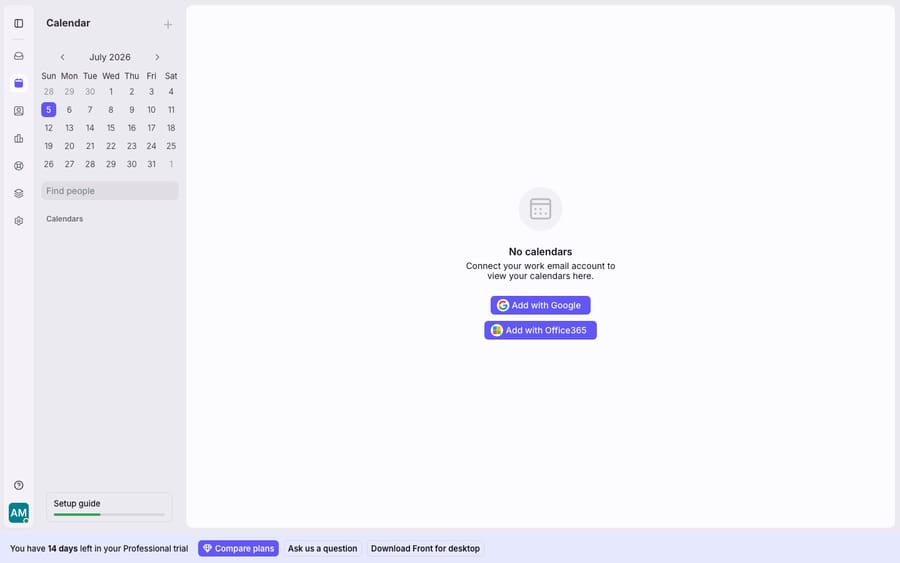
Honest note: the screenshot above is the genuine empty state on a trial workspace with no calendar linked. It's the same screen you'll hit before the fix, not a reproduced error. Once a Google or Office 365 account is connected, the sync-specific issues below become relevant.
Why didn't attendees get a cancellation when I deleted a meeting?
Because the "email guests" option was switched off when you deleted it. In a Front community thread (27 August 2025), a Front support rep explained that deleting a calendar event through Front opens a pop-up with an option to enable or disable "email guests". Leave it on and attendees get the cancellation. Turn it off, or delete the event somewhere that skips the prompt, and it quietly disappears from your calendar only. Front's own guide adds the inbound side: "You'll also get notified by email if an event is updated or canceled."
The fix is to cancel deliberately:
- Open the event you organized, from the connected calendar.
- Delete it and, in the pop-up, keep "email guests" enabled so the cancellation goes out.
- If you already deleted it silently, or the pop-up didn't appear, open the same event in the source calendar (Google Calendar or Outlook on the web) and cancel it there so the provider sends the notice. If it's already gone, email the attendees directly.
Honest note: this applies to events where you are the organizer. If you weren't the organizer, deleting only removes your copy. You can't cancel a meeting you don't own, and attendees keep theirs.
Can I add a co-organizer to a Front Calendar event?
No. Front's calendar uses a single-organizer model, so you won't find a co-organizer or "alternate host" field. Front's support team confirmed in the same August 2025 community thread that co-organizers aren't supported and pointed users to the Ideas Portal to request it. Whoever created the event owns it. This trips up teams who expect a shared-inbox tool to make events collaborative the way conversations are. The Front shared inbox collaborates on messages, not on calendar-event ownership.
Workarounds:
- Create the event on a shared or resource calendar in Google or Microsoft so more than one person has native edit rights, then view that calendar in Front.
- Grant edit access to the underlying calendar at the provider level (Google's "Make changes to events" sharing, or Outlook delegate/editor permissions) so a colleague can manage the event without a co-organizer field.
- Keep the coordination in the conversation thread, with comments and assignments, and treat the calendar purely as the scheduling surface. For how Front's calendar fits alongside the rest of the workspace, see Front calendar explained.
Why won't my Office 365 group calendar sync to Front?
This is a hard limitation, not a misconfiguration. The Front Calendar documentation answers both questions with a flat no: "Office 365 group calendars do not sync to Front" and "Office 365 calendar groups currently do not sync to Front when you import your calendar." It also says you cannot add guests to an event that was originally created in Office 365. So if your team schedules against a Microsoft 365 Group calendar (the calendar attached to a Team or an M365 Group), it won't appear in Front however you connect it.
Workarounds:
- Point Front at a regular user or shared calendar instead of the group calendar. A standard shared calendar, owned by a mailbox and explicitly shared, can sync where a group calendar can't.
- Mirror key group events onto a personal or shared calendar that Front does read, if you need them visible inside Front.
How do I get back a shared Office 365 calendar that disappeared from Front?
Re-share it. The usual cause is a Microsoft change to how calendars are shared: calendars shared before that change "are not available by default to services like Front Calendar, and must be re-shared." Front's troubleshooter for Office 365 shared calendars not appearing lays out the fix, and every step has to happen in Outlook on the web, not the desktop app:
- Remove the shared calendar from Outlook on the web (
outlook.office.com/calendar). - Have the owner re-share the calendar with you via Outlook on the web.
- Accept the share invitation from the email in Outlook on the web (
outlook.office.com/mail), not in the desktop client. - Refresh Front and confirm the calendar now appears.
Honest note: doing any of these steps in desktop Outlook is the most common reason the fix "doesn't work." Keep the whole loop in the browser.
Which Front Calendar limits need a plan change or a different provider?
Three smaller ones worth naming so you don't chase them. First, removing Front's branding from calendar invites is "available on the latest Professional plan or above", per Front's calendar guide. Front's current plans are Starter, Professional and Enterprise, so Starter workspaces keep the branding and no setting turns it off. Second, Exchange On-Premise can't sync to Front Calendar at all; the integration targets Office 365 (cloud) and Google, so the fix is an account on a supported provider, not a setting. Third, Front does not support Office 365 invite forwarding and has no invite-forwarding feature of its own, so forwarded invites won't reliably appear as events.
How can an AI layer on Front cut the follow-up messages these quirks cause?
Most of the tickets these quirks generate aren't calendar-engine problems. They're communication problems. A silent delete becomes "is our meeting still on?" A missing group calendar becomes "why can't you see the event?" That's inbound conversation volume landing in your shared inbox.
Macha is an AI agent layer that sits on top of Front and doesn't replace it. Because it reads the same conversations your team does, it can answer routine scheduling and status questions ("did that get canceled?", "what's on the calendar for the demo team?") directly in the thread, and it can call a scheduling or calendar action through custom tools when you connect one. You pay per ticket, one conversation charged once, rather than per seat: plans start at $299 a month for up to 750 tickets, with setup and monitoring by the Macha team included. The full breakdown lives on the pricing page, and AI agents for customer service covers the broader pattern. Macha doesn't fix Front's co-organizer model. It stops each quirk from turning into three follow-up messages.
FAQ
Does deleting a meeting in Front notify attendees? Only if you leave "email guests" enabled in the pop-up that appears when you delete an event you organized. With it off, the event is removed from your calendar only. If you missed it, cancel the event in the source calendar (Outlook on the web or Google Calendar) or email attendees directly.
Can I add a co-organizer to a Front event? No. Front uses a single-organizer model with no co-organizer field, and Front support has pointed users to its Ideas Portal for the request. Share edit rights on the underlying Google or Microsoft calendar, or use a shared or resource calendar, so a colleague can manage the event.
Why won't my Office 365 group calendar show in Front? Because Office 365 group calendars and calendar groups don't sync to Front, a documented limitation. Use a regular shared calendar, or mirror the events you need onto a calendar Front can read.
A shared Office 365 calendar disappeared from Front. How do I get it back? Re-share it. Remove it in Outlook on the web, have the owner re-share via Outlook on the web, accept the share email in Outlook on the web, then refresh Front. Doing any step in desktop Outlook is the usual reason it fails.
Can I remove Front branding from calendar invites? Only on the latest Professional plan or above. There's no toggle on Starter.
Does Front Calendar work with Exchange On-Premise? No. Front's guide says it is not possible to sync Exchange On-Premise with Front Calendar. Connect a Google or Office 365 (cloud) account instead.
Ready to see Macha on your own Front workspace? Start a free trial and connect Front in a few minutes.






