





 Shopify
 Stripe
 Slack
Slack Notion
 Google Workspace
 Confluence

What Channels Does Front Support? Email, Chat, SMS, WhatsApp, Social and Voice (2026)


Front's channels carry messages from a Gmail address, a Twilio number, an Instagram account or a chat widget into one shared inbox, where the team replies, assigns and comments as if everything were email. Most channels connect natively, but SMS, voice and native WhatsApp are plan-gated, and WhatsApp costs extra.
Key takeaways
- Front supports email, Front Chat, SMS, voice, WhatsApp, Facebook, Instagram, X, Slack and custom channels built on its Channels API, all feeding shared inboxes.
- Front's SMS and voice channels are listed only on the Professional plan, $65 a seat per month billed annually, and the $105 Enterprise plan.
- Native WhatsApp in Front is a paid add-on billed at Meta's WhatsApp costs plus a 20% admin fee, while third-party WhatsApp through Twilio is listed on all plans.
- Front's Twilio SMS channel imports only the 100 most recent messages on connect, allows one webhook per Twilio number and does not support group SMS threads.
- Front syncs Gmail and Office 365 email natively in both directions, while other email providers forward mail to a Front address and usually need custom SMTP for outbound.

Front supports nine kinds of channel: native Gmail and Office 365 email, forwarded email from any other provider, Front Chat, SMS through Twilio or Dialpad, voice through integrations such as Aircall and Dialpad, WhatsApp, social (Facebook, Instagram, X), Slack, and custom channels built on its Channels API. SMS, voice and native WhatsApp need the Professional plan ($65 a seat per month billed annually) or Enterprise, and native WhatsApp is a paid add-on on top (front.com/pricing, checked 24 September 2026).
| Channel | How it connects | Plan / gating (front.com/pricing) | Main quirk |
|---|---|---|---|
| Email (Gmail / Office 365) | Native two-way sync | No plan gate flagged | Replies sent from the native app stay in sync |
| Email (other providers) | Forwarding + custom SMTP | No plan gate flagged | No native sync; forward to a Front address |
| Front Chat | Native widget | No plan gate flagged | Live chat plus chatbots |
| SMS | Twilio or Dialpad | Professional and Enterprise | One Twilio webhook per number; no group SMS |
| Voice | Aircall, Dialpad and similar | Professional and Enterprise | Runs through a telephony partner |
| Native (Meta) or third party | Native: paid add-on on Professional and Enterprise | Templates outside the 24-hour window | |
| Facebook / Instagram / X | Native social connect | No plan gate flagged | Posts, comments, DMs |
| Slack | Native | No plan gate flagged | Structured support requests |
| Custom | Channels API | Needs developer work | You build and maintain it |
What is a channel in Front, and how is it different from an inbox?
In Front, a channel and an inbox are not the same thing, and understanding the split is the key to everything else. Per Front's guide to shared inboxes, an inbox is "an organizational space where you can categorize or sort conversations," and it "can have channels such as email, Instagram, or SMS feeding into it, or can have no channels and be an empty inbox."
So the channel is the pipe; the inbox is the bucket it pours into. When you connect a channel, Front asks you to "select the inbox to connect to your channel," and from then on "all messages from your channel will route to this inbox by default." One inbox can gather several channels. Your support inbox might take email, SMS, and Instagram at once, which is how Front collapses an omnichannel workload into a single collaborative surface.
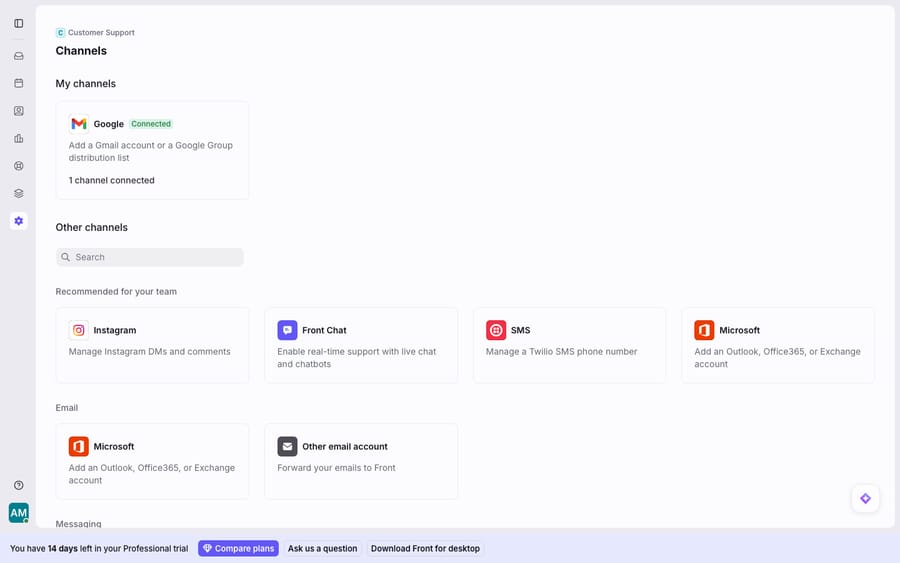
You manage all of this in one place: Settings → Channels → Connect channel. That screen shows the channels you already have connected and cards for every channel type you can add.
Which channels does Front support?
Front's omnichannel inbox supports a wide spread of channel types. Here's the map, grouped by kind.
Email is the foundation, and it connects two ways (covered in the next section): native sync for Google/Gmail and Microsoft/Office 365, or forwarding for any other provider.
Front Chat is Front's own live-chat channel: a widget you embed on your site or app, with chatbots so you can capture and triage conversations before a human picks them up. It's a native channel, not a third-party add-on.
SMS and voice run through partners. SMS connects through Twilio or Dialpad, and voice through telephony integrations such as Aircall and Dialpad. Inbound texts land in the inbox alongside everything else, with the same reply, assign, and comment tooling. Both are listed on the Professional and Enterprise plans only.
WhatsApp lets you send and receive on a WhatsApp Business number inside Front, using approved message templates for outbound. Note the commercial detail up front: native WhatsApp is a paid add-on on Professional and Enterprise, billed as Meta's WhatsApp costs plus a 20% admin fee. Third-party WhatsApp through Twilio or Number AI is listed on all plans.
Social covers Facebook, Instagram, and X. Posts, comments, and direct messages flow into the inbox so social replies live next to email and chat rather than in a separate tool.
Slack can be handled as a support channel too, for teams who field structured requests through Slack.
Custom channels cover everything else. Front exposes an open Channels API so you can build a channel for any source that isn't natively supported and push messages into an inbox programmatically. Partners use the same mechanism to ship their own Front channels.
Should you connect a channel natively or forward into Front?
This is the distinction that decides how well a channel behaves, and it's easiest to see on email.
Native connect means Front talks directly to the source's API. For Gmail/Google and Microsoft/Office 365, Front syncs your mailbox two ways, inbound and sent, so replies you send from Front, and even replies sent from the native app, stay in sync. Twilio SMS, WhatsApp, and the social channels are native in the same spirit: a live, two-way link with full collaboration on top.
Forwarding is the fallback for email providers Front doesn't sync natively. As the getting-started walkthrough describes, you pick Other emails on the channel setup screen, Front hands you a unique forwarding address, and you configure your mailbox to auto-forward mail to it. Messages then land in the inbox, but the link is one-directional at the source, so you'll typically also configure custom SMTP (your own outbound server, authenticated with SPF/DKIM/DMARC) so sent mail is delivered and retained correctly rather than going out through Front's default servers.
The practical rule: native connect gives you clean two-way sync and less setup; forwarding gives you reach into providers Front can't sync, at the cost of more moving parts. If you're on Gmail or Microsoft, connect natively. If you're on anything else, forwarding plus custom SMTP is the supported path.
What are the per-channel quirks to know before you connect?
Channels look uniform once they're in the inbox, but a few have setup gotchas worth naming before you commit.
SMS via Twilio is Professional plan and up. Per Front's Twilio SMS setup guide, you connect using your Twilio Account SID and Auth Token and a phone number or shortcode. Three quirks matter. Front imports only "100 of the most recent" Twilio messages into the Archived tab on connect, so older history won't appear. Twilio allows only one webhook per number, so if another app is already pointed at that number, connecting Front can override it (or be overridden). And you can send one SMS to up to 200 contacts at once, but group SMS threads aren't supported. If you're using A2P 10DLC numbers, your Messaging Service must be set to "Defer to Sender's Webhook" or messages won't route.
WhatsApp is an add-on, not a plan feature. Budget for it separately: native WhatsApp is billed at Meta's WhatsApp rates plus a 20% admin fee on top of your plan. Outbound messaging outside the 24-hour window requires pre-approved templates, which is a WhatsApp platform rule, not a Front limitation.
Front Chat brings chatbot behaviour that the other channels don't. It's the one channel where you're designing a pre-human capture flow, so it needs its own thought about routing and business hours.
Email forwarding needs SMTP hygiene. Forwarded email works, but without custom SMTP your outbound deliverability and sent-mail retention can suffer. This is the most common "why did my reply not send properly" surprise for teams not on native Gmail/Microsoft sync.
What can't Front channels do, and where does an AI layer fit?
Front's channel model is strong: consolidating email, chat, SMS, social, and voice into one collaborative inbox is what most teams juggling five tools need, and the native connectors are solid.
But two caveats. First, the useful channels are tiered. Front lists three plans, Starter, Professional and Enterprise, at $25, $65 and $105 a seat per month billed annually. SMS and voice sit on Professional and above, native WhatsApp is a paid add-on on those same plans, and Starter is capped at 10 seats. A small team can find that the omnichannel picture they signed up for costs more than the base price implied. Front's pricing tiers lay out what unlocks where. Second, and this is the structural one, a channel delivers a message; it doesn't answer it. Front routes an Instagram DM and an SMS into the inbox without a hitch, but a human still has to read each one and write the reply. Across five channels, that reply volume is the same whether it arrives by email or WhatsApp.
That's the gap an AI agent layer fills, not by replacing your channels, but by working across all of them once they're unified. The category of AI agents for customer service exists for the read-and-respond work a channel connector can't do. Macha is one such layer: it runs on top of the Front you already use through the live Macha–Front connector, and it does not replace Front, your inboxes, or your channels. Because every channel already funnels into one inbox, Macha's agent can read any incoming conversation whether it arrived by email, chat, SMS, or Instagram, and draft or send a grounded reply, pulling a real order or account status through a custom tool that turns your REST API into something the agent can call. If you want the mechanics, connecting Front to Macha to route conversations to AI walks through it. Macha bills per ticket, from $299 a month for 750 tickets: one conversation, charged once however many messages it takes, whichever channel it arrived on, never per resolution.
The clean division of labour: let Front's channels be the omnichannel front door, let Front rules and tags organise what arrives, and layer an agent on top to read and answer across every channel at once. For how the inbox itself works underneath all of this, see the Front shared inbox model.
FAQ
What channels does Front support? Email (via native Gmail/Microsoft sync or forwarding), Front Chat live chat, SMS through Twilio or Dialpad, voice through integrations such as Aircall and Dialpad, WhatsApp, social channels (Facebook, Instagram, X), Slack, and any custom channel you build on Front's open Channels API. All of them can feed one or more shared inboxes.
How do I add a channel in Front? Go to Settings → Channels → Connect channel, pick the channel type, follow the provider-specific setup, and choose which inbox the channel routes to. By default every message from that channel lands in the inbox you select; one inbox can hold several channels, and an inbox can also have no channels at all.
What's the difference between connecting a channel natively and forwarding? Native connect is a direct, two-way API link, used for Gmail/Google, Microsoft/Office 365, Twilio SMS, WhatsApp, and social, with full sync of inbound and sent messages. Forwarding is the fallback for email providers Front doesn't sync natively: you auto-forward mail to a Front-provided address (the "Other emails" option) and usually add custom SMTP for reliable outbound.
Is WhatsApp included in Front? No. Native WhatsApp is a paid add-on on the Professional and Enterprise plans, billed at Meta's WhatsApp costs plus a 20% admin fee, and outbound messages outside the 24-hour window use WhatsApp-approved templates. Third-party WhatsApp through Twilio or Number AI is listed on all plans.
Which Front plan do I need for SMS and voice? Professional or Enterprise. Front's Twilio SMS guide says the feature is "available on the Professional plan or above," and the pricing page lists SMS and voice integrations on those two plans only.
Can I add AI across all my Front channels without replacing Front? Yes. An AI agent layer like Macha connects to Front as a live connector and works on top of your existing inboxes and channels. Because email, chat, SMS, and social already funnel into Front, the agent can read any incoming conversation regardless of channel and draft or send a grounded reply, while your channels and routing stay exactly as they are.
Ready to answer across every Front channel from one AI layer? Start a free trial of Macha ($50 of usage, no credit card) and connect it to your Front.






