





 Shopify
 Stripe
 Slack
Slack Notion
 Google Workspace
 Confluence

What Is the Gorgias SKU Generator? The Free Tool and In-App Merchant Tools Explained


The Gorgias SKU Generator is a free tool on the Gorgias website, not a setting inside the help desk. The merchant tools that do live in the app are the Shopify order actions and discount codes in the ticket sidebar, and each has clear limits.
Key takeaways
- The Gorgias SKU Generator is a free public tool at gorgias.com/tools/sku-generator, separate from the Gorgias help desk, and needs only a company email to start.
- The Gorgias SKU Generator builds codes from a product type, a product name and up to three attributes, then exports the list as CSV or JSON.
- Gorgias suggests SKUs of roughly 7 to 20 characters that start with letters and avoid confusable characters such as O versus 0.
- Inside the Gorgias help desk, agents can create, duplicate, edit, cancel and refund Shopify orders from a ticket once the Shopify integration is connected.
- The Gorgias AI Agent costs $0.90 per resolved conversation on most plans and $1 on Starter, and a conversation handed to a human is not charged twice.

The Gorgias SKU Generator is a free public tool at gorgias.com/tools/sku-generator that builds SKU codes from a product type, a product name and up to three attributes, then exports the list as CSV or JSON. It is not a feature inside the Gorgias help desk. The merchant tools that do live in the app are the Shopify actions in the ticket sidebar: create, duplicate, edit, cancel and refund orders, draft orders, and one-time discount codes.
Which Gorgias merchant tools are free, and which need a plan?
Here's the quick map of what costs nothing and what needs a Gorgias plan and a Shopify connection.
| Tool | Where it lives | Cost / gating | What it does |
|---|---|---|---|
| SKU Generator | Public site (gorgias.com/tools) | Free, email to start | Build consistent SKUs, export CSV/JSON |
| Shopping Assistant ROI Calculator | Public site | Free | Model the return on Gorgias's shopping assistant |
| Shopify order actions | In-app ticket sidebar | Requires Gorgias plan + Shopify integration | Create / duplicate / edit / cancel / refund orders, draft orders |
| Discount-code generator | In-app message view | Requires Gorgias plan + Shopify integration | One-time %, fixed, or free-shipping codes |
| AI Agent | In-app | On every plan, billed per resolved conversation | Automated replies and actions |
The pattern: the public tools are free and standalone, while the in-app merchant tools are genuinely useful but Shopify-gated. They light up only once you've connected Shopify to Gorgias, and the automation on top is billed per resolution. For the full plan picture, see our Gorgias pricing explained breakdown.
What is the Gorgias SKU Generator?
A SKU (Stock Keeping Unit) is the internal code you use to track a product variant across your catalog, warehouse and marketplace dashboards. A good one is human-readable and consistent; a bad one is a random string nobody can decode at a glance. The free SKU generator by Gorgias exists to help you produce the good kind at scale.
It is a standalone marketing tool, not an in-app help-desk feature. You don't need a Gorgias subscription; you enter a company email to start. It sits on the Gorgias tools page alongside a Shopping Assistant ROI Calculator and a wider collection of ecommerce tools. None of these touch your ticketing workspace. They're free resources aimed at ecommerce operators.
How do you use the SKU generator?
The tool is deliberately simple. Per Gorgias's own instructions, the flow is:
- Enter your company email to unlock the generator.
- Enter a product type, the broad category (e.g.
TSHIRT,MUG,CANDLE). - Enter the product name, the specific item.
- Add up to three attributes (Attribute 1, 2 and 3) that distinguish variants, such as color, size or material (e.g.
BLK,LG,COTTON). - Generate the SKU, then repeat for each product until you've built out your catalog.
- Export the finished list as CSV or JSON to drop into Shopify or another marketplace dashboard. A "Clear data" option lets you start over.
Gorgias also bakes in SKU hygiene. Its length rule: under seven characters, a SKU probably carries too little information; over twenty, too much. So aim for roughly 7 to 20 characters, start with letters rather than numbers, and avoid easily confused characters (the classic O versus 0, I versus 1). The tool does not generate barcodes or QR codes. It's a naming utility, not a labeling system.
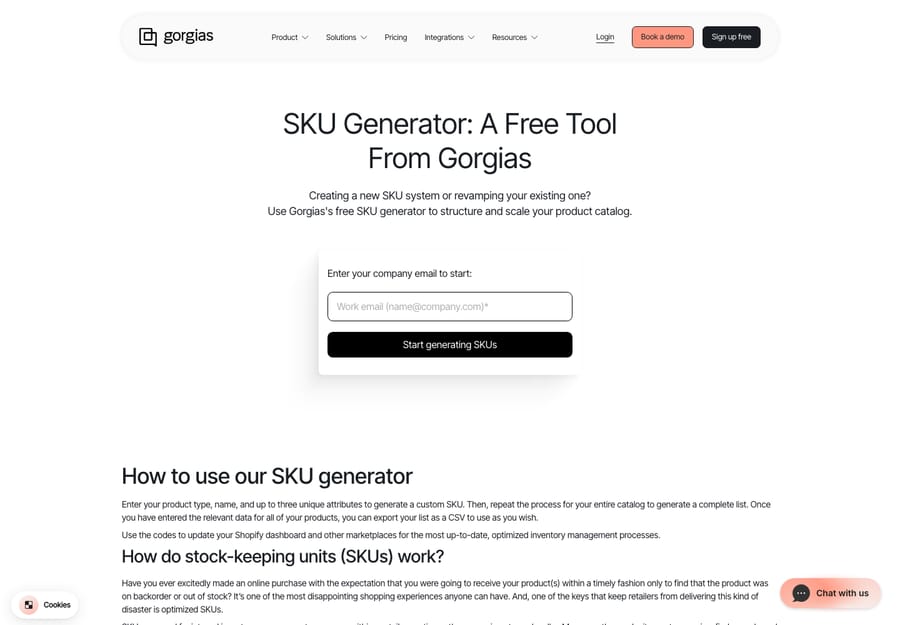
That's the whole tool. It's a fast way to impose a consistent naming scheme on a catalog, and for a brand standardizing SKUs before a Shopify migration, it does the job without a spreadsheet formula.
Which merchant tools live inside the Gorgias help desk?
When support teams say "Gorgias merchant tools", they usually mean the Shopify-powered actions in the ticket sidebar. These are where Gorgias earns its reputation as an ecommerce-native help desk, because an agent can resolve an order problem without leaving the conversation. If you're new to the platform, our what is Gorgias primer sets the broader context.
1. Shopify order actions. With the Shopify integration connected, agents act on orders directly from the ticket. Per Gorgias's Shopify Actions documentation, you can create, duplicate, edit, cancel and refund orders from inside a ticket (editing is limited on archived orders and orders over 60 days old). Creating an order lets you add existing products or custom items, apply discounts, add shipping, charge taxes and email the invoice, and you can build a draft order for the customer to complete.
2. Refunds. For a WISMO-turned-return ticket, an agent can refund a past order without switching tabs: set the quantity to refund, choose the shipping amount, add a reason, decide whether to restock the item, and notify the customer, all from the ticket.
3. Discount-code generation. This is the in-app cousin of the public tools. Per the Shopify Discount Code Generator docs, agents can create and send a one-time discount code straight from the message view as a percentage off, a fixed amount off, or free shipping. The code is saved in Shopify's discount section with its creation details, so there's no copy-paste coordination between support and marketing.
Together with Gorgias macros for canned responses and the Gorgias AI Agent for automation, these Shopify actions make the sidebar feel like an ecommerce cockpit rather than a generic inbox.
Where do the Gorgias tools stop?
For a Shopify brand, this toolset is excellent. The SKU generator does one small thing cleanly, and the in-app order actions are the reason many merchants pick Gorgias over a generic help desk. But be clear about where the tools stop.
The public SKU generator is manual and one-directional. You type each product in by hand, and it doesn't read your existing catalog, deduplicate against SKUs you already use, or sync back into Shopify. You export a file and import it yourself. It's a starter, not an inventory system.
The in-app merchant tools still need an agent to drive them. The refund flow is smooth, but a human has to read the ticket, decide the refund is warranted, open the sidebar and click through it. The discount-code generator is a click, but someone has to judge that this shopper should get a code and how big. These tools make the action fast; they don't make the decision or absorb the volume when a hundred WISMO tickets land at once.
Gorgias's own automation, the AI Agent, is included on every plan and billed per resolved conversation: $0.90 on most plans, with Starter plans at $1, according to Gorgias's AI Agent pricing guide (updated 28 May 2026). If the AI hands a conversation to a human, it moves to your Helpdesk plan as a standard ticket, and Gorgias says you're not charged for both. That's a defensible model, but your automation bill still scales with how many conversations count as resolved.
How can you add AI to Gorgias without replacing it?
This is the seam where an AI agent layer fits. AI agents for customer service exist to do the reasoning-and-action work these utilities can't. Macha is one such layer, and the Macha–Gorgias integration is live: Macha runs on top of the Gorgias you already use and doesn't replace your help desk, its Shopify sidebar or its order actions. Connected to Gorgias, it reads and writes the same tickets your agents do: triaging by intent, looking up order status through a custom tool that turns a REST API into something an agent can call, and drafting or posting the grounded reply, including the WISMO answer or the returns instruction, before a human opens the sidebar. Macha bills per ticket, not per resolution: one conversation, charged once however many messages it takes, from $299 a month for up to 750 tickets. The pricing page has the tiers.
The clean division of labour: keep Gorgias's merchant tools as the system of record for orders, refunds and codes, and layer an agent on top for the reading, deciding and drafting the sidebar can't do on its own.
FAQ
Is the Gorgias SKU Generator free? Yes. It's a free public tool at gorgias.com/tools/sku-generator. You enter a company email to start, generate SKUs from a product type, name and up to three attributes, and export the result as CSV or JSON. You don't need a Gorgias subscription.
Is the SKU generator inside the Gorgias app? No. It's a standalone tool on the Gorgias website, separate from the ticketing product. The merchant tools inside Gorgias are the Shopify order actions and discount-code generator in the ticket sidebar, which need a Gorgias plan and a connected Shopify store.
Does the Gorgias SKU generator create barcodes or QR codes? No. It generates SKU text strings only, with guidance to keep them between 7 and 20 characters, start with letters and avoid confusable characters like O/0. It doesn't produce barcodes, QR codes or printable labels.
Can Gorgias generate Shopify discount codes automatically? Agents can generate one-time discount codes (percentage, fixed amount or free shipping) from the ticket message view, and the code is saved in Shopify. That's a manual, agent-triggered action; automation lives in the AI Agent, billed per resolved conversation.
How much does the Gorgias AI Agent cost? Gorgias charges $0.90 per resolved conversation on most plans and $1 on Starter plans. A conversation the AI hands to a human counts against the Helpdesk plan instead, not both.
Can I add AI to Gorgias without replacing it? Yes. Macha connects to Gorgias as a live integration and runs on top of your existing help desk, Shopify sidebar and merchant tools. It triages, looks up order data and drafts grounded replies, and it bills per ticket, one conversation charged once, rather than per resolution.
Ready to layer AI onto the Gorgias merchant tools you already use? Start a free trial of Macha and connect it to your Gorgias in minutes.






