





 Shopify
 Stripe
 Slack
Slack Notion
 Google Workspace
 Confluence

Why Is My Front Rule Not Working? 6 Causes and Fixes (2026)


A Front rule that does nothing, or fires on the wrong conversations, is usually being overruled by something outside its own edit screen: rule order, a Stop processing switch, a company rule, or a Once setting. Work through the causes below in order, most common first, each checked against Front's own help center.
Key takeaways
- A Front rule that does nothing is usually switched off, or skipped because a rule above it has Stop processing other rules checked.
- Front evaluates rules top to bottom and the higher-ordered rule wins a conflict, so a broad rule above a specific one claims the conversation first.
- Front company rules run before every workspace or personal rule, are on the latest Enterprise plan, and only company admins can create them.
- Front caps workspace rules at 10 on the latest Starter plan and 20 on Professional, while Enterprise allows unlimited workspace and company rules.
- Front auto-reply rules set to Once fire only on a single inbound message on a new conversation, so follow-up nudges need Always.

A Front rule that does nothing is usually switched off, or blocked by a rule above it that has Stop processing other rules checked; a rule that fires on the wrong conversations is usually sitting below a broader rule that claims them first. Work down the causes below in order, since those two account for most "my rule isn't working" reports. Also check your plan: Front caps workspace rules at 10 on the latest Starter plan and 20 on Professional (Enterprise is unlimited), and several rule actions only exist on Professional or above.
Which symptom points to which cause?
| Symptom | Most likely cause |
|---|---|
| Rule does nothing at all | Rule is inactive, or an earlier rule has Stop processing on |
| Wrong rule "wins" a conflict | Rule order: a higher rule ran first and took precedence |
| Workspace rule never runs | A company rule ran first and stopped processing |
| Auto-follow-up never sends | Reply is set to Once, not Always |
| Tags vanish after a rule moves a conversation | Tags are dropped on move between workspaces |
| A rule action doesn't re-fire its own trigger | A rule can't trigger itself (by design) |
| Can't add another workspace rule | Plan limit: 10 rules on Starter, 20 on Professional |
| Load balancing or time goal option missing | Plan gate: needs Professional or above |
1. Is the rule switched off, or did an earlier rule stop processing?
Start with the two things you can see on the Rules list itself: the Active toggle and rule order. Open Settings → Rules and macros. Every rule has an on/off Active toggle and an Order number, and both are common, boring reasons a rule "doesn't work." A toggled-off rule silently does nothing; a rule sitting below one that halts the pipeline never gets its turn.
That second half is the single biggest gotcha in Front. Per Front's understanding rules guide, "If a rule is processed, and you don't want other rules listed below to apply, check the Stop processing other rules box. When this option is checked, subsequent rules will be ignored even if they would apply." So if an early rule (say, a spam-archiver) has Stop processing other rules enabled and your conversation matched it, every rule below it is skipped, including the one you're debugging. The one exception Front notes: delayed rules based on time conditions still run.
Fix:
- Confirm the rule's Active toggle is on.
- Walk the Rules list top to bottom and note any rule above yours with Stop processing other rules checked. Ask whether the failing conversation could have matched it first.
- If it did, either reorder your rule above the stop-processing rule, or remove the stop-processing flag where it's too aggressive.
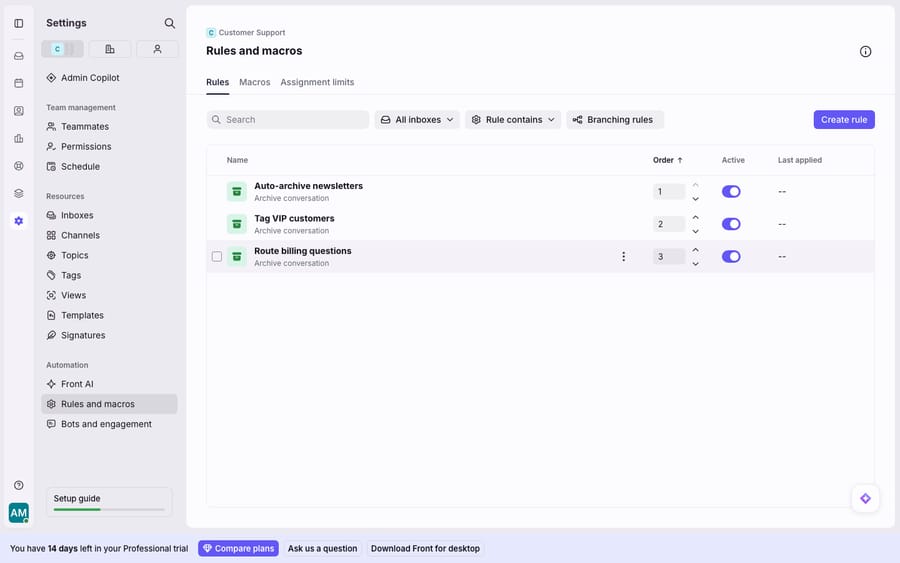
2. Why does the wrong rule win when two rules match?
Front evaluates rules top to bottom, and the higher rule takes precedence in a conflict. Front states that "you can set an order for your rules if you want certain ones to take priority over others… the one ordered higher will have its actions take precedence." So if two rules both try to assign the same conversation, the one nearer the top wins, and the lower one may only apply the actions that don't conflict.
This is why a rule can appear to "fire on the wrong conversations": it isn't wrong, it's just running before a more specific rule that should have claimed the conversation. The classic case is a broad catch-all Assign to support rule sitting above a narrow Assign VIP tickets to a lead rule.
Fix: use the up/down reorder arrows in the Order column (visible in the screenshot above) to put your most specific, highest-stakes rules first. A sensible pattern: kill spam → tag → start the SLA clock → auto-reply → assign what's left. If you want the full model behind ordering and the When/If/Then structure, Front rules explained breaks the engine down.
3. Is a company rule running before your workspace rules?
Company rules always execute before any workspace or personal rule, whatever your workspace Order column shows. Per Front's company rules documentation, company rules "behave as if they were ordered before all other rules. Since company rules always execute first, they cannot be triggered by workspace rules." That has a nasty corollary: a company rule with Stop processing other rules enabled can prevent every workspace and personal rule from ever firing, and you won't see it in the workspace Rules list at all.
Honest note: company rules are available on the latest Enterprise plan (Front says some legacy plans also have them), and only a company admin can create or manage them, under Company settings → Rules. If you're not on one of those plans you don't have them, so you can skip this cause. If you are, and especially if a whole workspace's rules stopped working at once, this is the first place a Front admin should look.
Fix: an admin should open Company settings → Rules, check for any company rule that matches the affected conversations, and confirm whether it has stop-processing enabled. Loosen the condition or remove the stop-processing flag so downstream workspace rules can run.
4. Can a Front rule trigger itself?
No. A Front rule cannot re-trigger itself; it's a built-in guardrail, not a bug. Front is explicit: "Due to the sequential nature of Front's rule engine, a rule cannot trigger itself." This prevents infinite loops, but it surprises people who build a rule whose action would satisfy its own trigger (for example, a rule triggered by "a tag is added" that itself adds that same tag). The action happens, but the rule doesn't fire a second time on its own output.
Fix: split the logic across two rules. Have rule A perform the action (add the tag, move the conversation), and a separate rule B trigger on the resulting event. Because B is a different rule, the self-trigger guard doesn't apply — B is free to react to A's output.
5. Why do tags disappear when a rule moves a conversation?
When a rule moves a conversation to another workspace (or a new conversation), the existing workspace tags are dropped — so a downstream rule that filters on those tags never matches. This is a frequently reported gotcha in the Front community, where a Front specialist confirms there's currently no option to retain tags when a rule action moves a message to a new conversation. If your triage flow tags first and then moves, the tag your next rule depends on may be gone by the time the conversation lands.
There's a second, related lever inside the Move action: a "Trigger rules when moved to another workspace" checkbox (default on) in the dropdown next to your Move action. Turn it off and the destination workspace's rules won't run on the moved conversation at all — another reason a rule in the target inbox appears dead.
Fix:
- Re-apply tags after the move. In the destination workspace, add a rule that re-tags the conversation, or fold the move and the tag into the same rule's Then block so the tag lands where the downstream rule can see it.
- Check the Trigger rules when moved checkbox on the Move action if you want the destination's rules to run.
6. Why does an auto-reply or follow-up never send?
Auto-reply rules have a Once vs. Always setting, and "Once" is the reason your auto-follow-up never sends. Per Front's community guidance on automated follow-ups, Once only triggers for a single inbound message on a new conversation, while Always sends a reply every time the rule's conditions are met. For a follow-up that fires after an outbound email (a nudge on an unreplied thread), Once will not trigger — you need Always.
Fix:
- In the reply action, set the frequency to Always for follow-up/nudge rules.
- Add a tag (e.g.
Auto-followed-up) in the same rule, and exclude that tag in the condition — so a customer who replies doesn't get the same auto-message a second time. This is the standard pattern for safe "Always" auto-replies.
What can't Front rules do, and where does an AI layer help?
Every fix above shares a root cause: Front rules are deterministic pattern-matchers. That's their strength — predictable, fast, the same result every time — and their ceiling. A rule matches "subject contains refund"; it can't tell that "I was double-charged" is the same intent. Order, stop-processing, self-trigger guards, and tag-loss-on-move are all the seams of a keyword engine doing exactly what it was told. And the heaviest actions are plan-gated: load balancing, time goal rules, delayed rules and required tagging need the latest Professional plan or above, Smart Rules need Enterprise or the Autopilot add-on, and company rules are Enterprise.
That's the seam an AI agent layer fills — not to replace your rules, but to shrink the volume of tickets that ever reach them. The broader category of AI agents for customer service exists for exactly this. Macha is one such layer: it runs on top of the Front you already use through the live Macha–Front connector — it doesn't replace Front, your shared inboxes, or your rules. Your rules keep routing, tagging, and starting the SLA clock; Macha's agent reads the routed conversation, understands intent instead of keywords, and drafts or sends a grounded reply — pulling a real order or account record through a custom tool that turns your REST API into something the agent can call. Fewer tickets in the queue means fewer chances for a rule ordering to bite you, and Macha bills per ticket — one conversation, charged once however many messages it takes — never per resolution. For how rules and inboxes fit together as a whole, see the Front shared inbox model.
FAQ
Why is my Front rule not firing at all? Check the two things visible on the Rules list first: the rule's Active toggle, and whether any rule above it has Stop processing other rules enabled. Front skips every subsequent rule after a stop-processing rule runs, even if they would have matched. On Enterprise, also check whether a company rule ran first.
Why does the wrong rule fire on my conversations? Front evaluates rules top to bottom and the higher-ordered rule takes precedence in a conflict. A broad rule sitting above a specific one will claim the conversation first. Use the reorder arrows in the Order column to move your most specific rules to the top.
Why does a company rule override my workspace rules? Company rules "behave as if they were ordered before all other rules" and always execute first, per Front. If one has stop-processing enabled, it can block every workspace and personal rule. Company rules are on the latest Enterprise plan (and some legacy plans), managed by company admins under Company settings → Rules.
Why did my tags disappear after a rule moved the conversation? When a rule action moves a conversation to another workspace or a new conversation, the existing workspace tags are dropped, so a downstream rule that filters on them won't match. Re-apply the tag in the destination workspace, or fold the tag and move into the same rule.
My auto-follow-up rule never sends — why? It's likely set to Once, which only triggers on a single inbound message on a new conversation. Follow-ups that fire after an outbound email need Always. Add an exclusion tag so customers who reply aren't messaged twice.
How many rules can I create in Front? Front's rules guide lists 10 workspace rules on the latest Starter plan, 20 on Professional, and unlimited workspace and company rules on Enterprise. If you can't add a rule, check the plan before debugging the rule itself.
Ready to turn "routed and tagged" into "actually answered"? Start a free trial of Macha and connect it to your Front in minutes.






