





 Shopify
 Stripe
 Slack
Slack Notion
 Google Workspace
 Confluence

How Does the Gorgias API Work? Auth, Rate Limits and Webhooks (2026)


The Gorgias REST API uses HTTP Basic auth with your account email and an API key, and allows 40 requests per 20 seconds (80 for OAuth2 apps). Webhooks run through HTTP Integrations, which retry failed calls 3 times and switch off after 500 consecutive failures.
Key takeaways
- The Gorgias REST API authenticates with HTTP Basic auth, using the account email as username and the API key as password, found under Settings, Account, REST API.
- Gorgias allows 40 requests per 20 seconds for API-key integrations and 80 requests per 20 seconds for OAuth2 apps, while Enterprise accounts get the same counts over a 10-second window.
- Going over the Gorgias rate limit returns HTTP 429, with a Retry-After header giving the wait in seconds and an X-Gorgias-Account-Api-Call-Limit header showing usage against the limit.
- Gorgias HTTP Integrations have a 5-second timeout, retry a failed call up to 3 times at 10, 20 and 40 seconds, and are disabled after 500 consecutive failures.
- Only the Gorgias account owner and admins can create API keys or manage HTTP Integrations, and HTTP Integrations are available on all Helpdesk plans.

The Gorgias REST API authenticates with HTTP Basic auth (your account email plus an API key), lives at https://{your-domain}.gorgias.com/api/, and allows 40 requests per 20 seconds on an API key or 80 per 20 seconds for an OAuth2 app. Outbound webhooks are called HTTP Integrations, and both the API credentials and HTTP Integrations are managed by the account owner and admins.
| Question | Answer | Source |
|---|---|---|
| Auth method | HTTP Basic (email + API key), or OAuth2 for shared apps | REST API credentials guide |
| Base URL | https://{your-domain}.gorgias.com/api/ | REST API credentials guide |
| Rate limit | 40 requests / 20s (API key), 80 / 20s (OAuth2), 10s window on Enterprise | Rate-limits reference |
| Over the limit | HTTP 429 with Retry-After | Rate-limits reference |
| Webhooks | HTTP Integrations: 5s timeout, 3 retries, auto-disabled after 500 consecutive failures | HTTP Integrations guide |
| Who can set it up | Account owner and admins, on all Helpdesk plans | Both guides |
How do you authenticate with the Gorgias API?
Gorgias authenticates the REST API with plain HTTP Basic authentication. There is no bearer-token exchange and no per-request signing on the API-key path. You send your account email as the username and your API key as the password, base64-encoded into a single Authorization: Basic header, over HTTPS.
The credentials sit in one place. Per the Gorgias REST API credentials guide, click the Settings icon in the bottom-left, find Account, then select REST API. Only the account owner and admins can see this page or create keys. Under API Access & Credentials you get three fields:
- Base API URL: always
https://{your-domain}.gorgias.com/api/, where{your-domain}is your account subdomain. Every request is scoped to your account by that hostname. - Username: your Gorgias account email address.
- Password (API Key): the key itself. If none exists yet, the field shows a Create API Key button; a Reset button next to it invalidates the old key and issues a new one.
A Run in Postman button imports the Gorgias collection with your domain, email and key pre-filled as environment variables. It is the quickest way to browse the endpoints before you write code. A minimal live call looks like this:
# GET the most recent ticket from your account
curl -u '[email protected]:YOUR_API_KEY' \
  'https://yourstore.gorgias.com/api/tickets?limit=1'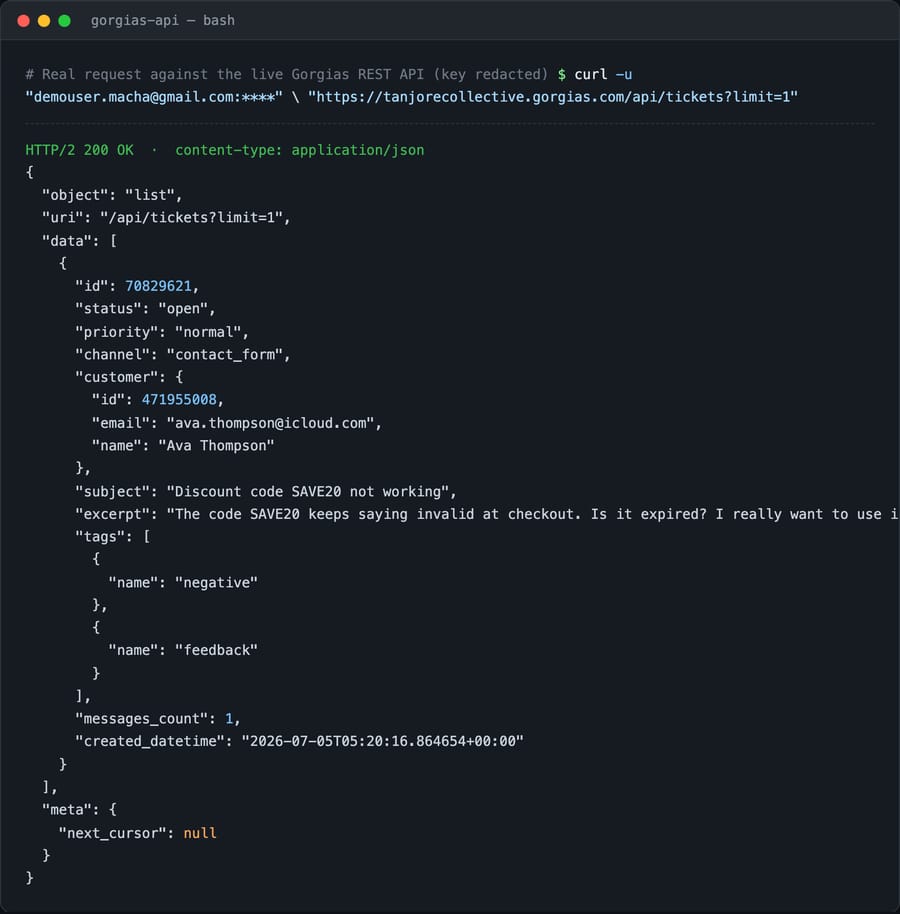
For anything customer-facing or multi-tenant, Gorgias also supports OAuth2. Besides being the right choice for a shared app, it gets you a higher rate ceiling.
What are the Gorgias API rate limits?
Gorgias rate-limits with a leaky-bucket algorithm: you can burst up to a ceiling, and the bucket drains at a fixed rate so capacity comes back over the window. The ceilings, from the official rate-limits reference, depend on how you authenticated:
| Auth method | Limit | Window |
|---|---|---|
| API key (Basic auth) | 40 requests | 20 seconds |
| OAuth2 app | 80 requests | 20 seconds |
| Enterprise accounts | Same counts | Smaller 10-second window |
Two things follow. First, if your integration will move real volume, OAuth2 doubles your throughput compared with a raw API key, which is often reason enough to do the OAuth work. Second, when you go over, Gorgias returns HTTP 429 Too Many Requests and gives you what you need to recover:
Retry-After: the number of seconds to wait before retrying.X-Gorgias-Account-Api-Call-Limit: requests made in the current period alongside the limit, e.g.10/80, so you can back off before you hit the wall.
A well-behaved client reads both headers on every response, sleeps for Retry-After seconds on a 429, and throttles itself as the call-limit header approaches the ceiling. Don't hard-code a fixed sleep: with a leaky bucket, your headroom shifts with recent traffic.
Which Gorgias API endpoints will you use most?
The API is organized around the objects you already know from the helpdesk. All paths hang off https://{domain}.gorgias.com/api/, accept and return JSON, and follow the usual GET / POST / PUT / DELETE conventions. The resources you will reach for most:
/api/tickets: the central object. List, retrieve, create and update tickets; filter and paginate with query params likelimit,order_byand cursor-based pagination./api/tickets/{id}/messages(and/api/messages): the individual messages inside a ticket, which is where replies are read and written./api/customers: the people contacting you, with their contact points and attached data./api/users: agents and other Gorgias users, useful for assignment and reporting./api/tags: the tag taxonomy; pair this with Gorgias tags if you sync labels to another system./api/macros: the saved reply templates behind Gorgias macros./api/integrations: where HTTP Integrations (webhooks) are managed programmatically.
Full object definitions, every filter and the pagination details live in the Gorgias API reference. For a hands-on tour of authenticating and paging through tickets, our how to use the Gorgias API guide is the companion how-to.
How do Gorgias webhooks (HTTP Integrations) work?
Gorgias doesn't use the word "webhook" in its UI. It calls outbound event callbacks HTTP Integrations, available on all Helpdesk plans. Per the HTTP Integrations documentation, you create one under Settings → Account → HTTP integration → Manage → Add HTTP integration, where you set the target URL, the HTTP method (GET, POST, PUT or DELETE) and the events that fire it. The available triggers are:
- Ticket created
- Ticket updated
- Ticket self unsnoozed
- Ticket message created
- Ticket message failed
- Ticket assignment updated and Ticket status updated: these two are mutually exclusive with the others (selecting one disables the rest), so you configure them on separate integrations.
Design around the reliability rules. Each request has a 5-second timeout. On a connection error or timeout, Gorgias retries up to 3 times with exponential backoff: 10 seconds, then 20, then 40. If your endpoint fails 500 consecutive times, Gorgias disables the integration automatically. In practice, your receiver must respond fast and idempotently, since the same event can arrive more than once, and you should watch for the disabled state so a bad deploy on your side doesn't quietly switch your automations off. If you'd rather keep event logic inside Gorgias, Gorgias Rules and Flows cover a lot without any external endpoint.
Where does the Gorgias API stop, and where does an AI layer start?
The Gorgias API is well documented and complete for helpdesk objects. For tickets, messages, customers, tags and macros, you can build almost anything. But an ecommerce team should know the edges going in:
- Rate limits are tight for bulk work. 40 requests per 20 seconds on an API key is fine for event-driven writes and modest syncs. It is not fine for a naive full-history backfill. Page carefully, respect
Retry-After, and consider OAuth2 for the 80-request ceiling. - Revenue and order data are not simply "in the API." Order details, revenue attribution and order actions come from Gorgias's Shopify (and other store) integrations, which are separate connectors and in some cases gated by plan or add-on. The REST API exposes helpdesk objects; it doesn't replace your store's own API for live order status.
- No agent-lifecycle webhooks. HTTP Integrations fire on ticket and message events only. There is no agent-created or agent-deactivated event, so user-provisioning sync has to poll
/api/users. - The API moves data; it doesn't reason over it. A
GET /api/ticketshands you a conversation. It won't work out what the shopper wants, look up their order and write the correct reply. That logic is yours to build.
That last gap is where an AI agent layer fits. AI agents for customer service exist to do the reasoning the REST API can't. Macha is one such layer: it runs on top of the Gorgias you already use through a live connector and does not replace Gorgias or its API. It uses this same REST surface to read tickets and post replies. When a shopper asks "where's order #1043?", it fetches the answer through a custom tool that wraps your store or backend API, then writes a grounded reply on the ticket. Billing is per ticket, not per message or per resolution: one plan priced by volume, starting at $299 a month for up to 750 tickets, with setup by the Macha team included. The pricing page has the tiers. The split is simple: the Gorgias API stays the read/write plumbing and system of record, and an agent on top handles understanding the message and answering it. New to the platform underneath? Start with what is Gorgias.
FAQ
How do I authenticate with the Gorgias API? Use HTTP Basic authentication: your account email as the username and your API key as the password, base64-encoded into an Authorization: Basic header over HTTPS. Find both under Settings → Account → REST API, in the API Access & Credentials section. Only the account owner and admins can see it. For shared or multi-tenant apps, use OAuth2 instead.
What are the Gorgias API rate limits? The leaky-bucket limiter allows 40 requests per 20-second window for API-key (Basic auth) integrations and 80 per 20 seconds for OAuth2 apps. Enterprise accounts use the same counts over a smaller 10-second window. Going over returns HTTP 429, with a Retry-After header (seconds to wait) and an X-Gorgias-Account-Api-Call-Limit header showing your usage against the limit.
What's the base URL and which endpoints matter? The base is https://{your-domain}.gorgias.com/api/. The core resources are /api/tickets, /api/tickets/{id}/messages (and /api/messages), /api/customers, /api/users, /api/tags, /api/macros and /api/integrations.
Does Gorgias have webhooks? Yes. They're called HTTP Integrations, available on all Helpdesk plans and set up under Settings → Account → HTTP integration → Manage → Add HTTP integration. Triggers include Ticket created, updated, self unsnoozed, message created and message failed, plus the mutually exclusive Ticket assignment updated and Ticket status updated. Each call has a 5-second timeout, retries up to 3 times (10/20/40s backoff), and the integration is disabled after 500 consecutive failures.
Can I add AI on top of the Gorgias API without replacing Gorgias? Yes. Macha connects to Gorgias as a native connector and runs on top of your existing account. It reads tickets and posts replies over the API, calls your own tools for order data, and never replaces Gorgias or its API.
Ready to turn the Gorgias API into an actual automation? Start a free trial of Macha and connect it to your Gorgias in minutes.






