





 Shopify
 Stripe
 Slack
Slack Notion
 Google Workspace
 Confluence

Why Is My Gorgias Chat Widget Not Showing on Shopify? Fixes for 2026


A Gorgias chat bubble that disappears from a Shopify store usually traces back to a theme change, a stale status, a strict Content Security Policy or a page-visibility rule. Each has a fix you can apply from Gorgias settings or your Shopify theme in a few minutes.
Key takeaways
- A missing Gorgias chat widget on Shopify is most often a manual theme.liquid snippet that disappeared in a theme switch, fixed by reinstalling with Quick Installation for Shopify.
- Gorgias's chat installation status reflects visits from the last 72 hours only, so a low-traffic or new store can show Not detected while the widget still works.
- Stores with a strict Content Security Policy must allowlist Gorgias Chat domains such as config.gorgias.chat and assets.gorgias.chat, using the list Gorgias maintains in its docs.
- Gorgias quick install shows chat on every page by default, but the Hide on specific pages setting on the Installation tab can suppress it on chosen URLs.
A Gorgias chat widget usually vanishes from a Shopify store because a theme change removed a manually pasted snippet from theme.liquid; the fix is to reinstall it with Quick Installation for Shopify under Settings → Chat, which survives theme changes. If that isn't it, the cause is almost always a stale 72-hour status, a strict Content Security Policy, a hide-on-page rule, or a cache.
Match what you see to the likely cause:
| What you observe | Most likely cause | Where to fix |
|---|---|---|
| Widget vanished right after a theme switch | Manual embed overwritten by the new theme | Migrate to Quick Installation for Shopify |
| Status shows "Not detected" but bubble is there | Traffic-based 72h status is stale | Visit + reload a page with the widget |
| Code is on the page, nothing renders, console errors | Strict CSP blocking Gorgias domains | Add Gorgias Chat domains to your CSP allowlist |
| Missing on some pages, present on others | Page-visibility / exclusion rule | Installation tab: Hide on specific pages |
| Missing only outside business hours | Offline behavior set to hide | Chat availability / hours settings |
| Missing only for you, not customers | Cache or a browser extension | Hard-refresh, private window, purge CDN |
Is the widget actually gone, or just "Not detected"?
Before you touch any code, check what Gorgias thinks. Open Settings → Channels → Chat and look at the installation status for your widget. There's a trap here that sends people down the wrong rabbit hole: that status is traffic-based, not a live health check. Per Gorgias's own chat setup documentation, the status reflects visits from the last 72 hours — "if there haven't been visitors to the pages where the widget is installed in the past 72 hours, you might see Not detected even though the widget is available." So a low-traffic store, a staging URL, or a brand-new install can read "Not detected" / "Not installed" while the widget is perfectly fine. To refresh it, just visit a real page on your storefront where the widget should appear and reload it. If the bubble shows up in your own browser, it's installed — the status is stale, not the widget.
What are the four common causes, in order?
Work top to bottom. Each item is quick to confirm, and they're ordered by how often they're the culprit on a Shopify store.
- A theme change overwrote the embed — the number-one cause. If you recently switched themes, duplicated and published a new theme, or restored a backup, that's your answer. When the widget was added by pasting a snippet into
theme.liquid, the code lives inside the theme — publish a different theme and the snippet is simply gone. Gorgias states this plainly: "Chat may no longer appear on your store if you recently changed your Shopify theme." The durable fix is to stop relying on a manual snippet and switch to Quick Installation for Shopify, which installs the widget as a Shopify app embed that survives future theme changes. In Gorgias, first remove the old chat code sitting near the closing</body>tag intheme.liquid, then go to Settings → Chat, select the chat you want, and next to Quick installation for Shopify click Install. You'll be redirected to Shopify — click Update permissions in the top-right, then return to Gorgias to confirm it now reads as installed via Quick installation. This is the method Gorgias recommends precisely "so Chat will not disappear even when you make changes to your Shopify theme," and it's covered in the Gorgias Chat FAQs.
- A strict Content Security Policy is blocking the widget from loading. If the status is current, the widget code is on the page, but nothing renders, open your browser's developer console on the storefront and look for CSP violation errors. Stores running a strict Content Security Policy — common on hardened Shopify Plus builds, headless storefronts, or sites behind certain proxies/apps — can silently block the scripts and frames Gorgias Chat needs. The fix isn't in Gorgias; it's in your CSP: you need to add the Gorgias Chat domains to your allowlist. As the docs put it, "if your store or website uses strict content security policies, you may need to add domains to your allowlist to ensure the chat widget is visible and operable." Gorgias maintains the list in Add Gorgias Chat domains to your allowlist. On 24 September 2026 it listed five core domains (
config.gorgias.chat,assets.gorgias.chat,config.gorgias.io,us-east1-898b.gorgias.chatandstorage.googleapis.com), plusapi.gorgias.workfor Gorgias Automate and ashopify-checkout.config.gorgias.chatwildcard for checkout and thank-you pages. Check that page before you edit your CSP, since the domains change over time.
- The widget is installed, but hidden by your visibility rules. Quick install deploys the widget to every page on your store by default, but you can then narrow where it appears. If Chat is missing only on specific pages — say it's gone from product pages but fine on the homepage, or vice versa — check the page-visibility settings: open the chat's Installation tab, click the pencil icon next to the Shopify quick installation, and review the Hide on specific pages list, per Gorgias's chat setup documentation. A rule excluding a URL pattern, or a visibility condition set to only certain pages or audiences, will make the widget correctly refuse to render exactly where you're looking. This is a settings problem, not a broken install, and it's the easiest to overlook because everything looks configured.
- Business-hours / offline behavior is hiding it, or a caching layer is serving a stale page. If the widget disappears on a schedule, confirm it isn't set to hide when your team is offline. And if you just installed or re-installed and see nothing, an aggressive CDN or a page-caching app can serve a cached version of your storefront without the new embed — hard-refresh (or purge the cache) and test in a private window with extensions disabled, since ad/script blockers can also suppress third-party chat widgets on your own machine while real customers see it fine.
Why does the Chat screen look empty on a Gorgias trial?
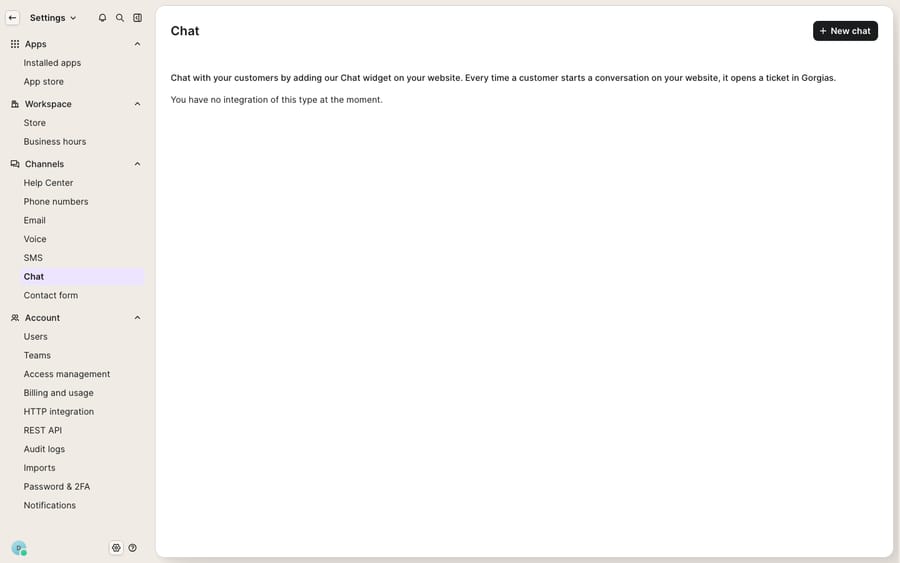
A few of these fixes only exist once you have a real, connected Shopify store. Quick Installation for Shopify requires the Gorgias–Shopify integration and the permission to install an app embed on that specific store — it isn't something you can demonstrate on a bare Gorgias trial with no store attached. Likewise, the traffic-based status only becomes meaningful once live shoppers are hitting your storefront, and CSP conflicts only surface on your actual production domain, not in the Gorgias admin. So if you're evaluating Gorgias before connecting your store, expect the Chat screen to look empty or gated — that's the normal pre-install state, not a fault. If you're new to the platform, what is Gorgias covers the fundamentals before you wire up the widget.
Can an AI layer cut the tickets behind the chat widget?
Getting the widget back on the page is step one. Step two is what it does once a shopper opens it — and that's a different conversation. A live chat bubble that only routes to a human queue still generates a ticket for every "where's my order?" and "do you ship to Canada?" On a busy storefront, that volume is exactly what buries your team. This is the seam where an AI agent layer helps: it answers the repetitive, policy-and-order questions inside the chat widget itself, so a large share of conversations resolve without ever becoming a ticket — and the ones that do reach a human arrive with context already gathered. The broader category of AI agents for customer service exists for exactly this.
Macha is one such layer, and the honest framing matters: it runs on top of Gorgias, not instead of it. It doesn't replace your help desk or your chat channel — it connects to the Gorgias you already use and works the same tickets and conversations, resolving the routine ones and handing off the rest with a summary. If you want the specifics, see the Macha–Gorgias integration and the walkthrough on connecting Gorgias to Macha to automate ticket replies, or read how the Gorgias AI agent is explained for the platform side. Because ecommerce questions so often need a live lookup — order status, tracking, subscription state — you can extend a Macha agent with a custom tool that calls your store's API mid-chat, and pricing is per ticket rather than per resolution — one chat, charged once however many lookups it takes — so browse pricing for the details.
FAQ
Why did my Gorgias chat widget disappear after changing my Shopify theme? Because the widget was added as a manual code snippet inside your theme (near the </body> tag in theme.liquid), and publishing a different theme dropped that snippet. Remove the old code and switch to Quick Installation for Shopify under Settings → Chat, which installs the widget as a Shopify app embed that survives future theme changes.
My Gorgias Chat status says "Not detected" / "Not installed" — is the widget broken? Not necessarily. That status is traffic-based: it reflects visits in the last 72 hours, so a low-traffic or newly installed store can show "Not detected" even though the widget is live. Visit a real page on your storefront where the widget should appear and reload it to refresh the status.
The widget code is on my page but nothing shows — what now? Open your browser's developer console on the storefront and look for Content Security Policy errors. A strict CSP can block the scripts and frames Gorgias Chat needs. Add the current Gorgias Chat domains to your CSP allowlist using the list Gorgias maintains in its documentation.
Why is the Gorgias widget missing on only some pages? Most likely a page-visibility or exclusion rule on the Installation tab of your chat configuration. Quick install deploys to every page by default, but the Hide on specific pages setting suppresses the widget on the URLs you list.
Which domains does Gorgias Chat need in a CSP allowlist? Gorgias's allowlist page lists config.gorgias.chat, assets.gorgias.chat, config.gorgias.io, us-east1-898b.gorgias.chat and storage.googleapis.com, plus api.gorgias.work if you use Gorgias Automate. Recheck the page before editing, because the list changes.
Can an AI agent reduce the ticket load behind my chat widget? Yes — when the problem is volume rather than the install. An AI layer like Macha answers routine WISMO, shipping, and policy questions inside the Gorgias chat itself, resolving many conversations before they become tickets and handing the rest to an agent with context. See the Macha–Gorgias integration and pricing.
Ready to turn a working widget into fewer tickets? Start a free trial and grade a Macha agent against your own Gorgias history before it ever touches a live chat.






