





 Shopify
 Stripe
 Slack
Slack Notion
 Google Workspace
 Confluence

Why Is Gorgias Not Creating Tickets From Emails? 5 Causes and Fixes


When a customer's email never becomes a Gorgias ticket, the cause is usually a spam flag from their email provider, a forwarding setup that drops spam, or an email integration that was deleted or disconnected. Check them in that order, starting at Settings, Channels, Email.
Key takeaways
- Gorgias most often fails to create tickets from emails because the sender's provider flagged the message as spam, and Gorgias imports it as spam even if it was later unmarked.
- Gorgias email channel health lives at Settings, Channels, Email, where a working connection shows a Verified or Connected status for each support address.
- A direct Gmail or Outlook integration sends spam-flagged emails to the Gorgias Spam view for recovery, while automatic forwarding never imports spam-flagged emails at all.
- Deleting or disconnecting a Gorgias email integration leaves existing tickets intact, but every later email to that address stops becoming a ticket until someone reconnects it.
- Microsoft 365 tenants that block external forwarding return the AS(7555) access denied error, which clears only after an admin updates outbound policies in the Microsoft Defender portal.

Gorgias usually stops creating tickets from emails for one of five reasons: the sender's provider flagged the message as spam, you connect by forwarding (which drops spam entirely), the email integration was deleted or disconnected, the domain or forwarding step was never finished, or Microsoft 365 blocks external forwarding. Spam is the most common and the quietest: per the Gorgias email integration FAQ, a message your provider marked as spam at any point imports into Gorgias as spam, even if someone later unmarked it. If colleagues see nothing arriving on any channel, rule out an outage first with is Gorgias down.
| What you observe | Most likely cause | Where to check |
|---|---|---|
| One specific email never arrived | Provider flagged it as spam | Provider spam folder + Gorgias Spam view |
| Missing emails all came via forwarding | Forwarding doesn't import spam at all | Email channel: integration type |
| Every email at one address stopped | Integration deleted or disconnected | Settings → Channels → Email |
| New address never worked at all | Forwarding not set or domain not verified | The three setup steps |
| Microsoft 365, forwarding won't set up | External forwarding blocked org-wide | Microsoft Defender outbound policy |
Where do I check whether the email channel is healthy?
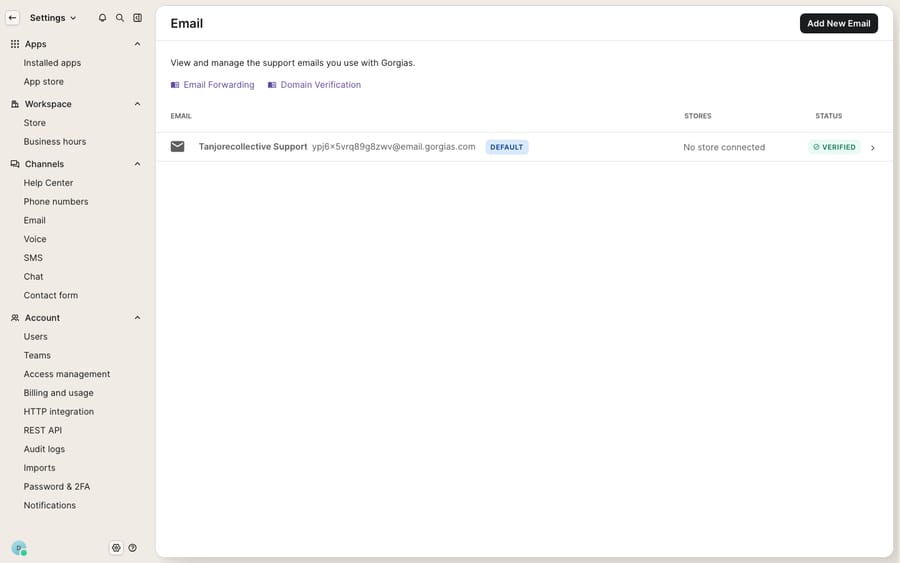
Open Settings → Channels → Email and look at the connection you expect tickets to arrive on. This panel lists each support address with a status column. A healthy connection reads Verified (or Connected). If the address you're missing tickets for is absent, greyed out, showing an error, or unverified, you've found the problem: the pipe isn't open. Every fix below either confirms or repairs something on this screen, so it's the first stop.
Which causes should I check first, and how do I fix each one?
1. The email was flagged as spam by your provider
This is the most common cause and the most misleading, because the message looks like it should have arrived. Gorgias imports each email with the classification your email provider already gave it. The email integration FAQ says that if a message was marked as spam in your provider at any point, even if someone later unmarked it, it will be imported as spam in Gorgias. It never lands in your main ticket view, so an agent watching the inbox sees nothing.
Fix: In Gorgias, open the Spam view and look for the message. If it's there, open the ticket, click the three dots in the upper-right corner, and select Unmark as spam to move it into your normal queue. Then check the spam or junk folder in Gmail or Outlook to confirm where the flag came from. Because one historical spam flag sticks, adding the sender to a safe-senders list at the provider stops a repeat. The same FAQ also lists a full provider inbox (storage capacity) as a reason mail doesn't arrive, so check the mailbox quota while you're there.
2. You're on email forwarding, which drops spam entirely
This trap makes the first cause worse. Gorgias connects email in two ways: a direct integration (the native Gmail or Outlook/Microsoft 365 connection) and automatic forwarding from any provider. They treat spam differently. With a direct Gmail or Outlook integration, spam-flagged emails are imported into the Spam view, where you can recover them. With automatic forwarding, the FAQ says spam emails won't be imported at all. There's no Spam view to rescue them from because they never reached Gorgias.
Fix: Check which method the address uses in Settings → Channels → Email. If you forward and legitimate emails keep vanishing, the lasting fix is a direct integration, where spam is at least recoverable. Gorgias documents how to switch from an email integration to email forwarding (and back). In the meantime, loosen the spam rules in your forwarding provider so fewer real emails get flagged. The native integration connects that specific mailbox and needs admin permissions on it, so plan the switch with whoever owns the account.
3. The integration was deleted, disconnected, or reconnected
If email arrived fine and then abruptly stopped for one address, someone probably changed the connection. The FAQ is direct about the consequence: when an email integration is deleted, the tickets already in your help desk from that address aren't affected, but any subsequent emails received at that address won't appear as tickets. That's why this is easy to miss. Your history looks intact while new mail falls on the floor. Common triggers are an expired OAuth token, a password change, or a security review revoking access.
Fix: In Settings → Channels → Email, confirm the address is present and healthy. If it's gone, re-add it. If it shows as disconnected, select Reconnect and sign in again with the Gmail or Microsoft 365 credentials (admin permissions required). Then send a test email from an outside address that isn't an agent's and confirm a ticket appears.
4. Forwarding or domain verification was never finished (new addresses especially)
If a newly added address has never produced a ticket, setup probably isn't complete. Gorgias' guide to forwarding emails to Gorgias from an external address lists three steps: add the address under Settings → Channels → Email, set up forwarding in your provider to the forwarding address Gorgias gives you, and verify your email domain by adding the DNS records Gorgias supplies at your domain registrar. Domain verification matters beyond looks: it reduces bounces and keeps your outbound replies out of customers' spam folders.
Fix: Re-walk the three steps. Confirm forwarding targets the exact Gorgias forwarding address, and that the DNS records Gorgias listed are published on your domain. Editing DNS needs access to a domain you control, so loop in whoever manages it.
5. Microsoft 365 is blocking external forwarding
A common blocker for Outlook and Microsoft 365 teams: if your organization disables external forwarding, setting up forwarding to Gorgias fails with the error "Access denied, Your organization does not allow external forwarding. Please contact your administrator for further assistance. AS(7555)". No forwarding means no tickets.
Fix: Gorgias' forwarding guide says your email administrator needs to update the outbound policies in the Microsoft Defender portal to allow automatic forwarding, for the organization or for the specific mailbox. Once that's allowed, finish the forwarding step and send a test message.
Is Gorgias at fault, and where does an AI agent help?
None of the above is Gorgias failing you. Email is a messy pipe with spam filters, forwarding rules and DNS at every joint, and Gorgias inherits whatever your provider decides. Once you know the two integration types and how each treats spam, the failures are diagnosable. If you're new to the platform, what is Gorgias covers how the help desk fits an ecommerce stack.
There's a related pressure worth naming. Much of the volume that makes a missed email feel serious is repetitive: "where's my order," "how do I return this," "did my discount apply." Each one is a ticket an agent opens, reads and answers by hand, which is the work an AI agent for customer service is built to take. Macha is one such agent. It runs on top of the Gorgias you already use, reading and writing the same tickets your agents touch, and resolves the routine questions so the human queue shrinks to messages that need a person. A smaller backlog makes a stray spam-flagged email easier to spot. See Gorgias AI agent explained for how that works, or the Macha–Gorgias integration for the connector details.
You can extend what the agent does with a custom tool that turns any REST API into an action it can call, such as checking live order or tracking status mid-conversation, which no email rule can do. Macha bills per ticket (one conversation, charged once however many messages it takes), never per resolution, starting at $299 a month for up to 750 tickets; the pricing page has the tiers.
FAQ
Why did one specific customer email never create a ticket in Gorgias? Most likely your email provider flagged it as spam. Gorgias imports emails with the classification the provider assigned, and a message marked as spam at any point, even if later unmarked, imports as spam. Check the Spam view in Gorgias and your provider's junk folder. If you use email forwarding rather than a direct integration, spam-flagged emails aren't imported at all.
What's the difference between the Gmail/Outlook integration and email forwarding for spam? With a direct Gmail or Outlook integration, spam is imported into the Spam view in Gorgias, so you can recover it. With automatic forwarding, emails your provider marked as spam aren't imported, so there's nothing to recover. That difference is the biggest reason forwarding setups appear to "lose" emails.
Emails stopped arriving at one address entirely. What happened? Almost certainly the integration was deleted or disconnected. After that, new emails at that address won't become tickets, though existing tickets stay put. Go to Settings → Channels → Email, re-add the address or click Reconnect (admin permissions required), and send a test email to confirm.
My new support address has never created a ticket. Why? Setup likely isn't finished. Gorgias needs you to add the address, forward mail to the Gorgias forwarding address, and verify your domain with the DNS records it supplies. If forwarding targets the wrong address or the domain isn't verified, mail won't flow. Microsoft 365 users should also check that external forwarding isn't blocked in Microsoft Defender.
Can an AI layer help with missed emails? Indirectly. It won't fix a broken forwarding rule; you still have to repair the connection. But an AI agent like Macha resolves the repetitive tickets on top of Gorgias, shrinking the human queue so genuine one-off emails are easier to spot and answer. See the Macha–Gorgias integration and pricing.
Want a smaller queue so nothing slips through? Start a free trial and grade a Macha agent against your own Gorgias history before it goes live.






