





 Shopify
 Stripe
 Slack
Slack Notion
 Google Workspace
 Confluence

How Do You Export Data From Front in 2026? Contacts, Conversations and the Limits


Front's only self-serve export is a contacts CSV; conversations and message history come out through an admin's request to Front Support, which skips individual inboxes, templates and tags. The Front API or a migration tool covers what that export leaves behind.
Key takeaways
- Front's only self-serve export is a contacts CSV from the Contacts Manager, so conversation and message history needs an account data export request to Front Support.
- Front acknowledges an account data export request within 72 hours and delivers CSV files in folders by inbox, each holding roughly 700MB of data.
- Front's account data export leaves out individual-inbox conversations, contact data, message templates and tags, and shared-inbox attachments arrive in EML format only.
- The Front API reaches conversations, messages, comments, tags and attachments, which makes it the only Front-native route to a complete export.
- Help Desk Migration's free demo moves 20 tickets with their associated data, and its Delta option syncs records changed during the full run while Front stays live.

Front lets you export one thing yourself: contacts, as a CSV from the Contacts Manager. Conversations, messages and history only come out through an account data export that a company admin requests from Front Support, which Front acknowledges within 72 hours and which leaves out individual-inbox data, message templates and tags. For anything that export drops, the Front API or a migration tool is the only route. Checked against Front's help center on 24 September 2026.
| Export path | Who runs it | What you get | What it misses |
|---|---|---|---|
| Contacts export (in app) | You, in the Contacts Manager | Contacts as CSV, with custom fields | Every conversation and message |
| Account data export | Front Support, on a company admin's request | Shared-inbox conversations, messages, comments as CSV by inbox; EML on request | Individual inboxes, contact data, templates, tags |
| Front API | Your engineer | Conversations, messages, comments, tags, attachments | Nothing reachable, but you write the code |
| Migration tool (Help Desk Migration) | The vendor's wizard | Contacts, accounts, conversations, comments, attachments, KB | Rules, shared drafts, analytics |
How do you export contacts from Front?
Open the Contacts Manager, pick a contacts tab, click Export at the top, choose which set to pull (Shared contacts, Private contacts, or Shared and auto-created contacts) and click Generate export to download a CSV. Per Front's own guide to importing and exporting contacts, the file carries the same columns as an import: name, email, phone, link, contact list, X handle, description, account name, and any custom contact fields you've configured.
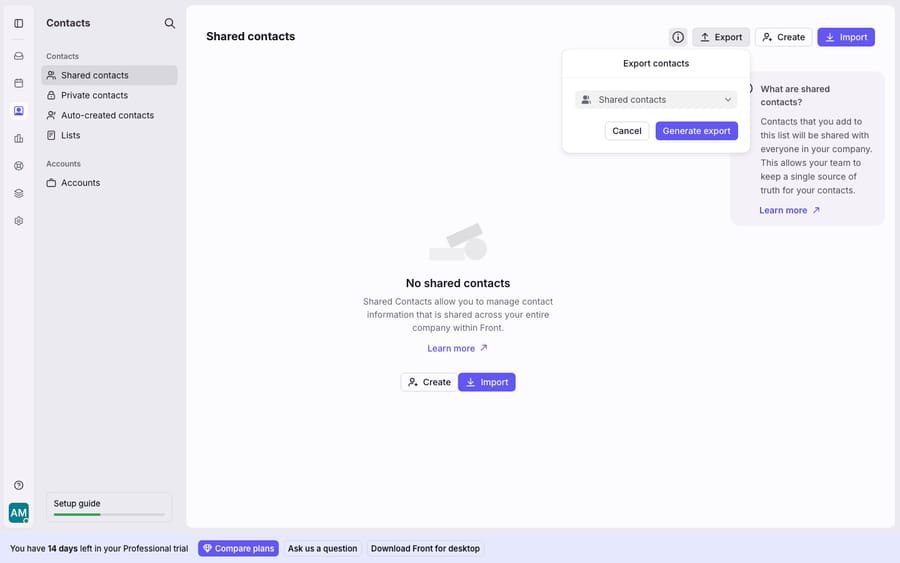
That's the whole of Front's in-app export surface. There's no button anywhere in Front to export conversations, message history, or ticket data. Front's help center says it outright: you "cannot do this on your own in the app at this time." If you were expecting a "download my inbox" option, that's where the second, harder path begins.
How do you export conversations from Front?
You ask Front Support. Following Front's account data export documentation, a company admin contacts Support with the exact line "Account data export request for {Customer name}." Front will acknowledge the request within 72 hours and tell you processing has begun. The finished export arrives as CSV files organized into folders by inbox, with each file holding roughly 700MB of data; larger inboxes are split across multiple files, and EML-format files are available on request. Data from blocked and deleted users is included.
What does Front's account data export leave out?
This export is lossy, and Front says so plainly. In Front's words, it will "not include attachments, comments, conversations, or discussions from individual inboxes or contact data," and it will "not export message templates and tags." Shared-inbox data fares better: conversations, messages, discussions and comments come through, and attachments do too, but in EML format only. Anything living in an individual inbox, plus every template and every tag you built, doesn't come out this way.
So the model to carry into any Front export is simple. The self-serve tool gives you contacts. The Support request gives you shared-inbox conversations, minus tags and templates. Individual-inbox history, tags and templates need the API or a migration tool. For a fuller picture of the platform you're exporting from, what Front actually is sets the context.
How do you get a complete Front export with attachments and tags?
Use the Front API. Conversations, messages, comments, tags and attachments are all reachable programmatically, so an engineer can pull exactly the data the Support export drops. This is the route teams take when they need attachments preserved, individual-inbox history retained, or tags carried across.
The trade-off is effort: you're writing (or running) code, paginating through conversations, handling rate limits, and downloading attachments one reference at a time. Our walkthrough of how to use the Front API covers authentication and the core endpoints. It's more work than a button, but it's the only Front-native way to a complete export.
What moves to a new help desk, and what do you rebuild?
If your export is really a migration, a third-party tool does most of the heavy lifting the API otherwise demands. Help Desk Migration handles Front as both a source and a target, moving teammates, contacts, accounts, conversations with their comments, attachments and dates, knowledge-base categories, folders and articles, and custom objects. Front is API-driven, so setup means generating an API token, disabling two-factor authentication, adding agents with the same email addresses as the source, and disabling rules that might touch imported tickets before the run. Here's the split between what ports and what you rebuild by hand:
| Data in Front | Self-serve export | Support export | Migration tool / API | Verdict |
|---|---|---|---|---|
| Contacts (+ custom fields) | ✅ CSV | ❌ excluded | ✅ | Moves |
| Shared-inbox conversations | ❌ | ✅ CSV | ✅ | Moves (Support/tool) |
| Individual-inbox conversations | ❌ | ❌ excluded | ✅ API only | Rebuild / API |
| Attachments | ❌ | ⚠️ EML, shared only | ✅ | Partial |
| Tags | ❌ | ❌ excluded | ✅ tool | Rebuild / tool |
| Message templates | ❌ | ❌ excluded | ⚠️ varies | Rebuild |
| Rules & automations | ❌ | ❌ | ❌ | Rebuild |
| Shared drafts | ❌ | ❌ | ❌ | Rebuild |
| Analytics history | ⚠️ per-chart CSV | ❌ | ❌ | Rebuild |
The pattern holds across every help desk: structured records (contacts, conversations) travel; configuration (rules, templates, tags, drafts, analytics) doesn't. Your Front rules, shared drafts and reporting are logic you designed inside Front, and no export format carries that logic to another platform. You re-create it wherever you land.
How much downtime does a Front migration cause?
Very little hard downtime, but the rebuild is real work. Help Desk Migration offers a Delta migration, which syncs only the records created or updated during the full run while your source stays live, and an Interval option that breaks the import into scheduled batches so your Front account stays usable during business hours. What isn't zero is the human effort on the far side: reconnecting channels, rebuilding rules, recreating templates and tag taxonomies, and retraining the team. Budget for that, not for a server being down.
A few more caveats. The Support export's 72-hour acknowledgement is an acknowledgement, not a delivery estimate; large accounts take longer to process. EML attachments and folders-by-inbox CSVs are archival formats, not something you can drop straight into another tool without transformation. And Help Desk Migration doesn't publish a flat price: cost depends on data volume, options and support package, and its free demo moves 20 tickets with their associated data so you can check the mapping before committing. On Front's side, which features you have at all depends partly on your plan; our Front pricing breakdown covers what sits where.
How do you handle a GDPR data request in Front?
Treat a data-subject request as a separate job from a bulk export. The account data export is built for whole-account archives, and it excludes contact data and individual-inbox content, so it can't be your only source for one person's records. Teams handling formal access or erasure requests usually pair it with a targeted API pull for that person's conversations and contact record, with EML files requested from Support where a readable message archive helps. If completeness matters for a regulator, lean on the API rather than assume the CSV export is exhaustive.
Where does Macha fit after a Front export?
None of the above is a Macha feature. Front's export is Front's, and the API and migration tooling belong to Front and Relokia (the company behind Help Desk Migration). Where Macha comes in is after the move. Macha is an AI agent layer that sits on top of the help desk you land on, and it runs on Zendesk, Freshdesk, Gorgias, Front, HubSpot or Intercom. It isn't a help desk and doesn't replace one. Once you're set up, Macha reads incoming conversations, works out intent rather than matching keywords, and drafts or sends grounded replies, pulling real order or account data through a custom tool that turns your API into something an agent can call. The broader category of AI agents for customer service exists for the reasoning work a migrated rule can't do, and if Front is where you're staying, the Macha–Front connector plugs in directly. Macha bills per ticket, from $299 a month for up to 750 tickets: one conversation, charged once however many messages it takes, never per resolution.
FAQ
Can I export conversations from Front myself? No. Front's only self-serve export is contacts as a CSV, from the Contacts Manager. To export conversation and message history, a company admin submits an account data export request to Front Support; there's no in-app button for it.
What does Front's account export leave out? Per Front, the export excludes "attachments, comments, conversations, or discussions from individual inboxes or contact data," and it doesn't export message templates and tags. Shared-inbox conversations and comments do come through, with attachments in EML format only.
How long does a Front data export take? Front acknowledges the request within 72 hours and then begins processing. Delivery depends on account size; larger accounts, split into roughly 700MB CSV files by inbox, take longer.
How do I get a complete export including attachments and tags? Use the Front API. It exposes conversations, messages, comments, tags and attachments programmatically, so an engineer can pull the data the Support export drops. It's the only Front-native way to a complete export.
Does migrating carry my Front rules and templates to the new platform? No. Structured records (contacts, conversations) migrate, but configuration such as rules, shared drafts, templates and analytics history doesn't port to another platform. You rebuild that logic wherever you land.
Does Front charge for an account data export? Front's export documentation doesn't mention a fee or a plan restriction; the only stated requirement is company admin permissions on the account.
Moving to a new inbox, or backing one up? Get the reply layer sorted early. Start a free trial of Macha and connect it to whichever help desk you land on.






