





 Shopify
 Stripe
 Slack
Slack Notion
 Google Workspace
 Confluence

How Do You Integrate Slack with Gorgias? Webhook Setup, Limits and Zapier


Gorgias has no one-click Slack app, so the supported way to get ticket alerts into Slack is a Gorgias HTTP integration posting to a Slack incoming webhook. It is a one-way notification: the Slack message tells your team a ticket exists, and the reply still happens in Gorgias.
Key takeaways
- Gorgias connects to Slack through an HTTP integration that posts to a Slack incoming webhook, a one-way notification included on all Gorgias Helpdesk plans.
- A Gorgias-to-Slack notification cannot reply to, reassign, tag or close a ticket, so every piece of ticket work still happens back inside Gorgias.
- Gorgias HTTP integration requests time out after 5 seconds and retry up to 3 times (10, 20, then 40 seconds apart), and Gorgias disables the integration after 500 consecutive failed requests.
- An AI agent layer such as Macha answers the ticket a Slack ping only announces, at about $0.40 a ticket, with setup by the Macha team and a dedicated success manager included.
- Gorgias offers hands-on Slack setup help only on Advanced plans or higher, and Advanced cost $900 a month billed monthly on 24 September 2026.

You integrate Slack with Gorgias by pointing a Gorgias HTTP integration at a Slack incoming webhook: Gorgias sends a POST request to the webhook URL when a ticket event fires, and Slack posts it as a message in the channel you picked. Gorgias has no one-click Slack app; its own Slack help article describes the setup as an HTTP integration using Slack incoming webhooks. The HTTP integration is included on every Gorgias Helpdesk plan. If you need more than a one-way ping, Zapier, Make or Pipedream sit in between.
| Route | Direction | Cost | Best for |
|---|---|---|---|
| HTTP integration + Slack incoming webhook | Gorgias → Slack only | Included on all Helpdesk plans | New-ticket and status alerts in a channel |
| Zapier / Make / Pipedream | Both ways possible | Separate subscription, per-task pricing | Routing logic, enrichment, Slack-to-ticket flows |
| AI agent layer (e.g. Macha) | Reads and answers tickets; can post to Slack | Separate plan, about $0.40 a ticket, setup and a dedicated success manager included | Working the ticket, not just announcing it |
What can a Gorgias-to-Slack integration actually do?
The native route is one-way. Gorgias sends an outbound HTTP request to Slack when something happens on a ticket, and Slack renders it as a message. Gorgias' template posts the ticket subject, the customer name and the first message body. You cannot reply to a customer, reassign, tag, snooze or close a ticket from the Slack message: the ping tells you a ticket exists, and the work still happens back in Gorgias.
For an ecommerce team, that's still useful. A #cx-urgent channel that lights up the moment a WISMO ("where is my order?") ticket or a chargeback threat arrives means nobody sits refreshing the Gorgias inbox. A #returns channel scoped to return-related events keeps ops in the loop without giving them a Gorgias seat. You're building a broadcast, not a two-way workspace.
How do you create the Slack incoming webhook?
The Slack side comes first, because you need the webhook URL before Gorgias has anywhere to send events.
- Go to the Slack app creation portal and choose Create an App → From scratch. Give it a name (e.g. "Gorgias Notifications") and pick your workspace.
- In the app's settings, open Incoming Webhooks and flip the toggle to On.
- Scroll to the bottom and click Add New Webhook to Workspace.
- Choose the Slack channel the messages should land in (e.g.
#cx-tickets) and authorize. - Copy the generated Webhook URL. It looks like
https://hooks.slack.com/services/…and is the endpoint Gorgias will POST to.
Anyone who has that URL can post to your channel, so treat it like a secret.
How do you add the HTTP integration in Gorgias?
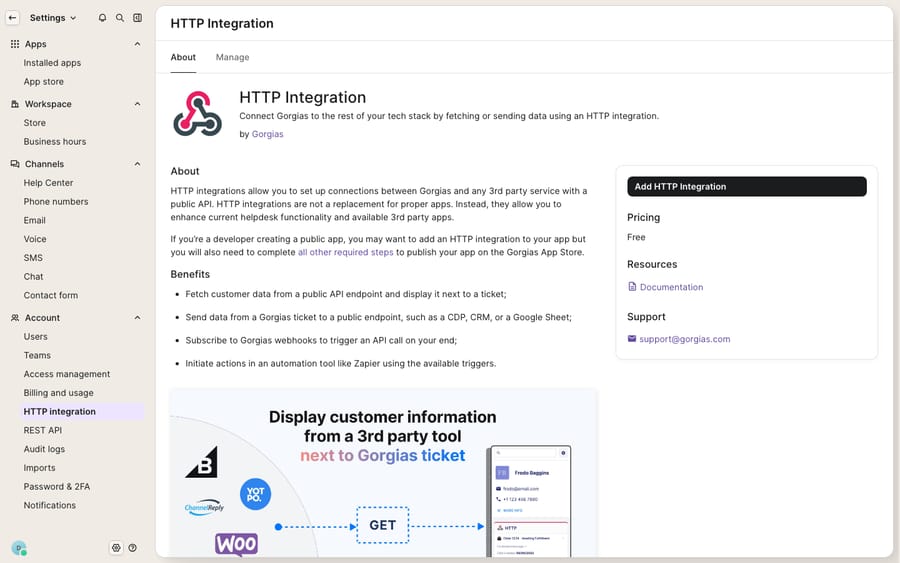
Per the Gorgias HTTP integrations documentation, it lives under the settings gear, and only the account owner and admins can create one.
- Click the Settings icon (bottom-left) → Account → HTTP integration.
- Open the Manage tab and click Add HTTP integration.
- Enter an integration name (e.g. "Slack: new tickets").
- Paste your Slack Webhook URL as the endpoint.
- Set the HTTP method to POST and the content type to application/json.
- Select the trigger: start with Ticket created.
- In the request body, paste a JSON payload Slack understands. A plain
{"text": "New ticket received"}proves the pipe; Gorgias' template variables let you inject the ticket subject, customer and channel. - Click Add integration.
Fire a test ticket and a message should appear in your channel within seconds. The HTTP integration offers more than Ticket created: the trigger list also includes Ticket updated, Ticket message created, Ticket self unsnoozed and Ticket message failed. Ticket assignment updated and Ticket status updated are there too, but Gorgias marks them as mutually exclusive with the others, so give each of them its own integration. A common ecommerce pattern is one integration for Ticket created into #cx-tickets and a second for Ticket message created into a quieter channel so agents can follow live conversations.
What are the reliability limits of the Gorgias HTTP integration?
Gorgias documents three guardrails worth designing around. Each request has a 5-second timeout. If a request fails on a connection error or timeout, Gorgias retries up to 3 times with exponential backoff: 10 seconds, then 20, then 40. And Gorgias disables an HTTP integration automatically if 500 consecutive requests fail, to avoid hammering a dead URL. Slack's incoming webhooks are reliable, so you're unlikely to hit that ceiling, but if you ever swap the endpoint for a flaky intermediary, a silent disable is the failure to watch for.
When should you use Zapier or Make instead?
If a one-way ping isn't enough (you want to create a Gorgias ticket from a Slack message, enrich the notification with order data, or send different events to different channels with logic), the HTTP integration runs out of road and an automation platform picks up. Gorgias lists a Zapier integration in its help center, built by a partner rather than by Gorgias, so Gorgias warns that technical issues can take longer to resolve. Make and Pipedream offer similar Gorgias and Slack building blocks. The trade-off:
| Native HTTP integration | Zapier / Make / Pipedream | |
|---|---|---|
| Direction | One-way (Gorgias → Slack) | Two-way possible (Slack → Gorgias too) |
| Setup effort | Moderate (build Slack app + JSON payload) | Low to moderate (prebuilt templates) |
| Cost | Included on all Helpdesk plans | Separate subscription, per-task pricing |
| Message formatting | Manual JSON | Visual builder, richer blocks |
| Logic / branching | None | Filters, paths, multi-step |
| Best for | Simple new-ticket alerts | Enrichment, routing, reverse flows |
For a team that just wants "tell me in Slack when a ticket lands," the native HTTP integration is the right call: it's free, it's in the product, and it does one thing. Reach for Zapier when you need conditional routing or a Slack-to-ticket flow. If you're weighing this against the rest of your stack, our roundup of the best Gorgias integrations puts it in context, and if Gorgias itself is new to you, start with what Gorgias is.
Who gets help from Gorgias if the Slack setup breaks?
Anyone can build this on any plan, but Gorgias' Slack article says hands-on help "setting it up or fixing any issues will only be supported for customers on Advanced plans or higher, due to the manual work required on our end." On Gorgias' pricing page on 24 September 2026, Advanced is $900 a month billed monthly for 5,000 tickets, above Starter ($10), Basic ($60) and Pro ($360). A smaller store is on its own if the JSON payload misbehaves.
What can't a Slack notification do, and where does an AI agent fit?
The native route is a doorbell, not a workspace. It tells you a WISMO ticket arrived; it can't tell you where the order is. It surfaces a returns question in #returns; it can't check the return window, look up the policy or draft the reply. Every Slack ping still resolves to a human opening Gorgias, reading the ticket, pulling data from Shopify and typing an answer. The notification saves you the refresh and none of the work.
That is the gap an AI agent layer fills. The point of AI agents for customer service is the reasoning-heavy part a notification can't do: read the ticket, work out the intent, fetch the real answer and reply. Macha is one such layer, and it runs on top of the Gorgias you already use as a native connector. It does not replace Gorgias, your inbox, your macros or the customer sidebar agents rely on (see the Gorgias customer sidebar explained). Instead of a channel that announces a WISMO ticket, an agent can look up the order status through a custom tool that turns your fulfillment API into something it can call, draft a grounded reply, and hand off when a human is needed. Macha also has its own Slack connector, so the same agent can post a summary to a channel, and your team can @mention it in Slack to ask about a ticket. Macha bills per ticket (one conversation, charged once however many messages it takes), never per resolution; the pricing page starts at $299 a month for 750 tickets, about $0.40 a ticket. Unlike the Slack webhook, you don't build this part yourself: on the trial and every plan, the Macha team analyzes your past Gorgias tickets, builds the knowledge base and the agent, and runs it in safe mode, with drafts as internal notes, until the drafts are right. The price also covers a dedicated success manager who handles your changes afterwards: new categories, instruction changes, new tools.
The clean split: keep the Slack webhook if you like a channel that pings on new tickets, and add an agent for the part a ping can't do, which is answering the ticket it's telling you about.
FAQ
Is there a native Gorgias Slack app? No. Gorgias does not offer a one-click Slack app. Its supported path is an HTTP integration pointed at a Slack incoming webhook, which Gorgias' own help article describes as "an HTTP integration using Slack incoming webhooks."
Can I reply to a customer from the Slack message? No. The native integration is one-way: Gorgias posts a notification to Slack, and you can't reply, reassign, tag or close the ticket from Slack. The work happens back in Gorgias. For two-way flows you'd need Zapier, Make or Pipedream.
Which ticket events can I send to Slack? The HTTP integration triggers are Ticket created, Ticket updated, Ticket message created, Ticket self unsnoozed and Ticket message failed, plus Ticket assignment updated and Ticket status updated, which Gorgias marks as mutually exclusive with the others. Most teams start with Ticket created.
Do I need a paid Gorgias plan to set this up? The HTTP integration is available on all Helpdesk plans, and you can build the Slack webhook yourself on any of them. Gorgias only restricts hands-on setup and troubleshooting help to Advanced plans or higher.
Can I add AI to Gorgias without replacing it? Yes. An AI agent layer like Macha connects to Gorgias as a native connector and runs on top of your existing help desk, alongside your Slack notifications. It handles the part a Slack ping can't: reading the ticket, looking up order or account data, and drafting or sending a grounded reply. The Macha team sets it up for you, included at about $0.40 a ticket.
Want Slack pings to turn into answered tickets? Start a free trial of Macha ($50 of usage, no credit card) and connect it to your Gorgias. The Macha team builds the first agent for you.






