





 Shopify
 Stripe
 Slack
Slack Notion
 Google Workspace
 Confluence

How Do You Integrate Yotpo with Gorgias? Reviews, Loyalty and Points Setup


The Yotpo integration for Gorgias puts a shopper's reviews, VIP tier and loyalty points in the ticket sidebar and lets agents reply to reviews or adjust points without leaving the ticket. Setup takes a few clicks, but it depends on a Yotpo Premium or Enterprise plan and a supported ecommerce store.
Key takeaways
- Connecting Yotpo to Gorgias happens under Settings, App Store, All Apps: search for Yotpo, click Add Yotpo account, then authorize the connection inside Yotpo.
- The Yotpo Gorgias integration needs a Yotpo Premium or Enterprise plan and a Shopify, Shopify Plus, Adobe Commerce (Magento) or BigCommerce store behind it.
- Loyalty data in the Yotpo Customer Widget syncs within five minutes of a message event such as a customer email, an agent reply or an internal note.
- Gorgias agents can reply to a Yotpo review only once, because Yotpo supports one comment per review and a second attempt returns an error.
- Adjusting loyalty points from a Gorgias ticket requires a custom action button that sends a POST request to the Yotpo loyalty API with your API key and GUID.

To integrate Yotpo with Gorgias, go to Settings → App Store → All Apps in Gorgias, search for Yotpo, click Add Yotpo account and authorize the connection in Yotpo; the integration needs a Yotpo Premium or Enterprise plan and a Shopify, Shopify Plus, Adobe Commerce (Magento) or BigCommerce store. Once connected, a Yotpo Customer Widget in the ticket sidebar shows the shopper's VIP tier, loyalty points and five latest reviews.
| What you want | Where it happens | Requirement |
|---|---|---|
| See reviews, VIP tier and points on a ticket | Yotpo Customer Widget in the sidebar | Yotpo Premium or Enterprise |
| Reply to a review | From the Gorgias ticket | One comment per review |
| Turn reviews into tickets | Yotpo tickets setting | Enabled in the integration |
| Add or deduct points | Custom action button in the widget editor | Yotpo loyalty API key and GUID |
| Fresh loyalty data | Automatic sync | Within five minutes of a message event |
What does the Yotpo integration for Gorgias do?
Yotpo and Gorgias solve two different halves of the same relationship. Yotpo owns the post-purchase side: the reviews a customer leaves, the loyalty points they accumulate, the VIP tier they climb into, the friends they refer. Gorgias owns the conversation. The integration's job is to make the first visible inside the second, so an agent handling a ticket sees the whole customer, not just the complaint in front of them.
Concretely, the integration adds a Yotpo Customer Widget to the Gorgias customer sidebar, and it wires up two-way actions (replying to reviews, escalating them into tickets, and adjusting loyalty points) from inside Gorgias. If you want the broader picture of what that sidebar is and how third-party widgets slot into it, we cover it in the Gorgias customer sidebar explained. For where Yotpo sits among the wider ecosystem, see our roundup of the best Gorgias integrations.
Which Yotpo plan and store do you need?
Two prerequisites matter, and both can quietly block you.
First, the Yotpo side is plan-gated. Per Yotpo's Gorgias integration guide, the Gorgias integration for both Reviews and Loyalty & Referrals requires a Yotpo Premium or Enterprise plan, and Gorgias' own documentation describes the review features as available only on Yotpo Premium. Yotpo does not publish plan prices on its pricing page, so confirm your subscription with your Yotpo account manager before you spend time on setup.
Second, this is an ecommerce integration built on an ecommerce backend. Yotpo documents support for Shopify, Shopify Plus, Adobe Commerce (Magento), and BigCommerce. If you're on Shopify, having Gorgias already connected to your store makes this far smoother; that groundwork is covered in Gorgias for Shopify. You'll want the same customer identity (email) flowing through Gorgias, your store, and Yotpo so the widget can match a ticket to the right shopper.
Step 1: Where do you find Yotpo in the Gorgias App Store?
Everything starts in Gorgias' app store.
- In Gorgias, go to Settings → App Store → All Apps.
- Search for Yotpo and select it. You'll land on the integration's connect page, the one that lists what the integration does and, if nothing is connected yet, shows "You have no integration of this type at the moment."
- Click the Add Yotpo account button.
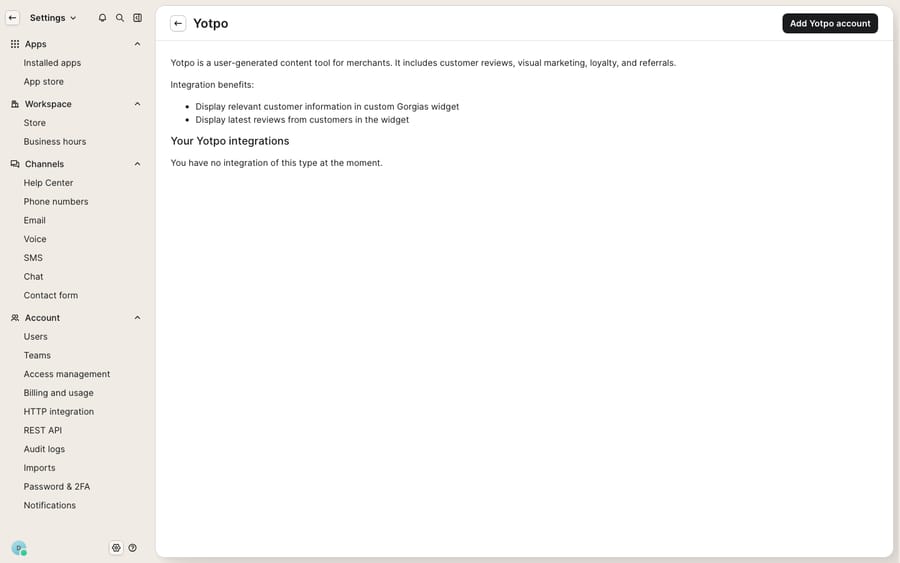
The screenshot above is that connect page: the starting point, not the finished widget. The populated reviews-and-loyalty sidebar only appears once you've authorized and Gorgias has a Yotpo account plus store data to match against.
Step 2: How do you authorize the connection?
Clicking Add Yotpo account hands off to Yotpo to establish trust between the two systems.
- Gorgias redirects you to Yotpo to log in, if you aren't already signed in.
- Click Authorize (labelled Connect in some flows) to grant Gorgias permission to read your Yotpo data.
- Optionally rename the integration, then confirm with Update integration.
Per the Gorgias Yotpo customer data documentation, this authorization is what lets Gorgias pull reviews, ratings, and loyalty details into the sidebar. Once it completes, a confirmation screen appears and the Yotpo Customer Widget becomes available to add to your ticket view.
Step 3: What does the Yotpo widget show on a ticket?
This is the payoff. Once connected, the Yotpo Customer Widget surfaces three groups of data for the shopper on the current ticket.
Overview. The customer's current VIP tier, their average star rating across all reviews, and their total review count: the at-a-glance answer to "is this a happy, high-value customer or a first-timer?"
Loyalty & referrals. Current point balance, lifetime points earned, total redemptions, and referral activity (successful referrals and clicks). This is what lets an agent see, mid-ticket, that a frustrated shopper has 4,200 points and referred three friends, context that changes how you handle the reply.
Reviews. Average site and product ratings, sentiment scored positive / neutral / negative, AI-identified top topics across their reviews, and the five latest reviews, each with its date, star rating, title, text, publish status, up and down votes, and the product it's about.
One timing detail worth knowing: loyalty data syncs within five minutes following a message event (a customer email, an agent reply, or an internal note) and won't refresh again until the next event. So the numbers are event-fresh, not real-time to the second.
Step 4: How do agents reply to reviews and turn them into tickets?
The integration isn't read-only. From Gorgias you can act on reviews:
- Reply to a review publicly or privately, straight from the ticket. Gorgias documents the constraint: Yotpo supports only one comment per review, and a second attempt returns an error, so your reply is a single, considered response rather than a threaded back-and-forth.
- Escalate a review or a Q&A into a ticket. With Yotpo tickets turned on, Gorgias creates a new ticket with the review details each time a product review arrives; Yotpo also lets you route reviews through its moderation interface, escalation rules, or a unique reply-to email address. A one-star review with a real problem lands in your queue like any other conversation instead of sitting in a moderation backlog.
For an ecommerce team, that moderation handoff matters: a negative product review often is a support ticket in disguise ("arrived damaged," "wrong size"), and pulling it into Gorgias means you can resolve the underlying issue, then follow up to ask if they'd revise the review.
Step 5: Can agents comp loyalty points from a ticket?
Yes, with some setup. Instead of asking a customer to wait while you log into Yotpo separately, you can adjust their points from inside Gorgias. For points and review questions answered by an AI agent, see the Yotpo AI support agent guide.
- In the widget editor, configure a custom action button (e.g. "Adjust Points") that sends a POST request to the Yotpo loyalty API, with your Yotpo API key and GUID in the headers and editable fields for the point amount and an optional reason.
- Once wired, the button appears in the Yotpo widget on the ticket, and an agent can add or deduct points for a customer without leaving the conversation.
The classic use case: a loyal shopper hits a WISMO snag (a late order), the agent apologizes, comps 250 points as an "on us" gesture, and closes the ticket, all in one place. It turns a support interaction into a small retention win.
Where does the native integration stop, and what can an AI layer add?
The native Yotpo integration is well-built and does exactly what a sidebar widget should: it puts reviews, loyalty, and VIP status where your agents already work, and it lets them reply and comp points without tab-switching. Credit where it's due.
But notice what it doesn't do. The widget displays context; it doesn't reason over it. It will faithfully show that a shopper is a Platinum-tier customer with a negative-sentiment review, but it won't decide that this ticket therefore deserves a proactive apology and a points comp. A human still reads all that and makes the call. The point-adjustment button is a manual action, taken deal-by-deal. And the deep parts of the setup, the custom action button and the API wiring, assume you have the Yotpo Premium/Enterprise plan and a connected store, which not every team on a Gorgias trial will have handy.
This is the seam where an AI agent layer fits. The broader category of AI agents for customer service exists to do the reasoning the widget can't: read the ticket, read the customer's Yotpo context and order status, decide what a good response looks like, and draft or send it. Macha is one such layer, and it runs on top of the Gorgias you already use as a native connector. It does not replace Gorgias, your Yotpo integration, or your loyalty program. It reads and writes the same tickets your agents do: pulling order status and account data through a custom tool that turns a REST API into something the agent can call, triaging by intent, and drafting grounded first replies so a WISMO ticket from a VIP gets an accurate, on-brand answer fast, with the human staying in the loop for the judgment call on whether to comp points. Macha bills per ticket, from $299 a month for up to 750 tickets: one conversation, charged once however many messages it takes, not per resolution. The pricing page breaks that down.
The clean division of labour: keep Yotpo as the system of record for reviews and points, keep Gorgias as the place conversations happen, and layer an agent on top for the reading-and-drafting work neither a review platform nor a sidebar widget was built to do.
FAQ
What plan do I need to integrate Yotpo with Gorgias? On the Yotpo side, both Reviews and Loyalty & Referrals require a Yotpo Premium or Enterprise plan for the Gorgias integration. On a lower tier, the customer widget won't populate. Confirm your Yotpo subscription before setup.
Where do I connect Yotpo in Gorgias? Go to Settings → App Store → All Apps, search for Yotpo, open it, and click Add Yotpo account. Gorgias redirects you to Yotpo to authorize, after which you confirm and the Yotpo Customer Widget becomes available in the customer sidebar.
What data does the Yotpo widget show in a ticket? The customer's VIP tier, average star rating and review count; loyalty point balance, lifetime points earned, redemptions, and referral activity; and review sentiment (positive/neutral/negative), AI-identified top topics, and their five latest reviews with dates, ratings, titles, publish status, and product. Loyalty data syncs within five minutes of a message event.
Can Yotpo reviews become Gorgias tickets automatically? Yes. Turn on Yotpo tickets in the integration and Gorgias creates a new ticket with the review details each time a product review arrives, so agents can resolve the problem and reply to the review in one place.
Can agents comp loyalty points from Gorgias? Yes. By configuring a custom action button in the widget editor that calls the Yotpo loyalty API with your API key and GUID, an agent can add or deduct loyalty points directly from the ticket sidebar, useful for a goodwill gesture after a delayed order or return.
Can I add AI to Gorgias without replacing it or Yotpo? Yes. An AI agent layer like Macha connects to Gorgias as a native connector and runs on top of your existing help desk and its integrations; it doesn't replace them. It reads the same ticket context (including order status and account data via custom tools) and drafts grounded replies, while Gorgias stays the place conversations live and Yotpo stays the source of truth for reviews and points.
Ready to give your agents an AI layer that reads the whole customer and drafts the reply? Start a free trial of Macha and connect it to your Gorgias in minutes.






