Shopify
 Stripe
 Slack
Slack Notion
 Google Workspace
 Confluence

Is Front Worth It in 2026? Pricing, AI Add-ons and Who It Fits


Front is worth it when it becomes your team's primary inbox and several people share the same email, chat and SMS conversations. Solo operators, very small teams and CRM-first shops usually find the per-seat price plus AI add-ons hard to justify.
Key takeaways
- Front is worth it mainly for collaborative teams of roughly 4 or more people where email, chat and SMS are the core work, not for solo operators or CRM-first shops.
- Front's plans cost $25 a seat a month for Starter, $65 for Professional and $105 for Enterprise billed annually, and Starter is limited to one channel type and 10 seats.
- Front sells Copilot at $20 a seat, Smart QA at $20 and Smart CSAT at $10 on Starter and Professional, while Enterprise includes all three.
- Adding Copilot and the $25 QA and CSAT bundle to a Front Professional seat raises it from $65 to $110 a month, more than the $105 Enterprise seat.
- For a 15-person team, Front Professional alone runs about $11,700 a year, rising to about $19,800 a year with Copilot and the QA and CSAT bundle.

Front is worth it for collaborative teams of roughly 4 or more people whose work runs through shared email, chat and SMS, and it costs $25, $65 or $105 a seat a month billed annually (front.com/pricing, checked 24 September 2026). Most of those teams end up on Professional at $65, because Starter covers one channel type only. Once you add Front's AI add-ons, a Professional seat costs about the same as Enterprise.
| Front plan | Per seat/mo (annual) | Seat cap | What it's for |
|---|---|---|---|
| Starter | $25 | 10 | One channel type (email, Front Chat or SMS), up to 10 rules |
| Professional | $65 | 50 | Omnichannel inbox, up to 20 rules, advanced analytics |
| Enterprise | $105 | Unlimited | Unlimited rules; Copilot, Smart QA and Smart CSAT included |
| AI add-ons (Starter/Professional) | Copilot $20, Smart QA $20, Smart CSAT $10 | Per seat | QA + CSAT bundle $25; Autopilot from $0.05 per conversation |
What does Front actually cost in 2026?
Front is a collaborative shared inbox: email, SMS, chat, and social channels flow into one place, teammates assign conversations to each other, leave internal comments without forwarding, and draft replies together. It's a well-built version of that idea. The interface is clean, the collaboration primitives (@-mentions, shared drafts, assignment) are the strongest part of the product, and reviewers consistently call it a "genuinely great tool" for teams drowning in a shared support@ or sales@ address.
The catch is the pricing model. Front charges per seat, per month, with annual billing about 24% cheaper than monthly, and the tiers climb fast. Front's in-app Billing page shows the same ladder as the public pricing page.
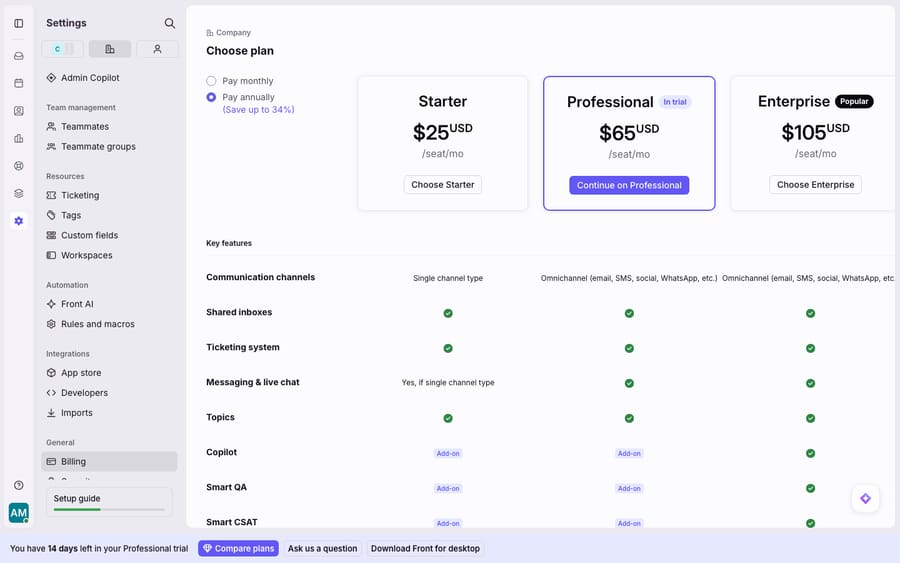
That's $25/seat/mo for Starter, $65/seat/mo for Professional, and $105/seat/mo for Enterprise, the same numbers you see when you open the plan chooser during a trial. For a 15-person team, Professional alone is roughly $11,700 a year before a single add-on. Front's own pricing tiers are broken down in detail if you want the line-by-line, but the top-line takeaway is simple: this is premium software priced like premium software.
Where does the per-seat bill get expensive?
Two things make the bill sting more than the sticker price suggests.
Starter is deliberately thin. It's limited to a single channel type (email, Front Chat or SMS), up to 10 seats and 10 rules, so most teams that want the omnichannel shared inbox Front is known for land on Professional at $65/seat from day one. The plan that matches the marketing is the middle plan, not the entry one.
The AI features are an add-on charge on the tiers most people buy. On Starter and Professional, Front's AI features are paid add-ons: Front's pricing page lists Copilot at $20/seat/mo, Smart QA at $20/seat/mo, and Smart CSAT at $10/seat/mo, with Smart QA and Smart CSAT also sold as a $25 bundle. All three are included on Enterprise. Autopilot, Front's AI agent, is priced separately by outcome, starting at $0.05 per conversation. Pricing roundups from featurebase.app and chatarmin.com walk through the same stack. Add Copilot plus the QA and CSAT bundle to a Professional seat and your effective cost climbs from $65 to $110/seat/mo, which is Enterprise money without Enterprise. As hiverhq's review and eesel's Front review both point out, that per-seat-plus-per-seat-AI structure means the total cost can nearly double once you turn on the features you probably came for.
| Scenario (15 seats, Professional) | Per seat/mo | Annual |
|---|---|---|
| Base Professional | $65 | ~$11,700 |
| + Copilot (AI drafting) | $85 | ~$15,300 |
| + Copilot + Smart QA | $105 | ~$18,900 |
| + Copilot + QA/CSAT bundle | $110 | ~$19,800 |
| Enterprise (Copilot, Smart QA, Smart CSAT included; Autopilot billed separately) | $105 | ~$18,900 |
The uncomfortable part: once you want AI, Professional plus add-ons costs about the same as Enterprise, or more. That's the moment most buyers re-evaluate.
Which teams is Front worth it for?
Strip away the marketing and the fit is narrow but real. Front is worth it when it's your primary inbox and channels are core to the job.
- Collaborative teams of ~4+: customer success, account management, billing/ops, logistics, where several people share the same conversations. Below that, the collaboration features you're paying the premium for sit mostly unused.
- Email/chat/SMS-first operations. Front's whole value is unifying those channels; if 90% of your work is really in a CRM or a ticketing tool, you're paying for a layer you'll route around.
- Teams that will actually adopt the workflow: assignment, tags, rules, shared drafts. Front rewards teams that lean in and punishes those who treat it as "inbox with extra steps."
Front is not worth it for a solo operator or a two-person team (the per-seat model has no volume discount at the bottom), for cost-conscious SMBs who need AI but can't absorb the add-on charges, or for teams whose real system of record is a CRM Front has to sync into. On that last point, reviewers are blunt: efficient.app and eesel both surface complaints that the HubSpot/CRM sync is "useless" and "antiquated," alongside occasional incorrect email threading and automation-rule glitches. The redesigned "New Front" UI has also drawn grumbling from long-time users who preferred the old layout. None of this is disqualifying, but it's the reality behind the polished demo.
So is Front worth the money?
Front is a very good product that is easy to over-buy. The collaboration is excellent, the omnichannel inbox is real, and for the right team (collaborative, channel-heavy, 4+ people who will adopt it) it's worth the money. Independent reviews keep landing in the same place: a "genuinely great tool" that's increasingly "hard to justify the cost" once you tally the tiers plus the AI add-ons, and once you compare against alternatives with bundled or usage-based AI. If you're on the fence, run the 14-day trial (Professional features, no card) with your real channels connected, count the seats you'll actually use, and add the AI line items you'll turn on. That total, not the $25 Starter headline, is the number to judge.
One more angle changes the arithmetic. Front's Copilot and QA add-ons are priced per seat, the same as the humans. But AI work is a volume problem more than a headcount problem, and the broader category of AI agents for customer service has largely moved to usage-based pricing for that reason. Macha is one such layer, and it's worth being precise about what it is: it runs on top of the Front you already use through the live Macha–Front connector. It does not replace Front, your shared inboxes, or your rules. You keep Front doing the collaboration it's good at; Macha's agent reads the conversation, works out intent, and drafts or resolves, pulling a real order or account status through a custom tool. Macha bills per ticket (one conversation, charged once however many messages it takes) from $299 a month for 750 tickets, with setup and monitoring by the Macha team included, so the cost tracks the volume you handle rather than the number of people logged in. If Front's price is what's giving you pause, read the full Front app review and the best Front alternatives before you sign.
For the deeper mechanics of what you'd actually be buying, what Front is and who it's for, the shared inbox model, and how Front's native AI works are the three pieces that most affect the "worth it" call.
FAQ
Is Front worth the price in 2026? For a collaborative team of roughly 4+ people where email, chat, and SMS are core, yes: the shared inbox and collaboration features justify the per-seat cost. For solo users, tiny teams, or CRM-first shops, the per-seat model plus AI add-ons usually makes it hard to justify against lighter or usage-based tools.
How much does Front really cost? Front's pricing is Starter $25/seat/mo, Professional $65/seat/mo, and Enterprise $105/seat/mo, billed annually. The real number is higher once you add AI on Starter or Professional: Copilot ($20/seat), Smart QA ($20/seat) and Smart CSAT ($10/seat) can push a Professional seat to or past Enterprise-level cost.
What's the break-even team size for Front? Roughly 4+ collaborative agents who share conversations. Below that, you're paying a premium per-seat rate for collaboration features that only a few people use, and a smaller or cheaper tool often makes more sense.
Which support features are gated to pricier tiers? Omnichannel (more than one channel type), higher rule limits and advanced analytics start at Professional. Copilot, Smart QA and Smart CSAT are included only on Enterprise; on Starter and Professional they are paid add-ons. Autopilot is billed per conversation on every plan, from $0.05.
Can I add AI to Front without paying per seat for it? Yes. An AI agent layer like Macha connects to Front as a live connector and prices per ticket (one conversation, charged once) rather than per seat. It sits on top of your existing inboxes and rules rather than replacing them, so you're not buying an AI seat for every human seat.
Weighing Front against the cost of adding AI per seat? Start a free trial of Macha and connect it to your Front to see per-ticket pricing in practice.