





 Shopify
 Stripe
 Slack
Slack Notion
 Google Workspace
 Confluence

How Do You Look Up a Customer's Stripe Payment History Without Leaving the Ticket?


A customer asks whether their card was charged this month, and the agent has to leave the ticket, search Stripe and read a payments table to answer one sentence. A Macha agent with read-only Stripe access runs that lookup inside the ticket and returns the history already summarized.
Key takeaways
- Macha looks up a customer's Stripe record with Get Customer and List Payments, then posts a summarized payment history inside the ticket instead of sending the agent to a separate Stripe tab.
- In the worked example, Macha retrieves 4 payments from the last 90 days for Alex Johnson, showing $99.00 charges on Mar 1, Feb 1, Jan 1 and Dec 1, all succeeded.
- Macha's Stripe connector exposes ten tools, but a read-only payment-history lookup needs only Get Customer and List Payments, backed by a restricted Stripe key scoped to read access.
- ChargeDesk, a competing sidebar widget, lists 15 helpdesk integrations and charges $29 to $249 a month, rendering a raw transaction table on every ticket.
- Macha bills $299 a month for 750 tickets, about $0.40 each, so a payment-history lookup inside a ticket already being billed adds nothing to the cost.

To look up a customer's payment history without leaving the ticket, connect Stripe to Macha with a read-only restricted key and let a Macha agent run two Stripe actions, Get Customer (by the ticket's email) and List Payments, then post a summary of amounts, dates, statuses and card last-fours into the ticket. The agent does in one step what usually takes an alt-tab to the Stripe dashboard, a search, and a read through a list of PaymentIntents to separate failed retries from real charges.
| Step | What happens | Stripe access needed |
|---|---|---|
| 1. Find the customer | Get Customer, matched on the ticket's email | Read: customers |
| 2. List payments | List Payments for a lookback you set (for example 90 days) | Read: charges |
| 3. Summarize | Amounts, dates, statuses and card last-fours posted in the ticket | None |
| 4. Act (optional) | Refund or charge, only after a human confirms | Write, granted separately |
Macha isn't a new helpdesk and it isn't replacing Stripe. It's an AI agent layer that sits on top of the helpdesk you already run (Zendesk, Freshdesk, Gorgias, Front, HubSpot or Intercom) and connects to the tools your billing lives in. The payment lookup is one action it can take; the point is that it takes it inside the ticket, in the agent's own workflow.
What does a payment-history lookup involve?
Strip the request down and there are two distinct steps, and the order matters:
- Find the right customer. A support ticket gives you an email (usually) and a name (sometimes). Stripe gives you a
customerobject keyed by an ID you don't have. So step one is resolving the human in front of you to the Stripe record behind them — Macha calls Stripe's Get Customer action by email. - List their payments. Once you've got the customer ID, you pull their charges — Macha's List Payments action — and present them in a way a human can read in two seconds, not a raw JSON array of PaymentIntents with
amount: 9900and Unix timestamps.
Those two Stripe actions — Get Customer and List Payments — are the whole spine of this use case. They're two of the ten tools Macha's Stripe connector exposes; the rest span charges, subscriptions, invoices, and refunds (you'll see the full list the moment you connect Stripe — more on that below). For a read-only history lookup you only need the first two, which keeps the action — and the cost — small.

How does the lookup run inside a ticket?
Here's the flow as it actually plays out. The trigger is mundane: a Zendesk ticket comes in (or is already open) and the agent needs billing context. The agent asks Macha, in plain language, to pull the history.
Agent: Can you check what payments this customer has made? Their email is [email protected]. Macha (Get Customer) → Found Stripe customer: Alex Johnson ([email protected]) Macha (List Payments) → Retrieved 4 payments from the last 90 days Macha: Payment history for Alex Johnson ([email protected]): - Mar 1 — $99.00 (Succeeded) — Visa ••4242 - Feb 1 — $99.00 (Succeeded) — Visa ••4242 - Jan 1 — $99.00 (Succeeded) — Visa ••4242 - Dec 1 — $99.00 (Succeeded) — Visa ••4242 Monthly subscription, all payments successful. Need me to look into anything specific?
Notice what the last line does. Macha doesn't just dump four rows — it reads them. Monthly subscription, all payments successful is the interpretation an experienced agent would make, surfaced for free. That one sentence is often the entire answer to the customer's question ("yes, you've been charged $99 on the 1st of each month, everything went through"), and the agent can paste it straight into a reply or use it to decide the next move.
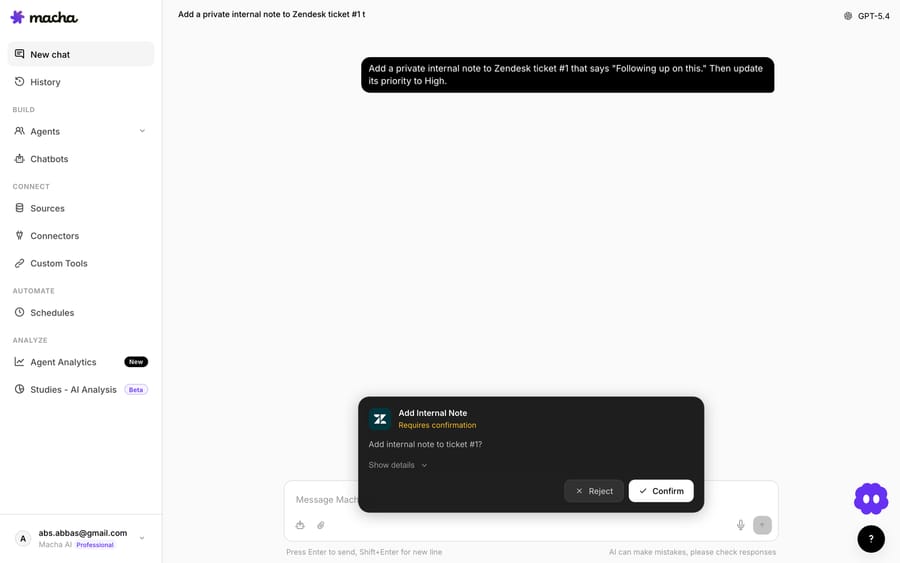
Macha runs these connector actions inside the same chat/ticket panel the agent already works in, and returns the result there — no second tool, no tab. A read like List Payments drops its summary straight into the thread (as above). A write — say a refund the agent asks for next — doesn't just fire: Macha surfaces a confirmation card first, so a human approves before any money moves.
The agent that does it
The lookup runs through a Macha agent you configure once. In the example below, a Billing Escalations agent is set up to handle exactly this class of work — its instructions tell it to monitor billing-related tickets and pull the context it needs before escalating. You define the behaviour in the Instructions panel, give it the Tools it's allowed to use (here, the Stripe Get Customer and List Payments actions), and connect the helpdesk under Triggers.
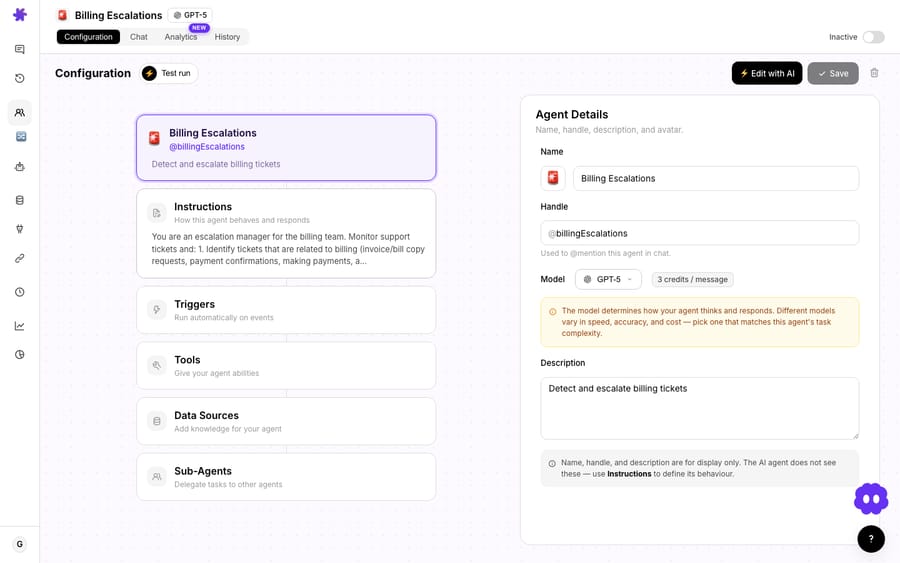
Because the agent is defined by instructions rather than a rigid form, you control the guardrails in english: only ever read payment data, never issue a refund without a human, redact full card numbers, and if you can't find a matching customer, say so instead of guessing. That last instruction matters more than it sounds — see the watch-outs below.
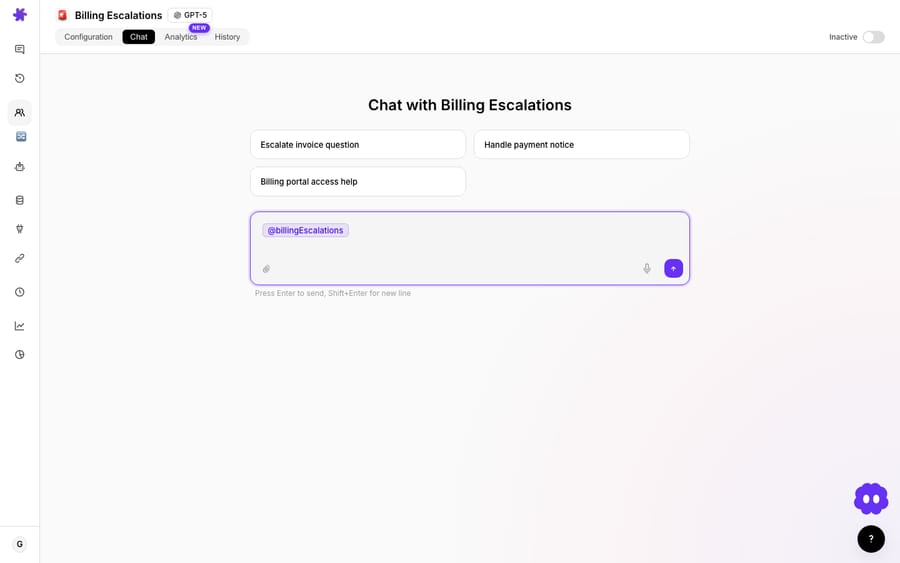
You can drive it two ways. Agents handle the lookup conversationally — an agent @-mentions the billing agent in Macha's chat and gets the summary back — or the whole thing fires automatically on a trigger when a ticket is tagged or routed as billing.
Why use an agent instead of a billing sidebar widget?
If you've shopped for this before, you've seen the established options: ChargeDesk, Stripe by Zenplates, eOne's Stripe Connector, and similar apps embed a Stripe panel into the ticket sidebar. They're legitimately useful — ChargeDesk, for instance, lets you search by the last four digits of a card or by email and shows billing history right next to the ticket, with refund and cancel-subscription buttons. And to be fair, it isn't a Zendesk-only tool: ChargeDesk's helpdesks page lists 15 integrations, including Zendesk, Front, Freshdesk, Help Scout, Intercom, HubSpot and Missive, plus Gmail and a Chrome extension (ChargeDesk helpdesks, checked 24 September 2026). Its plans run from $29 a month (Hobby) to $249 a month (Business) with a 14-day free trial, priced by recent customers and active agents (ChargeDesk pricing). If all you want is a raw billing panel pinned to every ticket, those do the job, in whatever helpdesk you run.
So the difference isn't "multi-helpdesk vs single-helpdesk" — both are multi-helpdesk. The difference is what happens with the data, and how wide the tool reaches. A sidebar widget shows you everything, always — a wall of transactions the agent still has to read, filter, and interpret on every single ticket, whether or not money is even the issue. Macha's approach is the inverse:
| Billing sidebar widget (ChargeDesk, Zenplates, etc.) | Macha agent | |
|---|---|---|
| When it acts | Always rendered on every ticket | On request, or on a trigger when billing context is actually needed |
| What you get | Raw transaction table to read yourself | A summarized history plus the agent's read of it |
| Interpretation | You do it | The agent does it ("monthly sub, all succeeded") |
| Next step | Manual (click refund, etc.) | Can chain into the next action under your rules |
| Helpdesk coverage | Multiple (ChargeDesk: 15 listed integrations) | Zendesk, Freshdesk, Gorgias, Front, HubSpot, Intercom |
| Scope | Billing/payments data only | One agent layer across every connected tool — Stripe, Razorpay, knowledge, comms |
That last row is the honest edge. A billing widget is a billing widget: it does payments, beautifully, and nothing else. Macha is a general agent layer, so the same agent that reads a payment history can also pull an order from Shopify, check a subscription, search your knowledge base, and post to Slack — under one set of instructions, in any helpdesk Macha connects to. The chaining is the unlock that follows from that. Once the history is on screen and Macha has read it, the next question writes itself — "I see two identical $65 charges on the same day, want me to refund the duplicate?" That's a different use case (resolving duplicate charges), but it starts from this exact lookup. The payment-history pull is the foundation the rest of your billing automation stands on, which is why it's worth getting right first. For the full picture of what the connector can do, see the Macha Stripe integration, and for the customer-facing version of this — pulling history mid-conversation in chat — see looking up payment history mid-conversation.
How do you set up the Stripe lookup in Macha?
The setup is short:
- Connect Stripe. In Macha's Connectors, add Stripe. The connection method is a single API key — and the panel tells you to use a restricted key rather than your secret key. For a pure read-only history lookup you scope that key to read access on customers and charges; Macha only needs Get Customer and List Payments for this flow. (Grant write scopes later, deliberately, if you want refunds.) The same panel lists all ten Stripe tools with their access level — Read or Write — so you can see exactly what each one touches before you enable it.
- Connect your helpdesk. Zendesk, Freshdesk, Gorgias, Front, HubSpot or Intercom, whichever you run.
- Build a billing agent. Give it instructions ("when an agent needs billing context, find the customer in Stripe and summarize their recent payments"), attach the two Stripe tools, and pick a model.
- Decide how it fires. Either agents call it by @-mention when they need it, or it runs on a trigger when a ticket lands in your billing view.
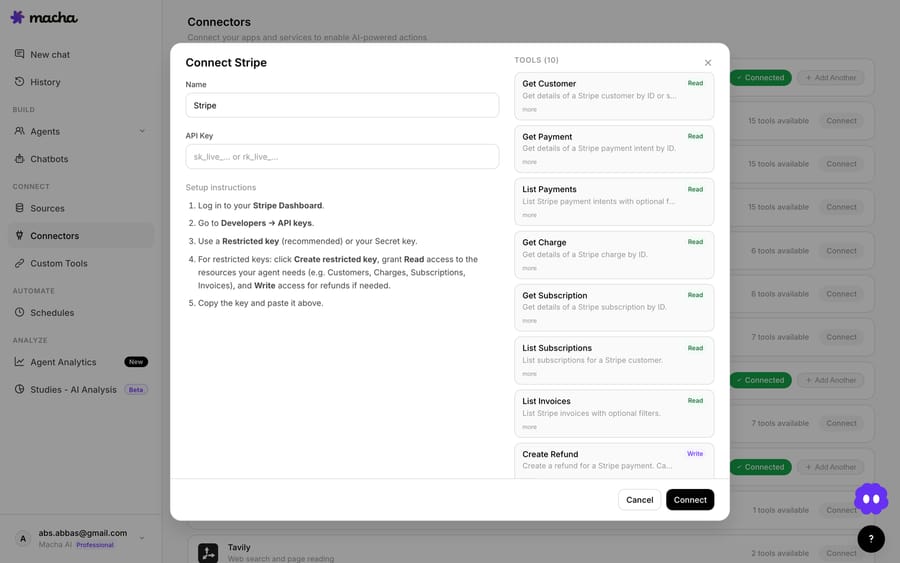
A note on connection method and data scope, because they decide what this agent can and can't see. Stripe is keyed, not OAuth'd, so the key you paste is the boundary — a read-scoped restricted key physically cannot issue a refund or create a charge no matter how the agent is prompted, which is a cleaner guarantee than instructions alone. Mind two other scopes too: Stripe test vs live mode keys hit different data (a live key won't see test customers and vice versa), and the time window of "recent" payments is yours to set — tell the agent the lookback you want (last 90 days, last 12 months, lifetime) rather than relying on a default. The full connector setup and tool list lives in the Macha docs.
What does the lookup cost to run?
Pricing in Macha is per ticket, not per "resolution" — one conversation, charged once, however many steps the agent takes inside it. A payment-history lookup (find customer, list payments, write the summary) happens inside a ticket you are already paying for, so the lookup itself adds nothing to the bill. Pricing starts at $299 a month for 750 tickets, about $0.40 a ticket. You can try the whole thing on the free trial ($50 of usage, no credit card required); the tiers are on the pricing page.
What can go wrong, and when should you not use it?
This is a read action, which makes it one of the safer things to automate — but it isn't free of edge cases, and a few are worth designing around.
- Email mismatches. The email on the ticket and the email on the Stripe customer aren't always the same person. People pay with a partner's card, sign up with a work email and write in from a personal one, or have two Stripe records. Instruct the agent to report when it finds zero or multiple matches rather than confidently summarizing the wrong account. "I found two Stripe customers with that email — can you confirm which one?" beats a clean-looking but wrong answer every time.
- Read-only means read-only. A history lookup should never silently turn into a refund or a charge. Keep the lookup agent's tools scoped to Get Customer and List Payments, and gate any write action (refunds) behind an explicit human confirmation step.
- Sensitive data on the screen. Payment summaries are PII. Show the last four of the card, never the full number (Stripe won't hand you the PAN anyway), and think about who can see Macha's output in a shared ticket thread.
- "Recent" is a choice. The sample pulls the last 90 days. A chargeback dispute or a fraud review might need the full lifetime history; a quick "did this month's payment go through?" needs only the latest charge. Tell the agent the window you want, or it'll default to something reasonable but maybe not what the case needs.
- When a widget is genuinely better. If your agents stare at billing data on every ticket all day — a payments-first support team — an always-on sidebar may suit that workflow more than an on-request lookup. Macha shines when billing is some of your tickets and you want context only when it's relevant, plus the ability to act on it. Be honest about which describes you.
FAQ
Which helpdesks does this work with? Macha runs on top of Zendesk, Freshdesk, Gorgias, Front, HubSpot or Intercom. The current list is on our integrations page. The same Stripe connector and the same billing agent work regardless of which helpdesk you use. (Purpose-built billing widgets like ChargeDesk are multi-helpdesk too, so that isn't the differentiator — the difference is that Macha is a general agent that interprets and acts across all your connected tools, not a single-purpose payments panel.)
Do I need to give Macha full Stripe access? No. For a payment-history lookup, a Stripe API key scoped to read access on customers and charges is enough — Macha only uses Get Customer and List Payments for this flow. Add write scopes (for refunds or charges) separately and deliberately if and when you want them.
Can it process a refund after showing the history? It can, but that's a separate, write-level action you should gate behind human confirmation. The history lookup is intentionally read-only. See processing refund requests for how to do that safely.
What if there are two customers with the same email? Instruct the agent to flag ambiguous matches instead of guessing. A good billing agent says "I found multiple Stripe customers for that email" and asks the human to disambiguate, rather than summarizing whichever record it hit first.
How much does each lookup cost? Nothing on its own. Macha bills per ticket — one conversation, charged once however many lookups it takes — from $299 a month for 750 tickets, about $0.40 each. See pricing for the full breakdown, and start on the free trial ($50 of usage, no credit card required).
Does it work with Stripe-like processors other than Stripe? This use case is built on the Stripe connector. Macha also connects to Razorpay for the same kind of billing context — see looking up payment history mid-conversation for the multi-processor version.
Pulling a customer's payment history shouldn't be a context-switch. With Macha, it's a sentence — and the answer comes back already read, already summarized, and ready to act on. Start a free trial ($50 of usage, no credit card required) and wire your billing context straight into the ticket.






