





 Shopify
 Stripe
 Slack
Slack Notion
 Google Workspace
 Confluence

What Is Parahelp? Pricing, Features and Alternatives (2026)


Parahelp is a Y Combinator-backed AI support agent whose Start plan lists $1,000 a month plus $1.25 per resolved ticket, with a second agent that configures the first from plain-language instructions. Here is how the two agents work, what the published pricing means at your volume, and which alternatives fit teams already running a help desk.
Key takeaways
- Parahelp's Start plan lists $1,000 a month plus $1.25 per resolved ticket for software companies under 3,000 tickets a month, and Scale costs $4,000 a month plus $1 per resolved ticket for 3,000 to 20,000.
- Macha is the done-for-you comparison: the Macha team configures and runs the agent inside your help desk at about $0.40 a ticket, resolved or not, with a dedicated success manager included.
- Parahelp's Internal Agent, which builds and tunes the Customer Agent from plain-language instructions, is billed at token usage plus 20% on every plan.
- Parahelp replaced its old credit pricing, which had an 800-credit monthly minimum and 0.1 to 5 credits per Internal Agent request, with per-resolution rates.
- Parahelp's case study with video-editing company Captions reports 46% of support tickets resolved within 7 days, a single-customer vendor figure.

Parahelp is a Y Combinator (Summer 2024) AI support agent for software companies, and its published Start plan lists $1,000 a month plus $1.25 per resolved ticket for teams under 3,000 tickets a month (parahelp.com/pricing, checked 24 September 2026). It runs two agents: a Customer Agent that resolves tickets across email, live chat and Slack, and an Internal Agent that builds and tunes the first one from plain-language instructions.
| Plan | Monthly price | Customer Agent | Internal Agent | Ticket volume |
|---|---|---|---|---|
| Start | $1,000/month | $1.25 per resolved ticket | Token usage + 20% | Under 3,000 a month |
| Scale | $4,000/month | $1 per resolved ticket | Token usage + 20% | 3,000 to 20,000 a month |
| Custom | Quoted | Quoted | Token usage + 20% | Above 20,000 a month |
We build AI agents for customer service ourselves, so we read Parahelp's claims the way a buyer evaluating both products would: what's a real mechanism, what's a case-study number, and what's marketing.
What is Parahelp?

Parahelp was founded in 2024 by CEO Anker Ryhl and Mads Liechti, and went through Y Combinator's Summer 2024 batch. It's based in San Francisco, and its YC profile lists a team of 11. It pitches itself at software companies that want an AI agent handling complex tickets end to end, such as billing questions and refund requests, not just answering FAQs. The company hasn't disclosed total funding raised.
Named customers on Parahelp's homepage include Kit, Bolt and Fyxer. Its YC profile cites a case study with the video-editing company Captions: Parahelp was "resolving 46% of all their support tickets within 7 days." That figure is a vendor-published, single-customer result rather than an average across Parahelp's book, and a first-week number tends to reflect the easiest tickets first. The homepage also quotes a customer CEO on a 94% CSAT, again a single-customer figure.
How does Parahelp's AI work?
Parahelp's structure is built around two named, separate agents:
Customer Agent is the one your customers actually talk to. It resolves tickets across email, live chat and Slack, and it can take real actions through any tool with an API: process a refund through Stripe, look up an account, pull an order status. Parahelp says it doesn't train AI models on customer data, which is one of the security claims enterprise buyers usually ask about first.
Internal Agent is the more distinctive piece. Instead of an engineer writing prompts and wiring up integrations by hand, a support or ops person describes what they want in plain language, and the Internal Agent configures the Customer Agent's tools and context sources accordingly. You refine the setup through conversation, the same way you'd brief a new hire, rather than editing a config file. This is the mechanism behind Parahelp's speed claim: the homepage says it "resolves your first customer issue within hours," laid out as a three-hour plan (context setup, configuration review, deployment).
On compliance, Parahelp says it is SOC 2 Type II audited and GDPR compliant, and it offers role-based access with Admin and Operator roles. That's the baseline checklist a security review usually asks for before an AI agent gets write access to a support tool.
What features does Parahelp include?
- Customer Agent: resolves tickets end to end across email, live chat and Slack.
- Internal Agent: builds, tests and refines the Customer Agent through natural-language instructions instead of manual configuration.
- Tool connections: "If a tool has an API, you can securely connect it." The YC profile names Stripe and Retool as examples.
- Security: SOC 2 Type II audited, GDPR compliant, no model training on customer data.
- Access control: Admin and Operator roles, with SSO/SAML and role-based access control on Scale.
- Fast setup: vendor-stated first resolution within hours.
How much does Parahelp cost?
Parahelp publishes structured pricing rather than requiring a sales call for a starting number. We checked parahelp.com/pricing on 24 September 2026. The plans:
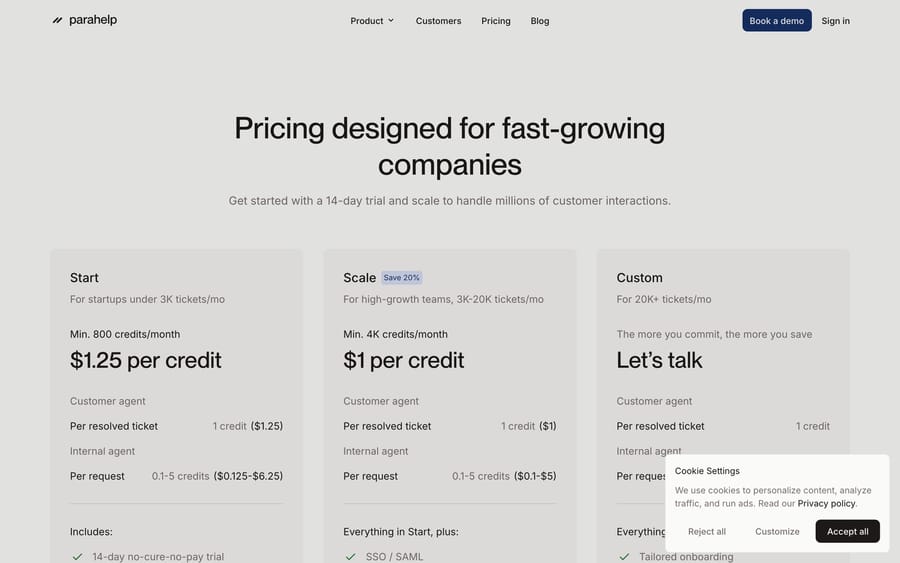
- Start: $1,000 a month, Customer Agent at $1.25 per resolved ticket, aimed at startups under 3,000 tickets a month. Includes a 14-day no-cure-no-pay trial, built-in guardrails, out-of-the-box connections and unlimited team members.
- Scale: $4,000 a month, Customer Agent at $1 per resolved ticket, for teams handling 3,000 to 20,000 tickets a month. Parahelp marks this as a 20% saving. Adds SSO/SAML, role-based access control and priority support.
- Custom: for more than 20,000 tickets a month, quoted directly with tailored onboarding and custom SLAs.
The pricing page has changed shape since we first wrote this guide. It used to sell credits: $1.25 a credit with an 800-credit monthly minimum on Start, $1 a credit with a 4,000-credit minimum on Scale, and 0.1 to 5 credits for each Internal Agent request. Today the word "credit" is gone. The Customer Agent is priced per resolved ticket, and the Internal Agent is billed at "token usage + 20%," meaning Parahelp passes through the model cost of configuration work with a 20% markup.
The page doesn't say whether the $1,000 is a floor that resolutions draw down or a platform fee on top of them. The old credit maths ($1.25 × 800 = $1,000) suggests the former, but ask before you sign. At face value, the Start fee alone covers 800 resolutions at $1.25, and the Scale fee covers 4,000 at $1. If you're near the 3,000-ticket boundary, model both fees against your real volume: the lower per-ticket rate on Scale only pays off once you'd otherwise spend more than $4,000 a month on Start.
The incentive is standard: Parahelp takes a lower margin per resolved ticket from a bigger customer in exchange for a much larger committed monthly fee. Per-resolution pricing also means Parahelp earns more when more of your tickets reach its agent, so watch how "resolved" is defined in the contract.
What reviewers say: There is no independent review evidence to report. Parahelp's G2 profile showed zero reviews when we checked it on 21 September 2026, and it has no Capterra listing. That's normal for a company at this stage, but it means every claim about outcomes here is the vendor's own. Treat the case studies accordingly and ask for references you can call.
What are Parahelp's pros and cons?
Pros
- Publishes real, structured pricing instead of gating every number behind a sales call.
- The Internal Agent's natural-language configuration is a different build experience from writing prompts or config files by hand.
- SOC 2 Type II and GDPR compliance, plus a no-training policy, cover the standard enterprise security checklist.
- A 14-day no-cure-no-pay trial on the Start plan gives you a real off-ramp if it doesn't work out.
- Unlimited team members on every plan.
Cons
- A $1,000 monthly fee on the entry plan means you pay for capacity you might not use in a slow month; there's no pure pay-as-you-go tier below Start.
- Internal Agent configuration is billed on token usage plus 20%, so the cost of building and tuning the agent isn't fixed in advance.
- A small company (founded 2024, 11 people on its YC profile) with less of a public track record than established CX platforms.
- The 46% resolution figure is one customer's first-week result, not a benchmark to plan around.
Who is Parahelp best for?
Parahelp fits software companies, roughly startup to mid-market, that want an AI agent taking real actions across existing tools like Stripe without hiring an engineer to build and maintain it. The Internal Agent's plain-language configuration suits a support lead who wants to change the agent's behavior directly, rather than filing a ticket with engineering every time.
It's a weaker fit for a large enterprise that needs a long procurement process with a vendor that has a longer track record, or for a team with low or highly seasonal ticket volume that would rather not commit to $1,000 a month.
How does Parahelp compare with alternatives?
| Parahelp | Decagon | Macha | |
|---|---|---|---|
| Model | Two-agent system: Customer Agent resolves, Internal Agent builds it | Enterprise conversational AI agent platform | AI agent layer on your existing help desk |
| Best for | Startups to mid-market software companies | Enterprise support, high-volume chat | Teams on Zendesk, Freshdesk, Gorgias, Front, HubSpot, Intercom |
| Configuration | Natural-language, via the Internal Agent | Enterprise onboarding, services-involved | Done for you by the Macha team, with a dedicated success manager, included |
| Pricing | $1,000/month plus $1.25 per resolved ticket (Start) to $4,000/month plus $1 (Scale), published | Unpublished; sales-quoted only | From $299/month for 750 tickets (about $0.40 per ticket), billed per ticket, published |
| Self-serve trial | Yes, 14-day no-cure-no-pay on Start | No | Yes, $50 of free usage (about 125 tickets), no credit card, no time limit |
| Replaces your help desk? | No, connects to your tools via API | No, but is a broad standalone platform | No, built to run on top of it |
Parahelp and Macha are structurally the closest comparison in this guide: both publish real pricing, and neither pretends to replace the help desk itself. They differ first on who does the configuring. On Parahelp, you configure the Customer Agent by giving the Internal Agent plain-language instructions, billed at token usage plus 20%. Macha is done for you: the Macha team analyzes your past tickets, builds the knowledge base and the agent, and runs it in safe mode, with drafts as internal notes in your help desk, until the drafts are right, and after go-live a dedicated success manager handles your changes. Scope and channel model differ too. Parahelp's Customer Agent runs its own resolution across email, chat and Slack; Macha runs as an agent layer inside the help desk your team already works in (Zendesk, Freshdesk, Gorgias, Front, HubSpot or Intercom), which matters if your macros, workflows and reporting are built around it. The billing unit differs too. Macha charges about $0.40 per ticket handled, resolved or not, one charge however many messages it takes, from $299 a month for 750 tickets, and that price includes the setup and the success manager. Parahelp's Start plan is $1,000 a month before its $1.25 per resolved ticket. Compare Parahelp's monthly fees against Macha's ticket-based tiers at your real volume before deciding.
Two alternatives belong on the same shortlist and have full guides here: Decagon, which sells the same AI-resolution story to larger teams, and Plain, if what you want is a modern B2B support platform with AI built in rather than an agent layer on top of one.
How we researched this: Features, pricing and customer figures come from Parahelp's homepage, its pricing page and its Y Combinator profile, all re-checked on 24 September 2026. The review position was checked in a real browser on 21 September 2026.
FAQ
What is Parahelp? Parahelp is a YC-backed (Summer 2024) AI support platform with a two-agent system: a Customer Agent that resolves tickets across email, chat and Slack, and an Internal Agent that builds and tunes the Customer Agent from natural-language instructions.
How much does Parahelp cost? Start is $1,000 a month with the Customer Agent at $1.25 per resolved ticket, for under 3,000 tickets a month. Scale is $4,000 a month at $1 per resolved ticket, for 3,000 to 20,000. Custom pricing applies above 20,000 tickets a month.
Does Parahelp have a free trial? There's no free tier, but the Start plan includes a 14-day no-cure-no-pay trial.
What is Parahelp's Internal Agent? It's the agent that builds and configures your customer-facing Customer Agent. You describe what you want in natural language and it sets up the relevant tools and context sources. It's billed at token usage plus 20% on every plan.
How much does a resolved ticket cost? $1.25 on Start and $1 on Scale, per resolved ticket by the Customer Agent. Internal Agent configuration work is billed separately on token usage plus 20%.
Is Parahelp secure enough for enterprise use? Parahelp says it is SOC 2 Type II audited and GDPR compliant, offers Admin and Operator roles (with SSO/SAML on Scale), and doesn't train models on customer data.
Who uses Parahelp? The homepage names Kit, Bolt and Fyxer. Parahelp's case study with Captions reports 46% of tickets resolved within 7 days.
What are good alternatives to Parahelp? For an established enterprise conversational AI platform, Decagon is a common comparison. For a team that wants agents working inside the help desk it already runs, with published per-ticket pricing, Macha is a comparable alternative, and the Macha team sets the agent up and runs it for you at about $0.40 a ticket, with a dedicated success manager included.
Does Parahelp integrate with Zendesk and Intercom? Parahelp says it connects to any tool with an API. Its homepage no longer names specific help desks, so confirm your help desk's connection and which actions it supports during the trial.
Sources: Parahelp homepage, Parahelp pricing, Parahelp on Y Combinator.






