





 Shopify
 Stripe
 Slack
Slack Notion
 Google Workspace
 Confluence

What Shipped in Macha's March 2026 Update? Triggers, Sub-Agents, Freshdesk and Shopify


Macha's March 2026 releases let agents start work on their own: on a help desk event, on a schedule, or by handing a job to a specialist sub-agent. Five dated releases also added Freshdesk and Shopify connectors, the AI Tool Builder and a privacy settings page.
Key takeaways
- Macha's March 2026 update shipped event triggers on March 1, sub-agents on March 8, a Freshdesk connector on March 15, Shopify and scheduled triggers on March 22.
- Macha scheduled triggers run at a minimum 1-hour interval with daily caps, and disable themselves after 5 consecutive errors.
- Scheduled triggers were capped at 3 on Pro and 20 on Enterprise at launch; they are now included on every paid Macha plan and stay off during the free trial.
- The Freshdesk connector launched with 15 tools, including replies, private notes, field updates and text extraction from PDF, DOCX, XLSX, CSV and TXT attachments.
- Macha's March 30 privacy release added JSON data export and auto-deletes conversations after 45 days of inactivity.

Macha's March 2026 update shipped event triggers (March 1), sub-agents and multi-instance connectors (March 8), a 15-tool Freshdesk connector (March 15), a Shopify connector and scheduled triggers (March 22), and the AI Tool Builder plus a privacy settings page (March 30). The theme was autonomy: an agent that used to wait for a message can now start on its own when an event fires or a schedule comes round.
| Date | What shipped | What it does |
|---|---|---|
| March 1 | Triggers, chat attachments | Agents run on Zendesk, Freshdesk, Slack or custom-webhook events; files dropped into chat |
| March 8 | Sub-agents, onboarding, multi-instance connectors | Agents call other agents as tools; 3-step setup; two accounts of one connector |
| March 15 | Freshdesk connector, file tools | 15 Freshdesk tools with attachment reading; agents generate XLSX, CSV, PDF and DOCX files |
| March 22 | Shopify connector, scheduled triggers | Order and product lookups; recurring runs at a minimum 1-hour interval |
| March 30 | AI Tool Builder, privacy page | Describe a REST API to get tools; data export and 45-day conversation cleanup |
A reminder on what Macha is, because it frames every item below: Macha is an AI agent layer that sits on top of your existing help desk (Zendesk, Freshdesk, Gorgias, Front, HubSpot or Intercom) and connects your commerce, knowledge and comms tools so agents can resolve, triage and route tickets while taking real actions through tools.
How do agents run themselves now?
Triggers: agents that fire on events (March 1)
The trigger system is the biggest shift of the month. An agent no longer needs a human to start working. You point a trigger at an external event and the agent runs autonomously when that event fires.
At launch, triggers supported Zendesk ticket events, Freshdesk updates, Slack mentions, and custom webhooks, and the custom-webhook path means any system that can send an HTTP POST can wake an agent. When you create a custom webhook trigger, Macha generates a unique URL with a signing secret so you can verify the payload came from your source.
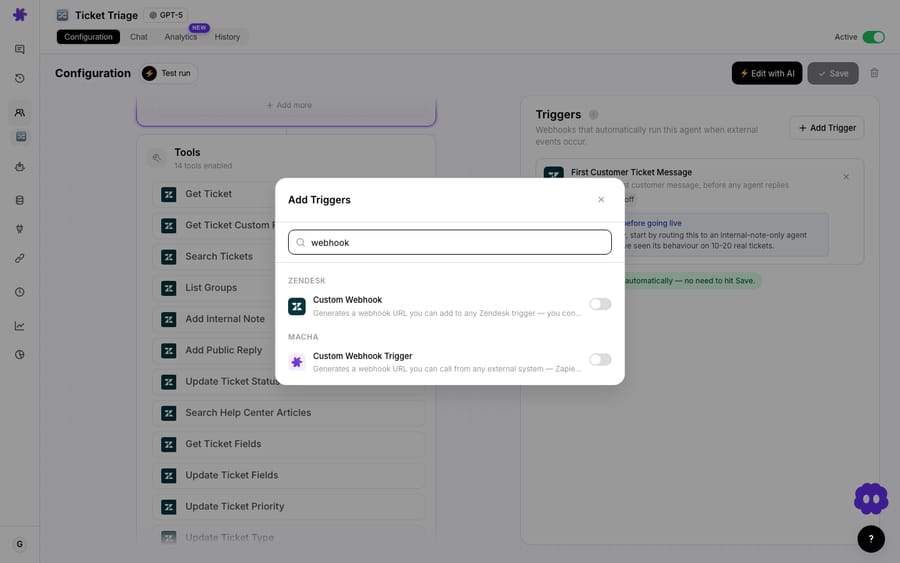
Two details make this safe to run in production:
- Debounce. Real systems emit bursts of events, like a flurry of ticket updates in a few seconds. A configurable debounce interval batches rapid events so the agent fires once on the settled state instead of once per update.
- Triggers scoped per agent. Each trigger is attached to a specific agent, so the right specialist responds to the right event.
The rest of the month builds on this. See the triggers documentation for the full event list and payload format, or the walkthrough on automating agents with triggers.
Scheduled triggers: cron for your agents (March 22)
Event-driven is half the story; the other half is time-driven. Scheduled triggers let an agent run automatically on a recurring interval: a 9am sweep of overnight tickets, an hourly stale-conversation check, or a nightly digest.
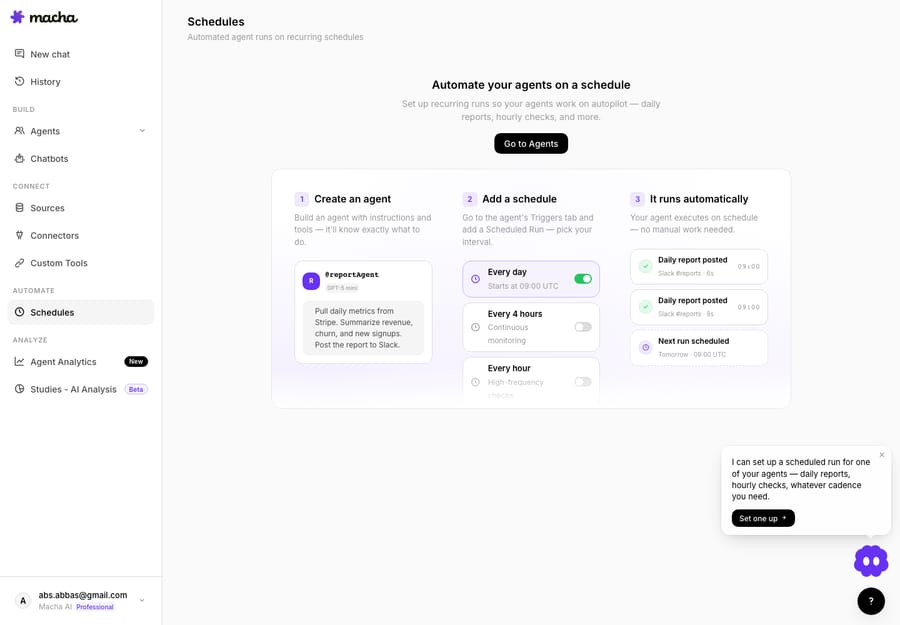
The guardrails are deliberately conservative:
- Minimum 1-hour intervals, with daily caps and concurrency limits so a schedule can't quietly burn through your monthly ticket allowance.
- Auto-disable on failure. A trigger that hits 5 consecutive errors disables itself, so a broken integration doesn't loop forever.
- Plan availability has changed since launch. In March the changelog capped scheduled triggers at 3 on Pro plans and 20 on Enterprise. Macha now sells one plan priced by ticket volume, and scheduled triggers are included at every paid tier alongside unlimited agents and seats. On the free trial they stay off until you upgrade. (See the pricing page for current details.)
Because every agent run does real work against your monthly ticket allowance, the daily cap and concurrency limit are the difference between a useful nightly job and a runaway loop. Set the cap to the worst case you'd tolerate, not the best case you hope for. For cron patterns and recurring-run recipes, see running agents on a schedule.
Sub-agents: delegation between agents (March 8)
The third piece is sub-agents: an agent can now call another agent as a tool. That enables specialist delegation. A front-line triage agent can hand a billing question to a billing specialist, or an order question to a Shopify-connected agent, instead of trying to be expert at everything itself.
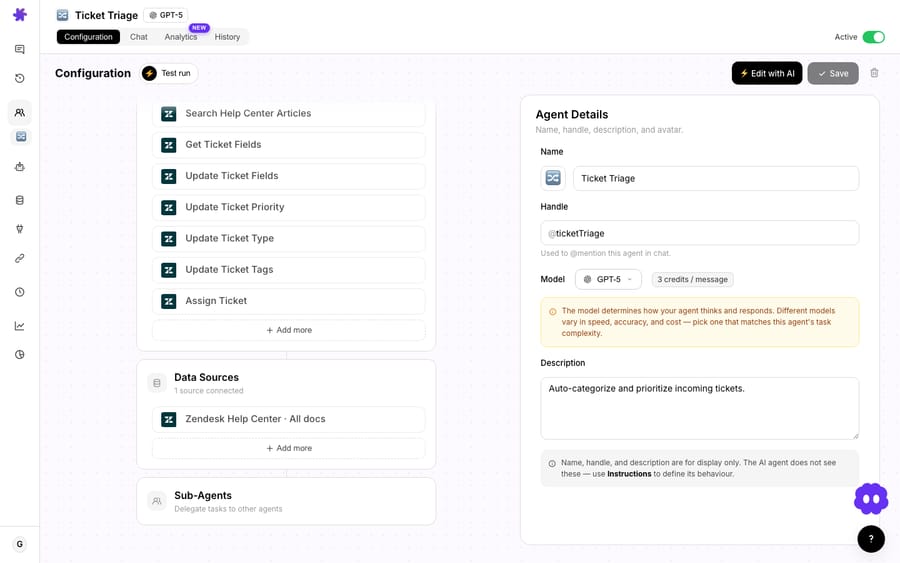
In practice this keeps each agent's instructions and tool set tight. A lean orchestrator that knows who to delegate to beats one bloated agent with thirty tools and a 2,000-word prompt. Pair sub-agents with triggers and you get a clean pattern: a trigger wakes the orchestrator, the orchestrator routes to the right specialist, the specialist acts. The sub-agents docs cover how delegation and tool-name disambiguation work, and our guide to multi-agent delegation with sub-agents shows when the pattern pays off.
Which connectors were added in March 2026?
Freshdesk connector: 15 tools (March 15)
Macha started Zendesk-first, but plenty of teams run Freshdesk. The March 15 connector brings full ticket management: get and search tickets, add replies and private notes, update priority, status, tags and custom fields, assign tickets, search contacts, and browse knowledge-base articles, 15 tools in all. The integrations page still lists 15 today.
Two parts make it more than a thin API wrapper:
- Attachment extraction. Agents can read and extract text from PDF, DOCX, XLSX, CSV, and TXT attachments on Freshdesk tickets, so a customer's attached invoice or log file becomes context the agent can reason over.
- Webhook triggers. Combined with March 1's trigger system, agents can respond automatically on ticket creation and updates.
The same release added built-in file tools: agents can create spreadsheets, CSVs, PDFs and Word documents on the fly and return them as download links, with no connection or setup required.
If you run Freshdesk, this is the connector that makes Macha a same-day fit. Browse the full integrations library for the rest.
Shopify connector: commerce context (March 22)
For ecommerce support, the help desk is only half the context; the store is the other half. As announced on March 22, the Shopify connector connected via OAuth and shipped 7 tools: search_products, get_order, lookup_customer, get_customer_orders, search_orders, get_discounts, and create_refund, with refunds gated behind confirmation. A pre-configured Shopify support agent on a demo account let you see the flow before connecting your own store.
Macha's public Shopify integration page now lists eight tools: the seven above plus Cancel Order, added after this release, with create_refund and Cancel Order both behind a confirmation step in chat. The integrations library has the rest of the connector list.
Those lookups target the most common ecommerce tickets: where is my order, what did I buy, is this in stock. With Shopify lookups plus the help desk connector, a Macha agent can answer them without an agent switching tabs.
A note on positioning: Macha isn't trying to be Gorgias or another Shopify-native help desk. Macha is the agent layer that plugs into whichever help desk you already use and adds the Shopify context on top.
What changed in tooling, onboarding and privacy?
AI Tool Builder: connect any REST API by describing it (March 30)
The AI Tool Builder is the quiet standout of the month. Instead of hand-defining endpoints, you describe the API you want to connect, paste your credentials, and the AI discovers endpoints, tests them, and creates the tools for you. It works with any REST API authenticated by API key, bearer token, or basic auth.

The details that matter:
- Auto-grouping. Generated tools are bundled under a named connector with an emoji icon and brand color.
- Auth reuse. Credentials captured from a successful test request are applied to every tool in the session.
- Write operations detected.
POST,PUT,PATCHandDELETEmethods are automatically flagged as write operations requiring confirmation, so destructive calls don't run silently.
Custom Tools got polish the same day: masked credential hints in the edit modal (see which key is set without exposing the secret), inline delete from the tools list, and automatic stripping of empty optional parameters from request URLs, which fixes errors from APIs that reject empty query values. Custom API tools are included on every plan.
Onboarding: set up in under two minutes (March 8)
New workspaces now get a guided 3-step onboarding: select your tools, pick from recommended agent templates, and connect your integrations. The goal is a working agent in under two minutes instead of a blank canvas.
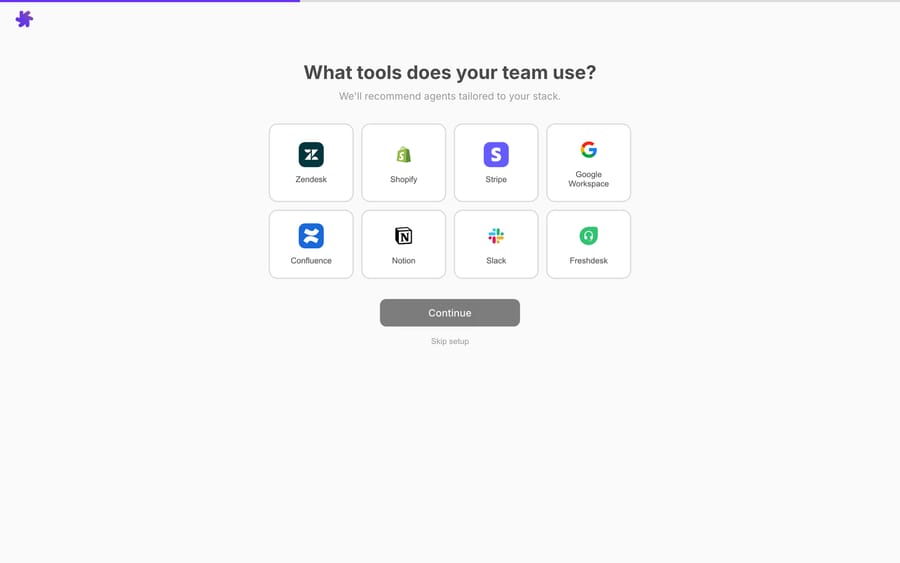
Multi-instance connectors (March 8)
Agencies and multi-brand teams asked for this: you can now connect multiple instances of the same connector, such as two Zendesk accounts or three Stripe accounts, each with its own credentials and name. When duplicate connector types exist, Macha auto-disambiguates by suffixing tool names and tagging descriptions with the account name, so the model knows which instance to call.
Chat attachments (March 1)
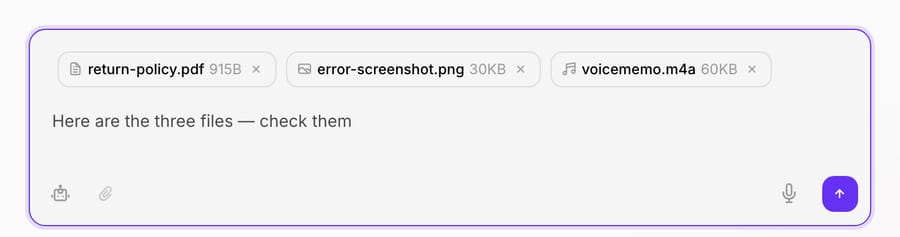
Alongside triggers, March 1 added drag-and-drop attachments in chat: images, documents (PDF, DOCX, CSV, XLSX), and audio. Text is automatically extracted from documents into the conversation context, and images are sent as vision content for models that support it.
Privacy and data management (March 30)
The month closed with a privacy pass: a new Privacy settings page to download your data, manage account deletion, and reach every policy in one place. Data export produces a complete JSON copy of your conversations, agents, connectors, and tools. There's a cookie-consent banner on all pages, and automatic cleanup: conversations auto-delete after 45 days of inactivity, and chat attachments expire automatically.

How do the March features work together?
Here's how the month's pieces compose into one workflow, which wasn't possible in February:
- A trigger fires on a new Freshdesk ticket (March 1 + March 15).
- A lean orchestrator agent reads the ticket and any attached files (Freshdesk attachment extraction).
- It delegates an order question to a Shopify sub-agent (March 8 + March 22).
- The sub-agent looks up the order and drafts the reply. Anything that changes state, such as a refund through a custom tool, runs behind confirmation.
- A separate scheduled trigger sweeps any still-open tickets each morning and posts a digest (March 22).
Every step is event- or time-driven, scoped to a specialist, capped, and billed as the one ticket it belongs to.
What should you watch out for?
March added a lot of autonomy, and autonomy needs guardrails. A few honest caveats:
- Scheduled triggers spend your ticket allowance unattended. That's the point, but a loose daily cap on a chatty agent can surprise you. Start with conservative caps and a low concurrency limit, then raise them once you've watched a few runs. Macha charges per ticket, one conversation charged once however many steps it takes and whichever model it runs on, so what you budget is conversation volume. Plans start at $299 a month for 750 tickets.
- Triggers without good instructions are just faster mistakes. An agent that responds autonomously to every ticket needs tight scoping and a clear "when in doubt, hand off to a human" rule. Don't point a trigger at a brand-new, untested agent.
- The AI Tool Builder makes tools fast, so confirmation gates matter. Auto-flagging write methods is a safety net, not a substitute for reviewing what the generated tools can do before an agent calls them on live data.
- Sub-agents add latency. Each delegated call is another model run. Use them where specialization pays; a single well-scoped agent is simpler for small queues.
- Anything that moves money stays behind confirmation. The convenience of one-click refunds is not worth an un-gated agent issuing them.
If your queue is small, simple, and well served by reply-only agents, you may not need triggers or schedules yet, and that's fine. These features earn their keep at volume and with workflows that have clear hand-off rules.
FAQ
What are the headline features in Macha's March 2026 update? Autonomous triggers (agents fire on Zendesk, Freshdesk, Slack or custom-webhook events), scheduled triggers (cron-style recurring runs), sub-agents (agents delegating to other agents), a Freshdesk connector (15 tools), a Shopify connector, built-in file tools, an AI Tool Builder for any REST API, guided onboarding, multi-instance connectors, chat attachments, and a privacy and data-management page.
How often can scheduled triggers run? At a minimum 1-hour interval, with configurable daily caps and concurrency limits. A trigger auto-disables after 5 consecutive errors. Scheduled triggers are included on every paid plan and stay off during the free trial.
Does Macha support Freshdesk as well as Zendesk? Yes. The March 15 Freshdesk connector added 15 ticket-management tools plus attachment text extraction and webhook triggers. Macha remains an agent layer on top of your help desk and today runs on Zendesk, Freshdesk, Gorgias, Front, HubSpot or Intercom.
Can a Macha agent issue Shopify refunds? The March 22 launch included a create_refund tool gated behind confirmation. The current Shopify integration page lists only read tools (products, orders and customers), so check the integrations library for the current list; any write action you add through a custom tool still requires confirmation.
Do I need to write code to connect a custom API? No. The AI Tool Builder lets you describe the API and paste credentials; it discovers and tests endpoints and creates the tools, auto-flagging write operations for confirmation. Custom API tools are included on every plan.
How do I try the March features?
If you've been waiting for agents that act on their own, start a free trial ($50 of usage, no credit card required, no time limit). Connect your help desk, point a trigger at it, and watch an agent do the work; upgrade when you want scheduled runs. Read the triggers docs and sub-agents docs for setup, or browse the Macha blog for deeper walkthroughs of each feature.
Written by Abbas (Customer Support & AI, Macha) · Reviewed by Ankeet Guha (Co-founder & CTO) · Published 2026-06-24 · Last updated 2026-09-24.






