Shopify
 Stripe
 Slack
Slack Notion
 Google Workspace
 Confluence

How Do You Connect WooCommerce to Zendesk? Marketplace Apps vs an AI Custom Tool (2026)


Zendesk's WooCommerce apps come from third parties like Zenplates, CRM Perks and AMS and mostly show orders in the ticket sidebar. For an AI agent that looks up orders and issues refunds inside the ticket, you point a Custom Tool at WooCommerce's REST API instead.
Key takeaways
- WooCommerce connects to Zendesk through at least five third-party Marketplace apps, including WooCommerce by Zenplates, CRM Perks, AMS and MorfDev, none of them built by WooCommerce itself.
- Zenplates lists its WooCommerce app for Zendesk at $10 per account with a 7-day free trial, and it shows a customer's orders in the ticket sidebar.
- A Macha Custom Tool calls WooCommerce's REST API at wp-json/wc/v3 using a consumer key and secret over HTTPS, so an AI agent can look up order status by email or order number.
- An AI agent can refund through POST /wc/v3/orders/<id>/refunds, where api_refund defaults to true, and since cancelling a paid order through the API doesn't return the money in core WooCommerce, a cancel tool should be paired with that endpoint.
- On the trial and every Macha plan, the Macha team builds and tests the WooCommerce tools and the agent for you, at about $0.40 a ticket including setup and a dedicated success manager who handles your changes.

You connect WooCommerce to Zendesk in one of two ways: install one of at least five third-party Zendesk Marketplace apps (Zenplates lists its app at $10 per account), such as WooCommerce by Zenplates, CRM Perks or AMS, to show a customer's orders in the ticket sidebar, or give an AI agent a Custom Tool that calls WooCommerce's REST API at wp-json/wc/v3 so it can look up and act on orders mid-ticket. None of the Zendesk Marketplace apps is built by WooCommerce itself.
| Option | Who builds it | What it does | Best for |
|---|---|---|---|
| Zendesk Marketplace app (Zenplates, CRM Perks, AMS, MorfDev) | Third-party vendors | Sidebar view of a customer's WooCommerce orders, matched by email | Human agents who want order context on screen |
| WooCommerce.com extension (OPMC) | Third-party vendor | Creates a Zendesk ticket when an order or inquiry comes in | Turning store events into tickets |
| Macha Custom Tool | Done for you by the Macha team, with a dedicated success manager, included | AI agent looks up orders and runs actions such as refunds, within the rules in its instructions | AI agents answering WISMO and refund tickets |
Macha runs on top of the Zendesk you already use: your team keeps working there, and Macha's agents read the ticket and call WooCommerce to answer or act.
Does Zendesk have a native WooCommerce app, and where does it stop?
Zendesk's Marketplace has at least five WooCommerce apps (WooCommerce Orders, WooCommerce by Zenplates, WooCommerce by CRM Perks, WooCommerce Integration Pro by AMS and WooCommerce Connector by MorfDev, found by a Google search on 28 September 2026), all built by third parties, not by WooCommerce. They add a sidebar widget that surfaces the customer's WooCommerce orders based on their email, so a human agent can see recent orders and their status while reading the ticket. Zenplates lists its app at $10 per account with a 7-day free trial on its apps page. If all you need is passive order context on the screen, one of those apps may be enough.
Where they stop:
- They're mostly display, not action. They show order fields; they don't let an AI agent decide to look something up mid-conversation, pass the right parameters, and reason over the result.
- They're third-party, with the usual trade-offs. Each is another vendor's app to install, trust, and keep updated against your store, usually behind a paid plan of its own. Zenplates prices its app per Zendesk account, and a flat per-account price earns the vendor the same whether your agents act on an order or only look at it, so there's little incentive to take on the support risk of write actions.
- They're fixed. You get the order fields the app exposes, not the specific query or write your workflow needs (e.g. "is this order shipped and what's the tracking?" or "issue a refund on it").
For a lot of teams, the order sidebar is fine. If you want an AI agent to look orders up and act on them, it needs its own connection to WooCommerce's API.
What should the integration actually do for an AI agent?
The useful version has the agent do the work. A customer emails Zendesk asking "where's my order?"; the agent recognizes them, looks up their live WooCommerce order by email or order number, and answers "it shipped yesterday, here's your tracking" or "it's still processing, expected to ship Friday", grounded in WooCommerce rather than a stale copy.
What can an AI agent do with Zendesk + WooCommerce?
An AI agent on Zendesk can answer order-status, refund-status and product questions from WooCommerce's REST API and, with write access, refund, cancel or change the shipping address on an order, because WooCommerce's v3 API documents each of those as an endpoint (we checked the WooCommerce REST API docs on September 28, 2026). The sidebar apps above display orders for a human; the difference with an agent is that it picks the call, reads the result and writes the reply. Here's what each ticket type maps to:
| Ticket | WooCommerce v3 call | Read or write | Who handles it today |
|---|---|---|---|
| "Where's my order?" (by email) | GET /wc/v3/customers?email= for the customer ID, then GET /wc/v3/orders?customer=; guest checkouts have no customer record, so GET /wc/v3/orders?search= with the email | Read | Sidebar apps show the orders to a human; an AI agent answers with them |
| "Where's order 1042?" | GET /wc/v3/orders/1042 (the status value is one of "pending", "processing", "on-hold", "completed", "cancelled", "refunded" or "failed") | Read | Same |
| "What's my tracking number?" | The core v3 order schema doesn't list a tracking field; stores add one with a shipment-tracking extension, or post it in an order note (GET /wc/v3/orders/<id>/notes) | Read | Depends on how your store records tracking |
| "Is this in stock?" | GET /wc/v3/products?search=, reading stock_status | Read | AI agent |
| "Please refund me" | POST /wc/v3/orders/<id>/refunds; api_refund defaults to true, which WooCommerce describes as "the payment gateway API is used to generate the refund" | Write | Human, or an AI agent within a refund policy in its instructions |
| "Cancel my order" before it ships | PUT /wc/v3/orders/<id> with status: "cancelled". The API doesn't block other statuses, so the instruction limits it to processing or on-hold | Write | Human, or an AI agent with a status check first |
| "Wrong address" before it ships | PUT /wc/v3/orders/<id> with a new shipping object | Write | Human, or an AI agent that confirms the new address with the customer |
Three details in that table decide how safe the write rows are. Refunds: with api_refund left at its default, WooCommerce asks your payment gateway to return the money, so the gateway has to support API refunds; set it to false and WooCommerce records the refund without moving money, which is the wrong outcome for a customer waiting on it. Cancellations: an agent should read the status first and cancel only processing or on-hold orders, since a completed order has already shipped (our guide to order cancellation requests covers the timing). A processing order is already paid, and in core WooCommerce setting its status to "cancelled" doesn't by itself return the money: WooCommerce's order status docs say a canceled order "may need to be refunded" and point you to your payment gateway. So a cancel tool should be paired with the refunds call above, and whether a gateway plugin refunds on cancel is something to test on your own store. Order notes: POST /wc/v3/orders/<id>/notes with customer_note: true emails the customer, per the docs, so an agent that logs its actions should post private notes.
Setup takes five steps:
- Create a REST API key in WooCommerce under Settings, Advanced, REST API, with Read access for the lookup tools and Read/Write only if you want writes.
- Macha's team builds the read tools first during onboarding: order by email, order by number, product stock.
- Add a Zendesk trigger: Macha's picker labels it First Customer Ticket Message (New Ticket on our integrations page), scoped to order questions.
- Test on a sandbox Zendesk with made-up tickets before switching the trigger on.
- Add write tools only after the lookups have run on real tickets for a while, each marked Write and described narrowly ("refund up to the order total, only for orders under 30 days").
Put three edge cases in the instructions: an order number WooCommerce can't find (the API returns an error, so the agent asks the customer to check the number rather than guessing), an email with several orders (the agent lists them and asks which one), and a guest checkout (no customer record, so the email lookup goes through orders?search=).
Limits to know. WooCommerce is self-hosted, so every lookup hits your own server, and a slow host means a slow answer. Here's the cost arithmetic on a made-up store: 600 order questions a month through Zendesk use 600 of the 750 tickets on Macha's $299 plan. At full use that's $299 / 750, about $0.40 a ticket; at 600 it's $299 / 600, about $0.50, and a ticket that needs three WooCommerce lookups still counts once. Basic auth needs HTTPS; if your server strips the Authorization header, the docs allow the key and secret as query-string parameters instead. Macha has no built-in WooCommerce connector: this runs through a custom API tool with Basic auth. On Zendesk, Macha's connector reads tickets and custom fields, posts public replies and internal notes, and runs on triggers such as New Ticket and Customer Reply. Macha fits teams already running Zendesk, Freshdesk, Gorgias, Front, HubSpot or Intercom on a WooCommerce store who want order questions answered in the ticket, not just displayed beside it.
How do you connect WooCommerce with a Custom Tool?
A Custom Tool is a single action you define once and point at WooCommerce's API. Macha's team builds these during onboarding, or you fill in the form yourself.
1. Point it at the WooCommerce API. WooCommerce exposes a REST API at wp-json/wc/v3. Per the WooCommerce REST API docs, you authenticate over HTTPS with HTTP Basic Auth, using the consumer key as the username and the consumer secret as the password. You give Macha the endpoint and credentials. The built-in Sidekick can scaffold the request from a plain-English description if you'd rather not fill in the form.
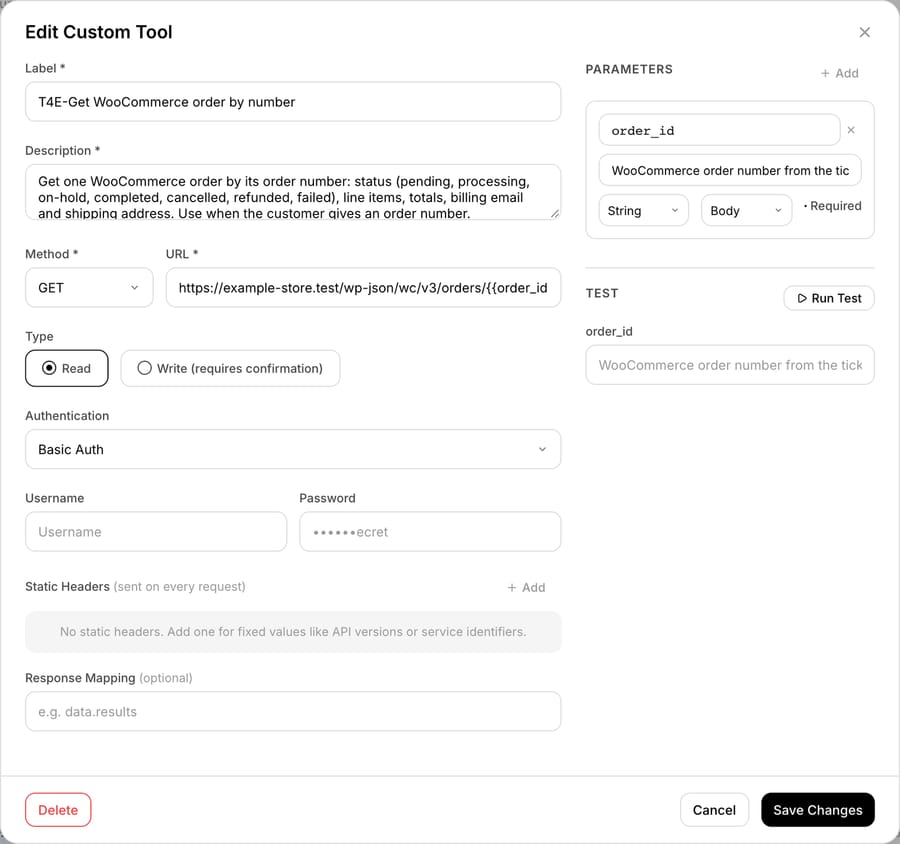
/wp-json/wc/v3/orders/{{order_id}}, Type Read, Basic Auth, where Username takes the consumer key and Password the consumer secret, which the form masks after saving. The form labels Write tools "requires confirmation", but in our 28 September test a custom Write tool ran in chat without a confirmation card, so the agent's instructions decide when it writes.2. Define the action. Give it a label and a description the AI uses to decide when to call it, e.g. "Get the WooCommerce order status and tracking for a customer by email". Set the method and URL (a call against the WooCommerce REST API, with an {{email}} or {{order_id}} placeholder), and choose Read or Write. A lookup is a Read; issuing a refund or updating an order is a Write. A custom Write tool ran without a confirmation card in our 28 September chat test, and on trigger runs Write tools execute when the agent's instructions say to, so write those instructions narrowly: when to refund or cancel, and when to hand the ticket to a person.
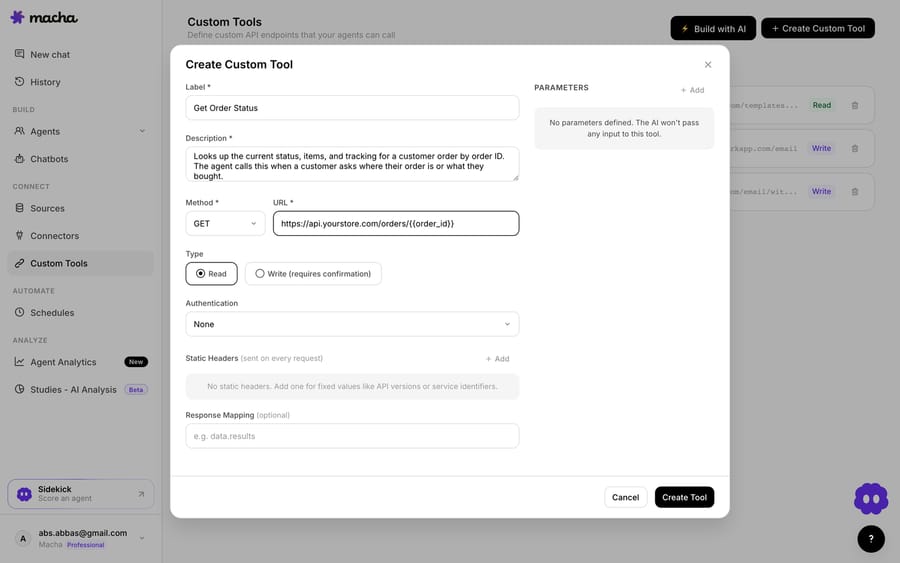
3. The agent uses it live. Once the tool exists, the agent calls it mid-ticket, passes the customer's email or order number, and reasons over the WooCommerce record it gets back, then answers the question or takes the next step.
How do Read and Write tools keep WooCommerce safe?
Read tools (lookups) run without a confirmation step. Write tools (issue a refund, update an order, change status) run when the agent's instructions tell them to; a custom Write tool showed no confirmation card in our 28 September chat test, so the safety sits in the instructions, a Read-only key where lookups are enough, and which agents get the tool. Each tool does one action, only agents you add it to can call it, and each conversation shows which tools the agent called. Credentials are stored on the tool, and the form masks the secret after saving.
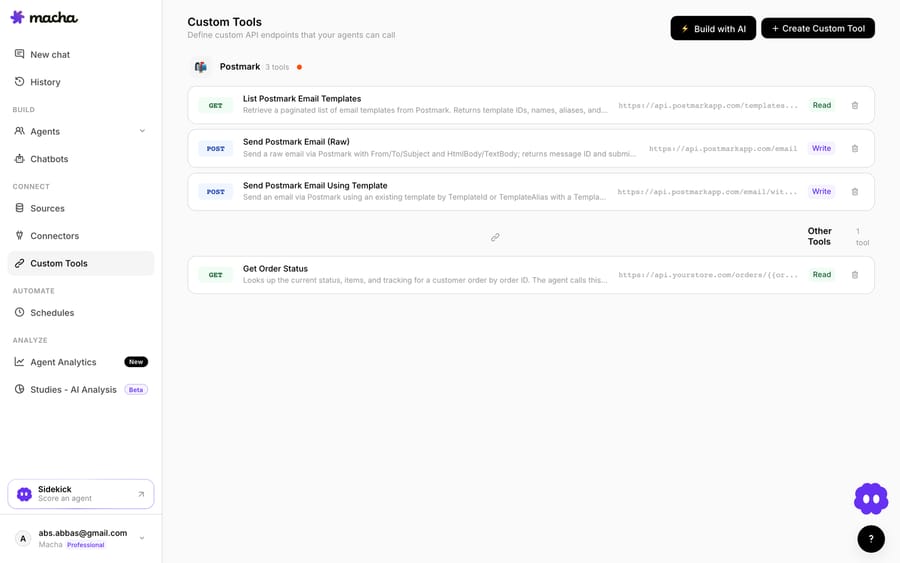
Teams usually build a few WooCommerce tools and group them, such as an "order lookup," a "check tracking," and an "issue refund", alongside tools for their other systems.
Should you use a Marketplace app or a Custom Tool?
- Use a WooCommerce Marketplace app if you just want a customer's orders visible in the sidebar for human agents and you're comfortable running a third-party app.
- Use a Custom Tool when you want your AI agent to look up live WooCommerce data or take an action from the ticket, you need a specific query or write the app doesn't expose, or you'd rather not install and maintain another connector. The two can coexist. Macha is the done-for-you option: the Macha team builds and tests the WooCommerce tools and the agent on your Zendesk, then runs it in safe mode, with drafts as internal notes, until the drafts are right. That's included on the trial and every plan at about $0.40 a ticket, which covers setup and a dedicated success manager who handles your changes.
What else can the agent do once it reaches WooCommerce?
Once the agent can reach WooCommerce, the same pattern covers more: check an order's shipping status before answering a WISMO ticket, read line items to handle a return, issue a refund, or verify a customer's order history. And because Custom Tools aren't WooCommerce-specific, the same approach connects your subscription billing, CRM, or internal API. See the full pillar on building custom Zendesk integrations.
See how Custom Tools work, browse the integration directory, or start a free trial ($50 of usage, no credit card).
Frequently asked questions
Does Zendesk have a native WooCommerce integration? The Zendesk Marketplace has WooCommerce apps, but they're built by third parties (Zenplates, CRM Perks, AMS, MorfDev), not by WooCommerce itself, and they're mostly sidebar widgets that display a customer's orders. A Macha Custom Tool adds live, agent-driven order lookups and actions through WooCommerce's own REST API instead of a sidebar app.
What can an AI agent do with Zendesk and WooCommerce? Through WooCommerce's v3 REST API, an AI agent can look up orders by customer email or order number, check product stock, and, with a Read/Write key, create refunds, cancel processing or on-hold orders and update the shipping address. Tracking numbers depend on your store, since the core order schema doesn't list a tracking field.
Does a WooCommerce refund through the API return the money? By default, yes: the refunds endpoint's api_refund parameter defaults to true, which uses the payment gateway's API to generate the refund. Your gateway has to support API refunds. With api_refund set to false, WooCommerce records the refund without refunding the payment.
Do I need an engineer to connect WooCommerce to Zendesk this way? No. Macha's team builds the tools during onboarding, or you describe the action in plain English and the Sidekick scaffolds the WooCommerce request, auth, and parameters. Technical teams can go deeper with full control over the endpoint, headers, and response mapping.
Can the agent update WooCommerce, or only read it? Both. Reads (lookups) run freely. Writes such as issuing a refund or updating an order run when the agent's instructions say to (a custom Write tool showed no confirmation card in our 28 September chat test), so you control them through the instructions and which agents get the tool.
Is it secure? Each tool does a single action, only the agents you add it to can call it, and it authenticates with your WooCommerce consumer key and secret over HTTPS. The form shows the secret masked after you save it, and each conversation records which tools the agent called. Use a Read-only key if the agent only needs lookups.
What does it cost? Macha is one plan priced by ticket volume, starting at $299 a month for up to 750 tickets, billed per ticket (about $0.40 each) rather than per tool call. That price includes the Macha team building the WooCommerce tools and the agent for you, and a dedicated success manager who handles your changes after go-live. Marketplace apps carry their own vendor pricing; see Macha pricing.