





 Shopify
 Stripe
 Slack
Slack Notion
 Google Workspace
 Confluence

What Does Zendesk's ADPP Add-On Include, and Does Your Account Have It?


Zendesk's data privacy controls split into a standard tier and a paid add-on, Advanced Data Privacy and Protection, which bundles several unrelated capabilities. That makes it hard to evaluate, because the reason you want one of them rarely has anything to do with the others.
Key takeaways
- Zendesk's Advanced Data Privacy and Protection add-on bundles seven controls, including access logs, customer-managed encryption keys, data masking and call transcription redaction, on Suite Enterprise and above or Support Enterprise.
- Zendesk does not publish an ADPP price; third-party write-ups put it around $50 per agent per month, which puts a thirty-agent desk at roughly $18,000 a year.
- Without ADPP, Zendesk allows one active end-user deletion schedule with one extra condition, and the add-on raises that to 10 end-user schedules.
- ADPP redaction suggestions flag a whole PDF attachment when PII is detected, but trigger-based automatic redaction covers ticket comments only, per Zendesk's documentation.
- On an account without the add-on, the Zendesk settings API returned access_logs_enabled and data_masking_configured_in_roles as false, a signal consistent with lacking ADPP but not proof.

Zendesk's Advanced Data Privacy and Protection (ADPP) add-on gives you seven controls: access logs, advanced encryption with your own key management service, advanced retention policies, data masking, redaction suggestions, automatic redaction, and call transcription redaction. It's sold only on Suite Enterprise and above or Support Enterprise, and Zendesk doesn't publish its price. A disclosure, since it shapes what this article can be: our developer instance doesn't have ADPP and we couldn't turn it on, so there are no screenshots of these features working. What we could do is work out how an account tells you what it has, which is less obvious than it sounds and is the part most people actually need.
| ADPP capability | What it does | Who usually needs it |
|---|---|---|
| Access logs | Logs views of tickets, user profiles and searches within 90 days | Teams that must answer "who viewed this" under audit |
| Advanced encryption | Encrypts service data with your own KMS (AWS, Azure Key Vault, Google Cloud, Thales) | Contracts that require customer-managed keys |
| Advanced retention | Up to 10 end-user deletion schedules, with more conditions | Retention policies with exceptions |
| Data masking | Hides end-user name, email and phone from chosen roles | Teams limiting who sees PII |
| Redaction suggestions | Highlights PII in tickets and flags PDF attachments | Agents cleaning up tickets by hand |
| Automatic redaction | Trigger-driven removal of PII from ticket comments | High-volume desks |
| Call transcription redaction | Removes PII and card data from call recordings | Zendesk Talk users taking card payments |
What is in the ADPP bundle?
Zendesk's overview of the add-on lists the capabilities above. They're worth separating, because they serve different buyers.
Data masking obscures end-user names, email addresses and phone numbers for custom and light agent roles. Zendesk's data masking documentation frames it around regulatory compliance. This is the one that matters when your answer to "who can see a customer's contact details" needs to be narrower than "everyone in support".
Advanced encryption lets you encrypt service data with your own enterprise key management service, per Zendesk's advanced encryption documentation. The practical driver is rarely the encryption itself. It's a requirement in a contract or a questionnaire that specifies customer-managed keys.
Access logs record views. The audit log records changes, and sits with the other settings covered in our Zendesk security checklist. This is the distinction that catches people out: the standard audit log tells you who edited a setting, and an access log tells you who looked at a ticket. If your obligation is to detect inappropriate viewing, the audit log doesn't answer it.
Advanced retention and redaction covers more deletion schedules, more conditions on them, redaction suggestions that highlight PII in a ticket, and automatic redaction driven by triggers.
Call transcription redaction is the one people forget, because it only matters if you run Zendesk Talk. It redacts PII and payment card data out of transcribed call recordings. If you take card details by phone, this is the item that decides whether your recordings are a compliance problem.
Why is the retention limit the one you hit first?
Of those, the retention piece is the most likely reason you look at the add-on at all, because it shows up as a wall during ordinary work rather than during a procurement exercise.
Without the add-on our instance allows one active deletion schedule per data type, and says so on the page:
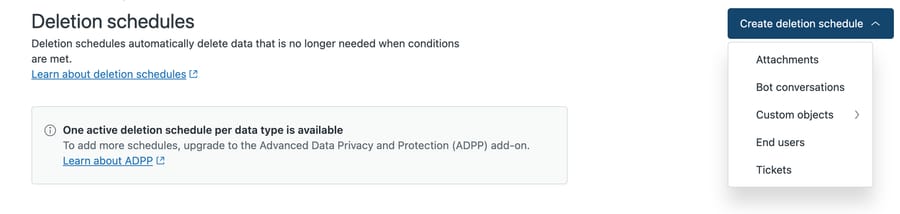
This is the most useful ADPP artifact you can get without buying ADPP: the paywall, stated by Zendesk, on your own account. It also shows the five data types a schedule can target, which is the shape of what the add-on multiplies. Zendesk's guide to end-user deletion schedules adds the numbers: with the add-on you can activate up to 10 end-user schedules, and without it only one is active at a time and you can add only one condition beyond the required "Last active" field.
One rule per data type and one condition on it is enough for "delete everything older than N years" and nothing more. That constraint interacts with storage too, since attachment deletion is a separate data type and therefore a separate schedule. The moment your policy says "except billing disputes" or "shorter for EU customers", you need a second rule, and that's the paid tier. We wrote about the mechanics and a silent failure we hit in setting up data deletion schedules.
How can you tell whether your account has ADPP?
This is the part we could establish first-hand, and it's the practically useful bit, because the answer isn't written anywhere obvious.
The Security overview gives a top-line count of your settings by state.
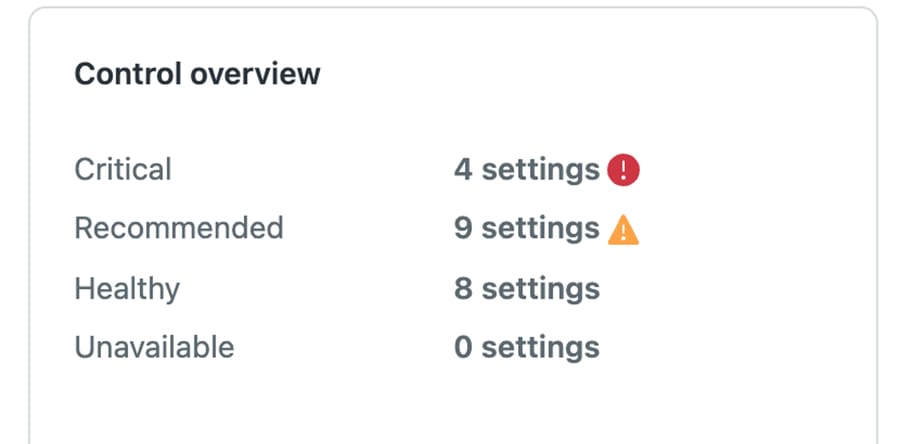
Note the last row. Unavailable reads zero on our account, and our account demonstrably lacks ADPP features. So the overview isn't listing the things we can't use and marking them unavailable; those settings are simply absent from the page. You can't discover a gap here, which means an admin reading a healthy-looking security overview can reasonably conclude there's nothing more to configure.
The API is more direct. The account settings endpoint exposes feature flags, and the ADPP-related ones read false on our instance. Our Zendesk API guide covers authenticating a call like this one:

Two flags, both false. Read them carefully, though, because they're weaker evidence than they look.
Neither flag appears in Zendesk's documented settings table, and data_masking_configured_in_roles describes configuration rather than entitlement: an account that holds ADPP and hasn't switched masking on for any role would presumably read false too. We only tested the negative case. So this is a fast signal consistent with not having the add-on, not proof that you lack it.
The third signal is the upgrade prompt itself, and it's the strongest. Where a limit exists because of entitlement, Zendesk tends to say so at the point of the limit, which is how we found the one-schedule-per-data-type constraint. A paywall only renders when there's something to sell you, so those notices are the most honest inventory of what you don't have.
How do you evaluate ADPP without a trial?
If you can't switch it on to look, the buying question is which single capability is forcing the conversation, because the bundle is priced as a bundle and the features have very little to do with each other.
If it's a contractual requirement for customer-managed keys, the evaluation is short: you either need advanced encryption or you don't, and no amount of testing changes the answer.
If it's a retention policy with exceptions, the evaluation is arithmetic. Count the distinct retention rules your policy actually requires. One means you're fine as you are. Two or more means you need the add-on, and knowing that before you write the policy saves rewriting it.
What does ADPP cost?
Zendesk doesn't publish an ADPP price, and its pricing page doesn't list the add-on at all; Suite Enterprise itself is "Talk to Sales". Third-party write-ups put ADPP around $50 per agent per month, Enterprise only. That's the figure our Zendesk pricing breakdown and what Zendesk really costs both carry, flagged as third-party, and strac.io is one of the sources quoting it. Treat it as approximate and confirm with sales before you build a business case. Taken at that figure, a thirty-agent desk is looking at roughly $18,000 a year, which reframes the question. At that price nobody buys ADPP to run a second deletion schedule. They buy it because a contract requires customer-managed keys or an auditor requires access logs, and the retention rules come along with it.
Does ADPP redact attachments?
Partly, and the gap is worth raising before you sign. Strac, which sells a competing product, states that ADPP won't scan or redact files attached to tickets. Zendesk's own redaction suggestions documentation is more specific: PDF attachments are highlighted when PII is detected anywhere in them, but the whole attachment is marked rather than the PII inside it, and trigger-based automatic redaction covers ticket comments only. So a PDF gets flagged for a human; a spreadsheet or screenshot carrying the same card number as the comment isn't covered by the automatic path. Ask Zendesk which file types your account will flag.
If it's data masking, the honest test is whether you can reach the same outcome with roles and ticket redaction. Sometimes you can. Masking earns its price when the requirement is that agents never see the data at all.
If it's call transcription redaction, the question is narrow and answers itself: do you take card details over the phone, and are those calls recorded? If both, your recordings currently hold card numbers, and no amount of ticket-side redaction touches them.
If it's access logging, the question is whether you need to answer "who viewed this" under audit. That obligation is usually external and specific, and if nobody has asked, this isn't the reason to buy.
Why does Zendesk sell these as one bundle?
Bundling is a pricing decision, and it's worth seeing clearly.
These capabilities have almost nothing in common architecturally. What they share is the type of customer who asks for them: regulated, audited, and large enough to have a compliance function. Selling them as one add-on means the customer who needs only key management also pays for masking they'll never enable, and the average revenue per customer who needs any one of them goes up considerably.
That's a completely normal way to price enterprise software. The consequence for you is that your evaluation should follow the one feature you need, not the length of the feature list, because the rest aren't a discount you're receiving. They're the reason the price is what it is.
Common questions
How do I check whether my Zendesk account has ADPP? There's no single definitive check we could find. On our instance access_logs_enabled and data_masking_configured_in_roles both read false in the account settings API, which is consistent with not having the add-on, though the second names configuration rather than entitlement. The clearest signal is an upgrade prompt at the point of a limit. The Security overview page didn't flag anything as unavailable, so it isn't the place to look.
What is the difference between the audit log and an access log? The audit log records changes, such as who edited a setting. The access log records views of tickets, user profiles and searches within 90 days. Only the second answers a question about inappropriate viewing.
How many deletion schedules can I have without ADPP? One active end-user schedule at a time, with one condition beyond the required "Last active" field. Zendesk documents that the add-on raises this to 10 end-user schedules.
Is data masking the same as redaction? No. Redaction removes data from a ticket permanently. Masking hides a user's name, email and phone from agents in particular roles while the data stays stored. Compliance requirements sometimes specify one and accept the other, so check which word the requirement uses.
Which plans can buy ADPP? Suite Enterprise and above, and Support Enterprise; legacy plans aren't eligible. Confirm against Zendesk's buying guide for your own account, since plan naming changes.
Does ADPP redact PII inside attachments? Redaction suggestions flag a PDF attachment when PII is detected in it, marking the whole file. Trigger-based automatic redaction covers ticket comments only, per Zendesk's documentation.
Where does an AI layer fit with Zendesk data privacy?
Data privacy and AI automation intersect in one specific place worth being precise about: what the agent is allowed to read.
An AI layer reading your tickets sees whatever the credentials it runs under can see. If your reason for wanting masking is that some fields should be invisible to most humans, the same reasoning applies to an automation, and the question to ask a vendor is what its integration reads and under whose permissions.
That question has a concrete answer and it's worth making somebody give you one, rather than accepting a general statement about security posture.
Macha works on top of your existing Zendesk and inherits its permissions rather than holding a second copy of your data. That suits teams whose privacy controls already live in Zendesk and who want automation to operate inside them. It suits you less well if your compliance model depends on data never leaving a specific boundary, because any AI layer processes what it reads and that needs its own review. Our Zendesk integration page sets out what's read and what's stored.
Start your free trial and check what it reads, and under whose permissions, before you commit to anything.






