Intercom
 Shopify
 Stripe
 Slack
Slack Notion
 Google Workspace
 Confluence

Why Is Zendesk Omnichannel Routing Not Working? Offline Agents, Capacity Rules and Skills


Most Zendesk omnichannel routing failures come down to an ineligible ticket, an agent excluded by capacity, skills or brand, a reassignment setting that was never switched on, or documented behavior that looks like a bug. Work through them in that order and you will find the cause faster than by watching the queue.
Key takeaways
- Zendesk omnichannel routing failures usually trace to one of four causes: ticket ineligibility, agent exclusion by capacity or skills, a reassignment setting left off, or documented, intentional behavior.
- On the standard omnichannel queue, an email ticket is only routed if it carries the auto-routing tag and has a group assignment, while a messaging ticket only needs a group assignment.
- Reassigning reopened tickets away from an offline agent requires selecting Offline in the Reassign reopened tickets setting, because Zendesk reassigns based on the current assignee's status.
- Zendesk's Auto-reassign open tickets setting only moves up to the 50 most-recently updated open tickets, so an agent who goes offline holding more than that keeps the rest.
- A Zendesk messaging session goes inactive after 10 minutes without an end-user reply and stops counting toward capacity unless Count inactive conversations towards an agent's capacity is enabled.

When Zendesk omnichannel routing looks broken, the cause is usually one of three settings: the ticket never became eligible (on the standard queue an email ticket needs the auto-routing tag plus a group), the agent was excluded by capacity, skills or brand, or Offline is missing from the statuses your reassignment settings act on. We checked every path, setting and behavior below against Zendesk's documentation on September 20, 2026, and rechecked the reassignment and capacity rules on September 24, 2026.
Is the ticket even eligible for routing?
Before blaming the router, confirm the ticket qualifies. The rules differ by queue type and channel, and this is where most "routing is broken" reports end.
| Queue | Email ticket needs | Messaging ticket needs |
|---|---|---|
| Standard omnichannel queue | The auto-routing tag, plus a group assignment | A group assignment |
| Custom queues | Nothing extra; queue conditions decide | Nothing extra; routes automatically |
On the standard queue, email is routed only when it carries the routing tag, auto-routing by default or whatever tag you configured, which normally comes from a trigger. Messaging tickets need to be in a group before they are eligible. On custom queues neither requirement applies, which is one practical reason to move to custom queues.
One more eligibility rule that catches people: omnichannel routing only routes tickets without an assignee. If a group contains exactly one agent, a system ticket rule assigns the ticket to that agent the moment it lands in the group, and the router never sees it. Check the ticket events; the assignment appears immediately after creation.
Why are tickets going to offline agents?
This is the most-reported routing complaint, and it's usually a reassignment setting rather than a bug. Routing to an offline agent and failing to take one away from an agent who goes offline are two different problems with two different settings.
Check: Admin Center, Objects and rules, Omnichannel routing, Routing configuration, and read the three reassignment options.
The three settings, and what each one does:
- Reassign reopened tickets (Professional and above) reassigns an email or messaging ticket when its status goes from Solved, Pending or On-hold back to Open and the assigned agent has one of the statuses you specify.
- Auto-reassign open tickets reassigns up to the 50 most-recently updated open email and messaging tickets, of the priorities you specify, when the assigned agent's status changes to one configured for reassignment.
- Reassign tickets through queues (Professional and above) sends reassignments through your custom queues instead of the standard queue.
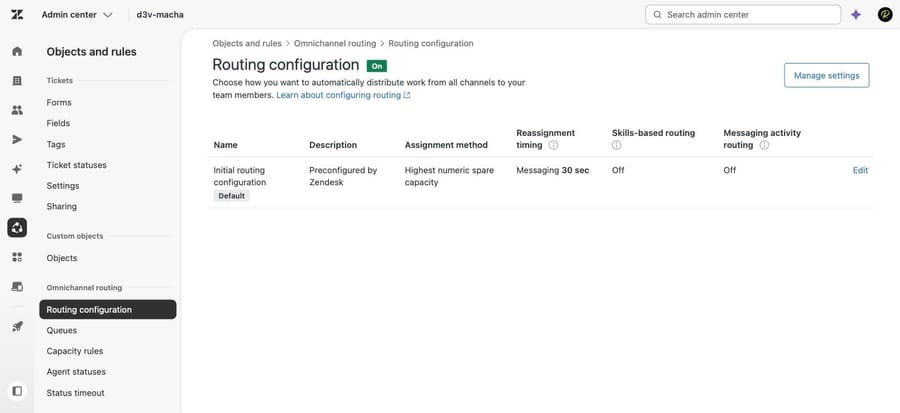
The fix people miss: reopened tickets are reassigned based on the current assignee's status, not the status of whoever might receive them. Zendesk's own troubleshooting note is blunt about it: select the agent status that the reopened ticket should become unassigned from. If Offline is not in that list, a reopened ticket stays with the agent who went home.
And note the 50-ticket cap on auto-reassignment. If an agent goes offline holding 120 open tickets, 70 of them stay put.
This is the mechanism behind the r/Zendesk thread on omnichannel routing assigning to offline agents, and the reason the related question about reassigning a ticket via automation keeps coming up: people reach for an automation because the routing setting didn't do what they assumed.
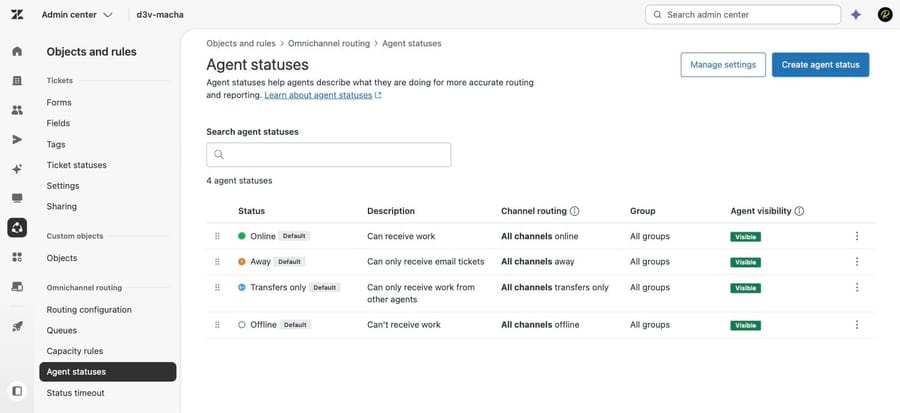
The statuses you can name in those settings are the ones on the Agent statuses page. A default account has four, and only Offline and Away take work away from an agent.
Why do agents hold more tickets than their capacity allows?
An agent with a capacity of 2 ends up with 3. Zendesk documents exactly why.
Cause: by default, inactive messaging tickets do not count toward capacity. A messaging session goes inactive after 10 minutes with no end-user reply. Two scenarios then break the limit:
- An agent's inactive messaging tickets become active again.
- Nobody was available overnight, messaging tickets arrived and went inactive, the first agent online received them all, and then they became active.
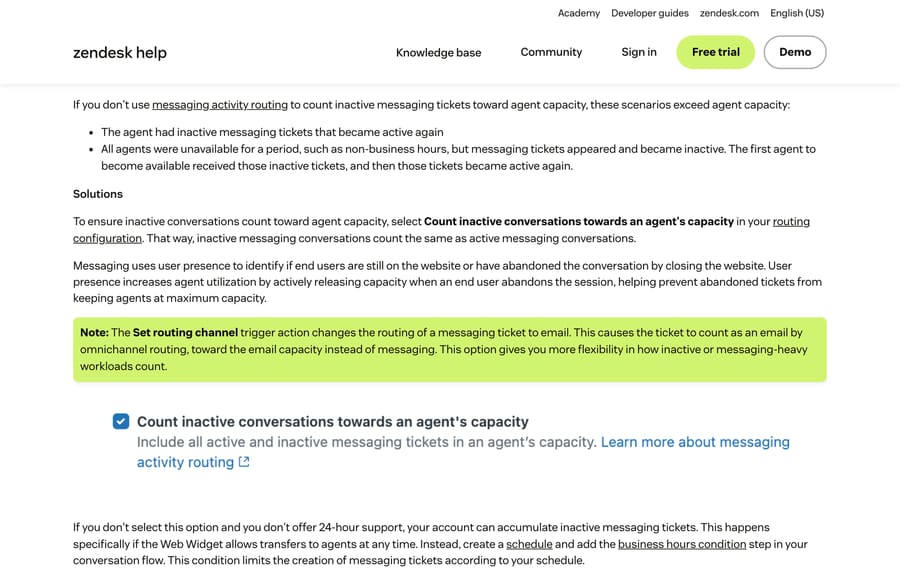
Fix: in the routing configuration, select Count inactive conversations towards an agent's capacity. Inactive conversations then count the same as active ones.
Two related causes to rule out first: an agent took the ticket manually from a view, or somebody assigned it by hand. Neither goes through the router, and no capacity rule stops them.
If you do not offer 24-hour support, Zendesk's own advice is to stop the overnight pile-up at source: add a schedule and a business hours condition to your conversation flow so messaging tickets aren't created outside hours, rather than letting the widget hand off at any time.
Why is skills-based routing not assigning anything?
Cause: skills are applied by triggers, and if the trigger conditions are wrong, nothing is skilled and everything routes as though skills didn't exist.
Checks, in order:
- Does the skill actually apply to these tickets?
- Are you using triggers to assign skills? Triggers can add skills on update as well as on create, which is the reason to prefer them.
- Have you set skill priority in the trigger action? The skills actions let you.
- Are the skills marked Required or optional? Required skills don't time out and stay part of the routing criteria. Optional skills stop being considered once a skills timeout occurs, which is why a ticket can sit and then land with somebody who doesn't have the skill.
One prerequisite that blocks people at step zero: skill-related trigger actions only appear once you have created at least one skill.
Related symptom: routing is uneven and some agents get more than others. Zendesk lists two causes, and they're administrative rather than technical. Higher-priority skills assigned to only some agents will concentrate work, and brand memberships silently exclude agents from tickets on brands they are not assigned to. Check that an admin has assigned the correct skills and brands to everyone.
Why won't capacity rules save or apply?
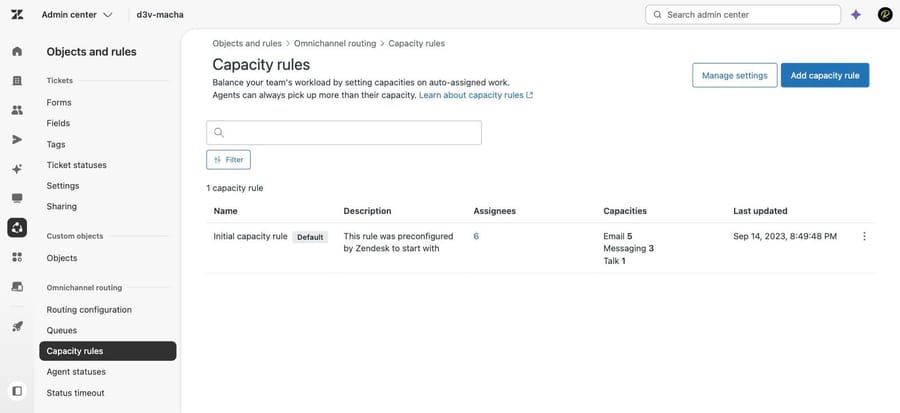
Where they live: Admin Center, Objects and rules, Omnichannel routing, Capacity rules. Edit through the options menu on a rule, and note that you can't delete the native capacity rule, only custom ones.
Two things to check when a rule does not behave:
- Permissions. Managing capacity rules has its own custom role permission, so an admin who doesn't have it will hit errors on save. This is the usual explanation behind the August 2026 r/Zendesk thread about errors assigning multiple agents to an omnichannel capacity rule.
- Overlaps. An agent belongs to one capacity rule. If you aren't seeing the capacity you configured, confirm which rule the agent is actually assigned to before changing numbers.
Why are tickets served in the wrong order?
Three documented behaviors, and they're all intentional:
- Two queues at the same priority level. The router may take the ticket closest to an SLA breach from the second queue in the list. Give the two queues different priority levels.
- SLA prioritization serves newer tickets first. If SLA prioritization is on, make sure tickets always have an active target, or turn it off, or use custom queues, whose priority takes precedence over SLAs.
- A queue was reordered. Check the audit log for a reorder around the time of the assignment.
Two more that look like bugs and are not: tickets follow the queue configuration as it was when they joined the queue, so a config change doesn't retroactively move them; and a ticket leaves a custom queue after an update if it doesn't match the queue conditions any more, which is why a condition like Ticket is created quietly ejects tickets on their first update.
Why are voice or messaging tickets routing oddly?
- Voice tickets not reaching the right groups. With omnichannel routing on, Voice creates the ticket immediately and routes before the agent accepts, rather than after. Triggers that run on those tickets can interfere. Zendesk's fix is to exclude them: add the condition Ticket > Channel | Is not | Phone call (incoming).
- Abandoned call tickets appearing. Omnichannel routing creates tickets for calls and doesn't support the Create tickets for abandoned calls setting, so the workaround is an automation that closes them.
- Messaging tickets routing as email tickets. Expected when Count inactive conversations towards agent capacity is off: an inactive session is not offered as a live conversation, it is routed directly.
- Round robin distributing unevenly. Round robin counts offers, not acceptances. An agent who declines has still had their turn. Zendesk's suggestion is to ask the agents why they are not accepting, which is a management answer to a technical-looking symptom.
- Voice and messaging not falling through to a secondary group. If an agent in the primary group is available but doesn't accept, the ticket doesn't fall through. Agents must set themselves to Away or Offline when they aren't taking work.
In what order should you troubleshoot routing?
- Eligibility. Auto-routing tag and group on the standard queue; queue conditions on custom queues.
- Assignee. Is the ticket already assigned, including by the one-agent-group system rule?
- Exclusions. Capacity, skills (required versus optional), brand membership.
- Agent status. Are the reassignment settings configured for the statuses you expect, and is the 50-ticket cap biting?
- Queue order. Duplicate priority levels, SLA prioritization, recent reorders in the audit log.
- Channel-specific behavior. Voice triggers, inactive messaging sessions, round robin counting offers.
For the setup side rather than the fixes, our Zendesk omnichannel routing setup guide covers turning it on and configuring queues in the first place.
Can an AI agent layer fix routing problems?
Nothing above is an AI problem. Routing is configuration, and an agent layer shouldn't be anywhere near touching capacity rules or queue priorities.
What it changes is the volume the router has to distribute. Macha on Zendesk answers the repeat questions before they need an agent at all, tags and routes what it cannot answer, and escalates with the whole thread attached, so the tickets that reach your queues are the ones that genuinely need a person. A router distributing fewer tickets is easier to tune than one distributing all of them.
It suits teams already running Zendesk whose queue depth is the real complaint behind the routing complaint, and it's the wrong fit if your volume is fine and your problem is genuinely one missing reassignment setting, which you should go and fix for free.
Worth naming the incentive: an AI vendor billing per resolution earns more the more tickets arrive, so a shorter queue isn't in their interest. Macha bills per ticket, one thread with one person as one charge however many replies it takes, from $299 a month for 750 tickets on published pricing, with setup and monitoring by our team included and $50 of free usage to start.
How we researched this
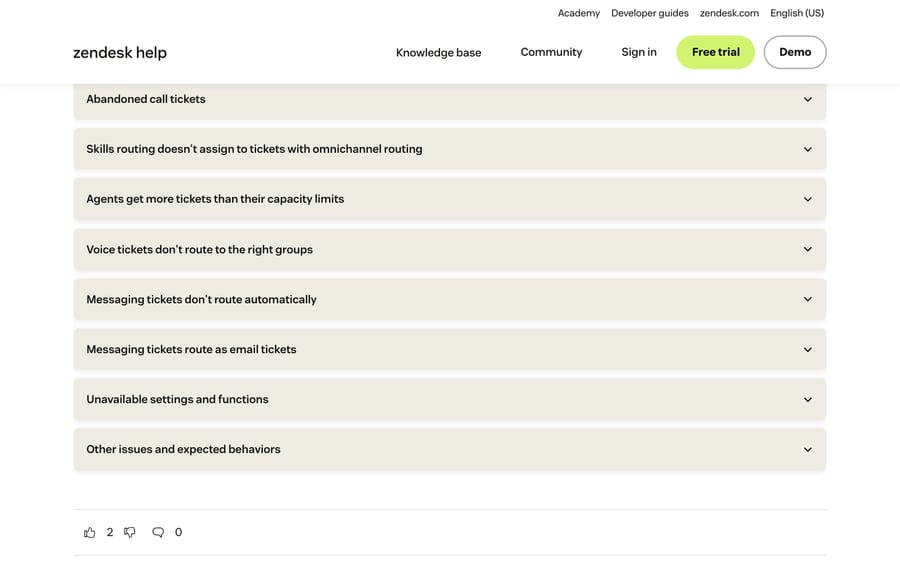
We checked every symptom, setting and path against Zendesk's current documentation on September 20, 2026: the omnichannel routing troubleshooting article (edited September 4, 2026), the routing configuration article (April 21, 2026), the capacity troubleshooting article (May 8, 2026), the capacity rules article, the custom queues article and the queuing and assignment scenarios article. Three of the five screenshots come from our own Zendesk sandbox, d3v-macha, captured on September 20, 2026: the routing configuration, the agent statuses and the capacity rules. The other two are of the documentation pages above. We didn't reproduce any of these failures on a live queue. The ordering of symptoms follows community thread frequency in our Plan 2 research plus Zendesk's own article order, not a measured distribution.
Frequently asked questions
Why is Zendesk omnichannel routing assigning tickets to offline agents? Usually because reassignment is not configured for that status. Reopened tickets are reassigned based on the current assignee's status, so Offline needs to be in the list of statuses you want tickets taken away from. Auto-reassign open tickets also only moves the 50 most-recently updated open tickets, so an agent holding more than that keeps the rest.
Why do agents get more tickets than their capacity rule allows? By default, inactive messaging tickets do not count toward capacity, and a messaging session goes inactive after 10 minutes without an end-user reply. When those conversations become active again, the agent exceeds their limit. Select Count inactive conversations towards an agent's capacity in the routing configuration to stop it.
Why isn't skills-based routing working with omnichannel routing? Skills are applied by triggers. Check that the skill applies to these tickets, that a trigger is adding it, that you set the skill priority, and whether the skill is Required or optional. Required skills don't time out; optional skills stop being considered once a skills timeout occurs.
Why are my email tickets not being routed at all? On the standard omnichannel queue, an email ticket needs both a group assignment and the auto-routing tag, which usually comes from a trigger. Custom queues need neither. Check the ticket has no assignee too, since omnichannel routing only routes unassigned tickets.
Why did a ticket get assigned instantly instead of being routed? If the group contains exactly one agent, a system ticket rule assigns the ticket to them as soon as it lands in the group, before omnichannel routing sees it. The ticket events will show the assignment immediately after creation.
Why is round robin distributing work unevenly? Round robin counts offers, not acceptances. An agent who's offered a ticket and doesn't take it has still had their turn. Zendesk's own advice is to find out why agents are declining, not to adjust the algorithm.
Why are tickets served from a lower-priority queue first? Most often because two queues share the same priority level, in which case the router may pick the ticket closest to an SLA breach from the second queue. Give the queues different priority levels. Also check the audit log in case an admin reordered a queue.
Why do voice tickets route to the wrong group? With omnichannel routing on, a voice ticket is created and routed before the agent accepts the call, so triggers running on those tickets can change where it goes. Exclude them with the condition Ticket > Channel | Is not | Phone call (incoming).
Sources: Troubleshooting omnichannel routing issues · Managing your omnichannel routing configuration · My agent automatically gets assigned more tickets than their capacity allows · Managing agent capacity rules · About omnichannel routing · Creating custom omnichannel routing queues · Omnichannel routing ticket queuing and assignment scenarios · Announcing new custom role permission to manage capacity rules
Add AI agents to your Zendesk
Macha reads the ticket, drafts the reply and takes the action, inside the Zendesk you already run.