Intercom
 Shopify
 Stripe
 Slack
Slack Notion
 Google Workspace
 Confluence

Is Zendesk Worth It? Zendesk Review (2026): Pricing, Pros, Cons and Who It's For


Zendesk is one of the most capable support platforms you can buy, and one of the easiest to overpay for: seats run $19 to $115 per agent a month before AI add-ons. It suits mid-market and enterprise teams that will use its routing, reporting and channels, and it strains small teams that mostly answer email.
Key takeaways
- Zendesk suits mid-market and enterprise teams in 2026, with annual seats at $19 for Support Team, $55 for Suite Team and $115 for Suite Professional per agent per month.
- Zendesk no longer lists Suite Growth on its public pricing page, and Suite Enterprise + Copilot is sold only through a sales quote.
- The Zendesk Copilot add-on costs $50 per agent per month, and Zendesk's pricing page lists automated resolutions at $1.50 committed or $2.00 pay-as-you-go.
- A 20-agent Zendesk team using AI realistically pays $6,000 to $8,000 a month all-in once add-ons and resolutions are counted, per 2026 third-party breakdowns.
- Zendesk held 4.3 out of 5 on G2 from roughly 6,700 reviews and about 4.4 on Capterra from about 4,038 reviews when observed in June 2026.

Zendesk is a strong pick in 2026 for mid-market and enterprise teams running several channels, and an expensive one for small teams: seats start at $19 per agent per month for Support Team and $55 for Suite Team (billed annually), Suite Professional is $115, Suite Enterprise is now quote-only, and AI adds a $50 Copilot seat plus a per-resolution meter. Ratings back the product (G2 4.3 out of 5 from roughly 6,700 reviews), and the complaints cluster around cost, admin effort and Zendesk's own support.
| Question | Short answer (checked 24 September 2026) |
|---|---|
| Best for | Mid-market and enterprise teams with several channels, SLAs and an admin |
| Seat prices (annual, per agent/mo) | Support Team $19, Suite Team $55, Suite Professional $115, Suite Enterprise + Copilot: contact sales |
| AI costs | Copilot add-on $50 per agent/mo; automated resolutions metered at $1.50 committed or $2.00 pay-as-you-go (Zendesk pricing page) |
| Ratings | G2 4.3/5 (~6,700 reviews), Capterra ~4.4/5 (~4,038), TrustRadius 8.7/10 (observed June 2026) |
| Main cons | Stacking add-ons, admin overhead, hard-to-forecast AI billing, slow vendor support |
We've been hands-on in a live Zendesk account, re-checked the seat and add-on prices against Zendesk's own pricing page on 24 September 2026, and pulled aggregate ratings and attributed quotes from real reviewers on G2, Capterra and TrustRadius. One disclosure up front: Macha is our own product, an AI agent layer that runs on top of Zendesk. It isn't a help desk or a Zendesk replacement, and it gets one aside near the end, flagged as ours.
How we reviewed it: pricing checked 24 September 2026 against Zendesk's pricing page; ratings and sentiment drawn from G2, Capterra and TrustRadius reviews observed in June 2026 (the rating pages block automated access, so those numbers are cited, not screenshotted); and the product experience grounded in a live Zendesk test account, including the Agent Workspace screenshot below.
What is Zendesk, and who is it built for?
Zendesk started life as a ticketing tool and grew into a full customer experience (CX) platform. At its core it turns every customer interaction (email, chat, phone, social DM, web form) into a ticket that lands in one shared workspace, then layers routing, automation, reporting, a help center and AI on top. If you're new to the model, our Zendesk ticketing system explainer covers the fundamentals.
It's built primarily for mid-market and enterprise support teams running real omnichannel operations: multiple channels, multiple brands, tiered escalation, SLAs to hit, and a manager who lives in dashboards. It can work for small teams, but that's where the value question gets hardest. The one-line summary: Zendesk is a platform you grow into, not a tool you grab to answer a few emails.
What do you actually get, channel by channel?
Zendesk's breadth is its defining strength, so here's the tour.
Tickets and the Agent Workspace
Everything funnels into the Agent Workspace, one view where an agent handles email, chat, messaging and voice with the full customer history on the side. This is the part reviewers praise most: channels behave as one conversation rather than separate inboxes. Below is the workspace from our live test account.
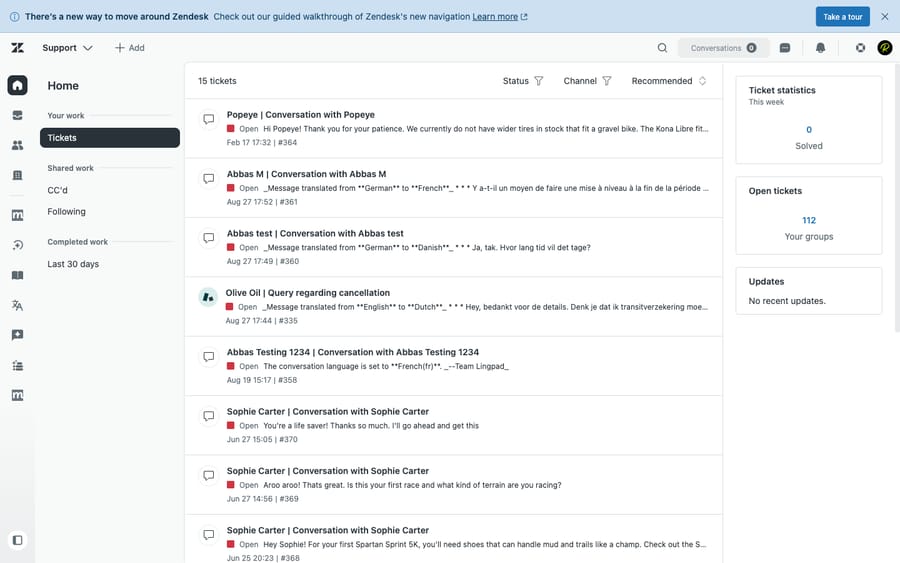
This is our own first-hand look at the product in a live Zendesk account. The rating numbers later in this review are cited from G2, Capterra and TrustRadius as published; their review pages block automated capture, so we don't fake screenshots of them.
Messaging and live chat
Zendesk messaging is the persistent successor to legacy live Chat. Conversations span web, mobile SDK, WhatsApp, Messenger and Instagram, and they don't vanish when the customer closes the tab; they resume as a ticket. For most teams it's a clear upgrade over old-style chat.
Talk (voice)
Zendesk Talk adds cloud phone support (call routing, recording, voicemail and IVR) inside the same workspace. It's convenient if you want voice in one place, though heavy call centers often still prefer a dedicated telephony platform. Advanced voice sits in the separate Contact Center add-on, listed at $83 per agent per month billed annually.
Guide / knowledge base
Guide is Zendesk's help center and knowledge base: public articles, an internal knowledge base for agents, and AI-assisted article suggestions. It's tightly integrated, and it's what feeds Zendesk's self-service deflection.
Explore (reporting)
Explore is the analytics layer, with dashboards for volume, agent performance, CSAT and SLA attainment. It's one of the reasons larger teams choose Zendesk, and also one of the loudest sources of complaints, because a reporting revamp removed features some long-time users relied on (more on that below).
AI agents and Copilot
Zendesk's AI comes in two shapes: AI agents (the bot that resolves customer requests on its own) and Copilot (agent assist: suggested replies, summaries, intelligent triage). Zendesk says AI agents are included in every Suite and Support plan and billed on the outcomes they deliver. How that's packaged and billed is the most important thing to understand before you buy, so it gets its own section.
How much does Zendesk cost in 2026?
Here's the published pricing, checked 24 September 2026. All figures are per agent, per month, billed annually. The pricing page no longer shows monthly-billing rates, and it no longer lists Suite Growth, the old $89 middle tier; a sales rep may still quote it.
| Plan | Price (annual, /agent/mo) | Built for |
|---|---|---|
| Support Team (support-only) | $19 | Email/ticketing only, smallest teams |
| Suite Team | $55 | Small teams wanting omnichannel basics |
| Suite Professional | $115 | Skills routing, advanced analytics, multi-brand |
| Suite Enterprise + Copilot | Contact sales | Large or complex orgs, governance, sandbox |
That table is only the base layer. On top of the seat price sit the add-ons most serious deployments end up buying:
- Copilot add-on: +$50 per agent, per month. This is the add-on formerly sold as Advanced AI, and the generative agent-assist and intelligent-triage features sit behind it. If AI is your reason for buying Zendesk, budget it as a second seat cost.
- Automated resolutions (AI agent outcomes): metered. When an AI agent resolves a request without escalating to a human, that's an "automated resolution". Zendesk's pricing page lists $1.50 per resolution on a committed pack and $2.00 pay-as-you-go, with a small allowance included per agent: 5 automated resolutions a month on Support Team and Suite Team and 10 on Suite Professional, which Zendesk's help center describes as a monthly dollar amount per seat. Since January 2026, third-party breakdowns (Coworker AI, CorePiper) report that Zendesk auto-bills every resolution above your commitment, so usage can outrun the budget if nobody is watching.
- Workforce Engagement Bundle ($50 per agent/mo) and Contact Center ($83 per agent/mo) add further per-agent costs, both billed annually.
The incentive is worth naming. Seat pricing pays Zendesk for every agent you keep; the resolution meter pays it for every ticket the bot closes. Buy both and the vendor earns on the humans and on the automation meant to replace some of them. Your sticker price and your effective price can differ by a lot: a 20-agent team using AI realistically lands in the $6,000 to $8,000 a month all-in range once add-ons and resolutions are counted, per 2026 third-party breakdowns. We model this in the Zendesk pricing pillar and the what Zendesk really costs guide; if budget decides it, start there.
Seat and add-on prices checked against Zendesk's pricing page on 24 September 2026; per-resolution rates are from the same page; the all-in example is a third-party figure and approximate. Verify with Zendesk sales for your volume.
What do real users say about Zendesk?
Aggregate review scores are the closest thing to a crowd verdict. Observed in June 2026:
- G2: 4.3 / 5 from roughly 6,700 reviews, and stable: it held at 4.3 from around 5,862 reviews in 2024 through ~6,800 in early 2026. A large, steady sample at 4.3 is a strong signal.
- Capterra: ~4.4 / 5 (some snapshots show 4.5) from about 4,038 reviews, with roughly 89% rated positive.
- TrustRadius: 8.7 / 10 for the Zendesk Support Suite.
Those are good numbers for a mature enterprise platform, with a consistent pattern in what the unhappy minority complains about. Here's both sides, in reviewers' own words where we could attribute them.
What reviewers praise. The omnichannel experience tops the list. As Capterra reviewer Pablo T. (a CX consultant) put it, Zendesk is a "very good tool to provide customer support in an omnichannel way, it's easy to use and quick to start." Sonu P. (a systems analyst, 5 stars, May 2026) wrote: "Overall, my experience with Zendesk Suite has been positive," crediting it for putting email, chat and tickets in one place. Scale, the integration marketplace and reporting depth round out the positives.
What reviewers criticize. Two themes dominate. First, change management around reporting: Capterra reviewer Melanie J. (an HR manager in retail) wrote that "the latest updates with reporting are difficult to navigate and removed helpful features," and that she "continued using the legacy versions." Second, and pointed for a support company, Zendesk's own support: a verified G2 reviewer noted that "the responses often rely on sending help articles rather than working through the issue directly," and that it can be "difficult to get in touch with a live support agent." Cost and complexity are the other two perennial gripes.
What are Zendesk's pros and cons?
Pros
- Omnichannel depth, done properly. Email, chat, messaging, voice and social behave as one conversation in the Agent Workspace. This is the most-praised aspect across every review platform.
- A huge ecosystem. The Zendesk Marketplace offers well over a thousand apps and integrations, so it slots into almost any stack (CRM, e-commerce, telephony, BI).
- Scales with you. Skills-based routing, triggers, automations, SLAs, multi-brand and governance controls let a 50- or 500-agent operation model real complexity.
- Deep reporting (Explore). Customizable analytics that data-driven support leaders rely on.
- Capable AI. The AI agents and Copilot are strong and improving, if you're willing to pay for them.
Cons
- The real bill stacks up. Seats are just the start; the Copilot add-on (+$50/agent), metered automated resolutions, and the workforce and contact-center add-ons push effective cost well past the sticker price.
- Fewer visible tiers. With Suite Growth gone from the pricing page, the visible jump from Suite Team to Suite Professional is $55 to $115 per agent, and Enterprise has no public price at all.
- Complexity and admin overhead. Configuring routing, triggers and Explore properly is real work. Many teams need a dedicated admin or a consultant.
- AI-resolution pricing is hard to predict. Outcome-based billing, with automatic overage since January 2026, makes AI costs variable and hard to forecast.
- Support friction. The recurring complaint that Zendesk's own support leans on help articles over live help is a sore point for a CX vendor.
Who should choose Zendesk, and who shouldn't?
Choose Zendesk if you're a mid-market or enterprise team running true omnichannel support, you'll use routing, automation and Explore, you have (or can hire) someone to administer it, and you can spread a seat-plus-add-ons cost across enough agents and tickets that the efficiency pays for itself. For that profile Zendesk is excellent, and the 4.3 G2 / 4.4 Capterra ratings reflect it.
Look elsewhere if you're a small team that mostly needs shared-inbox email and a simple help center, you're price-sensitive, you don't have an admin, or you'd be paying enterprise money to use a fraction of an enterprise tool. At that size, leaner competitors often cover most of what you need for much less. We compare the strongest options in the best Zendesk alternatives, and weigh the value question in is Zendesk worth it.
Where does an AI agent layer fit on top of Zendesk?
Zendesk's built-in AI is capable, but it's a paid gate (the Copilot add-on) plus metered per-resolution usage, and its autonomous resolution tends to lean on help-center content or escalation. Teams that want deeper resolution, with answers pulled from a connected knowledge base, past tickets and other systems and resolved inside the ticket, sometimes add an AI agent layer on top of Zendesk rather than relying only on the native bot.
That's the category our own product, Macha, sits in. Macha is not a help desk and not a Zendesk alternative; it runs on top of your existing Zendesk, reads the customer's actual question, pulls from your connected knowledge, and resolves the issue in the thread, escalating to a human with full context when it isn't confident. It bills per ticket, one charge however many steps it takes, on one plan priced by monthly volume from $299 a month for up to 750 tickets, with setup and monitoring by the Macha team included. It's only as good as the knowledge you connect, so it fits teams whose volume is mostly repetitive, knowledge-answerable questions. If that's you, see how it works on Zendesk or try it ($50 of free usage, no credit card required). If it isn't, Zendesk's native AI may be plenty.
What are the main Zendesk alternatives?
If Zendesk's cost or complexity gives you pause, the usual contenders are Freshdesk (leaner, cheaper), Intercom (messaging-and-AI-first), Help Scout and Front (simpler, inbox-style), Zoho Desk (value, especially inside the Zoho ecosystem) and Gorgias (e-commerce focus). We break down each in the best Zendesk alternatives.
Update (September 2026): Salesforce completed its acquisition of Fin (the company that had already renamed itself from Intercom on May 12, 2026) on September 10, 2026, in a deal worth ~$3.6 billion, and plans to fold it into Salesforce's Agentforce. Worth weighing in any long-term Intercom/Fin decision.
Frequently asked questions
Is Zendesk a good platform in 2026? Yes, for the right team. It carries strong, stable ratings (G2 4.3/5 from ~6,700 reviews, Capterra ~4.4/5 from ~4,000, TrustRadius 8.7/10) and excels at mature omnichannel support, routing and reporting. The caveats are cost stacking, complexity and variable AI-resolution pricing.
How much does Zendesk cost? Billed annually per agent per month: Support Team $19, Suite Team $55, Suite Professional $115, and Suite Enterprise + Copilot on a sales quote. Suite Growth is no longer on the public pricing page. The Copilot add-on is +$50/agent/mo, and automated resolutions are metered at $1.50 (committed) to $2.00 (pay-as-you-go) each, per Zendesk's pricing page. See the pricing pillar for the full breakdown.
What are Zendesk's main pros and cons? Pros: mature omnichannel support, a 1,000+ app marketplace, strong scalability, deep Explore analytics and capable AI. Cons: add-ons inflate the real bill, real setup and admin effort, unpredictable AI-resolution costs, complaints about Zendesk's own support, and a learning curve.
Is Zendesk worth the money? For mid-market and enterprise teams that use its breadth, generally yes. For small or price-sensitive teams needing mostly email support, the effective cost (seat plus Copilot plus per-resolution charges) often isn't worth it against leaner tools. We dig into this in is Zendesk worth it.
Why do reviewers complain about Zendesk? The common gripes are cost (add-ons stacking on the seat price), admin overhead, a reporting revamp that removed familiar features, and Zendesk's own support leaning on help articles over live help. They're concentrated among teams paying for more than they use.
Is Zendesk's AI worth paying extra for? It's capable, but it's a paid add-on (Copilot) plus metered per-resolution usage rather than something fully included. If AI is your main reason for buying, model the cost carefully, and consider whether an AI agent layer on top of a desk you already like is cheaper.
So is Zendesk worth buying in 2026?
Zendesk earns its reputation. It's a deep, mature omnichannel platform with a huge ecosystem and reporting that data-driven teams rely on, and the steady 4.3 to 4.4 ratings across thousands of reviews back that up. The caveats are equally real: the effective price climbs once you add AI and the add-ons you'll actually use, Enterprise pricing is now fully behind a sales call, the platform demands admin effort, and AI-resolution billing is hard to forecast.
So the verdict is "good for whom." If you're a mid-market or enterprise team that will use its depth and can spread the cost, Zendesk is one of the safest bets in support software. If you're small or price-sensitive, model your effective per-agent cost first, then weigh it against the alternatives before you sign. Buy it for the depth you'll use.
Seat and add-on prices checked against Zendesk's pricing page on 24 September 2026; per-resolution rates are from the same page; all-in figures are third-party estimates, flagged inline. Aggregate ratings and review quotes were observed in June 2026 on G2, Capterra and TrustRadius and may have moved since. Macha is our own product (an AI agent layer on top of Zendesk), disclosed as such.
Add AI agents to your Zendesk
Macha reads the ticket, drafts the reply and takes the action, inside the Zendesk you already run.