Intercom
 Shopify
 Stripe
 Slack
Slack Notion
 Google Workspace
 Confluence

What Are Zendesk Side Conversations? Email, Slack, Teams and Child Tickets Explained


Zendesk side conversations let an agent ask engineering, finance or a supplier a question from inside a ticket, with the replies kept on the ticket and hidden from the customer. They replace forwarding the ticket and pasting answers back in by hand.
Key takeaways
- A Zendesk side conversation is a separate thread attached to a ticket that lets an agent loop in engineering or a supplier without the customer ever seeing it.
- Zendesk side conversations run over four channels: email, Slack, Microsoft Teams and child tickets, and Slack and Teams each need their own Zendesk app installed.
- An email side conversation in Zendesk supports up to 100 recipients, and at most 48 of those recipients can be non-agents.
- Zendesk side conversations are available on Customer Service Suite Professional and above, Employee Service Suite Growth and above, or Support with the Collaboration add-on.
- On Zendesk Enterprise plans, admins can control which agents have access to side conversations by creating a custom role.
A Zendesk side conversation is a separate thread attached to a ticket that lets an agent loop in a third party, such as engineering or a supplier, over email, Slack, Microsoft Teams or a child ticket, without the customer ever seeing it. The back-and-forth stays docked to the ticket it belongs to, and it is available on Customer Service Suite Professional and above or on Support with the Collaboration add-on. The mechanics here are checked against Zendesk's own documentation.
| Channel | What it does | What it needs |
|---|---|---|
| Sends a real email from the ticket; replies land back in the thread | Up to 100 recipients, at most 48 non-agents | |
| Slack | Posts the thread to a Slack channel and syncs replies back | Slack for Zendesk Support app, Slack side conversations turned on |
| Microsoft Teams | Posts the thread to a Teams channel and syncs replies back | Zendesk for Microsoft Teams app, Teams side conversations turned on |
| Child ticket | Creates a separate linked ticket another team owns | Child tickets turned on in admin settings |
If you're still getting your bearings on how a ticket is put together in the first place, start with the Zendesk ticketing system explained and come back — side conversations make a lot more sense once the anatomy of a ticket is clear.
What is a side conversation, exactly?
Open a ticket and you've got one primary thread: the public conversation with the customer, interleaved with internal notes between agents. A side conversation is a second, parallel thread that hangs off that same ticket but talks to someone outside the customer conversation.
Think of it as a branch. The trunk is the customer's ticket. A branch shoots off to engineering to ask "is this a known bug?" Another branch goes to a supplier to ask "when does this ship?" Each branch keeps its own little thread of messages, but all of them stay attached to the original ticket so the context never scatters across inboxes and Slack DMs.
Two properties make side conversations useful:
- They're internal to the support side. The customer (the requester) does not see side conversations at all. The third party you loop in sees only the side-conversation messages you send them — never the customer's ticket.
- They stay with the ticket. When the next agent picks the ticket up, the side conversations are right there, with their full history, instead of buried in someone's personal email.
That combination is the whole point: cross-team coordination that's on the record and attached to the work, without exposing any of it to the customer.
Where do side conversations appear in the Agent Workspace?
In the Zendesk Agent Workspace, side conversations don't appear inline in the main reply thread. They live in the ticket's context / interaction panel — the area alongside the conversation — as their own list of threads, separate from the public reply box. You open a side conversation, read or add to it there, and the main customer conversation stays untouched.
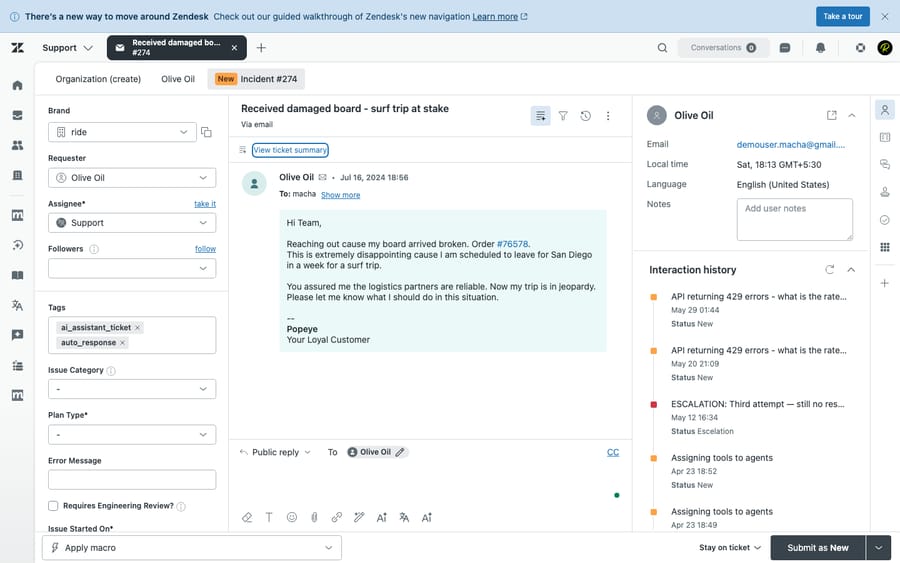
When you start one, you pick a channel (more on those below), choose recipients, write a subject and a message, and send. From then on it behaves like a mini-inbox docked to the ticket: replies land back in that thread, and you can keep the conversation going or close it out once you have your answer. (The composer itself sits behind the agent login, so we're describing it rather than showing a screenshot of it — but functionally that's the flow.)
What are the four side conversation channel types?
A side conversation can run over one of four channels. Which ones are available depends on what your admin has activated and which integrations are installed.
1. Email
The most common type. An email side conversation sends a real email to one or more recipients — your engineering lead, a vendor, an internal stakeholder — straight from the ticket. Their replies come back into the same side-conversation thread instead of into a personal inbox. Zendesk supports up to 100 recipients on an email side conversation, of which a maximum of 48 can be non-agents, so it scales from a quick one-to-one to a broader loop-in.
This is the channel to reach for when the person you need isn't in your chat tools at all — a supplier, a partner, an external contractor.
2. Slack
If your team lives in Slack, a Slack side conversation posts the thread into a Slack channel and syncs the replies back to the ticket. An engineer can answer in Slack where they already are, and the agent sees the response on the ticket without anyone copy-pasting. This requires the Slack for Zendesk Support app to be installed and connected.
3. Microsoft Teams
Functionally the same idea as Slack, but for Microsoft Teams: the side conversation reaches a Teams channel and routes replies back to the ticket. It requires the Zendesk for Microsoft Teams integration to be installed and side conversations activated for it. Pick this if Teams, not Slack, is your company's internal chat backbone.
4. Child tickets
A side conversation child ticket spins up a separate ticket that's linked back to the original (the "parent"). This is the heavyweight option: instead of a lightweight message thread, you create a fully-fledged ticket that another team can own, prioritize, track against an SLA, and even route automatically. It's ideal when the side request is real work in its own right — a task for a different department that needs its own lifecycle — rather than a quick question.
A useful way to think about the four: email, Slack, and Teams are lightweight threads for "I just need an answer," while child tickets are for "this needs to become its own piece of tracked work."
Who can see a side conversation, and who can't?
This is the question that matters most, so to be unambiguous: the customer does not see side conversations. The requester's view of the ticket — and any email they receive — contains only the public replies. Side conversations are invisible to them.
The people who can see a side conversation are agents on the ticket (subject to your plan's access controls) and the external recipients you explicitly add to that thread. An external recipient sees only the side-conversation messages addressed to them; they get no window into the customer's ticket. So you can safely ask a supplier a blunt question, or vent a little to engineering about a gnarly bug, without any of it leaking to the customer.
Which Zendesk plans include side conversations?
Here's where the brief many teams start with is out of date, so it's worth stating carefully. Side conversations are not in Suite Team, and not in any Support-only plan by default. Per Zendesk's documentation, side conversations are available on:
- Customer Service Suite — Professional, Enterprise, or Enterprise Plus
- Employee Service Suite — Growth, Professional, Enterprise, or Enterprise Plus
- Support with the Collaboration add-on
All four channel types (email, Slack, Teams, child tickets) are turned on through the same admin setting once you're on a qualifying plan; Zendesk doesn't split the channels across different tiers. The practical gating is integration-based, not tier-based: Slack and Teams side conversations need their respective apps installed and connected. On Enterprise plans, admins get an extra lever: they can control which agents have access to side conversations by creating a custom role.
Bottom line: if you're on Suite Professional or above, you have all four channels available to switch on; if you're on a plain Support plan, you'll need the Collaboration add-on first.
(Plan packaging is the part of Zendesk that changes most often. Confirm the current gating in your own admin center before you rely on it.)
How are side conversations different from internal notes, CCs and forwarding?
Side conversations overlap, on the surface, with three other Zendesk features. Getting the distinction right is what stops a team from misusing them.
vs. internal notes. An internal note is a comment inside the main ticket thread, visible to other agents but not the customer. It's for agents who already have the ticket — "heads up, this customer is a VIP." A side conversation reaches someone outside the ticket (engineering, a vendor) and keeps that exchange in its own thread. Rule of thumb: internal note for agents already on the ticket, side conversation to pull in someone who isn't.
vs. CCs and followers. CCs and followers are about who's attached to the main conversation. A CC is part of the email thread and can reply to it; a follower is an agent silently watching the ticket and getting update notifications, invisible to the customer. Neither creates a separate thread — they just add people to the existing one. A side conversation, by contrast, opens a brand-new thread to a separate audience. If you want a manager to keep an eye on a ticket, that's a follower; if you need to ask a different team a question, that's a side conversation. We untangle the CC/follower/requester muddle in requesters, CCs, and followers explained.
vs. forwarding. Forwarding ejects the conversation from Zendesk into someone's email, where the reply comes back disconnected from the ticket (or spawns a messy new one). A side conversation does the same job — reaching an outside party — but keeps the thread docked to the original ticket, on the record, where the next agent can find it. Side conversations exist precisely to kill the "forward and pray" habit.
What are the best practices and common mistakes?
A few things separate teams that get value from side conversations from teams that just add noise:
- Use a clear subject and lead with context. The recipient has zero visibility into the customer's ticket. "Re: order delay" means nothing to a supplier; "Customer #4821 — order 9930 shows 'shipped' but no tracking, can you confirm dispatch?" gets you an answer in one round.
- Match the channel to the job. Quick question to someone in chat → Slack or Teams. External party not in your tools → email. Real work another team must own and track → child ticket. Don't open a child ticket for a question, or a child ticket pile-up becomes its own backlog.
- Don't leave the customer in the dark. A side conversation runs in the background, but the customer still expects updates. Set the ticket to Pending or On-hold and send a brief "we're checking with our team" so the silence isn't mistaken for being ignored.
- Don't treat it as the customer's record. Anything the customer needs to see belongs in a public reply, not a side conversation. Side conversations are deliberately invisible to them — useful for coordination, wrong for anything that's part of the answer.
- Watch access on Enterprise. If you've locked side conversations to certain roles, make sure the agents who actually need to escalate have them — otherwise people fall back to forwarding and you lose the benefit.
Can AI reduce how often you need a side conversation?
Side conversations solve the plumbing of cross-team coordination — they keep the thread attached to the ticket. What they don't solve is the chasing: an agent still has to know who to ask, write the question, wait, and fold the answer back into the customer reply.
That gathering step is increasingly something software can do. An AI agent layer like Macha sits on top of your existing Zendesk (it's an automation layer, not a help desk and not a Zendesk replacement) and can pull cross-system context on its own — looking up an order status, checking an internal knowledge source, or surfacing what engineering already said about a known issue — so an agent often has the answer before they'd have finished typing a side conversation. When a human genuinely is the only source, the side conversation is still the right tool; AI just shrinks how often you need one.
Worth being honest about the model: Macha bills per ticket — one thread with one person, charged once however many lookups, summaries and drafts it takes — not per "resolution," so the bill never hangs on an outcome definition you don't control. If chasing other teams for context is a real drag on your handle time, that's the gap it fills. You can try it free — $50 of free usage, no credit card required.
Frequently asked questions
What are side conversations in Zendesk? Side conversations are separate threads attached to a ticket that let an agent loop in a third party — engineering, a supplier, another team — without adding to the main customer conversation. They keep cross-team coordination docked to the ticket and out of the customer's view.
Can the customer see a side conversation? No. Side conversations are internal to the support side. The requester (the customer) never sees them — their view of the ticket and any email they receive contains only the public replies. External recipients you add see only the side-conversation messages sent to them, not the customer's ticket.
What are the four side conversation channel types? Email, Slack, Microsoft Teams, and child tickets. Email, Slack, and Teams are lightweight message threads; a child ticket creates a separate, linked ticket that another team can own and track. Slack and Teams require their respective Zendesk integration apps to be installed.
What plans include Zendesk side conversations? They're available on Customer Service Suite Professional, Enterprise, and Enterprise Plus; on Employee Service Suite Growth, Professional, Enterprise, and Enterprise Plus; or on a Support plan with the Collaboration add-on. They are not included in Suite Team or in Support-only plans by default. Enterprise tiers add custom-role access control.
How is a side conversation different from an internal note? An internal note is a comment inside the main ticket thread, for agents who already have the ticket. A side conversation opens a new thread to reach someone outside the ticket — like engineering or a vendor — and keeps that exchange separate from the customer conversation.
When should I use a child ticket instead of an email side conversation? Use an email (or Slack/Teams) side conversation for a quick question where you just need an answer. Use a child ticket when the side request is real work another team must own — something that needs its own assignee, priority, SLA, and lifecycle — rather than a one-off reply.
How many people can I add to an email side conversation? Up to 100 recipients, and at most 48 of them can be non-agents. Slack and Teams side conversations post to a channel instead of a recipient list.
Which related Zendesk concepts should you learn next?
Side conversations solve one problem: tickets that can't be solved without someone outside the conversation. Instead of forwarding the ticket into the void, you open a parallel thread over email, Slack, Microsoft Teams or as a child ticket, and the replies stay attached to the original ticket and invisible to the customer. The neighbouring concepts are worth getting straight too: the anatomy of a ticket, requesters, CCs and followers, and the Agent Workspace where all of it comes together.
Side conversation mechanics, recipient limits and plan availability checked against Zendesk's official documentation on 24 September 2026. Zendesk changes its packaging periodically, so confirm specifics in your own account before relying on them.
Add AI agents to your Zendesk
Macha reads the ticket, drafts the reply and takes the action, inside the Zendesk you already run.