





 Shopify
 Stripe
 Slack
Slack Notion
 Google Workspace
 Confluence

How Do You Find and Clean Up Unused Zendesk Organizations? (2026)


An unused Zendesk organization costs nothing and breaks nothing, yet it still shows up in the ticket picker, in routing conditions and in reports grouped by organization. Nothing in Zendesk flags one, so finding them takes a per-organization count of users and tickets.
Key takeaways
- To find unused Zendesk organizations, count users and tickets per organization through the API and sort ascending, since Domain and Tags are blank on busy organizations too.
- On the test instance, sampling the first 100 tickets counted one organization's tickets as 6 when a per-organization query returned the correct 140.
- Zendesk organization merges are permanent and only work when the merging organization has 10,000 or fewer tickets and 10,000 or fewer users.
- A merged Zendesk organization passes on its tickets, users and domains but loses its tags, notes, custom organization fields, external ID and group mapping.
- Zendesk's API allows 200 requests a minute on Team, 400 on Professional and 700 on Enterprise, and bulk delete takes up to 100 organization ids per request.

To find dead Zendesk organizations, count two things per organization through the API, its users and its tickets, and sort ascending: the ones at zero and zero are the candidates, because the Domain and Tags columns on the Organizations page are blank on busy organizations too. Then decide per organization whether to merge, fill in or delete. The specific harm of leaving them is misselection, in ticket pickers, routing conditions and reports, and it compounds quietly.
| What the counts show | What to do | Watch out for |
|---|---|---|
| Two organizations for one company, both with tickets | Merge | Permanent; the merged-away org loses tags, notes, custom fields; 10,000-ticket and 10,000-user ceiling |
| Users but no domain or tags | Fill in the domain | Routing and auto-mapping skip it until you do |
| 0 users, 0 tickets, no configuration | Delete | Check views and triggers for the name first; bulk delete takes up to 100 ids a request |
What data is this audit based on?
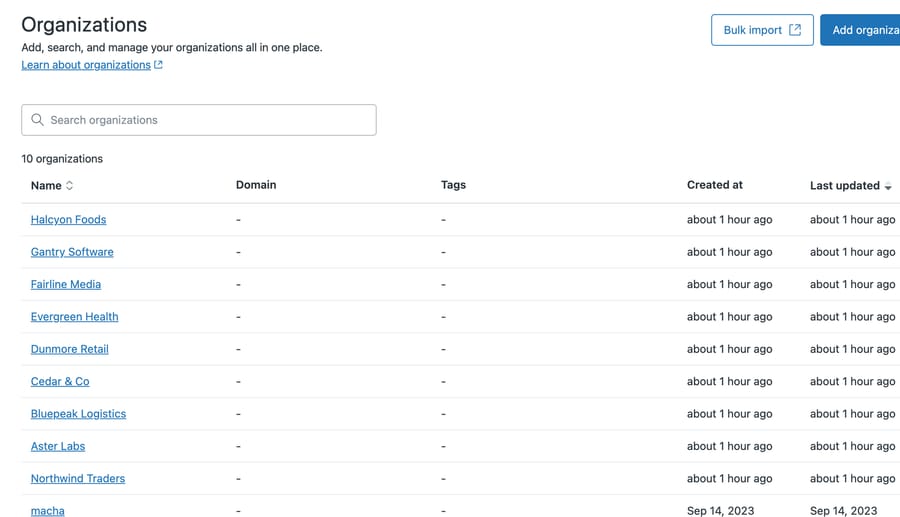
Our developer instance had one organization. One isn't enough to demonstrate an audit, so we created nine more to give the query something to return.
That means the empty organizations in the screenshots below are new-and-empty rather than genuinely abandoned, and any ratio you could compute from them describes our seeding. We're showing the method and the signature, not a finding about how many organizations go stale in the wild.
The one real data point is the original organization, which has 3 users and 140 tickets.
Why can't the Organizations list show which ones are dead?
The obvious move is to read the list. Domain and Tags are empty on all nine seeded rows, and it is tempting to call that the signature of an abandoned organization.
Our own screenshot is the argument against doing that. The macha organization has no domain and no tags either, and it has 3 users and 140 tickets attached to it. Blank columns mean unconfigured. They do not mean unused, and on this instance the single busiest organization looks identical to the nine empty ones.
A domain matters because that is how end users get mapped in automatically, and tags matter because that is how an organization feeds routing and business rules. An organization with neither is not participating in either mechanism. That is still worth knowing, and it is still not a reason to delete anything.
Which is the whole case for the audit below: the only columns that separate a dead organization from a busy one are the two the list page does not show you.
Dates help a little more than the other columns, though not enough to act on alone. An organization whose last update is years old and whose ticket count is zero has been dormant since somebody made it, and that is a different situation from one that used to be busy and went quiet. Separating those two still needs the counts.
How do you audit Zendesk organizations with the API?
Two counts per organization: how many users belong to it, and how many tickets reference it. Both are single API calls, and the whole thing fits in a short script. Our Zendesk API guide covers authentication if you have not scripted against it before.
Here is the whole thing:
// audit-orgs.js — rank organizations by how little they contain.
const { execFileSync } = require('child_process');
const get = p => JSON.parse(execFileSync('node', ['scripts/zd-fetch.js', p], { maxBuffer: 1e8 })
  .toString().split('\n')[0]);
// List endpoints return at most 100 records per page. Follow next_page or you will
// silently audit only the first 100 organizations, which is the failure this post warns about.
function all(path, key) {
  const out = [];
  let url = path;
  while (url) {
    const page = get(url);            // must surface 429 + Retry-After, see below
    out.push(...(page[key] || []));
    url = page.next_page ? page.next_page.replace(/^https:\/\/[^/]+/, '') : null;
  }
  return out;
}

const rows = all('/api/v2/organizations.json?per_page=100', 'organizations').map(o => ({
  name: o.name,
  users: all(`/api/v2/organizations/${o.id}/users.json?per_page=100`, 'users').length,
  tickets: get(`/api/v2/organizations/${o.id}/tickets.json?per_page=1`).count ?? null,
  created: o.created_at.slice(0, 10),
}));
rows.sort((a, b) => (a.users + a.tickets) - (b.users + b.tickets));
const pad = (s, n) => String(s).padEnd(n);
console.log(pad('ORGANIZATION', 24) + pad('USERS', 8) + pad('TICKETS', 9) + 'CREATED');
console.log('-'.repeat(55));
for (const r of rows) console.log(pad(r.name, 24) + pad(r.users, 8) + pad(r.tickets, 9) + r.created);
Swap scripts/zd-fetch.js for whatever you use to make an authenticated GET. Running it against our instance:
ORGANIZATION            USERS   TICKETS  CREATED
-------------------------------------------------------
Aster Labs              0       0        2026-08-27
Bluepeak Logistics      0       0        2026-08-27
Cedar & Co              0       0        2026-08-27
Dunmore Retail          0       0        2026-08-27
Evergreen Health        0       0        2026-08-27
Fairline Media          0       0        2026-08-27
Gantry Software         0       0        2026-08-27
Halcyon Foods           0       0        2026-08-27
Northwind Traders       0       0        2026-08-27
macha                   3       140      2023-09-14
Sort ascending by users plus tickets and the dead ones surface at the top. On a real instance this is the whole audit: the organizations worth attention are the ones at the top of that list, and the ones at the bottom are the ones actually doing work.
One caution that cost us time. If you sample tickets to estimate this rather than querying per organization, you'll get a wrong answer, and it will look plausible:

Six versus a hundred and forty, for the same organization, on the same instance, a second apart. The six is an artifact of the sample: the tickets endpoint returns oldest first, and this instance's organization-linked tickets sit at higher ticket ids, so the first page misses almost all of them.
Count per organization. Don't extrapolate from the first page of anything.
Should you merge, fill in or delete a stale organization?
There are three outcomes. Only one is deletion.
Merge. Two organizations for the same company is the most common real finding, usually from a domain change or a slightly different spelling. Zendesk has a native organization merge, available to admins on every Support and Suite plan: users, tickets and domains move into the surviving organization and the merging one is deleted when it completes. That keeps the history and removes the ambiguity, and it's usually the right call when both have tickets.
It is not free, though, and this article has been careful about warning before deletion so it should be careful here too. Zendesk documents that "organization merges are permanent and can't be undone", and that the merging organization loses its tags, notes, details, custom organization fields, external ID, group mapping, shared-organization setting and related records. Tickets, users and domains carry over; the configuration around them does not. There is also a ceiling: the merging organization must have 10,000 or fewer tickets and 10,000 or fewer users, or the merge is blocked.
So decide which organization survives before you start, because the one you merge away is the one that loses its configuration.
Fill in. An organization with users but no domain and no tags is unconfigured. It's doing something, and somebody is going to wonder why routing skips it. Adding the domain is usually a two-minute fix that removes a recurring confusion.
Delete. If your reason for deleting is data hygiene, check whether a deletion schedule is the better instrument, since that removes ticket data on a timer and leaves the organization records alone. Reserve deletion for organizations with no users, no tickets, and no configuration, which is to say the ones that were created and never used. If you do not write code, this is not a dead end. Zendesk's own guidance on bulk deleting organizations and users points at marketplace apps built for exactly this, and they are the right answer when the alternative is clicking through several hundred rows. What they generally will not do is the diagnosis: the counts that tell you which organizations are safe to remove. Read this article for the audit and use an app for the removal.
At any real scale the removal is a scripted job: the API exposes a bulk delete that takes up to 100 organization ids per request, and the list endpoints page at 100 records, so both halves of the work want a loop. Deleting an organization that has tickets changes what those tickets look like. Treat any ticket count above zero as a reason to stop and think.
Before deleting anything, check whether the name is referenced in a view or a trigger. A business rule pointing at an organization that no longer exists is a quiet failure, and it's much easier to find the reference before you remove the target than after.
Where do unused organizations come from?
Organizations get created by more paths than most admins remember, and only one of those paths involves a person deciding an organization should exist.
They come from imports, where a spreadsheet column becomes an organization per unique value including the typos, the same way a careless import multiplies custom field values. They come from integrations that create an organization per account in some other system. They come from the mapping rules that attach end users by email domain, where a one-off domain produces a one-off organization. And they come from people setting something up, changing their mind, and moving on.
None of those paths includes a cleanup step, which is the entire reason this article exists. The rate of creation has a mechanism and the rate of removal does not, so the count only goes up.
That also tells you when to run the audit. Run it after any bulk import, any new integration that writes organizations, and any migration. Those are the events that create dozens at once.
Why doesn't Zendesk flag stale organizations?
It's worth being clear about where the tooling stops, because the incentive explains the gap better than an oversight would.
Organizations are unlimited and free. They don't appear on your bill, they don't consume a seat, and a thousand of them cost Zendesk essentially nothing to store. The cost of having too many falls entirely on you, and it falls as confusion: a slower picker, a duplicated report line, a routing rule that misses.
The tooling position is more interesting than "they built nothing", which is what we assumed before checking. There is a documented bulk delete endpoint for organizations, so the removal half is solved if you are willing to script it. Zendesk also shipped a bulk-delete organizations app, now archived. Its last commit was September 2016, which tells you how long it went unmaintained before somebody flipped the archive switch.
What does not exist is the half that would prompt you. No staleness flag, no badge for an organization with no users and no tickets, nothing in managing organizations that surfaces the problem at all. A vendor builds detection where the pain shows up in their own metrics or their own support queue, and organization sprawl shows up in neither.
Deletion is a supported operation. Noticing you need it is your job, so put the audit in your own calendar.
How long does the audit take on a large instance?
At ten organizations, none of this matters much and you can eyeball the list.
At several hundred, the picker becomes genuinely hard to use, and misselection stops being hypothetical. At a few thousand, reporting by organization becomes unreliable in a way that's hard to trace, because the long tail of near-duplicate names splits a single customer's tickets across several rows and nobody notices the total is spread out.
The audit does not take the same time at every size, and it is worth being precise about that because the script above is the thing that breaks.
It makes two calls per organization plus one to list them, so a hundred organizations is around 201 requests and two thousand is around 4,020 once the paged listing is counted. Zendesk's rate limits are 200 requests a minute on Team, 400 on Professional and 700 on Enterprise, so the large case is roughly 6 minutes on Enterprise and 20 minutes on Team of sustained calling even if you never exceed the limit, and in practice you will meet a 429.
There is an optimization worth naming before you accept that number. The user half does not have to be per-organization: one paged pass over /api/v2/users.json, grouped by organization_id, gets the same counts in about a twentieth of the calls. The version above stays per-organization because it is easier to read and easier to stop halfway, which is the right trade at a hundred organizations and the wrong one at two thousand.
Either way, handle the 429 or the script dies partway through a job you then have to restart. On a 429 Zendesk returns a Retry-After header telling you how many seconds to wait; sleep for that long and repeat the request rather than treating it as a failure. The version above deliberately leaves that out to stay readable, which is fine on a small instance and not fine on the ones this article is aimed at.
Common questions
Does deleting an organization delete its tickets? No, but it changes them: tickets lose the organization association. Check the ticket count before deleting and treat anything above zero as a reason to merge rather than delete.
How do I find organizations with no users? Query the users endpoint for each organization and count what comes back. Don't infer it from a sample of tickets, since ticket listings are ordered and a first page is not representative.
Can I merge two Zendesk organizations? Yes, if you are an admin, and it's usually the right answer when both have history. Merging preserves tickets, users and domains while removing the duplicate name from pickers and reports. It can't be undone, and the merging organization must have 10,000 or fewer tickets and 10,000 or fewer users.
How many organizations can I delete at once through the API? Up to 100 per request. The bulk delete endpoint takes a comma-separated list of up to 100 organization ids or external ids, so a larger cleanup is a loop.
What creates organizations I didn't ask for? Imports, integrations that sync accounts, and automatic domain mapping. Run an audit after any of those, since they create organizations in bulk.
Is an organization with no domain broken? Not broken, just unconfigured. Automatic user mapping relies on the domain, so an organization without one needs users added by hand or by rule, which is often why it looks half-populated.
Why does organization cleanup matter for an AI agent?
Organization data is one of the few things an AI agent can use to change an answer, not merely to find one. Most context an agent reads tells it what to say. Organization membership tells it which policy applies: which terms this customer signed, which SLA governs the reply, which queue the ticket belongs in.
That distinction is why duplicates hurt here more than elsewhere. A wrong article retrieved produces a vague answer somebody notices. A wrong organization produces a confident, specific, well-written answer citing the wrong contract, and it reads exactly like a right one.
The failure is worse than a human's for a structural reason. An agent seeing "Northwind Traders" and "Northwind Traders Ltd" has no way to know they are one customer; a person has met them. So every duplicate in your list is a coin-flip an automation makes silently and a person would not have to make at all.
Which sets the order of work. The audit in this article is not tidying you do before adopting an agent. It is the thing that decides whether the agent's most valuable capability works or misfires, and it costs a few minutes. Macha reads your organizations as they stand, applies no fuzzy matching, and will treat those two Northwinds as two customers, because guessing would be worse. Whether that is the behavior you want depends on which problem you have. If you already maintain the list, strict matching is what you want and fuzzy matching would be the bug. If you were hoping automation would paper over a messy list, nothing here will, and the audit above is the actual prerequisite rather than an optional tidy-up beforehand.
Start your free trial once your organization list is clean enough to be worth reading.






