Intercom
 Shopify
 Stripe
 Slack
Slack Notion
 Google Workspace
 Confluence

Zendesk Suspended Tickets: Why Real Emails Land There and How to Recover Them


A suspended ticket is an email Zendesk held back for review instead of turning into a ticket, and it is often real customer mail from an unverified sender or a misconfigured forward. You find them in Support under Views, Suspended tickets, and anything nobody recovers is deleted permanently after 14 days.
Key takeaways
- Zendesk deletes unrecovered suspended tickets automatically after 14 days, and those deletions are permanent, so an unwatched Suspended tickets view loses customer email on a rolling basis.
- Zendesk rejects an email outright, with no chance of recovery, when its spam score is 99% or higher, when the sender is blocklisted, or when the message is an automated bounce.
- Recovering a Zendesk suspended ticket manually creates a plain-text copy without the HTML or attachments and leaves the original suspended, so Auto recover is the safer choice.
- On Zendesk Enterprise plans, an agent needs a custom role where "An agent may manage suspended tickets" is set to Recover or delete before the Suspended tickets view appears.
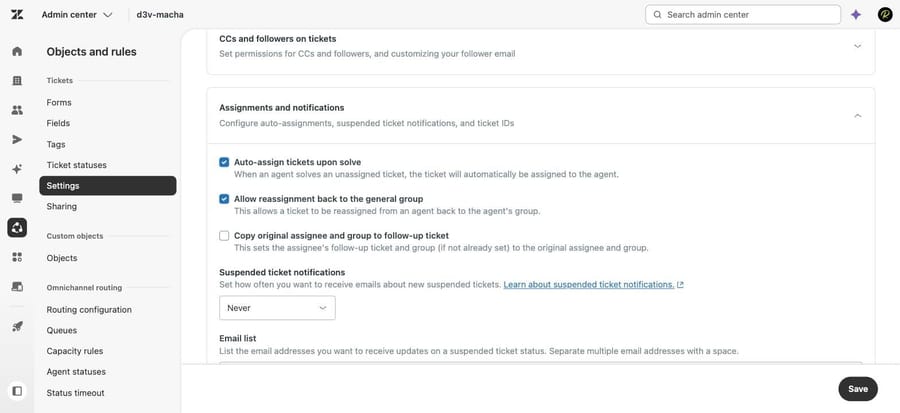
- Zendesk suspended ticket notifications can be set to Every 10 minutes, Hourly digest or Daily digest in Admin Center under Objects and rules, Tickets, Settings.

Zendesk suspends an email instead of creating a ticket when it scores as probable spam (below the 99% score that gets mail rejected outright), comes from an unregistered or unverified sender, carries automated-mail headers, arrives from your own support address or fails DMARC. You recover it from Views, then Suspended tickets, and anything nobody reviews is deleted permanently after 14 days.
| Cause of suspension | Usual fix |
|---|---|
| Detected as spam | Unsuspend the user, then recover the ticket |
| Unknown or unverified submitter | Verify the user or relax end-user registration |
| Automated response mail | Stop the forwarding server adding auto-reply headers |
| Received from support address | Forward so the requester stays in From and Reply-To |
| Email authentication failed | Configure SPF and DKIM for the sending source |
Everything below was checked against Zendesk's current documentation on September 20, 2026, and the deletion window, rejection threshold, recovery behavior and notification options were re-checked on September 24, 2026.
Who can see the Suspended tickets view?
Most "our suspended tickets disappeared" reports are permission problems. The rules differ by plan, and they aren't intuitive.
- Non-Enterprise plans: an agent needs permission to view all tickets. Group-restricted agents can't open the view.
- Enterprise plans: the agent must sit in a custom role where "An agent may manage suspended tickets" is set to Recover or delete, configured in Admin Center under People, Roles. The other value is Not allowed.
- Any plan: an agent with the "Play views only" permission can't open the Suspended tickets view at all.
- A side effect worth knowing: an agent who can open the view can delete anything in it, even if ticket deletion is switched off for them elsewhere.
That last pair explains the recurring r/Zendesk question about giving agents permission to view suspended tickets without handing them the rest of an admin role. On Enterprise you can scope it; below Enterprise you can't, and the price of letting someone triage the queue is letting them see every ticket.
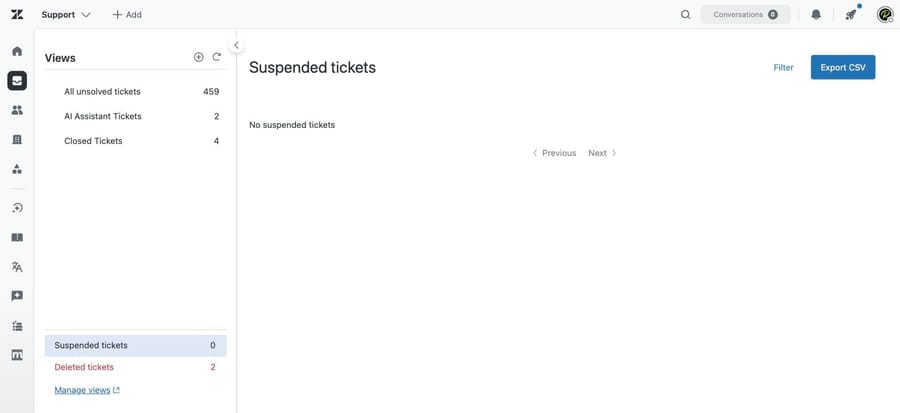
How long do suspended tickets last, and which emails never reach the view?
Two facts change how urgently you should care.
Unrecovered suspended tickets are deleted automatically after 14 days, and those deletions are permanent. If your suspended queue is a place mail goes to die quietly, you are losing customer emails on a two-week rolling basis.
Separately, suspension is not the harshest outcome. Zendesk rejects an email outright when its spam score is 99% or higher, when the sender is on your blocklist, or when the message is a bounce or other automated system mail. Rejected mail never appears in the Suspended tickets view and can't be recovered. So an empty suspended queue doesn't mean nothing was dropped.
Why do real customer emails get suspended?
Zendesk's causes for ticket suspension reference lists more than twenty. These are the ones that catch real customer mail, starting with the most common. Zendesk names spam as the top cause; the order after that follows the r/Zendesk and Zendesk community threads we sampled for this post rather than a measured distribution.
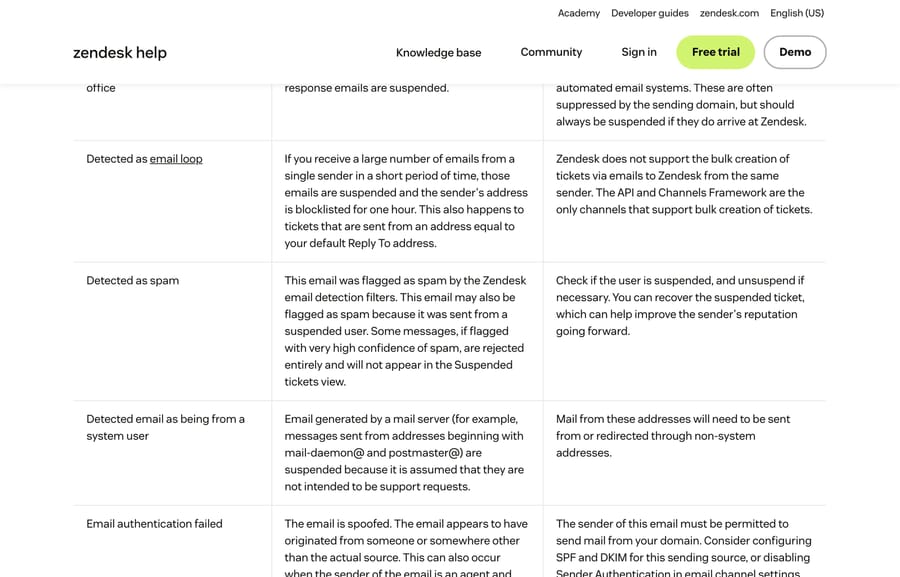
1. Detected as spam
What it means: Zendesk's filters scored the message as probable spam, or the sender is a suspended user in your account. Check: open the ticket in the view and look at the user record. A suspended user's mail gets treated as spam regardless of content. Fix: unsuspend the user if they are legitimate, then recover the ticket. Recovering isn't just a one-off rescue: Zendesk says it feeds back into the sender's reputation, so a customer whose mail keeps getting caught is worth recovering rather than re-sending.
2. Permission denied for unknown email submitter, or Submitted by unverified user
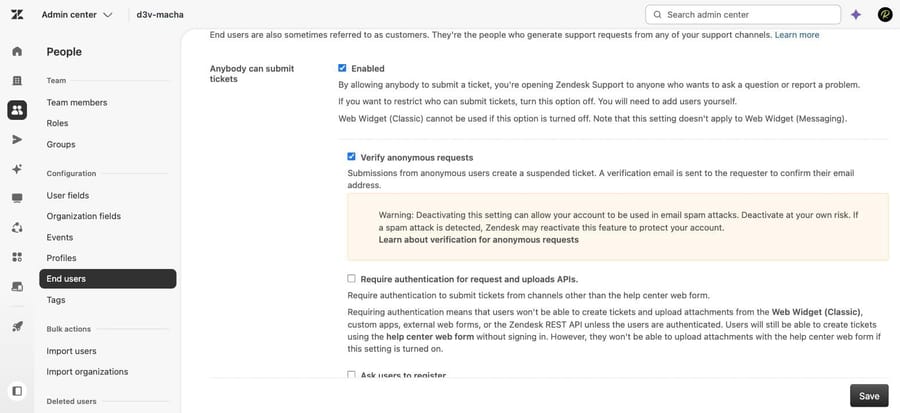
What it means: your account requires users to register, and the sender either has no account or has never clicked the verification email. Check: Admin Center, People, Configuration, End users, and look at whether "Anybody can submit tickets" is on and whether email verification is required. Fix: for one person, an agent or admin can verify the address manually on the user's profile or resend the verification email. For a known customer base, bulk import your users before they write in. Every tightening you apply here trades fewer spam tickets for more suspended real ones, which is the balance Zendesk's own guidance asks you to pick deliberately.
3. Automated response mail
What it means: a header on the message says it was machine-generated. Zendesk lists the triggers, and it's broader than people expect: Precedence, Auto-Submitted, X-Autoreply, X-Autorespond, Autoresponder, Delivered-To, X-NetSuite, RT-Ticket and others. Check: open the original message in your mail client and read the raw headers. Fix: if the mail is coming from your own forwarding setup, stop the forwarding server adding those headers. Zendesk does not support un-suspended automated email into the email channel at all, including from custom-built ticket forms; the API and the Channels Framework are the supported routes for programmatic ticket creation. Delivered-To is the one that surprises people, because plenty of mail servers add it by default.
4. Received from support address
What it means: the message arrived from one of your own support addresses rather than being forwarded from it, which Zendesk treats as a mail loop risk. Check: look at the From and Reply-To headers of a suspended example. Fix: change the forwarding so the requester's address, not your support address, appears in From and Reply-To. Zendesk's troubleshooting article on every incoming email being suspended also rules out aliases and email groups as support addresses, and asks you to forward at the server level rather than in the individual support address settings.
5. Email authentication failed, or Failed email authentication
What it means: the message failed DMARC, or looks spoofed. This also fires when an agent's own mail is forwarded through a domain that fails DMARC. Check: your SPF record, and whether the sending source is authorized for your domain. Fix: configure SPF and DKIM for that sending source. Turning off DMARC authentication or Sender Authentication in the email channel settings works too, and costs you a layer of protection, so treat it as the last option.
6. Detected as email loop
What it means: a lot of mail arrived from one sender in a short window, or the sender matches your default Reply To address. Check: the sender address and the timestamps on the run of suspended messages. Fix: there's nothing to configure. Zendesk blocklists that sender for one hour automatically and does not support bulk ticket creation by email. If you're creating tickets in bulk, use the API.
7. Sender or domain is on the blocklist, or Sender domain not on allowlist
What it means: your own access rules caught it. Check: Admin Center, People, Configuration, End users, and read the allowlist and blocklist fields. Fix: edit the list. Worth re-reading these fields periodically: an allowlist configured during a spam wave keeps suspending new customer domains long after the wave passes, which is one of the patterns behind the r/Zendesk thread on email tickets going to suspended.
8. Detected email as being from a system user, or Email for "noreply" address
What it means: the address starts with something like mail-daemon@ or postmaster@, or is a no-reply address. Fix: for system addresses, route the mail through a normal mailbox instead. For a customer who genuinely writes from a no-reply address, add that address to your allowlist.
9. End user only allowed to update their own tickets
What it means: someone replied to a ticket from a different address than the requester's, usually after forwarding the notification internally. Fix: add the second address to that user's profile, or add them as a CC on the ticket. Otherwise it becomes a flagged comment rather than an update.
How do you recover a suspended ticket without losing attachments?
This is where the real trap lives, and most guides skip it.
- In Support, click Views, then Suspended tickets.
- Click Filter in the top right and filter by Cause, Sender email or Subject. Filtering by cause is what makes bulk handling safe: one cause at a time, one decision at a time.
- Select the tickets, then use the Auto recover drop-down and choose Auto recover, Recover manually or Delete permanently.
- Click Submit.
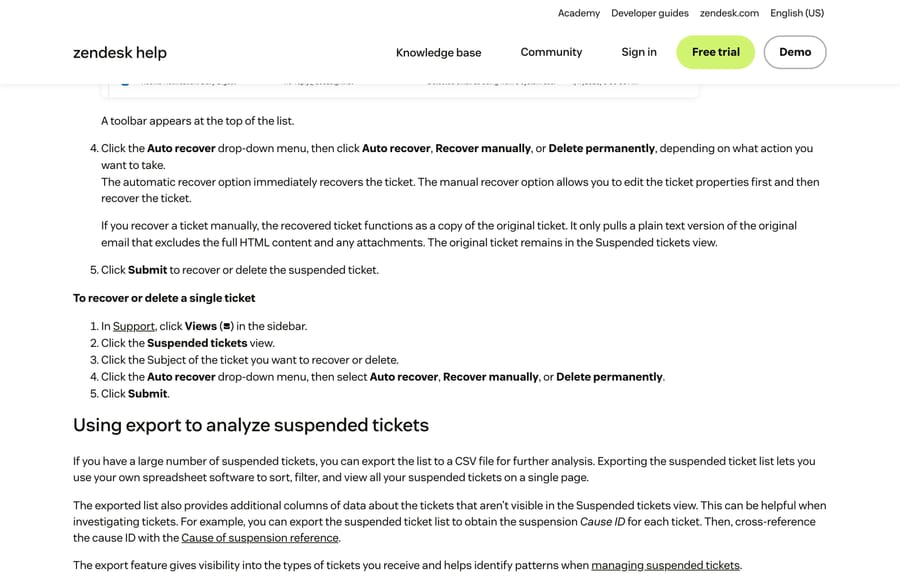
Auto recover puts the original message into the queue as a new, unassigned ticket with New status. It'll show up in unassigned views and in search, and the via field reads System or Email rather than naming you.
Recover manually lets you edit the ticket's properties first, and it'll cost you the message. Per Zendesk's recovery documentation, a manual recovery creates a copy that pulls only a plain text version of the original email, drops the HTML and every attachment, and leaves the original sitting in the suspended view. If a customer's sent a screenshot of the error they are reporting, a manual recovery loses it. Use auto recover unless you have a specific reason not to.
One more permission wrinkle: if a light agent recovers a suspended comment that carried CCs, the CCs from the last end user reply are not added to the ticket, because light agents can't manage CCs. Teams that run CC-heavy threads usually make it a rule that light agents do not touch the suspended queue.
How do you stop real emails being suspended again?
Turn the notifications on. In Admin Center, click Objects and rules, then Tickets, then Settings, expand Assignments and notifications, and set Suspended ticket notifications to Every 10 minutes, Hourly digest or Daily digest, with the email addresses that should get it. The digest lists everything currently in the queue, including items from earlier notifications, and it only sends when the queue isn't empty. This is the single cheapest fix in the whole post: a 14-day silent delete becomes a daily email.
Audit the queue by cause, not by ticket. Export the Suspended tickets view to CSV with Export CSV in the top right. The export carries columns the view does not show, including a Cause ID per ticket, so you can count causes in a spreadsheet and fix the biggest one instead of clicking through 400 rows. The same export mechanics as every other view apply; our guide to exporting data from Zendesk covers the limits.
Then fix the cause, not the symptom. If most of your suspensions are unverified users, the fix is user provisioning. If they are automated response mail, the fix is on your mail server. If they are genuine spam, that's a different job, and our guide to stopping Zendesk spam tickets covers the allowlist, blocklist and form-level defenses. If no email at all is turning into a ticket, the problem is probably the channel rather than suspension, which is why Zendesk email is not creating tickets.
Can an AI agent layer help with suspended tickets?
Worth being plain, because AI vendors are vague about this: an AI agent layer sees tickets, and a suspended message isn't a ticket yet. Macha can't read your suspended queue, recover anything from it, or stop Zendesk suspending mail. Nothing in this post is something an agent can do for you, and a vendor claiming otherwise is describing the wrong object.
Where Macha on Zendesk does help is the stage after recovery: once a rescued message becomes a real ticket, it lands unassigned with New status and no context, and somebody still has to read it, tag it, route it and answer it. That is the work an agent layer takes. It fits teams already running Zendesk whose recovered and ordinary tickets are mostly repeat questions their help center already answers, and it's the wrong fit if your queue is small enough that triage is not the bottleneck.
The incentive is worth naming while we are here. A vendor billing per automated resolution earns more the more tickets reach the queue, so nothing in that model rewards you for a cleaner inbox. Macha bills per ticket, one thread with one person as one charge however many replies it takes, from $299 a month for 750 tickets on published pricing, with setup and monitoring by our team included and $50 of free usage to start.
How we researched this
Every path, permission and limit here comes from Zendesk's current help center documentation, read on September 20, 2026: the suspended tickets overview (edited April 15, 2026), the causes reference (edited September 17, 2026), the recovery article (edited May 7, 2026), the notification settings article (edited May 26, 2026), the "every incoming email is suspended" troubleshooting article (edited July 13, 2026) and the custom roles article. We captured three of the five screenshots first-hand on our own Zendesk sandbox, d3v-macha, on September 20, 2026: the Suspended tickets view, the End users settings and the suspended ticket notification setting, which that account has on Never. The other two are of the documentation pages above, captured the same day. We didn't manufacture a suspension, so each cause below is documented rather than reproduced. Community examples are public r/Zendesk threads, linked in place.
Frequently asked questions
Where are suspended tickets in Zendesk? In Support, click Views in the sidebar and select the system-generated Suspended tickets view. If you can't see it, on non-Enterprise plans you need permission to view all tickets, and on Enterprise you need a custom role where "An agent may manage suspended tickets" is set to Recover or delete. Agents with the Play views only permission don't see it.
How long do Zendesk suspended tickets last? 14 days. Anything nobody recovers is deleted automatically at that point, and an automatically deleted suspended ticket can't be recovered. Turning on the suspended ticket digest is the cheapest way to stop that clock running unnoticed.
Why are real customer emails being suspended? The frequent causes are a spam score below the rejection threshold, a sender who is unregistered or unverified when your account requires registration, headers that mark the message as automated, mail arriving from one of your own support addresses, and DMARC failures. Open the ticket in the view; Zendesk prints the cause of suspension on each one.
What is the difference between a suspended and a rejected email in Zendesk? A suspended message is held for review and can be recovered for 14 days. A rejected message isn't kept at all. Zendesk rejects mail scored at 99% or higher confidence of spam, mail from blocklisted senders and automated system mail such as non-delivery notifications, and none of that appears in the Suspended tickets view.
Should I use Auto recover or Recover manually? Auto recover in almost every case. It restores the original message as a new unassigned ticket. Recover manually creates a copy containing only a plain text version of the email, without the HTML or any attachments, and leaves the original in the suspended view, so you'll lose screenshots and files.
How do I stop Zendesk suspending emails from a specific sender? Add the address or domain to the allowlist in Admin Center under People, Configuration, End users, and make sure it isn't on the blocklist. If the cause is authentication, configure SPF and DKIM for that sending source instead; if the cause is automated headers, the fix belongs on the sending mail server.
Why is every email to my Zendesk being suspended? Usually a forwarding setup that puts your support address in the From or Reply-To header, or a forwarding server that adds an automated header such as Precedence: bulk or Auto-Submitted: auto-generated. Zendesk also doesn't support aliases or email groups as support addresses, or a web form combined with email forwarding.
Can I report on suspended tickets? Not in Explore, though you can export the view. Click Export CSV in the Suspended tickets view and the file arrives by email with extra columns the view hides, including the suspension Cause ID, which you cross-reference against the cause list to count causes.
Sources: Understanding suspended tickets and spam · Causes for ticket suspension · Viewing, recovering, and deleting suspended tickets · Setting up suspended ticket notifications · Every incoming email sent to my Zendesk is suspended · Creating custom roles and assigning agents · Guidelines for reviewing suspended tickets · Suspended/Spam tickets (r/Zendesk)
Add AI agents to your Zendesk
Macha reads the ticket, drafts the reply and takes the action, inside the Zendesk you already run.