Intercom
 Shopify
 Stripe
 Slack
Slack Notion
 Google Workspace
 Confluence

How to Migrate from Freshdesk to Front in 2026: What Moves, What Breaks


Front's built-in Freshdesk importer moves inboxes, contacts, conversations, attachments, comments and assignments for your 9,000 most recent tickets, and skips tags and teammates entirely. Front's own documentation recommends Help Desk Migration or ClonePartner over it, because the importer is not actively maintained.
Key takeaways
- Front's built-in Freshdesk importer moves your 9,000 most recent tickets with contacts, attachments and internal notes, but it skips tags and teammates, and rerunning it does not fetch older history.
- Front's own help article recommends Help Desk Migration or ClonePartner over its built-in Freshdesk importer, which it says is not actively maintained.
- Front estimates the Freshdesk import takes about one hour per 3,000 tickets, so a full 9,000-ticket import runs roughly three hours.
- Front caps automation rules at 10 on Starter, 20 on Professional and unlimited on Enterprise, so a Freshdesk team with 35 dispatch rules has to consolidate or move to Enterprise.
- Front's Core API import endpoint works one message per call, so a 40,000-ticket Freshdesk history averaging four messages a ticket needs 160,000 API calls.

You migrate from Freshdesk to Front in one of two ways: Front's free built-in importer, which moves your 9,000 most recent tickets with contacts, attachments and internal notes but skips tags and teammates, or a paid partner, Help Desk Migration or ClonePartner, which Front's own help article recommends instead. Front estimates its importer runs about one hour per 3,000 tickets.
| Route | Cost | History limit | Tags carried | Best for |
|---|---|---|---|---|
| Front's built-in importer | Free | 9,000 most recent tickets | No | Small histories you could redo |
| Help Desk Migration or ClonePartner | Paid, quoted by the partner | Set by the partner | Yes, per the partner's mapping | Large histories, tags, accountability |
| Front Core API | Your own engineering time | One call per message | You write it | Selective imports of one inbox or date range |
We checked every step and limit below against Front's and Freshworks' current documentation on September 20, 2026, and re-checked Front's importer article and pricing on September 24, 2026. We do not run a Freshdesk instance, so nothing here is a recording of our own migration; it is their documented behavior plus what migrators have reported in Front's community. Going the other way? We have a separate guide to migrating from Front to Freshdesk.
What moves from Freshdesk to Front, and what doesn't?
Front's importer is explicit about both lists. Read them before you promise anyone a clean cutover.
| Front's importer brings over | It leaves behind |
|---|---|
| Inboxes | Tags |
| Contacts | Teammates |
| Conversations and messages | Automations, dispatch rules and scenario automations |
| Attachments | SLA policies and business hours |
| Comments (internal notes) | Canned responses |
| Conversation assignments | Knowledge base articles and the customer portal |
| Ticket fields beyond what maps to a conversation | |
| Satisfaction survey history |
The two that catch people are tags and teammates. Tags are usually where a Freshdesk team has encoded years of reporting taxonomy, and they are the one thing the importer skips outright. Teammates are a smaller problem because you create them in Front anyway, but it means agent attribution depends on the mapping step rather than on the import.
Should you use Front's importer or a migration partner?
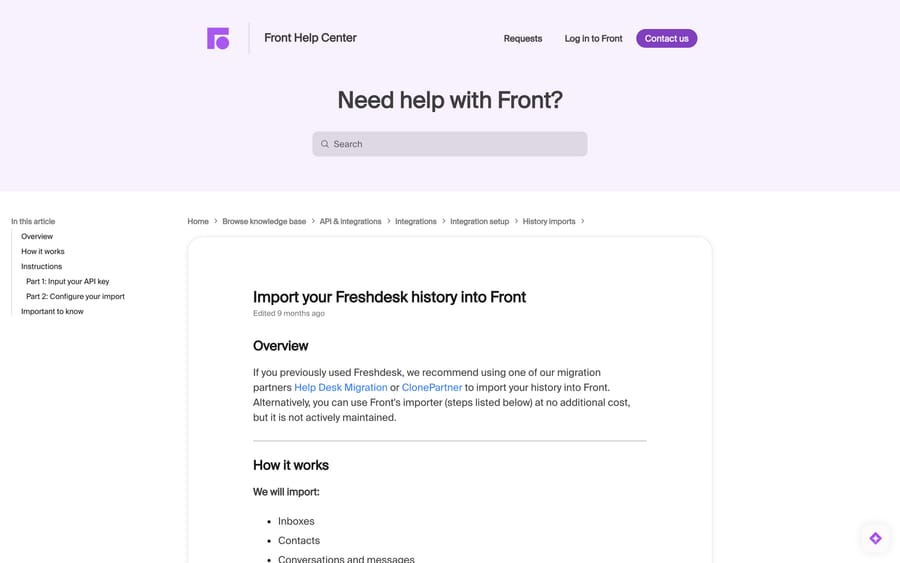
Front's article opens by recommending Help Desk Migration or ClonePartner, then adds: "Alternatively, you can use Front's importer (steps listed below) at no additional cost, but it is not actively maintained."
That sentence is the whole decision. Front's importer is free and unsupported; the partners charge and are the route Front points at when something goes wrong. Naming the incentive helps here: Front gets no revenue from either path, so it has no reason to talk up the partners other than that its own tool is old. Take the warning at face value.
Use Front's own importer if your Freshdesk history is under 9,000 tickets, your reporting needs do not depend on historical tags, and you can accept a best-effort import with no support commitment behind it.
Use a migration partner if you have more than 9,000 tickets, you need tags or custom fields carried across, you need ticket IDs preserved for reference in other systems, or the business needs somebody accountable if the import stalls halfway.
The cap is hard. Front's article states the importer takes "9000 of your most recent Freshdesk tickets" and that running it again does not fetch more. A Freshdesk team doing 800 tickets a month hits that ceiling at 11 months of history.
How do you export your Freshdesk data before migrating?
Do this even if you use a partner. It costs an hour and it is the only copy of your data that you control.
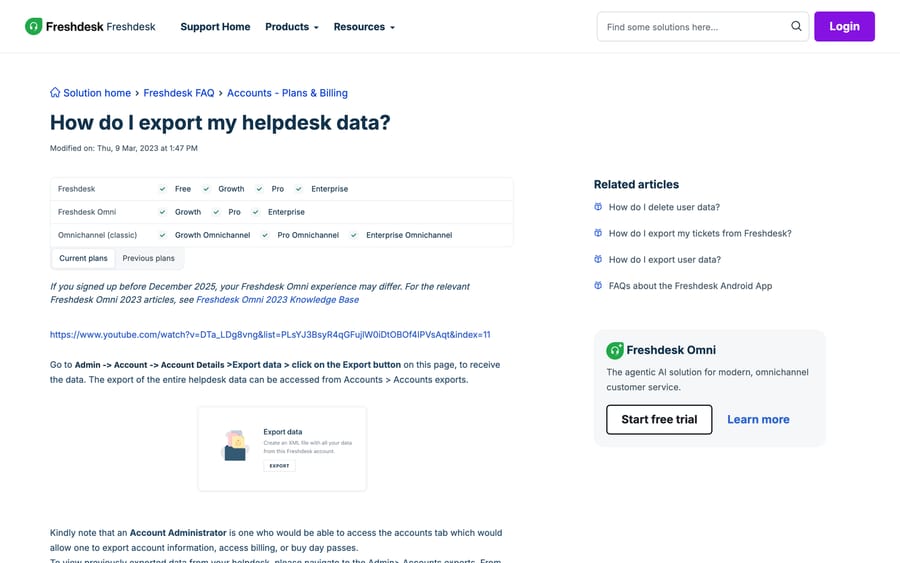
- In Freshdesk, go to Admin → Account → Account Details → Export data and click Export. This produces an XML file of the whole account. Freshworks lists this on Free, Growth, Pro and Enterprise, and notes that an Account Administrator is the role that can reach the Accounts tab.
- Collect earlier exports from Admin → Accounts exports if you have run one before.
- Export tickets separately from the Tickets tab: open the All tickets view, apply the filters you want, click Export, and choose CSV or Excel plus the ticket fields to include. This is the copy your analysts will actually use, because the account XML is awkward to query.
- Export contacts from the Customers tab, and companies from the same page using the hamburger menu. Freshdesk emails the download link to whoever triggered it.
- Screenshot or export your automations, SLA policies, canned responses and ticket field definitions. None of these travel, and reconstructing them from memory is where migrations lose a week.
How do you run Front's Freshdesk importer?
The path below matches Front's current article. Labels in italics are the exact ones in the interface.
Part 1: get the API key in.
- In Freshdesk, open My Profile Settings and click View API Key. Copy it.
- In Front, click the gear icon and go to company settings, then Imports.
- Click Import on the Freshdesk row.
- Enter the API key and your Freshdesk Subdomain, then click Continue.
Part 2: configure the mapping.
- Pick the workspace the data lands in, and a default teammate. Anything Front cannot attribute to a matched agent is assigned to this person, so choose an operations account rather than a real agent whose stats you care about.
- Match Freshdesk Agents to Front Teammates. Create the teammates in Front first if you want this step to do anything useful.
- Map Freshdesk Groups to Front inboxes. For each group you can match an existing inbox, skip it, or create a new one.
- Click Import.
Budget about an hour per 3,000 tickets, per Front's own estimate. A full 9,000-ticket import is therefore a three-hour job, which means you start it in the morning and cut over the next day, not over a lunch break. Front's article also warns not to delete any inbox tied to the import while it runs, or the import stops.
Should Freshdesk attributes become tags or custom fields in Front?
Freshdesk gives you ticket fields, types, groups and tags, and most teams end up with reporting spread across all four. Front's model is narrower: tags, custom fields and inboxes. Where you put each Freshdesk attribute decides whether your Front analytics are usable in a year.
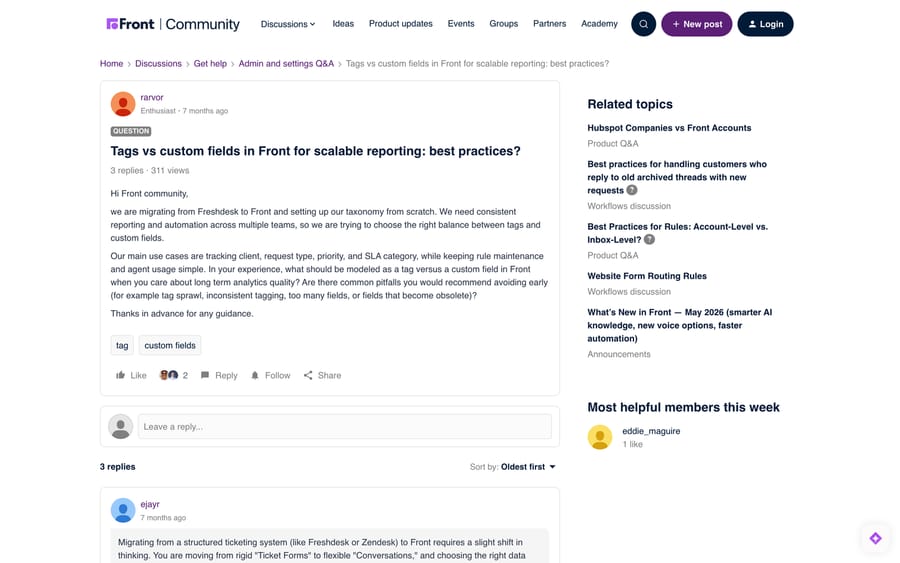
A team doing exactly this migration asked Front's community about it in January 2026, and the answers are the clearest guidance published anywhere. The asker, rarvor, was "moving from Freshdesk to Front" and setting up taxonomy from scratch, worried about "tag sprawl, inconsistent tagging, too many fields, or fields that become obsolete."
The answers, dated and attributed:
- ejayr, January 22, 2026 gave the rule most people should follow: "Use Tags for attributes that are fluid, visual, or multiple" and "Use Custom Fields for attributes that are strict, singular, or structured." He also advised starting with around 10 core tags instead of 50, because agents abandon a tagging system that asks too much of them.
- daniel_roiter, February 6, 2026 argued for starting with tags, which are "much easier to use to pull data from and to create automation rules off of", and adding custom fields once the tags show you what is genuinely structured.
- Ruben-burdin, February 24, 2026 drew the line by data source: custom fields for attributes that originate outside Front and get updated programmatically (client, SLA category), tags for signals the agent generates (request type, workflow stage).
Applied to a Freshdesk migration, that resolves cleanly:
| Freshdesk object | Where it belongs in Front |
|---|---|
| Group | Inbox, mapped during the import |
| Agent | Teammate, created before the import |
| Ticket Type (single-select) | Custom field |
| Priority and Status | Front's own conversation and ticket statuses |
| Product or Brand (single-select) | Custom field, or a separate inbox if routing differs |
| Tags | Tags, recreated by hand |
| Custom dropdown fields used for reporting | Custom fields |
| Free-text custom fields used as agent notes | Comments, not fields |
Our Front tags explainer covers how tagging behaves once it is set up.
What do you have to rebuild by hand in Front?
Plan two to five days for this depending on how much automation you had.
Automations become rules. Freshdesk's ticket-creation, ticket-update and time-triggered automations all map onto Front rules, but the trigger vocabulary differs and the conditions do not translate one to one. Rule counts are plan-gated: Front's pricing page lists up to 10 automation rules on Starter ($25 a seat billed annually), up to 20 on Professional and unlimited on Enterprise. A Freshdesk team with 35 dispatch rules is going to consolidate or land on Enterprise. Our Front rules setup guide covers the builder.
Canned responses become macros. Export the text before you cancel Freshdesk. Macros are on Professional ($65 a seat billed annually) and above per Front's pricing page; Starter has none.
SLA policies get rebuilt. Copy the targets and the business hours out first; both are configuration rather than data, so nothing carries them.
The knowledge base moves separately. Freshdesk Solutions articles are their own export and their own import. Front has a no-code public knowledge base on Starter and a multi-language one on Enterprise, and our Front knowledge base explainer covers what it supports.
Email routing gets recreated. Point the addresses at Front only after the import finishes, or you will split one conversation across two systems.
How do you import more than 9,000 tickets without a partner?
There is one more route, and it is real work. Front's Core API has an import endpoint for historical messages. A Front community member asked about importing mail from a provider Front does not two-way sync with, and ejayr answered on March 30, 2026: "You'll send a POST request to /inboxes/{inbox_id}/imported_messages for each message you want to bring over."
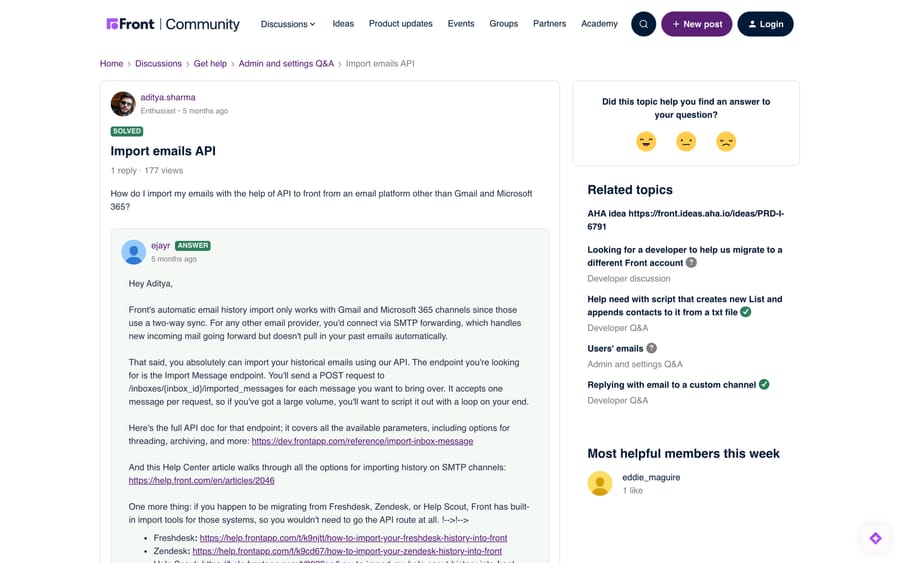
That endpoint is per message, so a 40,000-ticket history with an average of four messages a ticket is 160,000 API calls to write, rate-limit and retry. It is a sensible route for a selective import (the last 18 months of one inbox, say) and a poor one for a full history, which is the case a partner exists to handle. Our Front API guide covers tokens, scopes and rate limits.
In what order should you cut over from Freshdesk to Front?
- Create teammates, inboxes and custom fields in Front. Do this a week ahead.
- Rebuild the top 10 rules and the macros you use daily. Leave the long tail.
- Export everything from Freshdesk.
- Freeze Freshdesk: stop new tickets landing there by scheduling the forwarding change.
- Run the import, or hand the export to your partner.
- Repoint the email addresses at Front.
- Recreate tags by hand, starting with the 10 that carry your reporting.
- Keep Freshdesk read-only for 90 days. Canceling early is how teams discover which report they forgot.
Where does an AI agent fit after the move?
A migration is the cheapest moment to change how much of the queue a human touches, because you are rebuilding the routing anyway. The tickets that were repetitive in Freshdesk will be repetitive in Front, and the rules you are about to rewrite are the same rules that were not deflecting them before.
Macha is an agent layer that sits on top of Front: it reads the conversation, answers from your connected knowledge, and tags or routes what it cannot handle. It suits teams who have just landed in Front with a clean taxonomy and want the repetitive third of the queue handled without hiring for it. It does not replace Front, and it will not import your history. Pricing is one plan on monthly ticket volume, from $299 a month for 750 tickets, about $0.40 a ticket, with setup by our team included and a $50 free usage trial. See Macha on Front and pricing.
Frequently asked questions
Does Front import Freshdesk tags? No. Front's importer brings inboxes, contacts, conversations and messages, attachments, comments and conversation assignments, and its documentation lists tags and teammates as the two things it skips. Recreate tags by hand, or use a migration partner that carries them.
How many Freshdesk tickets can Front import? Front's article states the importer takes your 9,000 most recent Freshdesk tickets, and that running it again does not retrieve more. Above that, use Help Desk Migration or ClonePartner, both of which Front recommends, or write against the Core API's imported_messages endpoint.
How long does a Freshdesk to Front import take? Front estimates roughly one hour per 3,000 tickets, so a full 9,000-ticket import runs about three hours. Plan the cutover across two days rather than one afternoon, and keep Freshdesk answering mail until the import finishes.
Should I use Front's importer or a migration partner? Front recommends a partner and says its own importer "is not actively maintained". Use the free importer for a small history you can afford to re-do; use a partner when you are over the ticket cap, need tags carried across, or need somebody accountable for the result.
How do I export my data from Freshdesk first? Go to Admin, then Account, then Account Details, then Export data, and click Export for a full XML account export. Export tickets separately from the All tickets view with the Export button, choosing CSV or Excel and the fields you want, and export contacts from the Customers tab. You need an Account Administrator role for the account-level export.
What happens to my Freshdesk automations and SLAs? They stay in Freshdesk. Automations get rebuilt as Front rules, which are capped at 10 on Starter and 20 on Professional and unlimited on Enterprise, and SLA policies and business hours are reconfigured from scratch. Screenshot them before you cancel the Freshdesk account.
Can I migrate only part of my Freshdesk history? Yes, through the API rather than the importer. Front's Core API accepts a POST to /inboxes/{inbox_id}/imported_messages per message, which lets you bring in a chosen inbox or date range. It is one call per message, so scope it deliberately.
Sources:
- Import your Freshdesk history into Front (Front help center, checked September 20 and 24, 2026)
- How do I export my helpdesk data? (Freshdesk support)
- Freshdesk pricing and Front pricing (both checked September 20, 2026)
- Moving from FreshDesk (Front Community, September 24, 2024)
- Tags vs custom fields in Front for scalable reporting (Front Community, January 21, 2026)
- Import emails API (Front Community, March 28, 2026)
Add AI agents to your Freshdesk
Macha reads the ticket, drafts the reply and takes the action, inside the Freshdesk you already run.