Intercom
 Shopify
 Stripe
 Slack
Slack Notion
 Google Workspace
 Confluence

How Do You Migrate from Zendesk to Intercom? 3 Routes and What Breaks (2026)


Intercom's built-in Zendesk importer moves users, organizations and tickets for accounts under 150,000 tickets, but it skips tags, side conversations and call recordings and runs all or nothing. Bigger or pickier moves go through a migration service or your own scripts, and help center articles always travel on a separate path.
Key takeaways
- Intercom's built-in Zendesk importer, at Settings > Data > Imports & exports, suits accounts with fewer than 150,000 tickets and moves users, organizations, tickets, notes and attachments.
- Intercom's Zendesk importer cannot migrate tags, side conversations or call recordings, caps attachments and inline images at 10 each per ticket, and offers no partial imports.
- Help Desk Migration's case study with Assignr reports that moving more than 14,000 tickets from Zendesk to Intercom cost around $1,500.
- Intercom advises posting one reply with the full transcript, because replaying a Zendesk thread message by message inflates API calls by 10 to 100 times.
- Zendesk Guide articles reach Intercom through Knowledge > Sources, where Sync re-syncs read-only articles every hour and Import sets up 301 redirects from old Zendesk URLs.

Most teams move from Zendesk to Intercom with Intercom's built-in importer at Settings > Data > Imports & exports > Import from Zendesk, which carries users, organizations and tickets for accounts under 150,000 tickets. Above that, or if you need tags, side conversations or call recordings, use a migration service or your own scripts on both APIs.
If you're still weighing the move itself, our Zendesk vs Intercom comparison covers the two platforms feature by feature. This page assumes the decision is made.
Which Zendesk to Intercom migration route should you pick?
| Route | Carries | Ceiling | Effort |
|---|---|---|---|
| Intercom's native Zendesk importer | Users, organizations, tickets, notes, attachments, data attributes | Under 150,000 tickets, no partial runs | A few hours of mapping, then it runs itself |
| A migration service (Help Desk Migration, Crane) | The above plus tags, side conversations as private notes, call recordings, articles, agent ownership | Priced per record | A demo run, a mapping pass, a paid full run |
| Your own scripts on both APIs | Whatever you write | Your rate limits and patience | Days of engineering, plus testing |
Most teams need one route for people and tickets and a second, separate path for help center articles. The article path is the same regardless of which of the three you pick.
How does Intercom's built-in Zendesk importer work?
This is the one to try first, and it's newer than most of the third-party guides ranking for this query. Intercom's documentation for it was last written on June 23, 2026.
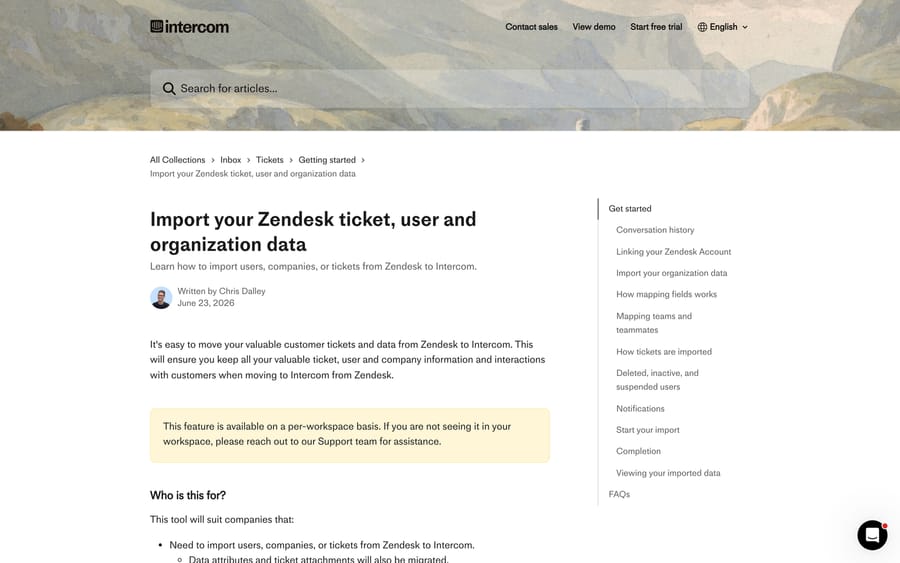
Before you start, three things have to already exist in Intercom, because the importer maps onto them rather than creating them:
- Ticket types for both customer and back-office tickets. A Zendesk ticket that involved a customer imports as an Intercom Customer ticket; an internal-only one imports as a Back-office ticket. Intercom's doc is explicit that you need a ticket type set up for both before you import.
- Your teams and teammates. Tickets need an assigned team and teammate, so create them first, then map Zendesk groups and agents onto them. You also pick a default team and teammate for anything that can't be mapped, and only an agent with a full seat can be that default.
- Custom data attributes you want Zendesk custom fields to land in. The importer will offer to create a matching field for you, but reviewing the list up front is faster than fixing it after.
Then run it. Go to Settings > Data > Imports & exports and choose Import from Zendesk. Enter your Zendesk account URL and link the account with a Zendesk admin login, since admin permissions are what let the tool read your data. Toggle on each object you want, pick the fields, and check the mapping screen: fields with a green tick are mapped, fields with a skip icon are being dropped. One ordering rule catches people out, and it's in the doc: customers can't be migrated without organizations being migrated.
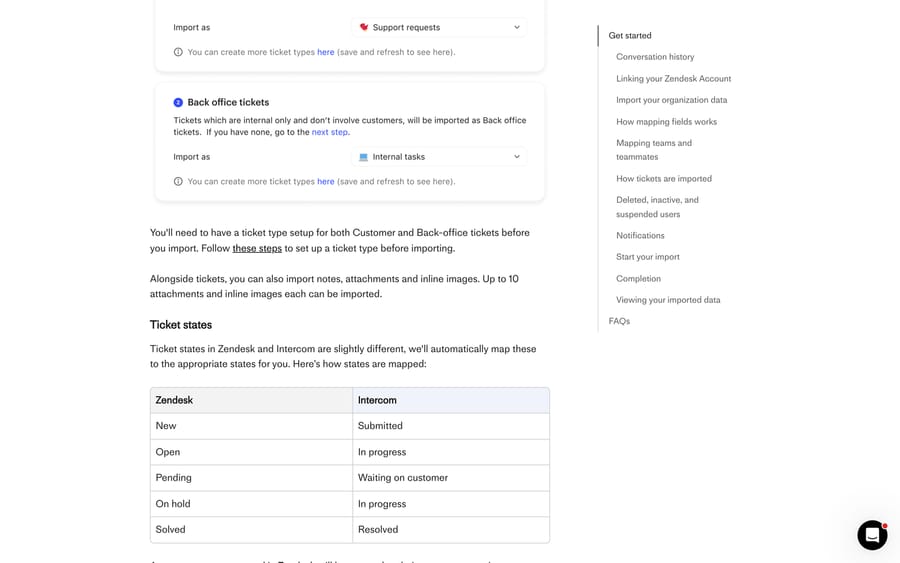
Ticket states map automatically, which is worth knowing before you rebuild your views. New becomes Submitted, Open becomes In progress, Pending becomes Waiting on customer, On hold also becomes In progress, and Solved becomes Resolved. Custom Zendesk states land on the nearest of those five; mapping a custom state to a custom Intercom state isn't supported.
What this route leaves behind
Intercom lists the tool's limits in plain language, and they're the reason some teams still buy a migration service:
- Tags cannot be migrated. You recreate them in Intercom.
- Side conversations cannot be migrated.
- Call recordings cannot be migrated.
- Attachments and inline images cap at 10 each per ticket.
- Partial imports aren't available. Every ticket goes, and if a run fails you start again: organizations and customers get updated, and previously imported tickets are deleted and reimported.
- Import error logs can't be exported from the tool, so debugging a failed run means reading the history page.
- Deleted, inactive and suspended Zendesk users are skipped, and their comments and tickets are reassigned to a default contact named "Inactive Intercom Contact".
- Zendesk multiselect and lookup fields can't import directly, because Intercom conversation attributes hold a single value. The documented workaround converts them to text with values separated by commas, which transfers the data but costs you filtering and reporting on the individual options.
One more, because it bites during the run rather than after it: the import is a snapshot. Intercom's doc says it imports your data as it is at that exact time, so anything that changes in Zendesk afterwards needs another run.
Turn the notifications off twice
Intercom suspends email notifications automatically during the migration. Its own doc then says some ticket notifications can still reach customers, and tells you to disable Ticket Updates for the whole workspace first, at Settings > Channels > Email > Email Settings > Notifications.
This is the single most asked question about this migration. In a community thread from May 2023 with 799 views, Ian L asked how to stop email notifications going out to customers while a script created historical conversations. Intercom's Jacob Cox pointed at the same notification settings, and added the detail that matters if you're scripting: a notification fires on an admin reply, so end-user-started conversations with no teammate reply won't send anything.
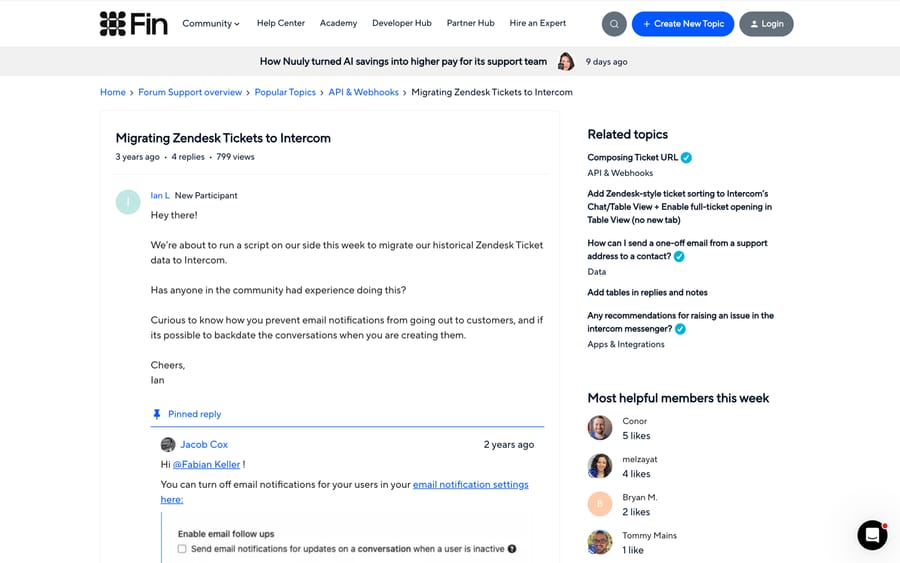
The second half of Ian's question, whether you can backdate conversations, never got answered in the thread. You can. Intercom's Create conversation endpoint takes a created_at Unix timestamp, and the API reference describes the field as recommended specifically for migrating past conversations from another source.
When do you need a migration service instead?
If you're over 150,000 tickets, want your tags, or want to move only the last two years, this is the route. Help Desk Migration (by Relokia, an Intercom partner) is the one that turns up most; Crane and a generic "Data Migration" app also sit in the Intercom App Store.
Its Intercom page lists the record types it carries: agents, users and leads, companies, tickets and conversations on the help desk side, and collections, sub-collections and articles with translations and redirects on the knowledge base side. Three options are worth naming because they cover the native importer's gaps. Side conversations migrate as private notes, in the vendor's words, because Intercom doesn't hold them as a separate object. Call recordings come across as ticket attachments. Inline images import as attachments so you don't get broken image icons.
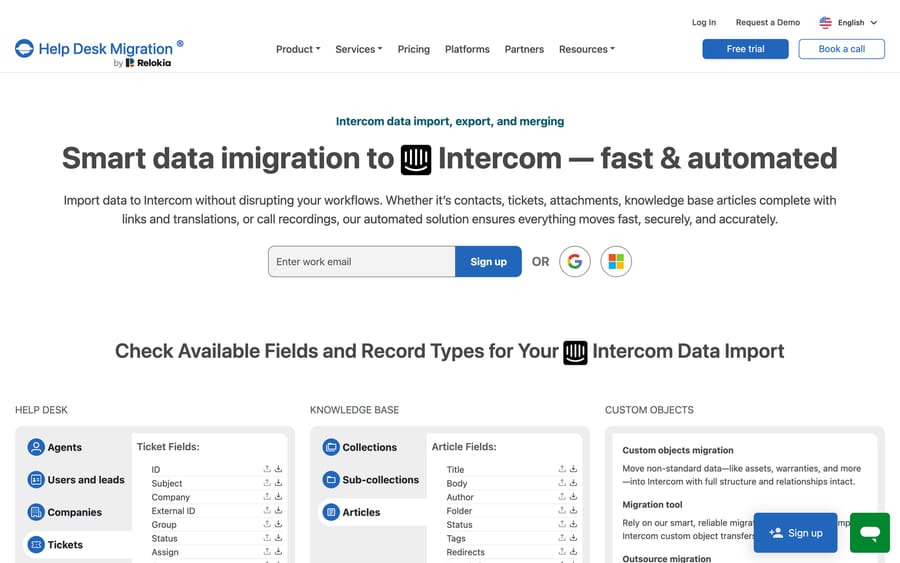
The free demo moves 20 random tickets and 20 knowledge base articles; a Custom Demo lets you pick the 20 of each you want to inspect. Delta migration re-runs afterwards to catch anything created during the window, and Interval migration splits a large set into scheduled chunks.
On cost, the vendor quotes by record count after a demo and publishes no rate card. The useful public number is in its own case study: Assignr, a refereeing SaaS, moved 14,000-plus tickets from Zendesk to Intercom, and founder Jeff Wigal says the migration cost around $1,500. He also ran the test migration twice, once before cleaning up Zendesk and once after, which is the cheapest hour in any migration plan.
Name the incentive here, because it shapes what you'll be sold: a migration vendor bills per record, so its pricing rewards moving your whole archive, while your own reporting rarely needs conversations from four years ago. Decide your cutoff date before you run the demo, not after you see the quote.
How do you migrate with your own scripts on both APIs?
Intercom publishes a genuinely detailed guide to doing this by hand, which is unusual and makes the route more viable than it looks. Two decisions come before any code.
Conversations or tickets. Intercom's guidance: Zendesk tickets that were really customer support interactions should become Conversations, which are visible in the Messenger and support real-time replies. Structured, trackable requests like bug reports should become Tickets, which have defined states and custom attributes. You can do both, but each structure needs its own import script and its own validation.
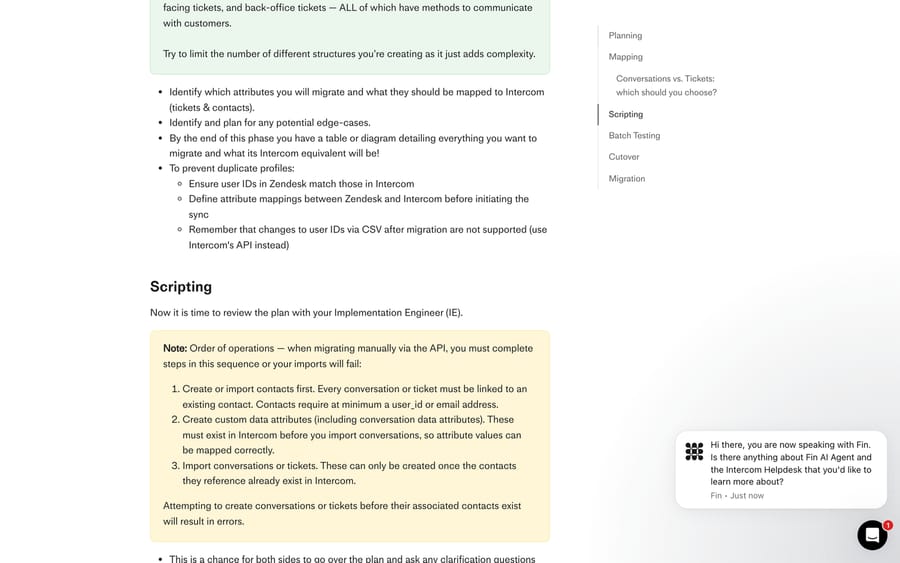
Order of operations. Intercom's doc is blunt that imports fail if you get this wrong. Create or import contacts first, because every conversation or ticket must link to an existing contact with at minimum a user_id or an email address. Create your custom data attributes second, so attribute values have somewhere to land. Import conversations or tickets third.
The shape of each record is: read the ticket from Zendesk with GET /api/v2/tickets and GET /api/v2/tickets/{id}/comments, match or create the Intercom contact, create the conversation by simulating an inbound message from the customer, then reply once with the full transcript. Intercom recommends that last step explicitly over replaying the thread message by message, because message-by-message migration inflates your API call count by 10 to 100 times. Then set the state.
Two traps in that sequence. Closed tickets pass through open, updated and replied-to states before they close, so any Workflow that acts on conversations will fire on your migration unless you add an exception for "Created via API" or switch the Workflows off for the run. And a reply on an email-channel conversation emails the customer unless notifications are suppressed, which is the same problem as Route 1 arriving by a different door.
For cutover, Intercom describes two patterns. Drain and Fill points new requests at Intercom early, works both platforms until the Zendesk queue empties, then migrates everything as closed tickets. Live Cutover migrates the open tickets at the moment you switch. Drain and Fill is slower and much easier to coordinate.
Teams that would rather not own this can buy a migration package from Intercom's Customer Implementation Services, where an implementation engineer does the work and you validate the result.
How do Zendesk help center articles move to Intercom?
Your Zendesk Guide content doesn't come through the ticket importer. It goes through Knowledge > Sources, and there are two modes with genuinely different consequences.
Sync keeps Zendesk as the source of truth. Articles appear in Intercom read-only, re-sync every hour, and power Fin, Copilot and the Inbox. Three consequences to plan around: your customer-facing help center stays on Zendesk, Intercom suppresses search engine indexing of its own help center while a sync is active to avoid duplicate content, and a customer clicking "Open in Help Center" on a synced article lands on Zendesk. Synced articles are readable through GET /articles but PUT and DELETE on them are blocked.
Import makes Intercom the source of truth. Articles become editable, Zendesk labels and categories carry over as Intercom tags, and Intercom sets up 301 redirects from the old Zendesk URLs. Imported articles aren't placed into a collection automatically, so budget an hour to organize them.
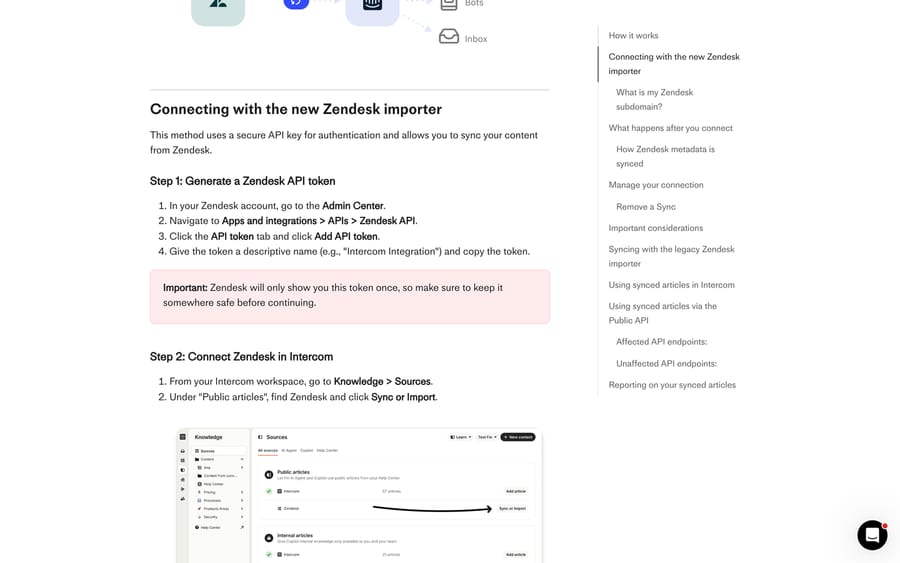
Either mode needs a Zendesk API token, generated at Admin Center > Apps and integrations > APIs > Zendesk API > API token > Add API token. Zendesk shows the token once.
Two limits worth reading before you commit. Only published articles that are public or visible to signed-in users are eligible, and only one Zendesk Help Center can be connected at a time. In a 2023 community thread, Intercom Support's Larissa Alberti spelled both out, and the person who asked came back to report that pointing the sync at her subdomain moved articles she hadn't intended to move. Selecting specific articles is a migration-service job, not a native one.
If you set up an article sync with Intercom's older importer, check it now. Intercom's docs say the legacy Zendesk importer is deprecated on 25 April (the page gives no year), after which its manual and daily syncs stop. Move it across from Knowledge > Sources > Manage > Migrate importer; that migration still runs after the cutoff.
How we researched this
Every path, limit and label above was read on September 20, 2026 from Intercom's own help center, its API reference, Help Desk Migration's Intercom page, and two public threads on community.intercom.com. We did not run a migration for this post, so there are no timings of our own here, and every screenshot is a documentation page or a public forum thread. Where Intercom's wording is a hard limit, such as the 150,000-ticket ceiling, we quote it.
What do you rebuild by hand on every route?
No route carries your operational layer. Zendesk macros become Intercom macros by hand. Triggers and automations become Workflows, and the logic rarely maps one to one. Views get rebuilt against Intercom's filters. Answer Bot flows become Fin, a different product with a different pricing model, so budget time to test it. Export your Zendesk macro, trigger and view lists before you decommission anything: ten minutes of insurance.
Going the other way instead? Our Intercom to Zendesk migration guide covers Zendesk's ticket import API and data importer, and what moves in a Zendesk data migration is the object-level reference.
If Zendesk's AI costs are part of why you're moving, the AI layer and the help desk are separable decisions. Macha is an AI agent layer that runs on top of the help desk you already have, and it fits teams who want agents acting inside the ticket instead of a second chat widget in front of it. It runs on Zendesk, Freshdesk, Gorgias, Front, HubSpot or Intercom, so it stays available on either side of this migration. It doesn't replace the desk itself. Either way, the pricing is published: one plan, billed on monthly ticket volume, setup and monitoring by the Macha team included, and how it works on Zendesk is on its own page.
Frequently asked questions
Does Intercom have a native Zendesk importer? Yes. It's at Settings > Data > Imports & exports > Import from Zendesk, and it moves users, organizations and tickets along with notes, attachments and data attributes. Intercom notes the feature is enabled per workspace, so if you can't see it, ask Intercom Support to turn it on.
How many tickets can Intercom's Zendesk importer handle? Intercom's documentation says the tool suits companies migrating fewer than 150,000 tickets. Above that, or where you need a specific subset instead of everything, Intercom points to other options, which in practice means a migration service or your own scripts.
What doesn't transfer from Zendesk to Intercom? Using the native importer: tags, side conversations, call recordings, and anything beyond 10 attachments or 10 inline images per ticket. Deleted, inactive and suspended users are skipped, and their tickets are reassigned to a placeholder contact. Macros, triggers, views and bot flows are rebuilt by hand on every route.
Will customers get emails when I migrate tickets into Intercom? Intercom suspends email notifications automatically during the import, but its own doc says some ticket notifications can still go out, and recommends disabling Ticket Updates for the whole workspace first at Settings > Channels > Email > Email Settings > Notifications. If you're scripting the migration, remember a notification fires on an admin reply, so also exclude "Created via API" from your Workflow triggers.
Can I backdate conversations I create in Intercom during a migration? Yes. The Create conversation endpoint accepts a created_at Unix timestamp, and Intercom's API reference describes that field as recommended for migrating past conversations from another source. Without it, every imported conversation carries today's date.
How do Zendesk Guide articles move to Intercom? Through Knowledge > Sources rather than the ticket importer, with a choice of two modes. Sync keeps Zendesk as the source of truth and makes the articles read-only in Intercom, refreshing hourly. Import makes Intercom the source of truth, carries labels and categories across as tags, and sets up 301 redirects from the old Zendesk URLs.
How much does a Zendesk to Intercom migration cost? Intercom's native importer is included with your workspace. Migration services price by record count and quote after a free demo; the clearest public figure is Help Desk Migration's own case study with Assignr, whose founder says moving 14,000-plus tickets cost around $1,500.
Do Zendesk ticket statuses survive the move? They map. New becomes Submitted, Open becomes In progress, Pending becomes Waiting on customer, On hold becomes In progress, and Solved becomes Resolved. Custom Zendesk statuses land on whichever of those five is nearest, and custom-to-custom mapping isn't supported, so rebuild any view that relied on a custom status.
Sources: Import your Zendesk ticket, user and organization data · Historical data migration to Intercom · Sync public articles with Zendesk · Import public articles from Zendesk · Switching from Zendesk to Intercom · Intercom API: create a conversation · Zendesk: about the data importer · Zendesk Tickets API · Help Desk Migration: Intercom · Community: migrating Zendesk tickets to Intercom · Community: migrating selected articles
Add AI agents to your Zendesk
Macha reads the ticket, drafts the reply and takes the action, inside the Zendesk you already run.