





 Shopify
 Stripe
 Slack
Slack Notion
 Google Workspace
 Confluence

How Do You Add an AI Chat Agent to Front Chat? (2026)


Front's own route to AI chat answers is Autopilot Resolve, billed once per conversation on top of Front seats ($0.89 for a resolution, $0.39 for a handoff, as of October 2026), and its agents work inside the Playbooks and knowledge you give them. For multi-part questions and live data lookups, you can connect a separate AI agent layer that answers behind the same Front Chat widget.
Key takeaways
- Front's live chat product page says to automate responses with AI you should use Autopilot Resolve, an AI-powered self-serve channel, rather than Front Chat itself.
- Front's older Topic-based Autopilot auto-replies, which skip messages with multiple Topics, are a legacy version as of October 2026; current Autopilot AI agents handle the conversations assigned to them, guided by Playbooks.
- Front's Autopilot bills each conversation once, $0.05 for triage, $0.39 for a handoff and $0.89 for a resolution as of October 2026, while Copilot costs $20 per seat per month and is included on the Enterprise plan.
- Front's AI Answers chatbot is now legacy and no longer available for purchase, and Front's help center points buyers to Autopilot Resolve instead.
- Macha, an AI agent layer for Front, bills per ticket starting from $299 a month for 750 tickets, rather than per conversation or per resolution.

To add an AI agent to Front Chat, you either switch on Front's own Autopilot Resolve (billed once per conversation on top of Front seats: $0.05 for triage, $0.39 for a handoff or $0.89 for a resolution, as of October 2026) or connect a separate AI agent layer to Front that answers behind the same widget. Front's own live chat page says it plainly: "To automate responses with AI, you should use Autopilot Resolve, an AI-powered channel for self-serve support embedded in your app or website." Autopilot handles the well-defined requests its Playbooks and knowledge cover; an agent layer is for the multi-part questions and live data lookups that fall outside those guardrails. Prices and doc quotes below were checked on Front's site on 24 September 2026.
| Native Front Autopilot | Macha agent layer on Front | |
|---|---|---|
| Where it runs | Inside Front (AI agents, Playbooks + rules) | On top of Front via live connector |
| Triggers on | Conversations assigned to the AI agent (the legacy version: a single tagged Topic) | Understood intent across the message |
| Multi-Topic message | Legacy Topic version won't reply (per docs) | Reasons across the whole question |
| Live data lookups | Limited | Custom tools call your API |
| Handoff | Hands off when it can't reply, via comment | Rule-based handoff with full context |
| Billing shape | Add-on, $0.05 triage / $0.39 handoff / $0.89 resolution per conversation | Per ticket (from $299/mo for 750) |
| Replaces Front? | It is Front | No, runs on top of Front |
What is Front Chat, and where does AI plug in?
Front Chat is Front's branded live-chat widget: the bubble you embed on a website or in a mobile app so visitors can start a conversation without leaving the page. Per Front's live chat product page, you can customize the widget's colors, logo, header greeting and placement, thread multiple conversations for the same contact, collect CSAT inside the chat, and send proactive messages for offers or updates. Native iOS and Android SDKs put the same chat in a mobile app.
Because Front is a shared-inbox, collaborative platform, a Front Chat conversation lands in the same shared inbox as your email, SMS and social channels. A support rep, a sales rep or an ops teammate can all see it, comment internally, assign it and reply, with no context lost when the conversation moves between people or channels.
The nuance is where AI plugs in. Front Chat is built for real-time conversations with people. Front's AI answers come from Autopilot, and on its chat-style surface that means Autopilot Resolve, which Front describes as its own AI-powered self-serve channel. Front's Autopilot documentation lists the channels Autopilot replies on as email, Autopilot Resolve, Portal, Slack, SMS and WhatsApp; Front Chat is not on that list. So the widget is one front door, and the AI behind your chat is either Autopilot Resolve or a dedicated agent layer you connect on top.
What does native Front Autopilot do well?
Autopilot is a real AI agent, not a decision-tree bot, and for a lot of traffic it does the job. Front's original version auto-replied to conversations tagged with a Topic that has auto-replies enabled; as of October 2026 that Topic-based setup is Front's legacy version, and new Autopilot AI agents own the conversations assigned to them, following instructions, knowledge sources and Playbooks (Using AI agents in Front). When it fires, it "identifies any similar conversations and relevant knowledge articles" to write the reply, so it's grounded in your past resolutions and help center rather than making things up.
A few native strengths worth naming:
- It's built into the platform. No connector, no separate console: Autopilot lives inside Front's rules, assignment and Playbooks.
- It shows its work in the thread. While Autopilot is on a conversation you see "Autopilot is handling this conversation," and AI-sent replies are labeled "Generated by AI." A teammate can click "Step in" to take over.
- Front's wider AI suite is useful. Copilot drafts and summarizes for agents, Smart QA scores conversation quality, and Smart CSAT reads sentiment. These make the human faster even when AI isn't sending the reply.
If your chat volume is mostly a handful of well-defined request types with good help-center coverage, native Autopilot may be all you need.
Where does native Front AI stop?
These are the limits that lead teams to add a dedicated agent layer rather than relying on Autopilot alone.
Autopilot needs the right setup, cleanly. In the legacy Topic-based version (Playbooks created before 6 October 2026 also stay on a legacy version), the docs are specific: Topics must be configured, the Autopilot add-on enabled, and the conversation must sit in a shared inbox you've selected. If a message contains multiple Topics, Autopilot won't reply and leaves the conversation open for a person. Real chat questions are messy (a visitor asks about a refund and a shipping delay in one line), and that multi-Topic case falls straight through to a human.
It's a paid add-on. Front's seats run $25 (Starter), $65 (Professional) and $105 (Enterprise) per seat per month on Front's pricing page. Autopilot sits on top, starting at $0.05 per conversation, and Front's help center bills each conversation once at the highest level reached: $0.05 for triage, $0.39 for a handoff, $0.89 for a resolution (Front's Autopilot pricing, as of October 2026). Copilot is $20/seat/month (included on Enterprise), and Smart QA and Smart CSAT are Enterprise-only as of October 2026. It's a fair model, but it's a separate line item layered on the seat cost.
The old chat bot is gone. If you went looking for Front's classic chatbot, AI Answers is now legacy: Front's help center states it "is no longer available for purchase" and points to Autopilot Resolve instead. So there's one native path forward for automated chat answers, and it lives inside the AI agent, Playbook and rules model above.
None of this makes Autopilot bad. It's native and works well inside its guardrails, and goes quiet outside them. That gap (the multi-Topic question, the one that needs a live order lookup, the answer that has to reason across two systems) is where an AI agent layer earns its place.
How do you add a resolving AI agent layer on top of Front?
Macha is an AI agent layer that runs on top of the Front you already use through the live Macha–Front connector. It does not replace Front, your shared inboxes, your rules or the Front Chat widget. You keep the widget, the branding and the shared-inbox workflow as they are. Macha adds the reasoning layer that reads a chat message, works out intent instead of matching a Topic tag, and resolves the question against a real source of truth.
The practical playbook for wiring a resolving chat agent onto Front:
- Keep Front Chat as your widget. The visitor experience, colors, greeting and shared-inbox routing stay in Front.
- Connect Front to Macha. Link your Front account so incoming conversations can be read and answered by an agent. The mechanics are covered in connecting Front to Macha to route conversations to AI.
- Ground the agent in your knowledge. Point the agent at your help center, docs and past resolutions so every answer is grounded, the same principle Autopilot uses, applied to a wider set of questions.
- Give it tools for the questions a KB can't answer. A custom tool turns your REST API into something the agent can call (look up a live order, check subscription status, verify an invoice), so a chat about "did my refund go through?" gets a real answer, not a link.
- Set the handoff rules. Decide when the agent should stop and bring in a person (covered below), and what context it hands over.
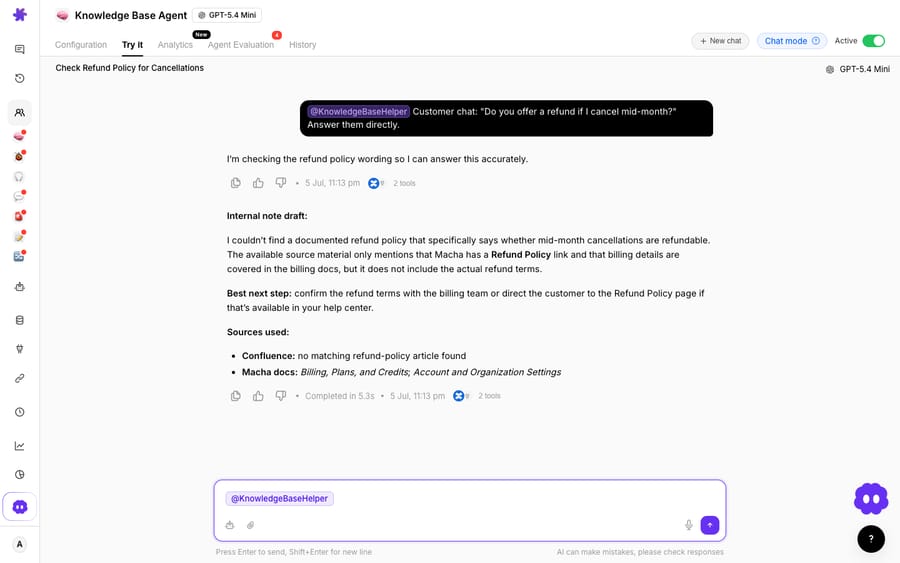
Above: a Macha demo-org chat agent resolving a refund question, grounded in its connected knowledge base. This shows the Macha agent in the dashboard, not a live Front conversation, but it's the resolution behavior you layer onto the Front Chat widget. For the broader picture, see Front AI explained and how to build an AI agent for Front.
The category this belongs to is AI agents for customer service: software that reads the conversation and does the reasoning a keyword or Topic match can't. Front stays the shared inbox and the widget; the agent becomes the resolver behind the chat bubble.
How should handoff to a teammate work?
A resolving agent is only trustworthy if it knows when not to resolve. Both native Autopilot and a layered agent handle this; the difference is how much control you get.
Front's native behavior is clean: per the Autopilot docs, when Autopilot can't generate a reply, it passes the conversation to a teammate, who gets a handoff comment in the thread. The human inherits the conversation with context attached.
A layered agent lets you make that handoff intentional rather than only a fallback. Rules worth setting:
- Confidence floor. If the agent isn't confident it's grounded, it hands off instead of guessing. Same instinct as Autopilot's "can't generate a reply," but tunable.
- Topic and intent triggers. Route anything touching billing disputes, cancellations, security or a named VIP straight to a person, however confident the agent is.
- Explicit-ask trigger. If the visitor types "talk to a human," hand off immediately.
- Rich context on transfer. The teammate should inherit a summary, the sources the agent checked and any tool results (the live order it looked up), so they're not re-reading a cold transcript.
- Business-hours awareness. Outside hours, the agent resolves what it can and captures the rest for the shared inbox to pick up.
Because the conversation lives in Front's shared inbox the whole time, a support rep, sales rep or ops teammate can jump in mid-chat, comment internally or reassign.
How do the two options bill?
The table at the top sums up the differences. On billing: Macha bills per ticket, from $299/mo for 750 tickets. One chat is charged once however many searches, tool calls and replies the agent makes inside it, not per resolution and not per seat, and setup and monitoring by the Macha team are included. Front's Autopilot is billed per conversation on top of your Front seats. For how the native side is priced in full, see Front pricing explained.
FAQ
Can I add an AI agent to the Front Chat widget? Yes. Front's own live-chat page says to use Autopilot Resolve, its AI-powered self-serve channel, to automate responses with AI. Alternatively, you can connect a resolving agent like Macha to Front and keep the Front Chat widget and shared inbox as they are.
Does Front's native Autopilot work on chat? Autopilot's documented channels are email, Autopilot Resolve, Portal, Slack, SMS and WhatsApp, and it works only in shared inboxes. As of October 2026, Autopilot AI agents handle the conversations assigned to them; in Front's legacy Topic-based version it replied only to conversations tagged with a Topic that has auto-replies enabled, and a message spanning multiple Topics fell to a human.
What happened to Front AI Answers? AI Answers is now a legacy feature. Front's help center states it "is no longer available for purchase" and points teams to Autopilot Resolve instead.
How does handoff-to-teammate work? Natively, when Autopilot can't generate a reply it passes the conversation to a teammate, who gets a handoff comment. A layered agent lets you go further: confidence floors, Topic and VIP triggers, an explicit "talk to a human" trigger, and a full context summary so the teammate never inherits a cold transcript.
Does adding a Macha agent replace Front Chat? No. Macha runs on top of the Front you already use through the live connector. You keep the Front Chat widget, your shared inboxes and your rules; Macha adds the agent that reads the conversation, resolves it against a grounded source of truth, and hands off to a teammate by your rules.
Ready to turn your Front Chat widget from a deflector into a resolver? Start a free trial of Macha with $50 of free usage and no credit card, and connect it to your Front.






