





 Shopify
 Stripe
 Slack
Slack Notion
 Google Workspace
 Confluence

How Do You Add an AI Chat Agent to Gorgias Chat? Setup, Handoff Rules and Cost (2026)


Gorgias's native AI Agent can answer shoppers on your chat widget once you connect a Shopify store, load your Help Center and toggle it on under Deploy → Chat. Below are the setup steps, the handover rules that keep it from damaging your CX, what each automated interaction costs, and where a dedicated agent layer on top of Gorgias fits.
Key takeaways
- Gorgias AI Agent on Chat is enabled from the AI Agent menu under Deploy → Chat, and it needs a connected Shopify store plus Lead, Admin or Account Owner permissions.
- Gorgias says AI Agent on Chat is not supported on stores that use BigCommerce, Magento or WooCommerce, so non-Shopify stores need a different chat agent.
- Gorgias bills AI Agent per automated interaction at $1.00 on Starter, $0.90 on Basic and Pro and $0.85 on Advanced, then $1.50 past the plan's bundle.
- Gorgias AI Agent hands a chat to a human when it detects anger, an explicit request for a person, a sensitive topic or a listed handover topic, and handovers are not charged.
- Macha runs on top of Gorgias and bills per ticket, from $299 a month for up to 750 tickets, so triage and partial help cost the same as a full resolution.

To add an AI chat agent to Gorgias Chat, open the AI Agent menu, go to Deploy → Chat, pick your chat channels, toggle Enable AI Agent on Chat to ON and save. It only works with a connected Shopify store, and you need Lead, Admin or Account Owner permissions plus knowledge (Help Center articles, website content or Guidance) loaded first. Billing is per automated interaction: $1.00 on Starter, $0.90 on Basic and Pro, $0.85 on Advanced, then $1.50 per interaction past your plan's bundle (gorgias.com/pricing, checked 24 September 2026).
| Question | Answer (checked 24 September 2026) |
|---|---|
| Where to enable it | AI Agent menu → Deploy → Chat → Enable AI Agent on Chat |
| Store platform | Shopify only; BigCommerce, Magento and WooCommerce not supported |
| Permissions | Lead, Admin or Account Owner |
| Knowledge | Help Center, website content, Guidance; order data after the shopper signs in |
| Price per automated interaction | $1.00 Starter, $0.90 Basic and Pro, $0.85 Advanced |
| Past the included bundle | $1.50 per interaction |
| Handed-over chats | Not charged as automated interactions |
What does "an AI chat agent" mean on Gorgias?
People mean two different things by an AI chat agent, and the difference matters for your CX. A deflection bot shows a shopper some help-center articles and hopes they read the right one. It reduces tickets by getting in the way. A resolving agent reads the shopper's actual question, pulls the relevant fact from your knowledge base or their order, and gives a specific answer that closes the conversation. Gorgias's native AI Agent is in the second camp: per the official chat documentation, it resolves conversations directly on the widget, adapts its tone to be shorter and more conversational on chat than on email, and hands off to a human when it should.
That split between deflection, resolution and full automation runs through everything below, and it's the same lens we use in our Gorgias AI Agent explained walkthrough.
What do you need before you enable it?
Gorgias's AI Agent on Chat has a few hard requirements. Per the docs, you need:
- AI Agent turned on for your account. Gorgias now lists AI Agent "on every plan", billed per automated interaction on top of your Helpdesk plan.
- Lead, Admin, or Account Owner permissions.
- A Shopify store connected to Gorgias. The docs state that AI Agent isn't supported on stores that use BigCommerce, Magento or WooCommerce.
- Chat installed on your website and connected to your store.
- AI Agent onboarded with knowledge: your Help Center articles, website content, or Guidance documents.
The last point decides whether your agent resolves or flails. An AI chat agent is only as good as what it's grounded in, so put real answers to shipping, returns and subscription questions in your Help Center before you flip the switch.
How do you turn on AI Agent on Chat?
Once the prerequisites are met, it takes five clicks. Per Gorgias's chat setup guide:
- Open the dropdown menu in the top-left and select AI Agent.
- Under the Deploy section, select Chat.
- Open the channel dropdown and choose one or more Chat channels you want the agent to cover.
- Toggle Enable AI Agent on Chat to ON.
- Select Save Changes.
One thing to know: Article Recommendations are automatically disabled when you enable AI Agent on Chat, so the widget doesn't send conflicting messages. That's the platform pushing you from a recommendation bot toward a resolving agent.
How do you ground it in your knowledge and order data?
A resolving agent needs two kinds of knowledge: general policy and shopper-specific facts. Gorgias's AI Agent draws general answers from your Help Center content, website content, and Guidance documents. For personal questions it can read the shopper's order, but only after the shopper signs in with an email or SMS verification code. That's what lets it answer a real WISMO ("where is my order?") question with a tracking status instead of a canned "check your email" reply.
Here's what that looks like with a dedicated agent layer resolving a live shipping question end to end, grounded in the knowledge base with a single tool call:
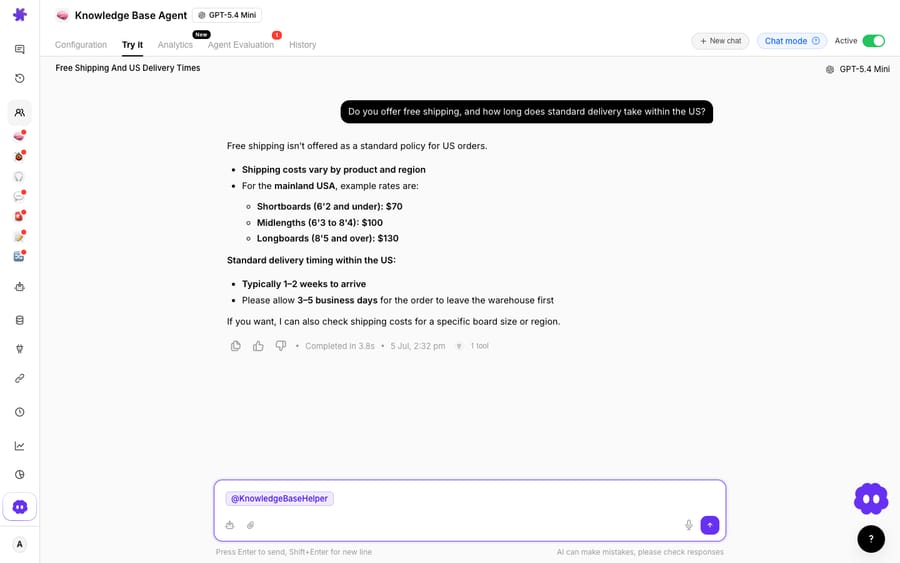
The pattern to copy: the agent doesn't recite your whole shipping policy. It retrieves the one fact the shopper asked for (free-shipping threshold, US delivery window) and returns it in a sentence. That's resolution, not deflection.
When does the agent hand a chat to a human?
The most important design decision in an AI chat agent isn't what it answers. It's when it stops and hands to a human. Per Gorgias's handover documentation, AI Agent hands over when it:
- Detects anger or frustration in the message.
- Gets an explicit request for a human.
- Spots a sensitive topic: self-harm, threats of violence, threats of legal action, or requests involving financial account details.
- Hits a handover topic you've defined (for example chargebacks or wholesale).
- Lacks the knowledge or confidence to answer reliably, or judges its draft not accurate enough to send.
For an ecommerce store, a sane starting set of rules looks like this:
| Shopper intent | AI resolves? | Handoff rule |
|---|---|---|
| WISMO / order status | Yes, reads order and tracking after sign-in | Only if tracking is missing or stuck |
| Free-shipping / delivery-time question | Yes, KB-grounded | Rarely |
| Return / exchange eligibility | Yes for policy; hand off for exceptions | Off-policy or damaged item |
| Subscription: skip / pause / swap | Yes if connected to the action | Cancellation-save or billing dispute |
| Chargeback / fraud / legal | No | Always hand off immediately |
| Angry or escalating tone | No | Hand off, tag as priority |
Handovers are the release valve that keeps AI from damaging your CX. Get these rules right and the agent only closes what it can close.
What does native Gorgias AI do well, and how is it billed?
Credit where it's due. Gorgias's native AI Agent is a strong ecommerce agent: it's built for Shopify stores, it reads order history after sign-in, it can take actions such as cancellations and discounts, and its handover logic is sensible out of the box. For a lot of stores it's the fastest path from "chat form" to "chat that answers." Our complete guide to Gorgias Automate and AI covers the full native feature set.
The billing is where it's worth slowing down. Gorgias charges per automated interaction. The pricing page lists $1.00 on Starter, $0.90 on Basic and Pro, and $0.85 on Advanced, with bundles of 30, 30, 190 and 530 interactions, and $1.50 per interaction past the bundle. Each automated interaction also counts as one helpdesk ticket. Gorgias's AI Agent pricing post defines a billable interaction as one where "the AI resolves a customer conversation entirely on its own," and says you aren't charged an automated interaction for handed-over conversations. Those become standard helpdesk tickets.
Per-resolution pricing is easy to reason about, and for pure deflection it's fair. But it ties the bill to one outcome, the fully resolved conversation, and that shapes what gets built. Two things fall through the gap: work that isn't a clean full resolution (a partial answer, a triage, a summary, a draft a human finishes), and multi-step automation where the value is in the actions, not a closed chat. Here's the contrast:
| Per-resolution billing | Per-ticket billing | |
|---|---|---|
| You pay for | A conversation the AI closes end to end | Each conversation, charged once |
| Best at | Clean deflection / full resolution | Deflection, resolution, and partial and multi-step automation |
| Partial help (triage, draft, summary) | Not the unit of value | Covered by the same one-ticket charge |
| Multi-step workflows | Hard to price cleanly | Every step sits inside one ticket |
| Predictability | Simple, but outcome-coupled | Flat per ticket, from $299/mo for 750 |
This is the difference behind Macha's pricing: you're billed per ticket, one conversation charged once however many messages it takes, not per resolution. Plans start at $299 a month for up to 750 tickets, and setup and monitoring by the Macha team are included. That keeps deflection (steer to an answer), resolution (close the conversation) and automation (take actions across your stack) as separate kinds of work rather than one "resolution" line item. Neither model is always cheaper; they reward different work. For the native numbers side by side, see Gorgias pricing explained.
Where does a dedicated agent layer have the edge?
Macha is not a Gorgias replacement. It's an AI agent layer that runs on top of the Gorgias you already use, through a live connector that reads tickets and customers, searches macros, posts public replies and internal notes, and updates tags, status, priority and fields. You keep Gorgias as your help desk, your inbox and your chat widget; Macha works the same conversations and adds the reasoning-heavy work. Three places that layer earns its keep on chat:
- Grounding you control. Point the agent at your knowledge base and it retrieves the exact fact a shopper asked for (the screenshot above is a single KB tool call resolving a shipping question), instead of guessing.
- Custom actions beyond the catalog. When a WISMO answer needs a lookup in a 3PL or an OMS that isn't a native Gorgias integration, a custom tool turns that REST API into something the agent can call, so "where's my order?" gets a real status, not a handoff.
- Priced by conversation, not outcome. Because the charge is per ticket, a triage, a draft for a human, or a two-step subscription change all cost the same single ticket. That suits stores where a lot of chat value is partial help, not clean full resolutions.
If you're weighing the native agent against a layer, our roundup of the best AI agents and chatbots for Gorgias compares the options, and the Macha–Gorgias integration page shows how the connector wires in. The clean division of labor: let Gorgias own the widget and the inbox, and layer an agent on top for grounded resolution, custom lookups, and the automation that per-resolution billing doesn't reward.
FAQ
How do I add an AI chat agent to Gorgias Chat? With a connected Shopify store and Lead, Admin or Account Owner permissions, open the AI Agent dropdown, go to Deploy → Chat, choose your chat channel(s), toggle Enable AI Agent on Chat on, and save. Onboard it with Help Center, website or Guidance knowledge first so it has something to resolve from.
Does the Gorgias AI chat agent actually resolve questions or just deflect? It resolves. Unlike an article-recommendation bot, Gorgias's AI Agent reads the shopper's question, grounds an answer in your knowledge base, and, once the shopper signs in with a verification code, can read order details to answer WISMO questions with a real tracking status. Article Recommendations are automatically disabled when you turn AI Agent on Chat on.
When does the AI chat agent hand off to a human? When it detects anger or frustration, gets an explicit request for a human, spots a sensitive topic such as legal threats or financial account details, hits a handover topic you've listed, or lacks the knowledge or confidence to answer reliably. Handed-over conversations become standard helpdesk tickets and aren't charged as automated interactions.
How much does the Gorgias AI chat agent cost? Per automated interaction: $1.00 on Starter, $0.90 on Basic and Pro, $0.85 on Advanced, then $1.50 per interaction past your plan's bundle, and each automated interaction also counts as a helpdesk ticket. Those are the figures on gorgias.com/pricing on 24 September 2026; confirm them there, as tiers change.
Can I add an AI chat agent to Gorgias without replacing Gorgias? Yes. An agent layer like Macha connects to Gorgias as a live connector and runs on top of your existing help desk and chat widget. It adds KB-grounded resolution, custom lookups and multi-step automation billed per ticket, while Gorgias stays your system of record.
Ready to turn your chat widget into an agent that resolves? Start a free trial of Macha with $50 of free usage and no credit card, and connect it to your Gorgias.






