Intercom
 Shopify
 Stripe
 Slack
Slack Notion
 Google Workspace
 Confluence

Copilot vs Copilot Studio (2026): What's the Difference and What Does Each Cost?


Microsoft 365 Copilot, now branded Microsoft Copilot, is per-user AI inside Word, Outlook, Excel and Teams at $30 a user a month, while Copilot Studio builds agents and bills in Copilot Credits at $200 per 25,000-credit pack. A Copilot seat covers internal agents, and Copilot Studio billing starts once an agent reaches customers, people without a seat, or runs on its own.
Key takeaways
- Microsoft 365 Copilot costs $30 a user a month paid yearly, while Copilot Studio bills in Copilot Credits at $200 per 25,000-credit pack or $0.01 a credit.
- A Microsoft 365 Copilot seat already includes agent building for internal use, and Copilot Studio billing is needed once an agent publishes to external channels, unlicensed users or runs autonomously.
- For 200 employees asking 4,000 grounded questions a month, Copilot Studio credit packs cost $400 versus $4,200 for 200 Copilot Business seats at $21 each.
- A Copilot Studio scripted answer costs 1 Copilot Credit, a generative answer 2, an agent action 5, and grounding an answer in the tenant graph 10 credits.
- The Copilot Business add-on is listed at $21 a month and shown at $18 under a discount offer running until December 31, 2026, for companies of up to 300 users.

Microsoft Copilot, sold as Microsoft 365 Copilot, is AI for your own staff inside Word, Outlook, Excel and Teams at $30 a user a month paid yearly, while Copilot Studio builds agents for customers and other users and bills in Copilot Credits at $200 per 25,000-credit pack or $0.01 a credit. A Copilot seat already covers internal agents for that employee; you need Copilot Studio billing once an agent publishes to a website or app, serves people without a seat, or runs on its own.
How do Copilot and Copilot Studio compare?
Microsoft's Copilot Studio pricing page puts the line this way. "Microsoft 365 Copilot includes agent-building capabilities for use within your organization. To publish or share agents to outside channels, choose a standalone Copilot Studio plan." Everything else in the table follows from that.
| Microsoft Copilot (Microsoft 365 Copilot) | Copilot Studio | |
|---|---|---|
| What it is | AI inside Microsoft 365 apps, plus Copilot Chat | A low-code studio for building, publishing and running agents |
| Architecture | Microsoft's own orchestrator over Microsoft Graph, working inside the user's existing permissions | Agents run on one of three "harnesses" (Copilot chat, standard, GitHub Copilot), with topics, tools, connectors and agent flows |
| Who builds | Every licensed employee, in natural language, through Agent Builder | Makers, IT and developers, in a web portal or VS Code |
| Channels | Word, Excel, PowerPoint, Outlook, Teams, Copilot Chat; agents stay inside the organization | Teams and Microsoft 365, plus websites, apps, social and voice channels |
| Billing unit | Per user per month | Copilot Credit per operation (1 for a scripted answer, 2 for a generative answer, 5 for an agent action) |
| Published price | $30 a user a month, paid yearly ($31.50 paid monthly, annual commitment); Copilot Business add-on, up to 300 users, $21, $18 on the current first-year offer | $200 a month per 25,000-credit pack, billed annually; $0.01 a credit pay-as-you-go |
| Internal agent, 200 staff, 4,000 questions a month | $4,200 a month if every user gets a Copilot Business seat ($3,600 on the offer), $6,000 on enterprise seats | $400 a month (two packs) |
| Customer chat agent, 5,000 chats a month | Not possible: no external publishing | $350 to $650 a month |
| Gartner Peer Insights | 4.4 from 810 ratings | 4.3 from 89 ratings |
| Capterra | 4.5 from 28 reviews | 4.4 from 7 reviews |
| G2 | 4.4 from 431 reviews | 4.4 from 155 reviews |
| Customers Microsoft names | Vodafone, Dow, Clifford Chance, Air India, KPMG | Estée Lauder, Amgen, Virgin Money, Dow |
Prices checked September 19, 2026 on Microsoft's Copilot Studio pricing page, the Microsoft 365 Copilot enterprise page and the Microsoft 365 Copilot plans page. The two cost rows are worked out further down. Ratings were read the same day on Gartner Peer Insights and Capterra.
Microsoft renamed Microsoft 365 Copilot to Microsoft Copilot in August 2026. The change log in Microsoft's Copilot Studio Licensing Guide (September 2026) records "Microsoft 365 Copilot rebranded as Microsoft Copilot", and the Learn overview is now titled What is Microsoft Copilot? The pricing pages still sell it as Microsoft 365 Copilot and Microsoft 365 Copilot Business, so this page uses both names for the same paid product.
"Copilot" on its own can mean three more things. The free consumer Copilot app at copilot.microsoft.com, for personal Microsoft accounts, still calls itself Microsoft Copilot too. Copilot Chat is the work-account chat that Microsoft's Copilot Chat overview calls "the standalone baseline experience included with eligible Microsoft 365 licenses." And GitHub Copilot is a coding product from GitHub, covered below. When people compare "Copilot" with Copilot Studio, they almost always mean the paid work product, and that's the comparison this page leads with.
What does Microsoft 365 Copilot do, and where do its agents stop?
Microsoft 365 Copilot is a per-seat license for the person. It puts a model into the apps an employee already uses and grounds its answers in what that employee can already see in Microsoft Graph: mail, files, meetings and chats. It doesn't widen permissions. Microsoft's comparison article on Learn says Agent Builder agents "respect existing Microsoft 365 permissions", so an agent can't surface a SharePoint site its user can't open.
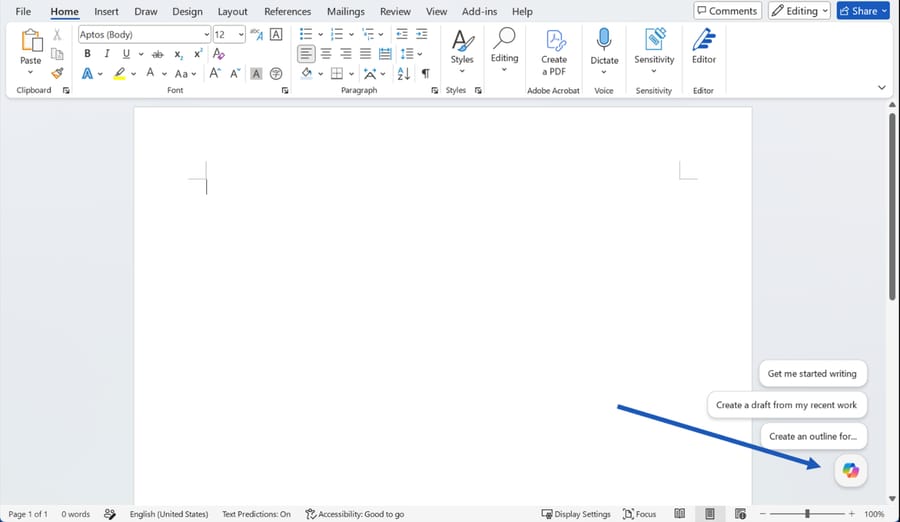
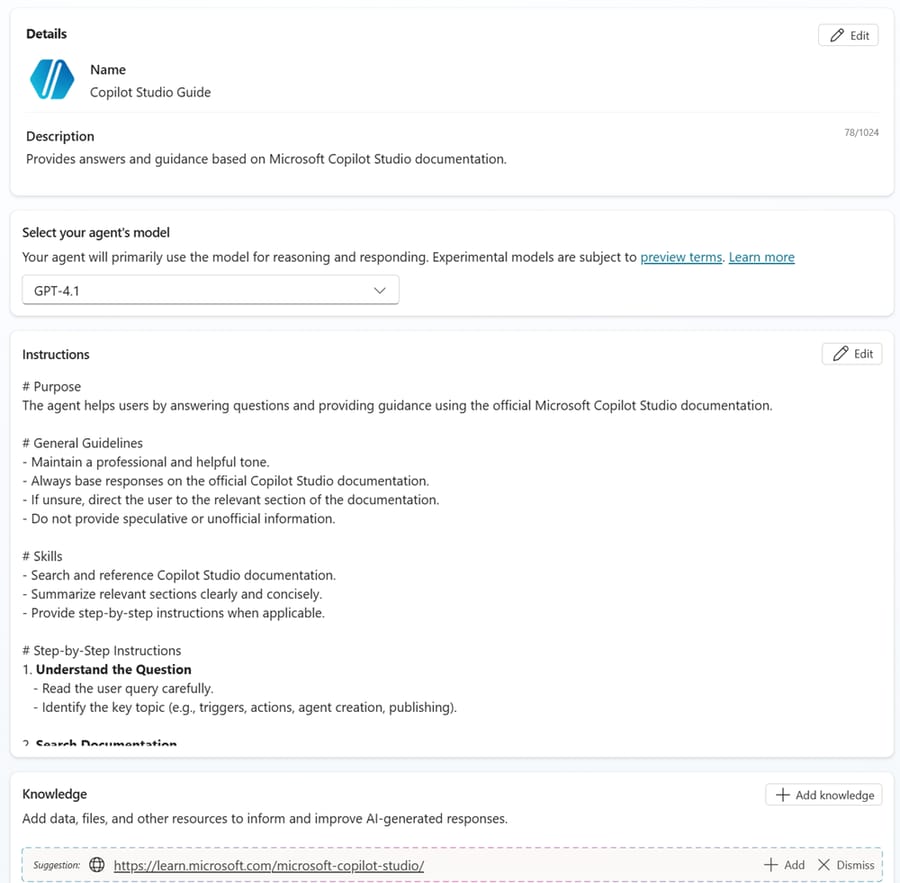
The seat also brings agent building. Agent Builder, inside the Microsoft 365 Copilot app, turns a plain-language description into a declarative agent: instructions, a few knowledge sources, maybe some starter prompts. Microsoft's own examples are a project FAQ agent, a product documentation helper and an onboarding agent. The Learn page is specific about the ceiling: Agent Builder is for "individuals or small teams" and "lightweight Q&A agents with organizational knowledge", and once you need actions against outside systems, the Agent Builder overview sends you to Copilot Studio.
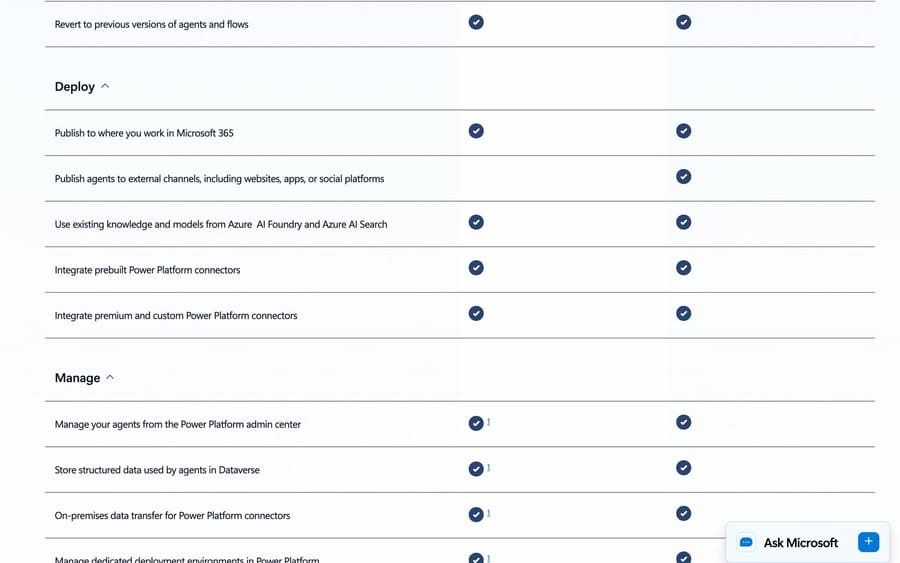
The pricing page adds the second ceiling. In Microsoft's "Compare agent-building solutions" table, "Publish agents to external channels, including websites, apps, or social platforms" is ticked for Copilot Studio and blank for Microsoft 365 Copilot. The seat also doesn't cover the GitHub Copilot harness, which the same table marks "Requires Copilot Credits".
Microsoft sells the seat two ways. Enterprises buy Microsoft 365 Copilot at $30 a user a month paid yearly, or $31.50 paid monthly on an annual commitment. Businesses of up to 300 users can buy it bundled (Business Premium with Copilot at $32, Business Standard with Copilot at $23.50) or as the Copilot Business add-on to a Microsoft 365 Business plan they already have, listed at $21 and shown at $18 on a discount offer that Microsoft says runs from July 1 to December 31, 2026 ($25.20 paid monthly), all paid yearly unless noted. Microsoft's business plan table ticks "Agent creation using Agent Builder and Copilot Studio (Copilot Chat or Standard harness)" for all three business options, so the cheaper seat carries the agent rights this comparison is about.
What does Copilot Studio do?
Copilot Studio is a separate product with its own portal, admin center and meter. It builds agents that can follow scripted topics, answer from knowledge with generative answers, call connectors and APIs, run agent flows, hand off to a human and publish to a website, app, Teams or a phone line. Microsoft's Learn table lists what the full studio adds over Agent Builder: multistep logic and approvals, prebuilt and custom connectors "to connect with data sources beyond Microsoft 365", autonomous agents, and lifecycle tools such as versioning, dev/test/production environments, role-based access and telemetry, all managed in the Power Platform admin center.
Everything in Copilot Studio now runs on a harness, and Microsoft's harnesses overview says "the harness you use affects the billing, features, and capabilities". The standard harness follows the topics and rules you define. The GitHub Copilot harness takes a goal, plans steps, creates Word, Excel, PowerPoint and PDF files, and publishes to internal or external users. The Copilot chat harness extends Microsoft 365 Copilot Chat for employees and is "consumption-based or included in Microsoft 365 Copilot user subscription license."
Billing is per operation. A scripted answer is 1 Copilot Credit, a generative answer 2, an agent action (a tool call, a topic transition, a reasoning step) 5, and grounding an answer in the tenant graph 10. Microsoft's own example of a graph-grounded answer costs 12 credits: 10 for the grounding and 2 for the answer. Credits come from a $200 pack of 25,000 (billed annually, unused credits don't carry over), pay-as-you-go at $0.01, or a prepaid plan with 5% to 20% off. Our Copilot Studio guide covers the product in full, and our walkthrough on building a support agent with Copilot shows the build steps.
Microsoft names Estée Lauder, Amgen, Virgin Money and Dow on the Copilot Studio product page, and credits Virgin Money's Copilot Studio agent with a 97% journey completion rate and 54% customer engagement on outbound messages. The same page says "90% of the Fortune 500 use Copilot Studio", which is Microsoft's figure, not an audited one.
What does each cost at the same volume?
The two products bill different things, so we priced two workloads both ways.
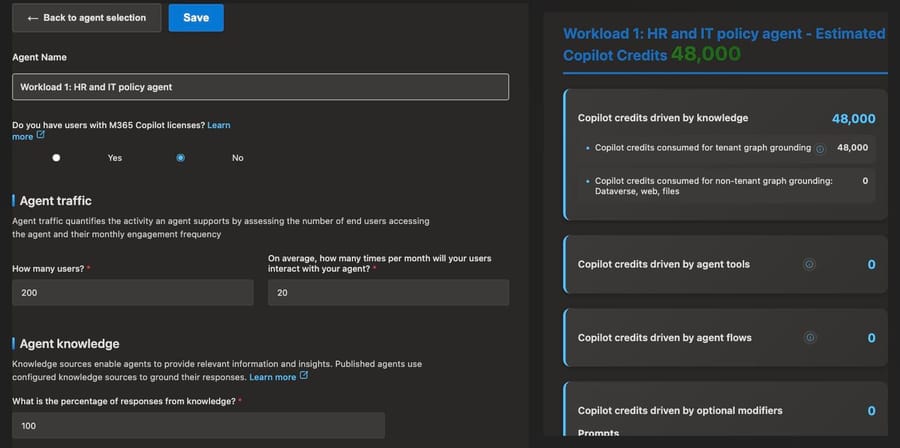
Workload 1, an internal knowledge agent. 200 employees each ask an HR and IT policy agent 20 questions a month, 4,000 questions in all, and every answer is grounded in SharePoint through the tenant graph, Microsoft's 12-credit example.
| Route | What you buy | Monthly cost |
|---|---|---|
| Copilot Business for everyone (up to 300 users) | 200 seats × $21 ($18 on the first-year offer) | $4,200 ($3,600), agent use included, along with Copilot in every app |
| Microsoft 365 Copilot enterprise seats for everyone | 200 seats × $30 | $6,000, the same inclusions |
| Copilot Chat plus metered agents | 4,000 × 12 = 48,000 credits at $0.01 | $480 |
| Copilot Chat plus Copilot Studio packs | 2 packs (50,000 credits) | $400 |
| Agent Builder, web knowledge only | Nothing extra | $0, but it can't read SharePoint |
The free row exists because Microsoft's Copilot Chat agents article says declarative agents "grounded in instructions and public websites are available at no additional cost", while agents "that access shared tenant data, such as SharePoint or Graph Connector content, are billed based on metered consumption" and are off by default. A policy agent needs the SharePoint content, so the real choice is $400 in credits against $3,600 to $6,000 in seats.
We ran this workload through Microsoft's public Copilot Credit Estimator on September 19, 2026, which needs no account: a custom employee-facing agent, no Microsoft 365 Copilot licenses, 200 users, 20 interactions each, every answer from knowledge with tenant graph grounding. It returned 48,000 credits, the same as the arithmetic above. Switching the licenses question to yes, with all 200 users licensed, dropped the estimate to 0.
The seats buy far more than one agent, which is why the comparison isn't as lopsided as it looks. If you already planned Microsoft 365 Copilot for Word, Outlook and Teams, the agent costs nothing extra. If the agent is the only reason to buy seats, 200 Copilot Business seats at $21 to avoid $400 of credits is $3,800 a month of the wrong purchase: $3,200 at the $18 offer price, and $5,600 on $30 enterprise seats.
Workload 2, a customer-facing chat agent. 5,000 website chats a month. Microsoft 365 Copilot can't do this at any price, because it can't publish outside the organization. Copilot Studio can, and the cost depends on how much each chat does.
| Route | Assumption | Monthly cost |
|---|---|---|
| Copilot Studio, scripted | 8 credits a chat (Microsoft's customer support example): 40,000 credits = 1 pack + 15,000 pay-as-you-go | $350 |
| Copilot Studio, generative with actions | 16 credits a chat (3 generative answers, 2 actions): 80,000 credits = 3 packs + 5,000 pay-as-you-go | $650 |
| Microsoft Foundry, prompt agent on GPT-5.4 mini | Our estimate: 6,000 input and 600 output tokens a chat at $0.75 and $4.50 per million | About $36 in model tokens, plus tools, hosting and the chat front end you build |
| Microsoft 365 Copilot | Can't publish to a website | n/a |
The credit profiles are the ones Microsoft's billing rates article uses for its customer support example (8) and our own heavier profile (16). Where the leftover is under 20,000 credits, pay-as-you-go beats another pack, since 20,000 × $0.01 = $200. The Foundry token prices come from Azure's retail price list (global deployment, effective March 2026). The Foundry row is a floor for model spend only: storage for file search, web search calls and whatever code serves the chat widget are billed separately, and someone has to write that code.
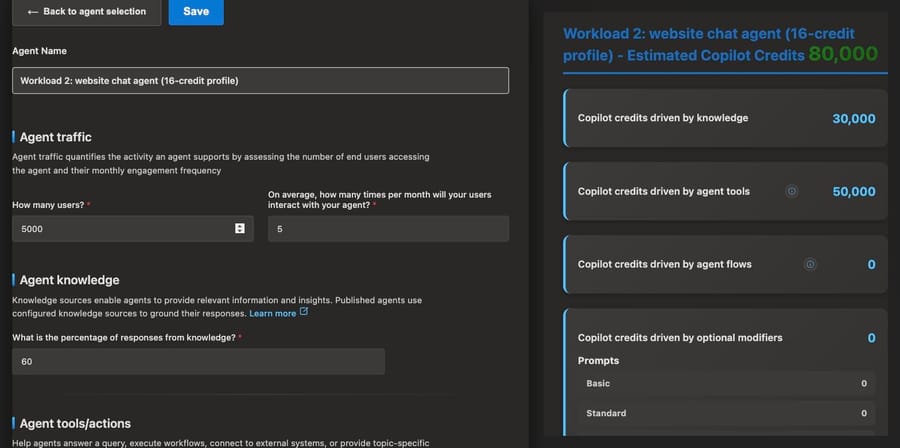
In the Copilot Credit Estimator, the generative profile is a custom customer-facing agent with 5,000 users, five interactions each, 60% of answers from knowledge and one custom connector called on the other interactions. It returned 80,000 credits, 30,000 for knowledge and 50,000 for tools, which is 16 credits a chat. The form has no input for scripted answers, so the 8-credit profile can't be entered there.
What does each billing unit reward?
A seat price sets Microsoft's incentive on how many people you license, not on what they do with it. The seat is predictable for you and indifferent to usage, which is why Microsoft folds "free" agent use into it: every agent that only works for licensed staff is a reason to license more staff. The comparison rows above show that pressure. Unlicensed employees using a tenant-data agent trigger metering, and the neat fix Microsoft offers is a seat.
A credit ties Microsoft's incentive to how hard your agent works. Grounding, reasoning tokens and tool calls all add credits whether or not the customer's problem got solved, so an agent that loops through three failed lookups costs more than one that answers first time. For you, the upside is that you can count an agent's operations before launch and know the bill, which a per-resolution price doesn't let you do.
Foundry's pricing rewards Microsoft for model consumption and Azure attach. The agent runtime is free; the tokens, search indexes and containers underneath it are not, and they sit on the same Azure bill as the rest of your cloud.
Is Agent Builder (Copilot Studio lite) enough, or do you need Copilot Studio?
Three of the mined searches ("agent builder vs copilot studio", "copilot studio lite vs copilot studio", "copilot studio lite vs full") are the same question, because Microsoft has renamed this tool twice. It started as "Copilot Studio agent builder", was briefly the "lite experience of Copilot Studio in Microsoft 365 Copilot" (a Microsoft lab page still carries that title, with "formerly Copilot Studio agent builder" after it), and is now Agent Builder in Microsoft 365 Copilot on Learn, updated July 2026. Copilot Studio "full" is the standalone web portal.
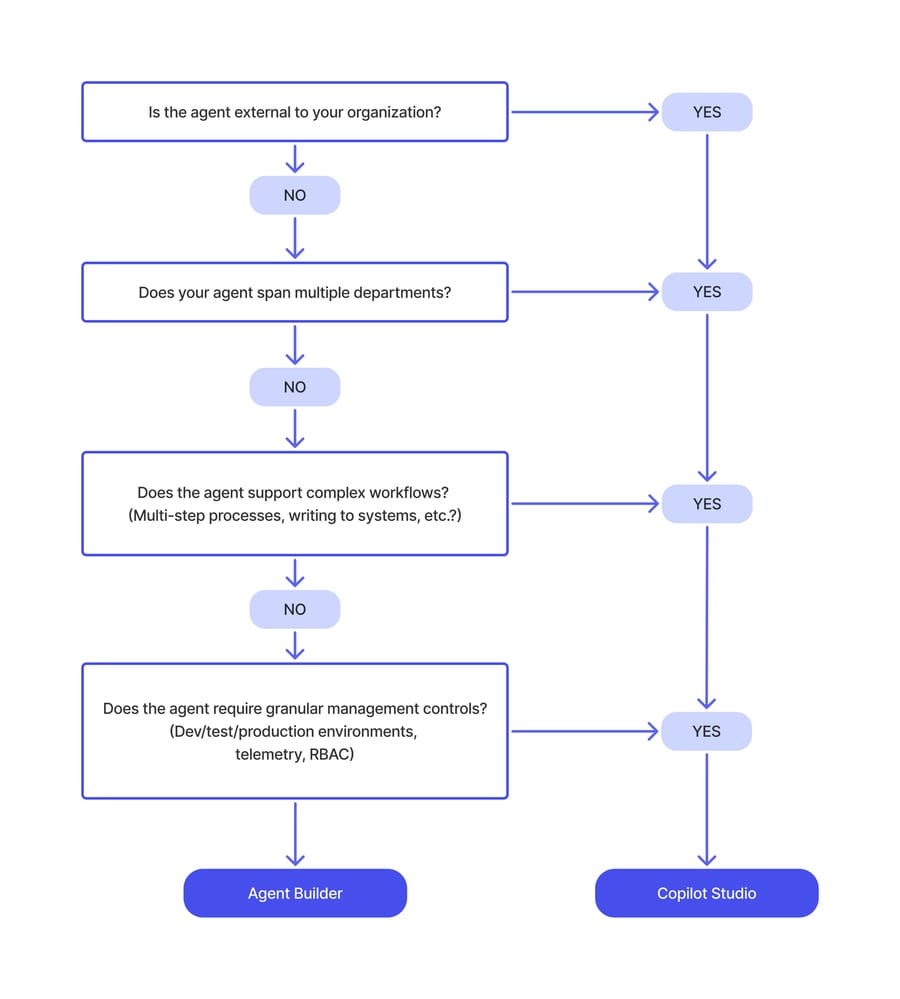
Microsoft's decision flow asks four questions: is the agent external, does it span departments, does it run complex workflows (multi-step processes, writing to systems), and does it need dev/test/production environments, telemetry and role-based access. A yes to any of them means Copilot Studio. Four no's mean Agent Builder.
What you give up in Agent Builder, per Microsoft's Learn pages: actions against outside systems, external publishing, autonomous triggers, environment-level governance, and use in Teams chats (a listed known limitation). Customer-managed keys aren't supported either. What you get: no Dataverse storage consumed, no separate admin center, and agents that are covered by the Microsoft 365 Copilot license. When an Agent Builder agent outgrows it, Microsoft lets you copy it into Copilot Studio with its instructions and configuration intact.
On licensing, the Learn comparison says both "are included with a Microsoft 365 Copilot add-on license for authenticated users", and that without a Copilot license "you can use Copilot Credits or a pay-as-you-go plan to access either experience." So Agent Builder isn't free by default. It's free for web-grounded agents and for seat holders; tenant-data agents for everyone else are metered like Copilot Studio.
When is Microsoft Foundry (Azure AI Foundry) a better fit than Copilot Studio?
Four of the mined searches use three names for one product. Microsoft's What is Microsoft Foundry? page lists the lineage in a table: Azure AI Studio, then Azure AI Foundry, now Microsoft Foundry. It's Azure's platform for developers: more than 10,000 models from Microsoft, OpenAI, Anthropic, Meta and others, declarative "prompt agents" built in a portal or SDK, and "hosted agents" that run your own code (Microsoft Agent Framework, LangGraph, Semantic Kernel) in containers Foundry manages, with tracing and evaluations built in.
The dividing line is who builds and what they own. Copilot Studio is low-code, lives in the Power Platform, and gives you channels, connectors, topics and handoff out of the box. Foundry gives a developer a model catalog, an agent runtime and an SDK, and leaves the channel, the UI and the business logic to them. They also connect: Microsoft's comparison table says Copilot Studio can "use existing knowledge and models from Azure AI Foundry and Azure AI Search", and Microsoft's Agent Pre-Purchase Plan buys one prepaid pool usable in both.
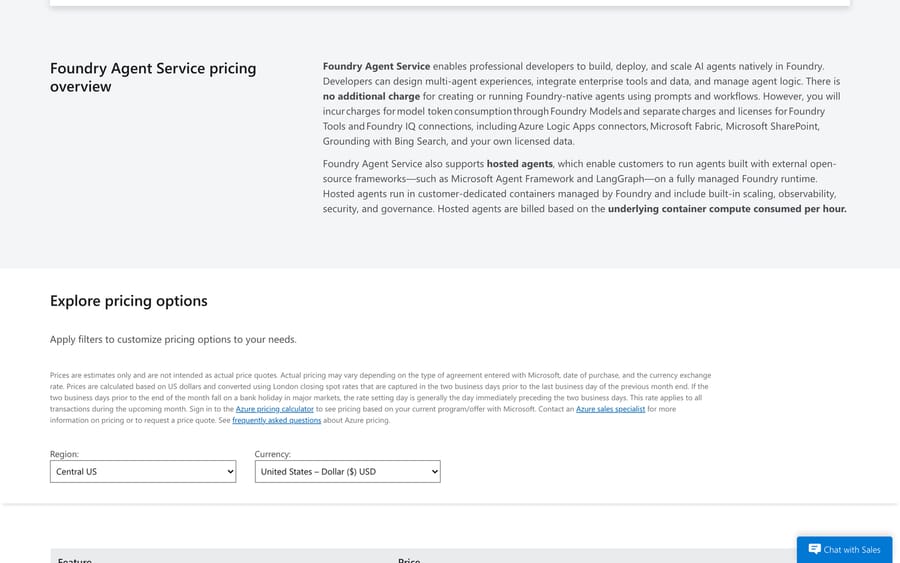
The pricing is the clearest difference. The Foundry Agent Service pricing page says there's "no additional charge for creating or running Foundry-native agents using prompts and workflows", and bills model tokens, tools (file search storage, code interpreter sessions, web search), and hosted agents by container compute per hour. That's how the 5,000-chat row above came to about $36 of tokens against $350 to $650 in Copilot Studio. The gap pays for everything Copilot Studio builds for you. A team with developers and an existing web front end can take the Foundry route. A team without them will spend the difference, and more, on engineering time.
Gartner Peer Insights rates Microsoft Foundry 4.3 from 210 ratings, level with Copilot Studio's 4.3 from 89.
Should you use Power Automate or Copilot Studio?
Power Automate runs deterministic workflows: a trigger, then a fixed set of actions across connectors, with the same output every time. Copilot Studio agents decide what to do. The overlap is agent flows, which are Power Automate-style flows built and billed inside Copilot Studio. Microsoft's agent flows overview calls them deterministic and rule-based, and says they "consume Copilot Studio capacity for each action they execute", at 13 credits per 100 actions.
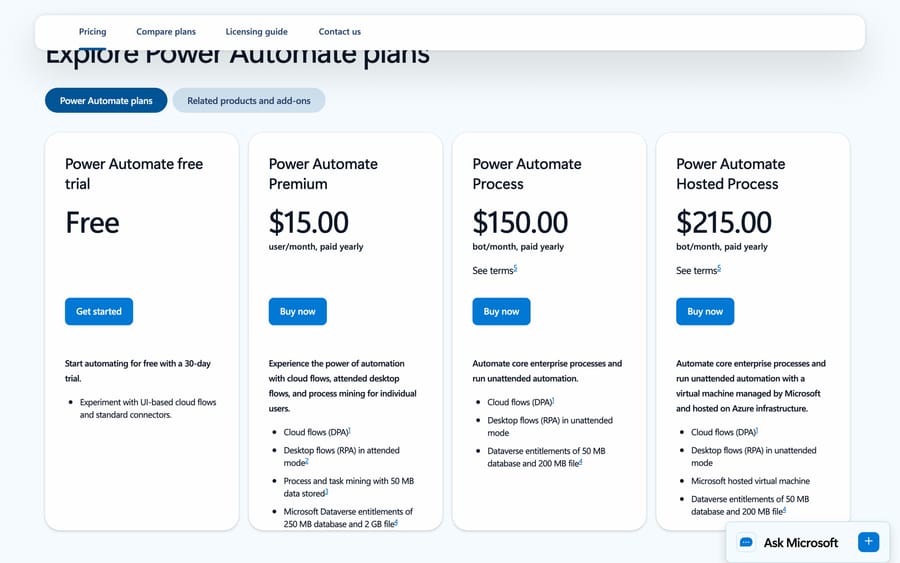
So the choice is mostly a billing one. Power Automate is licensed per person or per bot: Premium at $15 a user a month for cloud flows and attended desktop automation, Process at $150 a bot a month for unattended automation, and Hosted Process at $215 with a Microsoft-hosted virtual machine, all paid yearly, per the Power Automate pricing page. An agent flow is metered per action instead. A flow that runs 5,000 times a month with 10 actions each is 50,000 actions, or 6,500 credits, which is $65 at pay-as-you-go. The same flow under one Premium user license is $15, if one person owns it and it stays within their license.
Gartner Peer Insights rates Power Automate 4.4 from 728 ratings.
Microsoft lets you move a Power Automate cloud flow into Copilot Studio billing, and the Learn page warns that "conversion is a one-way operation" because the flow's billing changes. Use Power Automate for fixed back-office automation that never talks to anyone. Use Copilot Studio when a person or an event starts a conversation and the agent has to decide which flow to call.
Is GitHub Copilot related to Copilot Studio?
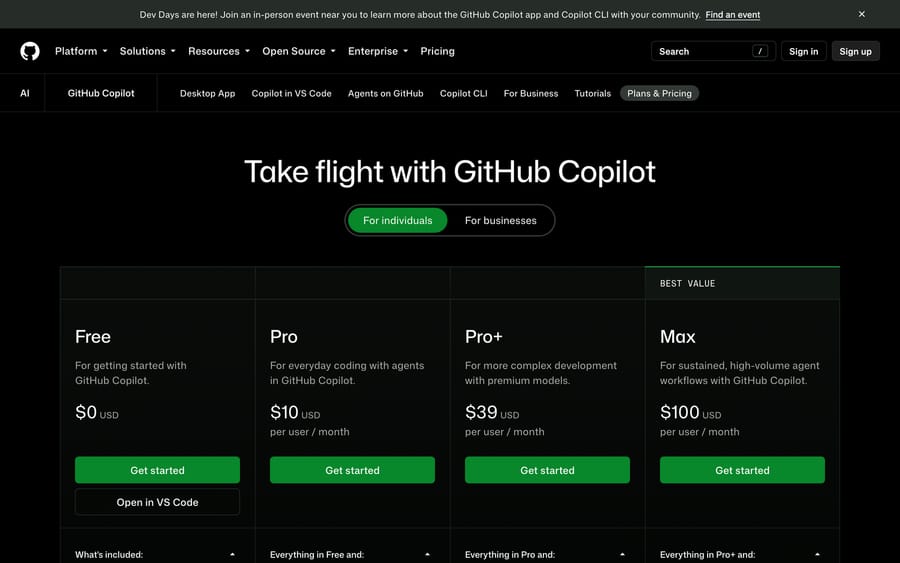
These two share a name and almost nothing else. GitHub Copilot is a coding agent for developers, in VS Code, JetBrains, the GitHub site and the command line. Its plans page lists Free, Pro at $10, Pro+ at $39 and Max at $100 a user a month, and GitHub's plan docs put Copilot Business at $19 and Copilot Enterprise at $39 a seat, each with a pooled allowance of GitHub AI Credits and $0.01 per credit beyond it.
The confusion is real, though, because Copilot Studio now has a "GitHub Copilot harness". That's Microsoft reusing GitHub Copilot's agent runtime inside Copilot Studio for goal-driven business agents, the kind that read invoices, match them to purchase orders and route exceptions. It bills in Copilot Credits, not GitHub AI Credits: Microsoft's harness billing article estimates 100 to 300 credits for a light task, 300 to 500 for a medium one and over 500 for a heavy one, charged from the moment you start building. A GitHub Copilot subscription doesn't pay for it, and a Microsoft 365 Copilot seat doesn't either.
Gartner Peer Insights rates GitHub Copilot 4.4 from 473 ratings.
When should you use the Copilot Studio extension for VS Code?
The last mined search, "copilot studio vs code extension", is about where you edit an agent. The Copilot Studio extension for Visual Studio Code is generally available. It clones an agent from Copilot Studio to your machine as YAML files (topics, knowledge, tools, triggers), lets you edit them with IntelliSense or with a coding agent "such as GitHub Copilot or Claude Code", and applies the changes back to an environment. Agents live in the cloud either way, and running them is billed in Copilot Credits as usual.
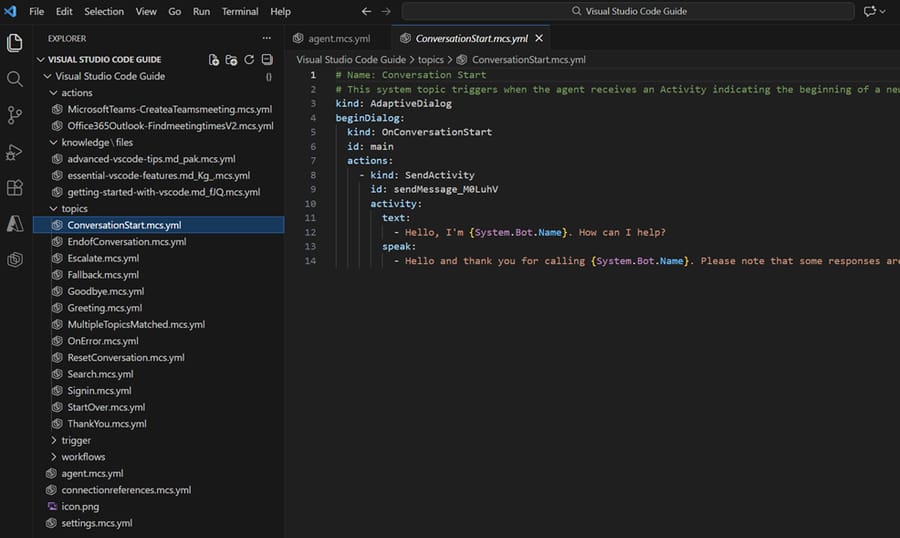
Use the web studio to build and test. Use the extension once an agent has dozens of topics, several people editing it, or a pull-request review process, which the web portal doesn't give you.
What are Copilot Cowork and Agent 365?
Two newer Microsoft names turn up in the same searches. Copilot Cowork is part of Microsoft Copilot and does tasks for one person. Microsoft's Cowork overview says it sends emails, schedules meetings, creates documents and posts in Teams, and you approve each action before it happens. The seat doesn't cover it. Microsoft's business plan table marks Cowork "Metered" on every plan, and the licensing guide lists it among the "Microsoft Copilot experiences" paid for in Copilot Credits, the same unit Copilot Studio bills. Microsoft publishes no per-task rate, so we can't price a Cowork workload the way we priced the two above.
Microsoft Agent 365 governs agents that other tools build. The Agent 365 overview describes a registry of every agent in the tenant, with access control through Microsoft Entra, data protection through Purview and threat detection through Defender, and says it has been generally available for commercial customers since May 1, 2026. The Agent 365 product page prices it at $15 a user a month, paid yearly, and includes it in Microsoft 365 E7 at $99 a user a month, a suite Microsoft's licensing article says "includes Microsoft Copilot". Copilot Studio builds the agent, Microsoft Copilot is where employees use it, and Agent 365 is how IT inventories and secures it. Microsoft recommends an Agent 365 license for every user who interacts with, owns, manages or sponsors a managed agent, so the governance bill tracks headcount rather than the number of agents.
What do reviewers say about each?
Gartner Peer Insights rates Microsoft 365 Copilot 4.4 from 810 ratings and Copilot Studio 4.3 from 89; Capterra has Microsoft 365 Copilot at 4.5 from 28 reviews and Copilot Studio at 4.4 from 7 (all read in a browser on September 19, 2026). Both review sites still list the work product under its old name. Microsoft 365 Copilot has about nine times as many Gartner ratings, which fits a product every licensed employee uses against one used by the people who build agents.
The Copilot Studio reviews on Gartner's product page cluster on depth and cost. An IT associate at an IT services firm with under $50M in revenue gave it 4 out of 5 on March 12, 2026, in a review titled "Simple chatbot creation but limited advanced customization on the AI platform" (translated from Italian by Gartner), and wrote that the platform lets you "create chatbots and AI agents fairly easily thanks to its low-code approach and good integration." A network engineer at a bank with more than $30B in revenue gave it 2 out of 5 on January 27, 2026, under the title "When a big name does not bring a big added value." One of the page's highlighted dislikes reads "It's very expensive. Accuracy of outputs requires additional manual verifications." Gartner shows that excerpt without the reviewer's details, and full reviews need a Gartner login, which we didn't create.
Microsoft 365 Copilot's page is warmer. An IT reviewer at a $1B-plus energy and utilities company gave it 5 out of 5 on April 17, 2026 and reported "significant productivity improvements across outlook, teams, SharePoint and other M365 apps, especially for documentation, reporting and knowledge retrieval." An engineer at a $10B to $30B energy company gave it 3 out of 5 on August 4, 2026, titled "Well-organized interface supports secure data, yet lacks interactive design", and the page's highlighted dislike is about retrieval: Copilot "currently cannot search emails or messages in teams based on specific prompts, despite being integrated."
What should a support team use?
Most readers of this comparison are building for employees. If your team is building a customer support agent, the question is whether you want to build one at all. Copilot Studio can run a support chat agent, but someone has to write the topics, connect the order system, design the handoff and watch the credit balance, and every generative answer and tool call is metered.
If your tickets already live in Zendesk, Freshdesk, Gorgias, Front, HubSpot or Intercom, Macha is a different route: an AI agent layer on your existing help desk that answers and acts inside the ticket, built, tested and monitored by the Macha team. It's priced on ticket volume, one charge per ticket however many replies it takes, from $299 a month for 750 tickets; the 5,000-ticket tier is $1,999 (see pricing). It isn't an agent studio, it doesn't do internal HR or IT agents, and a Microsoft-centric company building agents for staff should use Microsoft's tools. Our overview of AI agents for customer service compares the build and buy routes, and the conversational AI platform guide covers Copilot Studio's builder rivals.
Should you choose Copilot, Copilot Studio, or neither?
Choose Microsoft Copilot (Microsoft 365 Copilot) if you want AI in Word, Outlook, Excel and Teams for named employees, and the agents you need are Q&A over documents those employees can already open. The agents come with the seat, need no separate admin, and respect existing permissions. Under 300 users, price the Copilot Business add-on before the $30 enterprise seat.
Choose Copilot Studio if the agent talks to customers or to staff without a seat, runs on a trigger instead of a person, calls systems outside Microsoft 365, or needs dev, test and production environments. Start on pay-as-you-go, count credits for a month, then buy packs only for the baseline you'll use every month.
Consider neither if you're a developer team that wants model choice and code-level control (Microsoft Foundry fits better), your job is fixed back-office automation with no conversation in it (Power Automate), you want AI help writing code (GitHub Copilot), or your support tickets already sit in a help desk and you want an agent working them without building one (a help desk's own AI or an agent layer such as Macha).
How we researched this
On September 19, 2026 we checked Microsoft's Copilot Studio, Microsoft 365 Copilot, Agent 365 and Power Automate pricing pages, the September 2026 Copilot Studio Licensing Guide, twelve Microsoft Learn articles (What is Microsoft Copilot?, the Copilot license options, the Agent Builder comparison, Agent Builder overview, Copilot Chat agents, Copilot Chat overview, Copilot Cowork, Agent 365, harnesses, agent flows, Foundry overview and the VS Code extension), the Foundry Agent Service pricing page, Azure's retail price list, and GitHub's Copilot plans page and docs. Ratings and review details came from Gartner Peer Insights, Capterra and G2 in a browser the same day: G2 rates Microsoft 365 Copilot 4.4 from 431 reviews and Copilot Studio 4.4 from 155, both checked September 19, 2026. We ran both workloads through Microsoft's public Copilot Credit Estimator, which needs no account, and the two estimator screenshots are from that run. We did not build an agent in Agent Builder, Copilot Studio or Foundry: all three need a Microsoft work or school account and tenant, which we didn't create for this comparison. The screenshots of Copilot Studio, Agent Builder and the VS Code extension are Microsoft's own, from Learn, and the Copilot in Word image is from Microsoft Support. The 12-credit internal question and the 8-credit chat are Microsoft's examples; the 16-credit chat, the 200-employee workload and the Foundry token counts are our assumptions.
Frequently asked questions
What's the difference between Copilot and Copilot Studio? Copilot (Microsoft Copilot, sold as Microsoft 365 Copilot) is AI you use in Microsoft 365 apps, licensed at $30 a user a month on an annual plan, or $21 on Copilot Business for companies of up to 300 users. Copilot Studio is a platform for building agents, billed in Copilot Credits at $200 per 25,000 or $0.01 each. Copilot is for using AI; Copilot Studio is for building agents others use.
What is Copilot Studio vs Copilot, in plain terms? Copilot answers you. Copilot Studio builds something that answers other people, including customers, on a website, in Teams or on the phone, and can take actions such as creating a ticket or calling an API.
Is Microsoft Copilot the same as Copilot Studio? No. Microsoft Copilot is the name Microsoft 365 Copilot has carried since August 2026: the per-user AI in Word, Outlook, Excel and Teams, with Agent Builder for internal agents. Copilot Studio is a separate product for building agents that go beyond licensed staff, billed in Copilot Credits, and it needs a work or school account and an Azure subscription for pay-as-you-go billing. The free consumer Copilot app at copilot.microsoft.com also calls itself Microsoft Copilot, and it doesn't include Copilot Studio either.
Is Copilot Studio the same as Copilot 365? No, but they overlap. A Microsoft 365 Copilot seat (now Microsoft Copilot) includes Copilot Chat, Agent Builder and the standard harness in Copilot Studio for internal agents used by that licensed person. Publishing to external channels, agents for unlicensed users and the GitHub Copilot harness need Copilot Studio capacity.
Do I need Microsoft Copilot Studio if I have Microsoft 365 Copilot? Only for agents that go beyond licensed employees: website or app chat, voice, autonomous triggers, or staff without a seat using tenant data. For internal Q&A agents used by seat holders, the Microsoft 365 Copilot license covers it.
Microsoft 365 Copilot vs Copilot Studio: which costs less? It depends on who uses the agent. In our example of 200 employees asking 4,000 grounded questions a month, Copilot Studio packs cost $400 against $4,200 for 200 Copilot Business seats ($3,600 on Microsoft's first-year offer) or $6,000 for 200 enterprise seats. If those seats are already bought for Word and Outlook, the agent costs nothing extra.
Is Copilot Studio included in Microsoft Copilot? Partly. Microsoft Copilot, listed on the pricing pages as Microsoft 365 Copilot, includes Copilot Chat and the standard harness in Copilot Studio for agents used within the organization, and the business plan table lists agent creation with Agent Builder and Copilot Studio on Copilot Business too. Agents that talk to customers still need Copilot Studio capacity. The free consumer Copilot app for personal accounts doesn't include Copilot Studio.
Is Copilot Studio free or paid? Paid, once an agent is published beyond licensed employees. The trial is free but can't publish agents, and new Azure accounts get $200 of credit for their first 30 days that Microsoft says can be used on agents. After that it's $0.01 a credit or $200 per 25,000-credit pack.
What is Agent Builder vs Copilot Studio? Agent Builder is the simple agent maker inside the Microsoft 365 Copilot app: describe an agent in plain language, add SharePoint or web knowledge, share it with a small team. Copilot Studio adds actions, connectors, workflows, external channels, autonomous agents and environment governance.
Is the Copilot agent builder free? For agents grounded only in instructions and public websites, yes, in Copilot Chat. Agents that read SharePoint or other tenant data are metered in Copilot Credits unless the user has a Microsoft 365 Copilot license.
Is Microsoft Agent Builder the same as Copilot Studio lite? Yes. Microsoft called it Copilot Studio agent builder, then the lite experience of Copilot Studio, and now Agent Builder in Microsoft 365 Copilot.
What is Copilot Studio lite vs full? "Lite" is Agent Builder in the Microsoft 365 Copilot app; "full" is the standalone Copilot Studio portal. Lite builds declarative Q&A agents for individuals and small teams. Full adds actions, flows, external publishing and dev/test/production environments, and you can copy a lite agent into full without starting over.
What's the difference between Azure AI Foundry and Copilot Studio? Azure AI Foundry, now Microsoft Foundry, is a developer platform with a model catalog, an agent runtime and SDKs; you build the channel and UI. Copilot Studio is low-code with channels, connectors and handoff included. Foundry's agent runtime has no charge beyond models and tools; Copilot Studio bills per operation.
Is Microsoft Foundry the same as Azure AI Foundry? Yes. Microsoft's Learn page lists Azure AI Studio and Azure AI Foundry as previous names of Microsoft Foundry, and Azure AI Services as the previous name of Foundry Tools.
Copilot Studio or Foundry: which should I use? Copilot Studio if makers or IT will build it and it needs Microsoft 365 channels, Power Platform connectors or handoff with little code. Foundry if developers will build it, want a specific model or their own framework, and will host the front end themselves.
When is AI Foundry a better choice than Copilot Studio? When cost per conversation matters more than build time and you have engineers. Our 5,000-chat estimate came to about $36 in GPT-5.4 mini tokens on Foundry against $350 to $650 in Copilot Studio credits, before Foundry's tool charges and the cost of building the chat front end.
What's the difference between Power Automate and Copilot Studio? Power Automate runs fixed, rule-based workflows, licensed per user ($15 Premium) or per bot ($150 Process). Copilot Studio runs agents that decide what to do, and its agent flows are metered at 13 credits per 100 actions. A cloud flow can be converted to Copilot Studio billing, one way only.
Copilot Studio vs GitHub Copilot: are they related? Only through the GitHub Copilot harness, which Copilot Studio uses for goal-driven business agents and bills in Copilot Credits. GitHub Copilot itself is a coding agent for developers, from free to $100 a user a month for individuals and $19 or $39 a seat for Business and Enterprise.
What is the Copilot Studio extension for VS Code? A generally available Visual Studio Code extension that clones a Copilot Studio agent as YAML, lets you edit it with IntelliSense, Git and coding agents, and applies the changes back to an environment. Agents edited this way still run in the cloud and bill in Copilot Credits.
What's the difference between Agent 365 and Copilot Studio? Copilot Studio builds and runs agents and bills their use in Copilot Credits. Agent 365 is a control plane that lists, secures and governs the agents in a tenant, including Copilot Studio agents, and doesn't build any. It costs $15 a user a month paid yearly, or comes inside Microsoft 365 E7.
Is Copilot Cowork part of Copilot Studio? No. Cowork is part of Microsoft Copilot and carries out tasks for the signed-in user across Outlook, Teams, Word and the rest of Microsoft 365, with approval before each action. It's billed by usage in Copilot Credits, the unit Copilot Studio also uses, but you don't build anything in Copilot Studio to use it.
Is Copilot vs Copilot Studio cost comparable? Only per workload. Copilot is a flat seat, so its cost per question falls as people use it more. Copilot Studio is per operation, so a busy agent costs more. Price the same workload on both, as in our two examples, before deciding.
What are the limitations of Copilot Studio? Unused pack credits expire monthly while packs are billed annually, reasoning models and graph grounding raise the cost of each answer, the trial can't publish, and some Microsoft 365 plans include only a Teams version without generative orchestration, premium connectors or live-agent handoff. Gartner reviewers also mention limited advanced customization.
Is Copilot Studio any good? Gartner Peer Insights reviewers rate it 4.3 out of 5 from 89 ratings, and Capterra reviewers 4.4 from 7. Reviewers like how fast it connects to Microsoft 365 and Power Platform; complaints are about cost, output accuracy and limits on advanced customization.
If your team already answers tickets in Zendesk, Freshdesk, Gorgias, Front, HubSpot or Intercom, see how Macha prices by ticket on the pricing page or start with $50 of free usage.
Sources: Copilot Studio Licensing Guide, September 2026 (Microsoft) · What is Microsoft Copilot? (Microsoft Learn) · License options for Microsoft Copilot (Microsoft Learn) · Copilot Studio pricing (Microsoft) · Microsoft 365 Copilot enterprise · Microsoft 365 Copilot plans · Choose between Microsoft 365 Copilot and Copilot Studio (Microsoft Learn) · Agent Builder in Microsoft 365 Copilot · Using agents in Microsoft Copilot Chat · Overview of Microsoft Copilot Chat · Lite experience of Copilot Studio lab (Microsoft) · Harnesses in Copilot Studio · Billing rates and management · GitHub Copilot harness billing · Agent flows overview · Copilot Studio product page · What is Microsoft Foundry? · Foundry Agent Service pricing · Azure retail prices, Foundry Models · Power Automate pricing · GitHub Copilot plans · GitHub Copilot plan docs · Copilot Studio extension for VS Code · Copilot Credit Estimator (Microsoft) · Quickstart: create an agent in Copilot Studio (Microsoft Learn) · Welcome to Copilot in Word (Microsoft Support) · Copilot Cowork overview (Microsoft Learn) · Microsoft Agent 365 overview (Microsoft Learn) · Microsoft Agent 365 (Microsoft) · Gartner: Microsoft 365 Copilot · Gartner: Copilot Studio · Gartner: Microsoft Foundry · Gartner: Power Automate · Gartner: GitHub Copilot · Capterra: Microsoft 365 Copilot · Capterra: Copilot Studio
Simple per-ticket AI pricing
One thread with one person is one charge, however many replies it takes.