





 Shopify
 Stripe
 Slack
Slack Notion
 Google Workspace
 Confluence

How Do You Draft Front Replies with AI From Your Knowledge Base? (2026)


Front's Copilot drafts a reply when you press the spacebar in an empty composer, but the draft is only as good as the knowledge sources you connect in Front AI settings. Here is how to set those sources up, keep drafts on-brand with templates, and what to add when a reply needs live order or account data.
Key takeaways
- Front Copilot drafts a reply when an agent presses the spacebar in an empty composer or clicks the Compose with Copilot icon, and a teammate reviews every draft before sending.
- Front Copilot drafts from past similar conversations until you connect a knowledge base in Front AI settings, which then lets it quote your documented policies.
- Front caps Copilot at 200 requests per user per day, and each compose action or transformation such as shortening a draft counts as one request.
- Front crawls up to 3,000 pages from a connected public website and accepts file uploads of 25 MB each, with a 500 MB limit per workspace.
- Front Copilot costs $20 per seat per month as an add-on on Starter and Professional and is included in Enterprise, while Autopilot bills each conversation once: $0.05 for triage, $0.39 for a handoff and $0.89 for a resolution (as of October 2026).

To draft a Front reply with AI, open the conversation and press the spacebar in an empty composer (or click the Compose with Copilot icon): Copilot writes a draft from your connected knowledge sources and past conversations, and a teammate reviews it before sending. Copilot is a $20 per seat per month add-on on Starter and Professional, included in Enterprise, and it allows 200 requests per user per day (front.com/pricing and Front's help center, checked 24 September 2026).
| Question | Answer (Front docs, September 2026) |
|---|---|
| How do I open Copilot? | Spacebar in an empty composer, or the Compose with Copilot icon |
| What does it draft from? | Past similar conversations by default; your knowledge base once connected in Front AI settings |
| Daily limit | 200 requests per user; each compose or transformation counts as one |
| Knowledge source limits | Up to 3,000 website pages crawled; 25 MB per file, 500 MB per workspace |
| Price | $20/seat/month add-on, or included in Enterprise |
| Does it auto-send? | No. Drafts wait for human approval |
What does "AI Compose" actually mean in Front?
When people say they want to draft Front replies with AI, they almost always mean Copilot, Front's in-inbox writing assistant. Per Front's guide to jumpstarting replies with Copilot, you invoke it two ways: hit the spacebar when the composer is empty, or click the Compose with Copilot icon in the reply box. From there you can draft a fresh reply from a short prompt, or take text you've already written and refine it.
The refinement side is useful. Copilot offers preset options (thank the customer, add structure with bullets, summarize the issue) alongside a free-text field for custom prompts. You're not stuck with the first draft; you iterate until it reads right, then you review and send it yourself. Copilot generates drafts for human approval. It does not auto-send from the composer.
The quality of that draft depends on what Copilot can see. Out of the box it leans on past, similar conversations in your Front history. To have it answer from your documented policies and product facts, you have to connect your knowledge base. That's the difference between a draft that guesses and a draft that's grounded.
How do you draft a grounded reply in Front, step by step?
Here's the sequence a team follows to get from an incoming message to a reviewed, on-brand reply.
- Connect your knowledge sources first. In Front AI settings, add the sources Copilot should draw from. Per Front's guide to maximizing AI with knowledge sources, you can connect Front Knowledge Bases, Public Websites (Front crawls up to 3,000 pages), third-party sources, file uploads (25 MB per file, 500 MB per workspace), short-form Notes, and your historical conversations. Until the knowledge base is connected in settings, Copilot can't quote your articles; it only has similar past conversations to lean on.
- Open the conversation and trigger Copilot. Spacebar on an empty composer, or the Compose with Copilot icon.
- Give it intent, not boilerplate. A short prompt like "reassure this customer their delayed order is on the way and give the new ETA" beats pasting a template. Copilot pulls the relevant facts from your connected sources.
- Refine for tone and shape. Use the preset options or a custom prompt to match your brand voice before anything leaves the inbox.
- Drop in a message template where it fits. Front's saved message templates handle the fixed scaffolding (greeting, signature, legal footer) while Copilot fills the situation-specific middle. The two work together.
- Review, then send. A human reads the draft, checks the facts, and sends from the shared inbox. Nothing goes out unread.
One operational note: Copilot is rate-limited to 200 requests per user per day, and each compose or transformation counts as a request. For most agents that's plenty. An agent who drafts, then shortens, then changes tone on every reply uses three requests per conversation, so a high-volume queue can reach the ceiling.
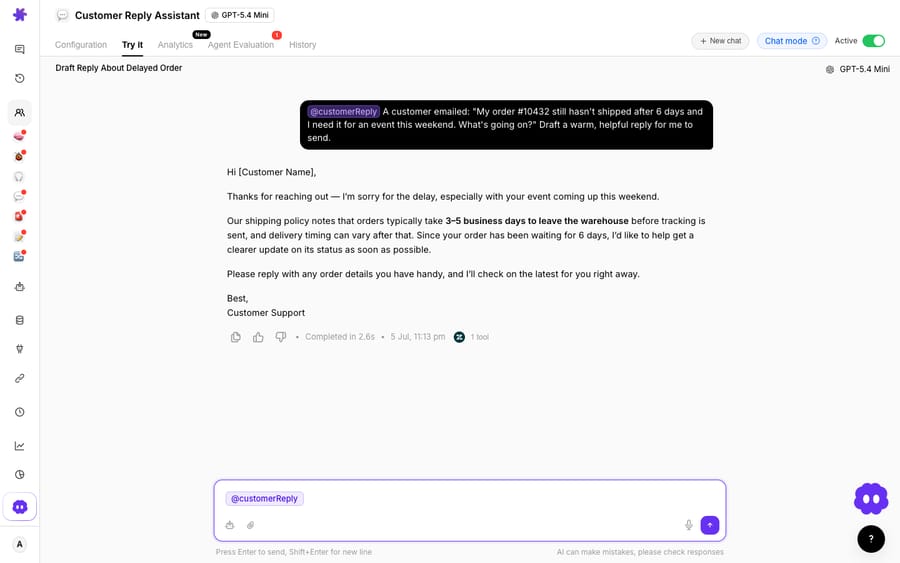
(The screenshot shows a Macha demo-org agent, the Customer Reply Assistant, demonstrating the grounded-draft capability. Front isn't a connected connector in this demo org, so this isn't a live Front conversation; it illustrates the same KB-grounded, draft-then-a-human-sends pattern that Macha runs on top of Front.)
How do you keep AI drafts on-brand in a shared inbox?
A shared inbox depends on consistency. Ten agents answering the same billing question shouldn't produce ten different voices, and this is where AI compose needs guardrails.
Message templates carry the structure; the knowledge base carries the truth. Front's templates are the reliable scaffolding: the way you open, the way you sign off, the disclaimers legal insists on. Let those stay fixed. Point Copilot at the situation-specific part, the actual answer to this customer's question. When you refine, use the tone presets deliberately so the middle matches the scaffolding around it.
Ground everything in a source of truth. Front frames this well: AI is good at language, but "it needs a source of truth to provide accurate, helpful, and brand-consistent answers." A draft grounded in your KB article about refund windows will use your refund window, not a plausible-sounding number the model invented. Grounding is what separates a helpful draft from a confident liability.
Where does native Front AI stop?
Front's AI does real work, and it's worth crediting properly. Copilot speeds up drafting from your knowledge base and history. Autopilot goes further: an AI agent that can auto-reply to conversations and run multi-step customer work. Smart QA scores conversations for quality at scale. For a lot of teams, that's a real toolkit.
There are edges worth naming plainly, because they affect planning:
- Compose drafts; it doesn't resolve. Copilot writes the words. It doesn't, on its own, look up whether this customer's order shipped, check their invoice, or take an action in another system. The reasoning-and-doing part, the part that turns a good draft into a resolution, is where in-inbox compose stops.
- The AI is add-on billing below Enterprise. Per front.com/pricing, Autopilot is a paid add-on "starting at $0.05 / conversation," and its help center bills each conversation once at the highest level reached: $0.05 for triage, $0.39 for a handoff, $0.89 for a resolution (Front's Autopilot pricing, as of October 2026). Copilot is a $20/seat/month add-on. Enterprise includes Copilot, and Smart QA is now Enterprise-only (no longer sold on Starter or Professional as of October 2026); Autopilot stays an add-on on every plan. Front's pricing tiers show where each unlocks. Seat-priced add-ons mean the AI bill grows with headcount, not with how many conversations the AI touches.
- AI Answers is retired. Front's older AI Answers chatbot is legacy: the help center states it is "no longer available for purchase" and points buyers to Autopilot Resolve instead. Older comparisons that still cite AI Answers describe a product you can no longer buy.
Here's a way to think about the cost model, since it's the question that trips teams up most:
| Front Autopilot | A dedicated AI agent layer | |
|---|---|---|
| What you pay for | Per conversation (add-on: $0.05 triage, $0.39 handoff, $0.89 resolution) | Per ticket: one conversation, charged once |
| Grounding | Connected KB + Front sources | Your KB + live data via custom tools |
| Scope | Reply/resolve within Front's model | Read intent, call APIs, draft or send |
| Runs where | Native inside Front | On top of the Front you already use |
Macha bills per ticket: one conversation, charged once however many messages it takes, never per resolution. Pricing starts at $299 a month for up to 750 tickets. Drafting, reasoning and tool calls all sit inside the ticket you already paid for, so the bill tracks the volume you handle rather than an outcome you didn't define.
Where does a grounded AI agent layer pick up?
Native compose is good at writing; it isn't built to reason over live data and act. That's the job of a dedicated AI agent, and the wider category of AI agents for customer service exists for the work an in-inbox writer can't finish.
Macha is one such layer. It runs on top of the Front you already use through the Macha–Front connector. It does not replace Front, your shared inboxes, your templates, or Copilot. You keep drafting in the inbox exactly as you do now. What Macha adds is grounding plus reasoning plus action: its agent reads the intent of a conversation, pulls a real order status or account detail through a custom tool that turns your REST API into something the agent can call, and either posts an internal comment with a draft your teammate reviews and sends, or, once you trust it, replies directly. The connector's actions include reading the full conversation, posting internal comments with @mentions, sending public replies, and updating tags and status.
That's the difference between "here's a nicely worded draft" and "here's the actual answer to this customer, with their real ETA in it." For the mechanics, connecting Front to Macha to route conversations to AI and the guide to building an AI agent for Front both walk through it, and Front AI explained covers the native feature set in full.
The division of labor: let Copilot and templates handle fast in-inbox drafting, and layer a grounded agent on top for the lookups and actions a writing assistant can't reach.
FAQ
How do I draft a reply with AI in Front? Open a conversation, then press the spacebar in an empty composer or click the Compose with Copilot icon. Give Copilot a short prompt describing what you want to say, refine the draft with the preset options or a custom prompt, then review and send it yourself. Copilot drafts for human approval and doesn't auto-send from the composer.
Does Front Copilot use my knowledge base? Only once you connect it. Copilot draws on past similar conversations by default, but to draft from your documented articles you must add your knowledge base in Front AI settings. Front supports Front Knowledge Bases, public websites (up to 3,000 pages), third-party sources, file uploads, notes, and historical conversations.
What's the difference between Copilot and Autopilot? Copilot is an in-inbox writing assistant that drafts replies for a human to review and send. Autopilot is an AI agent that can auto-reply to conversations and run multi-step work. Copilot is a $20/seat/month add-on on Starter and Professional and included in Enterprise; Autopilot is an add-on billed once per conversation, $0.05 for triage, $0.39 for a handoff or $0.89 for a resolution, per Front's help center as of October 2026.
Is Front AI Answers still available? No. AI Answers is a legacy feature that Front's help center says is "no longer available for purchase." Front now directs buyers to Autopilot Resolve for automated AI replies.
How many Copilot drafts can one agent generate a day? 200 requests per user per day, according to Front's help center. Each compose action or transformation (shorten, change tone, add bullets) counts as one request.
Can I add a grounded AI agent to Front without replacing it? Yes. An AI agent layer like Macha connects to Front as a live connector and runs on top of your existing inboxes, templates, and Copilot. Your team keeps drafting in the inbox; the agent adds intent-reading, live data lookups via custom tools, and grounded drafts a teammate reviews and sends.
Ready to turn a good draft into the actual answer? Start a free trial of Macha and connect it to your Front in minutes.






