Intercom
 Shopify
 Stripe
 Slack
Slack Notion
 Google Workspace
 Confluence

How Do You Set Up and Customize the Freshdesk Help Widget? (2026)


The Freshdesk help widget is a launcher you build under Admin > Channels > Widgets that shows knowledge base articles and a contact form on your site. Freshworks documents it on every plan, gates brand colors to Growth and contextual articles to Pro, and now files its documentation under a "Legacy" label.
Key takeaways
- The Freshdesk help widget is created under Admin > Channels > Widgets and is documented on every plan, with appearance options from Growth and contextual articles from Pro.
- The Freshdesk help widget accepts up to 5 files and 25 MB in total per submission when attachments are enabled.
- Freshdesk contextual articles map up to 5 solution articles to a specific page URL and are available on the Pro plan and above.
- Freshworks files its help widget setup article under the breadcrumb "Configuring Help Widget (Legacy)"; on Freshdesk Omni the equivalent is the Web Chat widget.
- Removing Freshdesk branding from the help widget happens under Admin > Account > Helpdesk Settings, not the Appearance tab, and needs a paid plan.
You create a Freshdesk help widget under Admin > Channels > Widgets, and Freshworks documents it on every plan from Free up: appearance options start at Growth, and contextual articles and frustration tracking start at Pro. The embed snippet goes in once, and the FreshworksWidget JavaScript API lets your own pages open, hide and prefill it on every plan.
| Feature | Plan needed |
|---|---|
| Widget, contact form, solution articles, CAPTCHA, JavaScript API | Every plan |
| Appearance (colors, patterns, position) | Growth and up |
| Removing Freshdesk branding | A paid plan |
| Contextual articles (up to 5 per URL) | Pro and up |
| Frustration tracking | Pro and up, plus a Freshmarketer account |
One piece of context before you build. Freshworks now files the help widget documentation under a breadcrumb reading "Configuring Help Widget (Legacy)", and the article's plan matrix covers Freshdesk and classic Omnichannel with no Freshdesk Omni row. On Omni, the equivalent surface is the Web Chat widget, configured under Admin Settings > Channels > Web Chat. Freshworks hasn't published an end-of-life date, and we're not going to invent one, but if you're planning a build that has to last, that label is worth knowing about first.
How do you create a Freshdesk help widget?
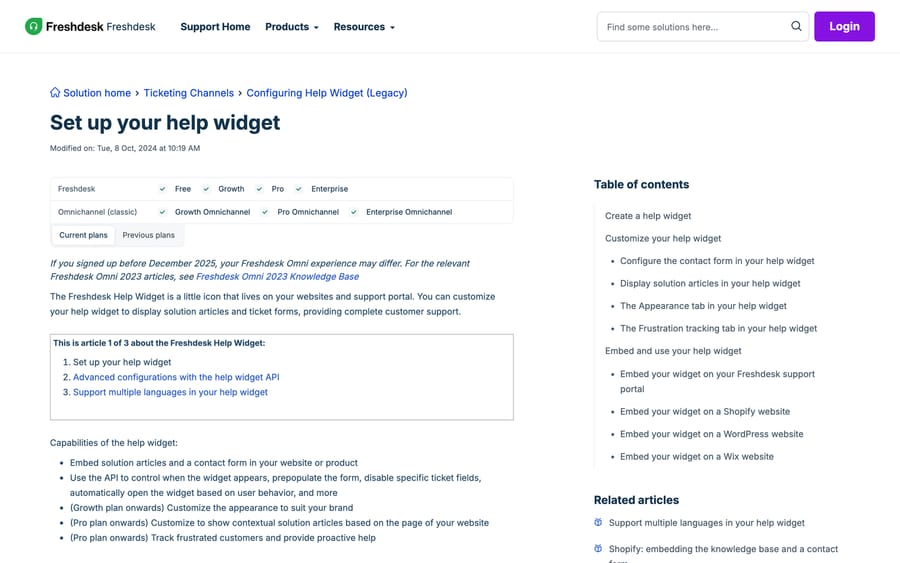
- Go to Admin > Channels > Widgets.
- Click Create a new widget.
- Give it a name and assign it to a support portal.
- Click Create.
The name is internal. The portal assignment matters, because it decides which knowledge base the widget searches and which ticket forms it can offer. If you run multiple products or brands, you want one widget per portal, and the Freshdesk customer portal explained guide covers how those map.
Which widget options need which Freshdesk plan?
General tab, available on every plan
Freshworks' plan matrix still lists Free, but Freshdesk's pricing page no longer sells a free plan; a Free program covers up to 2 agents for 6 months.
Banner and button text. The launcher label and the banner headline. Both are free text, and both are the first thing anyone changes.
Contact form. Toggle it on, then pick one of two shapes: a simple contact form with four fields, or show form with ticket fields, which uses your real ticket forms including custom fields. The second is what you want if the widget is a genuine intake channel rather than a "message us" box. Field behavior follows your form config, covered in Freshdesk ticket fields and forms explained.
Attachments. Up to 5 files and 25 MB per submission.
CAPTCHA. A toggle. Leave it on for a public site.
Screenshot capability. Lets the visitor capture the page with their report, which saves a round trip on any UI bug.
User validation. Restricts the widget to authenticated customers via the API, so only signed-in users can raise a ticket. This is the setting that turns a public widget into a logged-in support surface.
Solution articles. Show knowledge base categories and enable search inside the widget. This is where widget value actually comes from, and it only works if your knowledge base is worth searching: how to build a Freshdesk knowledge base covers that side.
Layout mode. Two choices, and Freshworks names them plainly: Neutral, which shows articles first, and Optimize for deflection, which requires the visitor to look at articles before the contact form appears. That second label tells you exactly what the feature is for, and it's worth being honest with yourself about the tradeoff: deflection mode lowers ticket count and raises the effort a frustrated customer has to spend to reach a human. If your articles are thin, it converts a support request into a bad experience and a worse one arriving later.
Appearance tab, Growth and up
Banner color as a gradient or a solid, with black or white text. Decorative banner patterns. Widget position, bottom-left or bottom-right, with a custom offset. Button color with its own text color.
Removing Freshdesk's own branding from the widget is a separate toggle in a separate place: Admin > Account > Helpdesk Settings, and it needs a paid plan. People hunt for it on the Appearance tab and it isn't there.
Contextual articles, Pro and up
Map specific URLs on your site to specific articles, up to five per URL, so the widget opens on your pricing page showing billing articles and on your integrations page showing setup articles. This is the single highest-return option on the list, and it's the one behind a Pro plan.
Frustration tracking, Pro and up
Tracks rage clicks and proactively opens the widget with a custom message and form. It requires a Freshmarketer account, which is a second product, so treat "Pro plan" as necessary rather than sufficient here.
How do you embed the widget on your site?
Copy the snippet from the Embed Code tab, then:
- Your Freshdesk portal: Admin > Channels > Portals > Edit theme > Pages > Footer.
- Shopify: Themes > Customize > Edit code >
footer.liquid. - WordPress: install the official Freshdesk plugin, then paste the code under the Freshdesk menu.
- Wix: Settings > Advanced > Tracking & Analytics > Custom tool, set to Body, end.
One detail that saves a deploy: the widget updates itself when you change settings. You embed the snippet once. Changing colors, form fields or article categories does not require re-embedding, which means a marketing site with a frozen release cycle can still have its support widget reconfigured the same afternoon.
For anything not on that list, the snippet is a standard script tag before the closing body tag, and the same applies to a site behind a tag manager.
How do you control the widget with JavaScript?
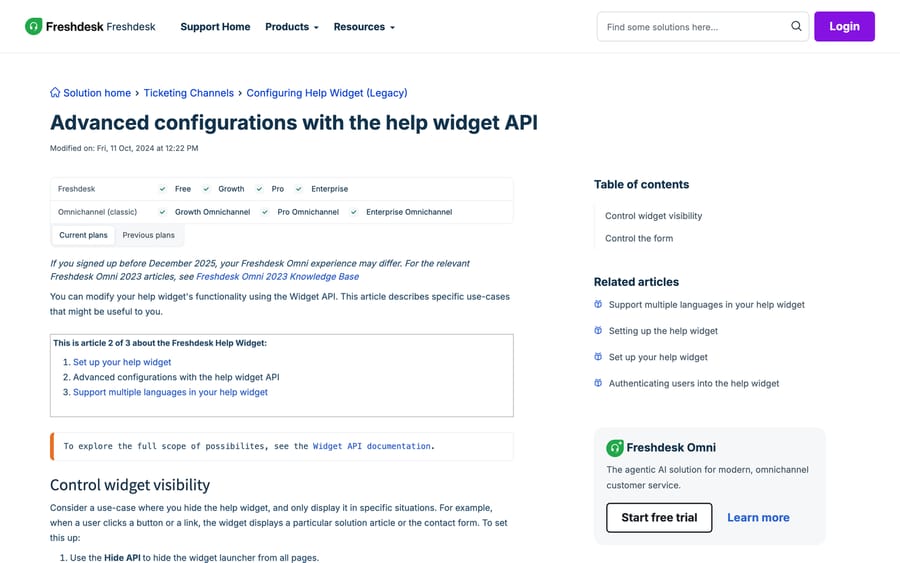
Everything above is a settings screen. The help widget API is what lets your own pages drive the widget, and Freshworks documents it as available on every plan, Free included (article modified 11 October 2024). The methods it shows:
FreshworksWidget('hide', 'launcher');              // hide the bubble on this page
FreshworksWidget('open');                          // open it from your own button
FreshworksWidget('open', 'ticketForm');            // skip straight to the form
FreshworksWidget('open', 'article', { id: 123 });  // open one specific article
FreshworksWidget('identify', 'ticketForm', {       // prefill who they are
  name: 'Jane Doe', email: '[email protected]'
});
FreshworksWidget('prefill', 'ticketForm', {        // prefill any field
  subject: 'Issue with order 4417', priority: 2
});
FreshworksWidget('hide', 'ticketForm', ['subject']);    // hide a field
FreshworksWidget('disable', 'ticketForm', ['subject']); // show it, lock it
Three things that matter in practice.
Hiding the launcher and opening from your own button is the answer to the most common design complaint about this widget. You call hide on the launcher, then wire open to whatever element your designer actually wants. That's the community's recurring "custom button" question, and the API answers it on every plan.
Mandatory fields must be prefilled if you hide or disable them. Freshworks states this explicitly, and it's the reason a form that looks fine silently refuses to submit. If subject is required and you hide it, you must also prefill it in the same page load.
identify and prefill do different jobs. identify sets who the requester is; prefill fills form fields. Using prefill for the email address gives you a filled box the visitor can change, which is not the same as knowing who they are.
How do you fix the most common widget problems?
These are the recurring shapes in the Freshworks community's portal and widget cluster, which runs to 104 threads and about 34,600 views.
CAPTCHA problems. The widget's CAPTCHA is the most complained-about single toggle, with threads like Captcha Too Small and, on the developer forum, Occurrence of multiple CAPTCHA. The practical position: it's a toggle in the General tab, its rendering isn't configurable from Freshdesk, and if it's breaking your layout the workable route is the User validation setting instead, which restricts the widget to authenticated customers and removes the need for a CAPTCHA at all. That only works if your visitors are signed in.
Embedding inside another product's page. SharePoint and iframe embeds are a steady stream, including the 2,400-view thread on iframing the portal with login and signups. Two different problems get confused here: embedding the widget is a script tag and works almost anywhere you can inject one; embedding the portal in an iframe is a cross-origin and session problem and frequently doesn't. If your goal is a support entry point inside an intranet page, the widget is the supported route and the iframe is not.
The widget shows the wrong articles. Check the portal the widget is assigned to before you check anything else. A widget assigned to the wrong portal searches the wrong knowledge base, and every symptom downstream looks like a search problem.
Branding won't disappear. It's not on the Appearance tab. Admin > Account > Helpdesk Settings.
Contextual articles do nothing. They're Pro and up, and they're keyed to URLs, so a single-page app that never changes its URL gets one mapping for the whole product.
How did we research this?
We read Freshworks' own help widget articles in a browser on 20 September 2026, rechecked the plan gates and limits on 24 September 2026, and took every option, plan gate, path and API method from them, capturing both screenshots in that session. We used the breadcrumb and the plan matrix on the setup article to establish the Legacy labeling rather than inferring it from a changelog. Community thread counts come from our crawl of community.freshworks.com. We don't run a Freshdesk account, so we created no widget and embedded no snippet; the JavaScript above is written from Freshworks' documented method list. We could not find a published end-of-life date for the legacy widget, so this post doesn't give one.
What can't the help widget do?
The widget's job is intake and self-service: show an article, take a ticket. What it can't do is answer a question that isn't already written down, and the "Optimize for deflection" layout is the honest admission of that. Deflection works by making the article step mandatory, which is a blunt instrument pointed at the customer rather than at the gap in your content.
Macha is an AI agent layer that runs on top of the Freshdesk the widget feeds. Once a widget submission becomes a ticket, it reads the actual question, answers from your knowledge base and past tickets, and calls your own systems through custom API tools when an answer needs a lookup. It doesn't replace Freshdesk, the widget or your portal, and it isn't a help desk. It suits teams whose widget deflection rate is low because the questions are specific to an account rather than to a topic; it's the wrong fit if your traffic is mostly generic how-to questions, since good articles and contextual mapping will do that job more cheaply.
Pricing is one plan on monthly ticket volume, from $299/month for 750 tickets, about $0.40 per ticket at every tier, with setup and monitoring by the Macha team, included on every plan. A ticket is one thread between Macha and one person, charged once no matter how many messages it takes. The trial is $50 of free usage (about 125 tickets), no credit card, no time limit. See Macha on Freshdesk and the pricing page.
Frequently asked questions
Where do I create a Freshdesk help widget? Admin > Channels > Widgets, then Create a new widget. Name it, assign it to a support portal, and click Create. The portal assignment decides which knowledge base the widget searches, so get it right first.
Is the Freshdesk help widget available on the Free plan? Yes. The widget itself and the JavaScript API are documented on Free, Growth, Pro and Enterprise, though Freshdesk's pricing page no longer sells a free plan; the Free program covers up to 2 agents for 6 months. Appearance customization starts at Growth, and contextual articles and frustration tracking start at Pro.
How do I embed the Freshdesk widget on my website? Copy the snippet from the Embed Code tab and paste it into your page before the closing body tag. Freshworks documents four specific routes: the Freshdesk portal theme footer, Shopify's footer.liquid, the official WordPress plugin, and Wix's custom tool set to Body, end.
Do I need to re-embed the widget after changing its settings? No. The widget picks up configuration changes on its own, so the snippet goes in once and everything after that is a settings change in Freshdesk.
How do I use my own button instead of the Freshdesk launcher? Call FreshworksWidget('hide', 'launcher') to remove the default bubble, then call FreshworksWidget('open') from your own element's click handler. Both methods are available on every plan.
How do I prefill the Freshdesk widget form? Use FreshworksWidget('identify', 'ticketForm', {name, email}) to set the requester and FreshworksWidget('prefill', 'ticketForm', {...}) for any other field. If you hide or disable a mandatory field with hide or disable, you have to prefill it as well, or the form won't submit.
How do I remove Freshdesk branding from the widget? Admin > Account > Helpdesk Settings, not the widget's Appearance tab, and it needs a paid plan. That's the most common place people look and fail to find it.
Is the Freshdesk help widget being deprecated? Freshworks files its setup article under a breadcrumb that reads "Configuring Help Widget (Legacy)", and the article's plan matrix lists Freshdesk and classic Omnichannel with no Freshdesk Omni row. On Freshdesk Omni the equivalent is the Web Chat widget under Admin Settings > Channels > Web Chat. No end-of-life date has been published that we could find.
What is the file size limit on the Freshdesk widget? Up to 5 files and 25 MB in total per submission, when attachments are enabled in the widget's General tab.
Sources:
- Set up your help widget (Freshworks support, modified 8 Oct 2024)
- Advanced configurations with the help widget API (Freshworks support)
- Support multiple languages in your help widget
- Authenticating users into the help widget
- Understand Threading Logic (Freshworks support)
- Freshdesk plans and pricing
- Community: Captcha Too Small
- Community: How do I iframe my portal and allow login and signups?
Add AI agents to your Freshdesk
Macha reads the ticket, drafts the reply and takes the action, inside the Freshdesk you already run.