







 Shopify
 Stripe
 Slack
 Notion
 Google Workspace
 Confluence


How Do You Migrate from Freshdesk to Help Scout? Field Mapping, Tools and Costs (2026)


You migrate from Freshdesk to Help Scout in four moves: create your users and Inboxes in Help Scout, run Help Scout's built-in importer (or a paid migration tool) to copy tickets, contacts and tags, rebuild your automations and canned responses by hand, then switch email forwarding. Help Scout's own importer lists Freshdesk as a source and is free up to 500,000 records, but it doesn't move custom fields, knowledge base articles or SLA policies. This guide covers the field mapping, what each route moves, what it costs and the order to do it in.
Key takeaways
- Help Scout's built-in importer, run by Import2, lists Freshdesk as a source and is free for imports of 500,000 records or fewer started from inside Help Scout.
- Help Scout's importer does not move custom fields, knowledge base articles, saved replies, macros or automations, so those are rebuilt by hand or moved with a paid tool.
- Freshdesk tickets become Help Scout conversations, contacts become customers, and Freshdesk's Open and Resolved statuses map to Help Scout's Active and Closed.
- Help Scout's pricing page describes custom fields as up to 10 data points per conversation, so a Freshdesk account with more ticket fields has to drop or merge some.
- Help Desk Migration's pricing page puts a 1,000-record move at $100 and a 10,000-record move at $514, with notes, comments and attachments not counted as records.

| Route | What it moves | Price | Best for |
|---|---|---|---|
| Help Scout's importer (Import2) | Tickets as conversations, customer profiles, tags | Free up to 500,000 records, then $500 per 500,000 | Small and mid-size accounts with few custom fields |
| Help Desk Migration | Conversations with notes and attachments, customers, companies, custom fields, Docs articles | Per record: $100 for 1,000, $514 for 10,000 (examples) | Teams that want custom fields and articles moved self-serve |
| ClonePartner | Conversations, threads, attachments, customers, companies, mapped custom fields | Flat-fee quote after a call | Large or messy histories where an engineer owns the mapping |
| Help Scout Inbox API | Anything you script | Developer time | Teams with an engineer and an unusual Freshdesk setup |
Which migration route actually moves your ticket history?
Start with the free one. We checked Help Scout's import article on November 22, 2026. It says the importer copies "emails or tickets along with the attached customer profiles and tags or labels" from about 30 providers, Freshdesk among them. You start it under Settings > Import Data, pick Freshdesk, authorize both accounts at Import2, run a sample migration, check it, then run the full one. Account Owners and Administrators on Standard, Plus and Pro can run it.
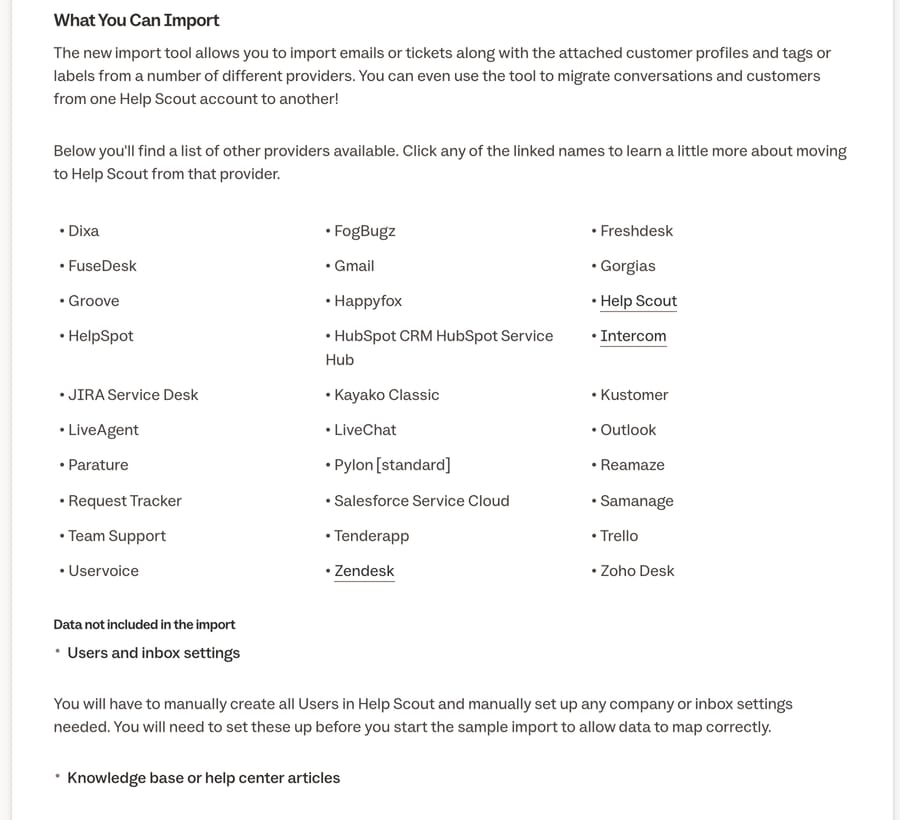
The same article lists what the importer won't touch: users and Inbox settings (create them first so records map), knowledge base content from any provider, saved replies, macros, ticket rules, automations, custom fields, ticket types and custom statuses. For a Freshdesk account that runs on canned responses and a handful of ticket fields, that list is most of the setup work. The tickets are the easy part.
The paid tools fill the gaps. Help Desk Migration's Help Scout page lists custom fields (including select and multi-select), internal notes, inline images, companies and knowledge base articles among what it moves into Help Scout. ClonePartner's Freshdesk to Help Scout page is a service: an engineer proposes a status and field mapping, you confirm it, and unlimited sample runs go first. One correction to that page: it says Freshdesk to Help Scout has no native path, but Help Scout's importer lists Freshdesk. What's missing natively is the custom-field and article mapping, which is the part ClonePartner sells.
If you want the vendors scored side by side, our Freshdesk migration tools roundup and the cross-desk help desk migration services roundup rank them on price, test runs and delta support.
How do Freshdesk fields map to Help Scout?
The two products describe a customer conversation differently. Freshdesk is a ticketing desk with groups, products, SLA policies and as many ticket fields as you care to add. Help Scout is built around shared Inboxes, with a short status list and a cap on custom fields. Most of the mapping work is deciding what to do with the Freshdesk objects Help Scout has no slot for.
| Freshdesk | Help Scout | Notes |
|---|---|---|
| Ticket | Conversation | One ticket becomes one conversation in an Inbox |
| Replies and private notes | Threads (customer, reply, note) | Help Desk Migration keeps internal notes as notes |
| Attachments | Conversation attachments | Within Help Scout's file size limit (ClonePartner flags this) |
| Contact | Customer | Contact fields become customer properties |
| Company | Company | Supported by both paid tools |
| Email config (support mailbox) | Inbox | Create the Inboxes before the import |
| Status: Open / Pending / Resolved / Closed | Active / Pending / Closed / Closed | Help Scout's switching guide maps Open to Active and Resolved to Closed |
| Custom statuses | No equivalent | Pick the nearest Help Scout status, keep the old one as a tag |
| Tags | Tags | Imported by every route |
| Ticket fields | Custom fields, up to 10 per conversation | Not moved by Help Scout's importer |
| Groups | Teams (Plus and Pro), Inboxes or tags | Help Scout's pricing page lists internal teams on Plus |
| Products | Custom field dropdown or a separate Docs site | ClonePartner's suggestion |
| Solution articles | Docs articles | Not moved by Help Scout's importer |
| SLA policies | SLA policies, rebuilt by hand | Pricing page: one basic SLA on Standard, two advanced on Plus, unlimited on Pro |
| Time entries | No equivalent | Export to a spreadsheet before you leave |
| Satisfaction ratings | No API to create them | Keep as tags or notes, lose the report |
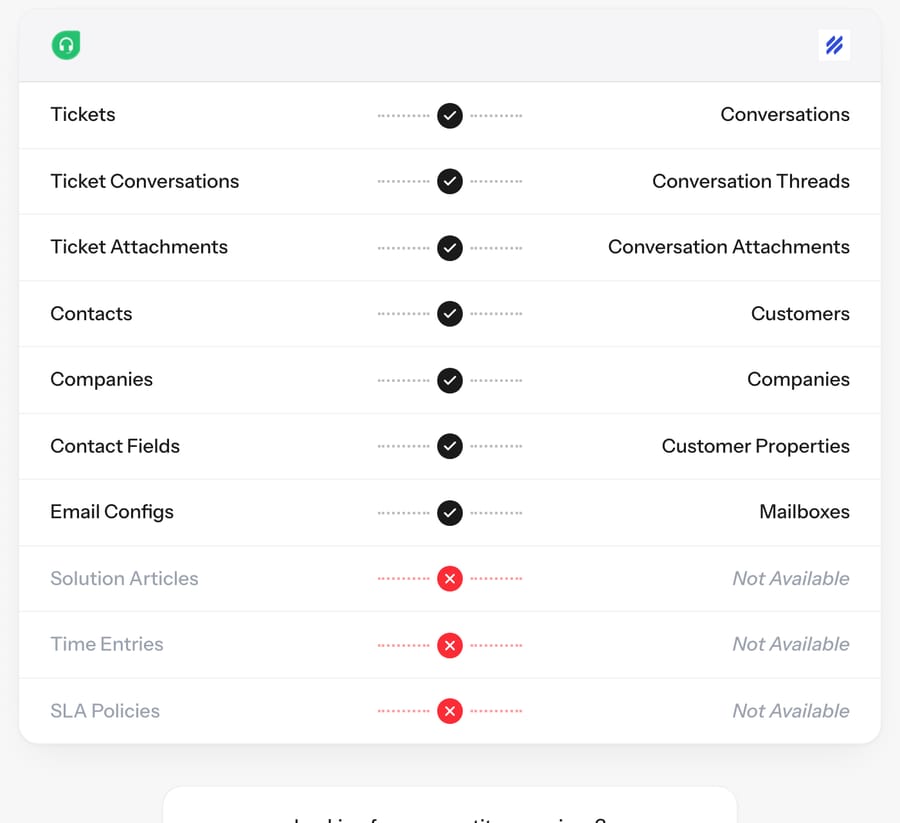
Three rows decide most projects. The 10-field cap on custom fields comes from Help Scout's pricing page, which describes custom fields as "up to 10 custom data points on each conversation." A Freshdesk account with 25 ticket fields has to drop some, merge some into tags, or write the old values into a private note on each conversation. Custom statuses collapse to Help Scout's four, so a "Waiting on warehouse" status becomes Pending plus a tag. And satisfaction ratings can't be recreated: ClonePartner says Help Scout's API cannot create them, so historical scores survive only as tags or notes.
What moves automatically, and what do you rebuild by hand?
Help Scout's switching guide is blunt about the rebuild list. Freshdesk's dispatch rules, supervisor rules and scenario automations become Help Scout workflows, which come as automatic workflows (they run on conditions) and manual ones (an agent clicks them). Canned responses become saved replies, recreated one by one. Help center articles don't come across with the importer at all; Help Scout points to its Docs API for a custom transfer, or you pay a tool that moves them.
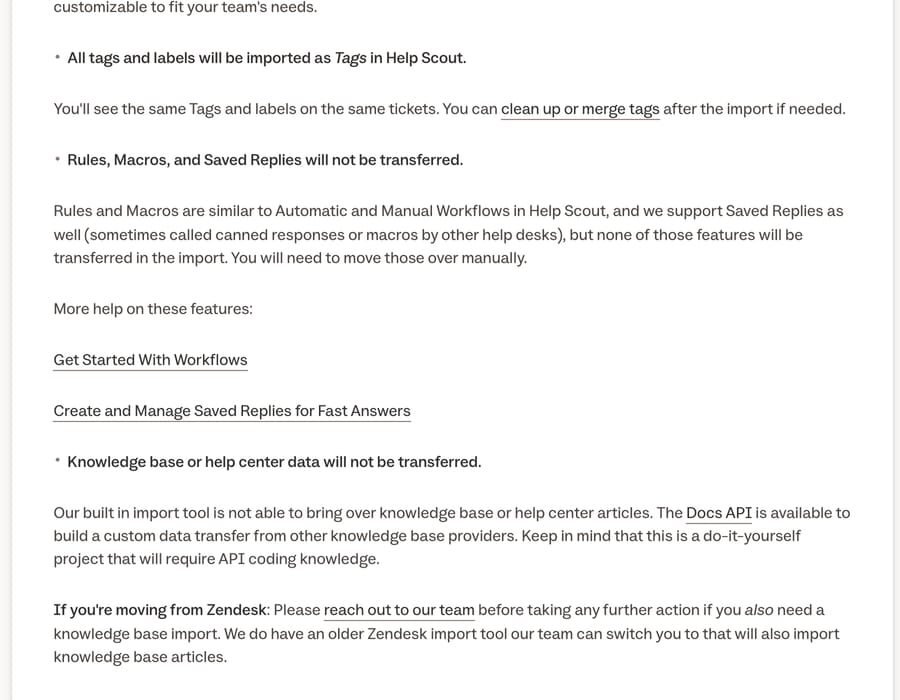
Workflow capacity depends on the plan. Help Scout's pricing page lists 150 basic workflows on Standard, 500 advanced workflows on Plus and unlimited advanced workflows on Pro. A Freshdesk account whose rules route on company or customer data will want Plus or higher: Help Scout's workflow conditions article gates the Company and Customer Property conditions to Plus and Pro, and its pricing page caps Standard at 150 basic workflows.
Anything AI is rebuilt too. Freddy's knowledge sources, bot flows and Copilot settings don't migrate to Help Scout's AI agent, Scout, which you set up from your Docs and website content. Our Help Scout AI guide covers what Scout and AI Drafts do and what they cost.
How much does a Freshdesk to Help Scout migration cost?
There are two bills: the move, and the new subscription.
The move. Help Scout's importer is free up to 500,000 records when you start it from inside Help Scout, then $500 per 500,000 records counted from the first, so a 1,000,000-record account pays $1,000. Help Desk Migration's pricing page gives two worked examples on its free Essential support tier: $100 for 1,000 records and $514 for 10,000. Its records are tickets, contacts, companies, agents and articles; comments, notes and attachments aren't counted. ClonePartner quotes a flat fee after a call; in our November 2, 2026 vendor dataset its pricing page said migrations start at $500 and most projects land between $3,000 and $10,000.
Here's the arithmetic for a typical mid-size account: 40,000 tickets, 25,000 contacts, 300 companies, 12 agents and 150 articles is about 65,500 records. Help Scout's importer moves the tickets, contacts and tags free, and you rebuild the 150 articles and the custom fields yourself. Help Desk Migration moves everything, and on its sliding per-record scale the price sits well above the 10,000-record example; run its free demo to get the exact number. The real choice is between paying for the custom fields and articles or spending a few days re-entering them.
The subscription. Help Scout's pricing page, read November 22, 2026, lists Standard at $25 per user a month billed annually ($30 monthly), Plus at $45 ($54) and Pro at $75 ($90). Twelve agents on Plus billed annually is $540 a month. Scout, Help Scout's AI agent, is billed on top at $0.75 per resolution after a three-month free trial for new accounts. Our Help Scout pricing guide works through the plans in more detail.
What is the cutover sequence?
The order matters because Help Scout attaches imported conversations to users, Inboxes and customers that already exist.
- Export a full backup from Freshdesk first. Freshdesk's export article puts it under Admin > Account > Account Details > Export data, and only an Account Administrator can run it. Keep the file even if a tool does the move.
- Create users and Inboxes in Help Scout, one Inbox per Freshdesk support address. Help Scout's importer needs them to map agents and mailboxes.
- Rebuild saved replies, workflows and custom fields before the import, so imported conversations land with the fields they need. Configure each Inbox's auto reply now, too.
- Tag the source records (Help Scout suggests a tag such as
imported) so you can find migrated conversations later and keep them out of new workflows. - Run a sample migration and read 20 or 30 conversations end to end: threads in the right order, notes still private, attachments opening, the right customer on each.
- Change email forwarding and other ticket sources just before the full import, as Help Scout's switching guide advises. Your support address stays the same; its forwarding moves to the Inbox's Help Scout address.
- Run the full migration, then a delta run for tickets that arrived during it if your tool offers one.
- Keep Freshdesk read-only for a month. Someone will need an old ticket the import missed.
Is there downtime, and what breaks after cutover?
The tickets themselves don't cause downtime. The risk sits in the gap between switching forwarding and the import finishing. Help Scout's importer runs through Import2, which tells customers to stop using the old system before the full migration and doesn't offer a delta run, so mail that arrives in Freshdesk mid-import has to be moved by hand. Help Desk Migration (paid delta within 10 days of the full run) and ClonePartner (a final delta sync at your switchover time) close that gap.
The things that break in the first week are predictable:
- Workflows fire on imported conversations. Exclude the
importedtag from every automatic workflow before the full run, or old tickets start getting auto replies. - Agents lose their filters. Freshdesk views built on ticket fields don't exist until you rebuild them in Help Scout, using custom fields, tags and Inbox folders.
- Reporting resets. Help Scout's reports start from your first live day, and imported Freshdesk satisfaction scores don't feed them.
- Integrations need reconnecting. Shopify, Jira, Slack and CRM apps are separate installs in Help Scout, and API scripts need new OAuth2 credentials, which our Help Scout API guide walks through.
Should you move from Freshdesk to Help Scout at all?
People ask this out loud. In a March 2023 r/CustomerSuccess thread, the support lead at a smart-home company with about 3,000 daily active users asked whether to stay on Freshdesk or move to Help Scout. Our Freshdesk vs Help Scout comparison covers that decision in depth. In short, Help Scout suits email-first teams that want a simple shared inbox and are fine with fewer ticket fields and statuses. Freshdesk suits teams that depend on detailed ticket forms, SLA policies and field-heavy reporting. Those are exactly the things that don't survive this migration.
A help desk vendor's importer is free because a new customer is worth far more than the migration costs it. A paid migration tool earns more as your record count grows, which is why every one of them offers a free demo: it's how they quote you. Use both facts. Run Help Scout's free sample first, and pay a tool only for the objects the free route leaves behind.
Where does an AI agent layer fit after the move?
If AI is part of why you're moving, look at what each desk's AI does with actions. Help Scout's Scout answers from Docs and website content. Freshdesk's Freddy has its own plan gates and session pricing. Both are first-party options worth testing before you add anything else.
Macha is an AI agent layer that runs inside the help desk you already use, and it doesn't connect to Help Scout today. It does run on Freshdesk. So if the reason for leaving is "we want AI that resolves tickets and takes actions in Shopify or Stripe," that's a reason you can solve without a migration. On Freshdesk, Macha reads the ticket, checks your other systems, and either replies or drafts the reply as an internal note for an agent to approve.
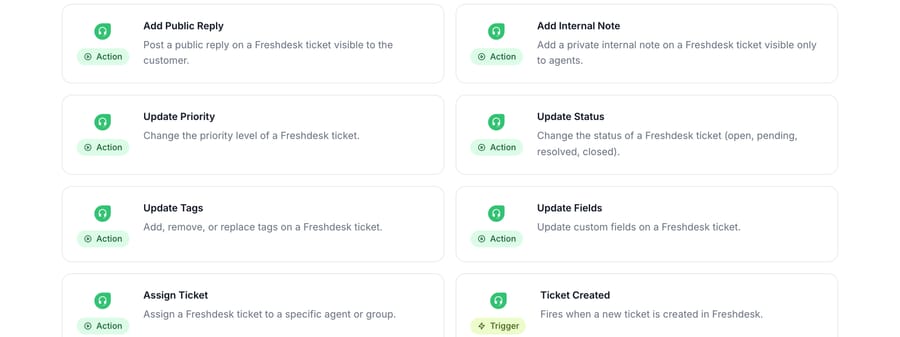
Macha is the done-for-you option: the Macha team analyzes your past tickets, builds the knowledge base and the agent on your existing Freshdesk, and runs it in safe mode until the drafts are right. That's included on the trial and every plan at about $0.40 per ticket, which covers setup and a dedicated success manager who handles your changes. The trial is $50 of free usage (about 125 tickets), no credit card, no time limit. See pricing, Macha on Freshdesk and the Freshdesk integration for the tool list, or the done-for-you setup for how the first two weeks run.
If you've already decided on Help Scout, finish the migration first and give the team a month on the new inbox before you add any AI. You'll know which conversation categories are worth automating once you see them in Help Scout's own reports.
How we researched this
We checked Help Scout's import article, its Guide to Switching Help Desks and its pricing page on November 22, 2026, and captured the screenshots the same day. Vendor facts come from ClonePartner's Freshdesk to Help Scout page and Help Desk Migration's Help Scout and pricing pages, read the same day, plus our November 2, 2026 dataset of migration vendors for ClonePartner's published price range. Freshdesk's export steps come from Freshdesk's own support article. The field mapping table combines Help Scout's switching guide, ClonePartner's mapping table and Help Desk Migration's field list; where they disagree, we say so. The 65,500-record example is our own arithmetic on invented figures. We didn't run a live migration for this guide. The Macha screen is our Freshdesk connector in the Macha demo workspace; Macha doesn't connect to Help Scout today. Screenshots were captured on the date in each caption.
Common questions
Can Help Scout import tickets from Freshdesk for free?
Yes, up to a point. Help Scout's built-in importer, run by Import2, lists Freshdesk as a source and is free for imports of 500,000 records or fewer started from inside Help Scout. Above that it costs $500 per 500,000 records. It moves tickets, customer profiles and tags, not custom fields or articles.
Do Freshdesk custom fields migrate to Help Scout?
Not with Help Scout's own importer, which lists custom fields among the things it can't import. Help Desk Migration and ClonePartner both map custom fields. Help Scout's pricing page describes up to 10 custom fields per conversation, so plan which Freshdesk fields to keep before the move.
Can I move my Freshdesk solution articles to Help Scout Docs?
Help Scout's importer can't import knowledge base content from any provider. Help Desk Migration lists Docs collections, categories and articles among what it moves into Help Scout, and Help Scout's switching guide points to the Docs API for a custom transfer.
How do Freshdesk statuses map to Help Scout?
Help Scout's switching guide maps Open to Active and Resolved to Closed. Pending stays Pending and Closed stays Closed. Custom Freshdesk statuses have no equivalent, so map each to the nearest Help Scout status and keep the original as a tag.
How long does a Freshdesk to Help Scout migration take?
ClonePartner's Freshdesk to Help Scout page says most migrations finish within 1 to 5 business days, and small ones can finish in under 24 hours. Rebuilding saved replies, workflows and custom fields usually takes longer than the data transfer, so budget a week or two for setup.
Do Freshdesk automations carry over to Help Scout?
No. Help Scout's switching guide says rules and macros don't transfer and should be recreated as workflows and saved replies. ClonePartner's FAQ offers to recreate triggers and automations with Help Scout's conditions and actions, with the list agreed during scoping.