





 Shopify
 Stripe
 Slack
Slack Notion
 Google Workspace
 Confluence

How Long Does a Front Migration Take? Checklist and Timeline (2026)


A Front migration takes one to two weeks for a mid-sized team, and most of that time goes to rebuilding the rules, templates and custom fields that no export carries. Here is the before, during and after checklist, with a rollback plan.
Key takeaways
- A Front migration typically takes one to two weeks end to end for a mid-sized team, including a few days of pre-work, a same-day demo and verification.
- Front's native data export must be requested through Front Support by a company admin, and Front acknowledges the request within 72 hours.
- Help Desk Migration says a full Front migration runs from a few hours to up to a week, depending on attachment size, API limits and record volume.
- Front's native export excludes individual-inbox conversations, contact data, message templates and tags, while Rules, shared drafts and analytics history never migrate by any route.
- Help Desk Migration's free demo imports 20 tickets with their associated data, and teams can rerun it until conversations, tags and assignments land correctly.

A Front migration takes one to two weeks end to end for a mid-sized team: a few days of pre-work, a same-day demo of 20 tickets, a full import that runs from a few hours to up to a week, then record-by-record verification. The work that decides the timeline is rebuilding what never ports, because Front's rules, shared drafts, message templates and analytics history do not move by any route.
| Phase | Typical length | Main task |
|---|---|---|
| Pre-work | A few days | Audit, map inboxes, request the native export (72-hour acknowledgement) |
| Demo | Same day | Import 20 tickets, check them against Front |
| Full import | A few hours to a week | Depends on volume, attachments and API limits |
| Verification | Before the archive window closes | Help Desk Migration keeps a full migration 3, 5 or 10 days by support package |
| Rebuild | Runs alongside | Rules, templates, reports |
Which export path should you use to leave Front?
Before you touch a checklist, decide how your data leaves Front, because the two routes have very different limits.
Front's native account data export is the official path, and it's gated. Per Front's guide on exporting your team's account data, only a company admin can request it, and you request it through Front Support's contact form rather than from a settings screen. Front says it will "acknowledge your data export request within 72 hours" and then process it. What you get back is a set of CSV files (EML on request) covering shared-inbox conversations, messages, discussions, comments, and shared-inbox attachments. What you don't get is the catch, covered below.
A third-party migration tool is the other path, and for a like-for-like move into a new help desk it's usually the pragmatic one. Help Desk Migration (by Relokia) runs a Migration Wizard that connects to Front through an API token and moves your records directly into the target platform. Help Desk Migration says a full migration takes anywhere from a few hours to up to a week, depending on attachment size, API limits on both sides and record volume. It maps far more than a raw CSV, but it too leaves things behind.
We cover the mechanics of pulling data out in depth in how to export data from Front; this post is the migration plan around it.
What moves out of Front, and what do you rebuild?
This table is the heart of any Front migration. Assume everything in the right-hand column is manual work, and scope your project around it.
| Item | Native Front export | Migration tool (Help Desk Migration) | Reality |
|---|---|---|---|
| Shared-inbox conversations & messages | Yes (CSV) | Yes (tickets, with dates/CCs) | Ports |
| Comments / internal discussions | Yes | Yes | Ports |
| Attachments | Shared inboxes only (EML) | Yes (option to skip) | Mostly ports |
| Contacts | No | Yes (customers) | Rebuild or use a tool |
| Agents / teammates | n/a | Yes | Ports via tool |
| Tags | No | Yes (via tool) | Native export drops them |
| Individual-inbox conversations | No | Limited | Largely lost |
| Message templates | No | No | Rebuild by hand |
| Rules & automations | No | No | Rebuild by hand |
| Shared drafts | No | No | Do not port |
| Custom fields | No | Yes (string, boolean, date and number types) | Ports via tool; check other field types |
| Organizations | No | No | Rebuild by hand |
| Analytics & reporting history | No | No | Starts fresh |
Two honest takeaways. First, the native export is lossy: it explicitly excludes individual-inbox conversations and comments, contact data, message templates, tags, and individual-inbox attachments. Second, even the richer migration-tool path does not carry organizations, inline images, knowledge-base articles, macros, triggers, or automations; those "remain in the source system," in Help Desk Migration's words. Its Front page does list custom fields of string, boolean, date and number types as migratable, so other field types need a manual check. Your rules were never portable; more on that in the rebuild section.
What should you do before the migration?
Do this work before a single record moves. It's the difference between a two-day migration and a two-week one.
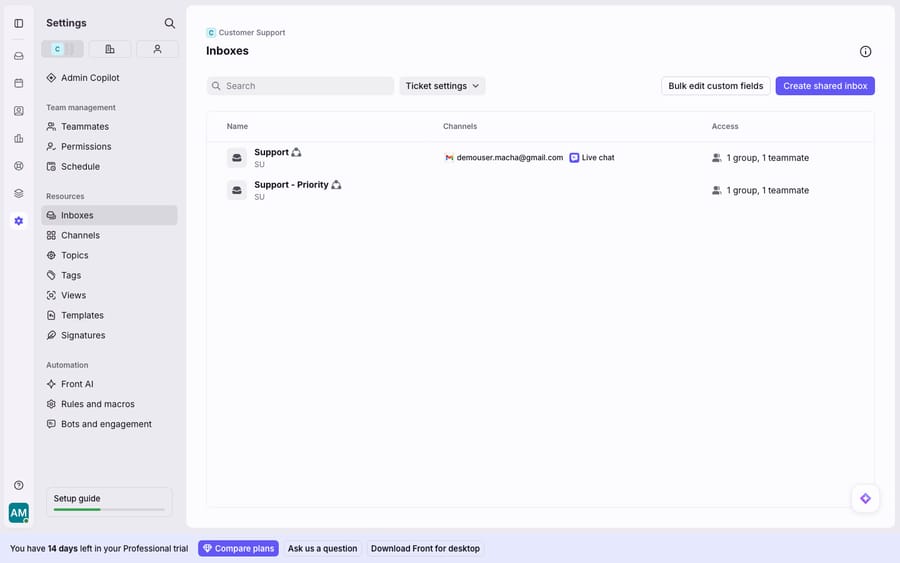
- Audit and prune. Walk your Inboxes settings and list every shared inbox, connected channel, tag, template, and rule. Delete the dead ones now so you don't migrate clutter.
- Map inboxes to the new platform. Decide which Front shared inbox becomes which group/queue in the target. Write it down — this mapping is what "during" runs against.
- Request the native export early (if you're using it) via Front Support, because of the 72-hour acknowledgement window — it's the longest-lead item in the plan.
- Prep the Front account for tooling. If you're using Help Desk Migration, generate an API token under Settings → Developers → API Tokens with Shared and Private scopes, temporarily disable 2FA on the service account, and add and invite your agents into Front first so records can be assigned to real people.
- Stand up the destination. Create the matching inboxes, agents, and business hours in the new platform before import day.
- Screenshot your rules and templates. They don't port. Capture every rule and every template now (the rebuild template below tells you exactly what to record).
What should you do on migration day?
- Run a demo migration first. Help Desk Migration's free demo imports 20 tickets with their associated data, and its Custom Demo lets you choose which 20, so you can check how conversations, tags, and assignments land. You can repeat the demo as often as you need. Note: each demo creates a new set of tickets, so delete the demo records before the full run to avoid duplicates.
- Verify the demo record-by-record. Check the same IDs on both the source and target. Confirm timestamps, requesters, attachments, and internal comments survived.
- Freeze changes, then run the full migration. Put Front into a low-traffic window, stop routing new work into inboxes you're moving, and start the full import. Expect anything from a few hours to a week, driven by ticket count and attachment size.
- Keep both systems live during the cutover. Don't disconnect Front's channels until the destination is confirmed working. This is your safety net.
How long does a Front migration take, and how much downtime is there?
Realistic timeline. For most teams the calendar looks like this: a few days of pre-work (audit, mapping, requesting the export), a same-day demo, a full migration whose length is driven by volume (from a few hours to up to a week, per Help Desk Migration), then post-migration verification. Do that verification promptly: Help Desk Migration archives a full migration 3, 5 or 10 days after completion, depending on whether you bought the Essential, Advanced or Premium support package. Budget one to two weeks end-to-end for a mid-sized team, more if you have heavy rule/template rebuild.
Downtime. A direct API migration can run with near-zero inbox downtime because you keep Front receiving mail while records copy across; the risk isn't outage, it's divergence — messages that arrive mid-migration. Freeze new inbound to the migrating inboxes during the final full run, or plan a delta pass for the gap.
What genuinely does not survive. Be candid with stakeholders: Front's rules, shared drafts, message templates, and analytics history do not migrate by any route. The native export additionally drops tags and contacts. None of this is a bug. It's the boundary of what's portable out of a collaborative shared-inbox system. Treat the rebuild as a first-class workstream, not an afterthought.
How do you rebuild Front rules and templates?
Because Front rules don't port, you rebuild them from a spec, and the cleanest way is to capture each one in a small table before you leave, then re-create it in the new platform's automation engine. Record, for every rule:
| Field | Capture from Front | Rebuild target |
|---|---|---|
| Rule name & scope | Individual / workspace / company | New platform's trigger name |
| Trigger (When) | e.g. inbound message received | Equivalent event |
| Conditions (If) | Subject/from/inbox/tag logic | Equivalent conditions |
| Actions (Then) | Tag, assign, move, auto-reply | Equivalent actions |
| Stop-processing? | Yes/No | Order/priority in new engine |
| Template used | Template body text | Recreated canned reply |
Do the same for templates: paste each template's full body and its trigger context into your doc so a teammate can rebuild it verbatim. This spreadsheet is your migration's memory of the logic Front won't hand over.
Where does Macha fit after the move?
Whichever inbox you land on, the reasoning your Front rules and templates were reaching for ("read this billing question, check the order, answer it") is exactly the part that never ports. The broader category of AI agents for customer service exists to do that reasoning work. Macha is one such layer, and it's honest about its role: it runs on top of your help desk and never replaces it. It works on Zendesk, Freshdesk, Gorgias, Front, HubSpot or Intercom, and on Front it connects through the Macha–Front connector. So if you're migrating between platforms, Macha doesn't add another thing to migrate; you point it at wherever you end up. It reads each conversation, understands intent rather than keywords, and drafts or sends a grounded reply, pulling a real order or account status through a custom tool that turns your REST API into something the agent can call. Because Macha bills per ticket (one conversation, charged once however many messages it takes, from $299 a month for 750 tickets), you can rebuild automation on the new platform and add the reasoning layer on top of it, at a price that tracks the volume you handle.
FAQ
Can I export my Front data myself? Partially. Only a company admin can request Front's native account data export, and it goes through Front Support's contact form rather than a self-serve button; Front acknowledges the request within 72 hours. It returns shared-inbox conversations, messages, comments, and shared-inbox attachments as CSV, but not tags, contacts, templates, or individual-inbox data.
What does Front's export leave out? The native export excludes individual-inbox conversations and comments, contact data, message templates, tags, and individual-inbox attachments. Rules, shared drafts, and analytics history don't come out by any route.
Do Front rules migrate to another platform? No. Front rules, macros, and automations do not port. You rebuild them in the new platform's automation engine, which is why capturing each rule's trigger, conditions, and actions in a spec before you leave is part of the checklist.
How long does a Front migration take? Plan one to two weeks end-to-end for a mid-sized team. Pre-work takes a few days, the demo is same-day, the full import runs from a few hours to up to a week, and Help Desk Migration archives the finished migration after 3, 5 or 10 days depending on your support package, so verify inside that window. Heavy rule and template rebuilding adds time.
How do I roll back if the migration goes wrong? Keep Front fully live — channels connected, receiving mail — until you've verified the destination record-by-record. Because a direct API migration copies rather than moves, your source of truth stays intact; if verification fails, you re-point routing back to Front and re-run the import after fixing the mapping.
How many tickets can I test in Help Desk Migration's free demo? 20 tickets with their associated data, and you can rerun the demo as often as you need. Each demo creates new records in the target, so delete them before the full run.
Landed on your new help desk? Start with $50 of free Macha usage and connect the AI agent layer to whichever inbox you chose. No extra migration required.






