





 Shopify
 Stripe
 Slack
Slack Notion
 Google Workspace
 Confluence

Why Is Front Search Not Finding a Conversation or Comment? 6 Fixes


Front search usually misses a conversation because of scope, not a bug: comments, Trash, Spam and other inboxes sit outside the default search. The six causes below run from most to least common, each with the operator or setting that fixes it.
Key takeaways
- Front's default keyword search reads message bodies, so finding text inside an internal comment requires adding the in:comments operator to the query.
- Front leaves the Trash and Spam folders out of keyword search by default, so recovering a trashed or spammed conversation requires adding is:trashed or is:spam.
- When Front's inbox scope is set to one inbox, a conversation ID search only covers that inbox, so switching to All inboxes or pressing Shift + O finds it.
- Front's docs give YYYY-MM-DD as the date format for before:, after: and during:, with filters combined by spaces and a leading dash to exclude.
- Front's default link-sharing setting is now Any teammate with the link, while companies on Only teammates with access need inbox access to open a shared conversation.

When Front search can't find a conversation, the cause is almost always scope: keyword search skips internal comments unless you add in:comments, leaves out Trash and Spam unless you add is:trashed or is:spam, and an ID lookup only covers the inbox you've selected. Switch the scope to All inboxes and most "missing" conversations turn up. The rest were deleted, sit in an inbox you can't access, or haven't indexed yet. Each fix below comes from Front's own search documentation, checked on 24 September 2026.
Which cause matches what you're seeing?
| What you're seeing | Most likely cause | Jump to |
|---|---|---|
| A comment / internal discussion isn't returned | Default search reads message bodies, not comments | Cause 1 |
| Conversation exists but never appears | It's in Trash or Spam (excluded by default) | Cause 2 |
Pasting a cnv_ / msg_ ID finds nothing | You're searching one inbox, not All inboxes | Cause 3 |
| ID still finds nothing across all inboxes | Deleted, or you don't have access | Cause 4 |
| Too many / wrong results, or an operator ignored | Operator syntax or an accidental filter | Cause 5 |
| Nothing at all returns, everywhere | Indexing lag or a Front-side incident | Cause 6 |
Cause 1: Why doesn't Front search find text inside a comment?
This is the single most common "search is broken" report, and it's a scope default, not a fault. When you type a keyword into Front's search bar, it matches against message bodies — the actual emails and channel messages in a conversation. Internal comments (the teammate-only notes you leave inside a conversation) and discussions are indexed separately.
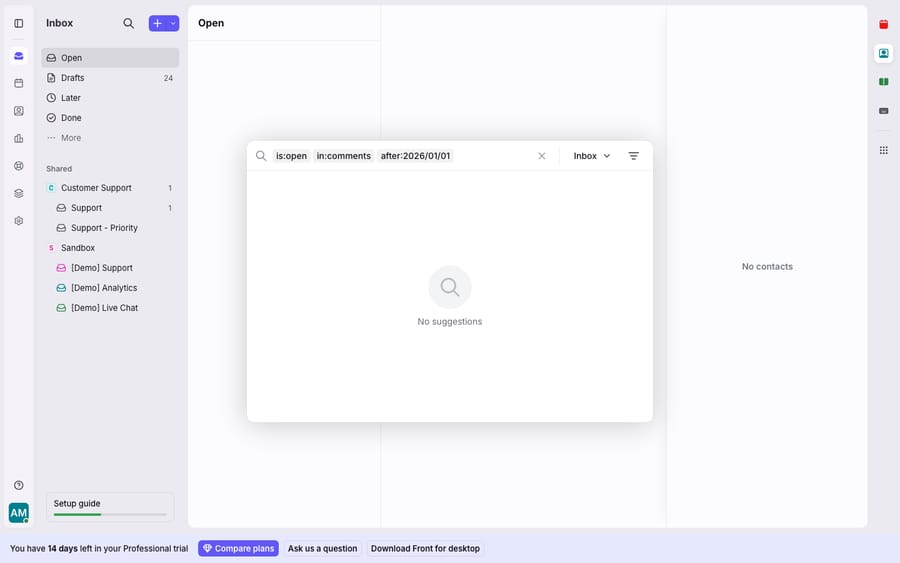
Fix: add the in:comments operator. Per Front's guide to searching, in:comments "refines your search to conversations where the text match is inside comments," while in:messages restricts to message bodies and in:attachments looks inside PDFs, CSVs, and Office files. So if a colleague wrote "escalated to billing" as a comment and a plain keyword search misses it, search escalated to billing in:comments instead. To find internal discussions specifically, add is:discussion, which returns Front's internal discussion threads. This exact behavior is what the community "Searching Discussions" thread is about — comment and discussion text is reachable, but only once you tell search to look there.
Cause 2: Why doesn't a trashed or spam conversation show up?
Front deliberately keeps clutter out of your everyday results, and that includes the Trash and Spam folders. This trips people up constantly: a real conversation got auto-classified as spam or was trashed by a rule, and now no ordinary keyword search will surface it.
Fix: Front's search documentation is explicit that "the Trash and Spam folders are not automatically included when you search for keywords." To include them, add the is:trashed or is:spam filter to your query. So refund is:trashed will find the trashed conversation, and newsletter is:spam will find the one that got mis-flagged. If you find it in spam and it shouldn't be there, move it back so it re-enters your normal inbox — otherwise you'll be re-typing is:spam every time. This is a shared-inbox reality: with a rule engine and spam filtering both moving conversations around, things land in these folders more often than a personal mailbox owner would expect.
Cause 3: Why does searching a conversation ID return nothing?
Front's search bar has an inbox-scope dropdown (visible in the screenshot above). If it's set to a specific inbox rather than All inboxes, every query — including an ID lookup — is silently constrained to that one inbox. This is the quiet reason a cnv_ or msg_ ID "doesn't work."
Fix: widen the scope. Per Front's article on conversation and message IDs, "if you're searching in a specific inbox, then searching by conversation/message ID will only return conversations that live in that inbox," and the fix is to search All inboxes. Set the scope dropdown to All inboxes, paste the full ID (the cnv_… conversation ID or msg_… message ID), and run it again. Front also documents a faster route: press Shift + O to open the "Open a conversation" window, which accepts a conversation or message ID or its URL. Most often the "missing" conversation was simply in a different inbox than the one search was pointed at.
Cause 4: What if the ID still finds nothing across all inboxes?
If you've widened to All inboxes and a valid-looking ID still returns nothing, the honest answer is that the conversation may not be reachable by you at all. The community thread on unfindable conversations gives two real reasons: the conversation was permanently deleted, or you don't have access to it — it's in a private inbox you're not a member of, or a conversation you haven't been shared on.
Fix: this one isn't a search-syntax tweak. Front's conversation ID article says the default link-sharing setting is now "Any teammate with the link"; the previous default, "Only teammates with access", still applies to companies that kept it, and there a link alone won't open a conversation in an inbox you can't see. So:
- Ask the person who sent you the ID to share the conversation with you — they can @-mention you or add you via the participant menu, which pulls you in directly.
- If it's an inbox-access problem, an admin needs to add you to that inbox under Company settings → Inboxes (admin-only; on a trial you may not see other teammates' private inboxes at all).
- If it was permanently deleted from Trash, it's gone — deletion is irreversible, and no operator brings it back.
Cause 5: Is an operator or a leftover filter skewing the results?
Sometimes search is returning results — just the wrong ones, or none, because an operator isn't doing what you think. Dates are the classic case: Front's docs give YYYY-MM-DD as the format (their example is after:2016-08-01) for before:, after:, and during: (the search bar renders these as chips, as in the screenshot). Typing after:01/01/2026 may not parse the way after:2026-01-01 does.
Fix: slow down and check the query:
- Combine filters with spaces, not commas —
is:open in:comments after:2026-01-01is three filters ANDed together. - Exclude with a leading dash —
-tag:spamor-from:noreply@removes matches. If you accidentally left a stray-keywordin the bar, you're silently excluding results. - Watch for a leftover chip. A previous
assignee:,tag:, oris:archivedchip still sitting in the search bar will filter your new query. Clear the bar fully and start clean. - Use
is:status filters deliberately —is:openhides archived conversations, so if the one you want is archived, either drop the filter or addis:archived.
Front's full operator list is the reference here; when a search feels "broken," it's usually one chip too many rather than a missing feature. If you want a plain-English tour of the syntax, Front search explained walks through the operators in context.
Cause 6: What if nothing returns for anyone?
If a conversation that arrived seconds ago isn't searchable, that's indexing latency — search relies on an index that updates continuously but not always instantaneously. And if nothing returns across every inbox, for every teammate, the problem is upstream of your query.
Fix: for very recent items, give the index a moment and retry, or open the inbox directly rather than searching. For a total, org-wide outage, confirm it's not just you before you troubleshoot syntax — check Front's status page and is Front app down? for how to read a real incident. A genuine Front-side incident isn't something operators can fix; the fix is to wait for Front to resolve it. This distinction matters because most "search not working" reports are scope issues you can fix in seconds, while true outages are rare and out of your hands.
Can an AI agent cut down how often your team searches?
Most of the friction above is really a volume problem in disguise: the more conversations flow through a shared inbox, the more often someone is reconstructing context by hand — digging for the past ticket, the earlier comment, the related discussion. Search operators help you find things faster, but they don't reduce how often you need to.
That's the seam an AI agent layer fits into. The broader category of AI agents for customer service exists to do that context-gathering automatically. Macha is one such layer: it runs on top of the Front you already use through the live Macha–Front connector — it doesn't replace Front, your inboxes, or your search. When a conversation lands, Macha's agent reads it, retrieves the relevant history and account details itself (pulling live data through a custom tool that turns your API into something the agent can call), and drafts or sends a grounded reply. The teammate never has to open the search bar to find the matching order or the earlier thread — the agent already did. It's the same shared inbox you know, with less manual archaeology on top, and Macha bills per ticket: one conversation, charged once however many messages it takes, from $299 a month for 750 tickets, never per resolution.
FAQ
Why isn't Front search finding a comment I know I wrote? Default keyword search reads message bodies, not internal comments or discussions. Add the in:comments operator (e.g. escalated in:comments) to search inside comments, or is:discussion to find internal discussion threads.
How do I search Trash or Spam in Front? Front excludes the Trash and Spam folders from keyword search by default. Add is:trashed or is:spam to your query — for example invoice is:spam — to include those folders.
Why can't I find a conversation by its cnv_ ID? Usually because search is scoped to one inbox. Set the scope dropdown to All inboxes and paste the full ID. If it still returns nothing, the conversation was either permanently deleted or lives in an inbox you don't have access to — ask a participant to share it or an admin to add you to the inbox.
Do I need to combine search filters with commas? No — separate filters with spaces. is:open in:comments after:2026-01-01 ANDs three filters together. Use a leading dash to exclude, e.g. -tag:spam.
Is my search broken, or is Front down? If only certain conversations are missing, it's almost always a scope issue (comments, Trash/Spam, or inbox scope). If nothing returns for anyone across all inboxes, check Front's status page and is Front app down? — that points to a Front-side incident, not your query.
Want fewer conversations to hunt for in the first place? Start a free trial of Macha and connect it to your Front in minutes.






