





 Shopify
 Stripe
 Slack
Slack Notion
 Google Workspace
 Confluence

How Do You Migrate from Front to HubSpot Service Hub? (2026 Step-by-Step)


Moving from Front to HubSpot Service Hub means translating shared-inbox conversations into HubSpot tickets, engagements and CRM records, then rebuilding the Rules, shared drafts and reports that have no equivalent. Front's export has to be requested from Front Support and leaves out contacts, templates and tags, so plan those as separate workstreams.
Key takeaways
- A Front to HubSpot Service Hub migration takes 1 to 2 weeks under 10,000 conversations and 4 to 8 weeks for a 30-agent team with 150,000 conversations.
- Front has no self-serve full export: a company admin requests it from Front Support, which acknowledges the request within 72 hours, and contacts, templates and tags are excluded.
- Each Front conversation becomes one HubSpot ticket plus Email and Note engagements, and HubSpot Note bodies cap at 65,536 characters, so long comment threads must be split.
- Front Rules must be rebuilt as HubSpot Workflows, while Front shared drafts and analytics dashboards have no HubSpot equivalent and stay behind.
- ClonePartner prices managed Front to HubSpot migrations at $2,000 to $5,000 under 10,000 conversations and $10,000 to $20,000 for 50,000 to 150,000 conversations.

To migrate from Front to HubSpot Service Hub, a company admin requests Front's account export from Front Support (acknowledged within 72 hours), each Front conversation is written into HubSpot as one ticket plus Email and Note engagements, Front Rules are rebuilt as HubSpot Workflows, and channels cut over at go-live while both tools run side by side. ClonePartner puts a 30-agent team with 150,000 conversations at 4 to 8 weeks end to end, and a team under 10,000 conversations at 1 to 2 weeks.
| Step | What happens | Watch for |
|---|---|---|
| 1. Export from Front | Admin requests the account export from Front Support | Shared inboxes only; no contacts, templates or tags |
| 2. Map objects | Conversations → tickets + engagements; contacts → HubSpot Contacts | Notes cap at 65,536 characters; pre-create tag values |
| 3. Rebuild configuration | Rules → Workflows; reports rebuilt | Shared drafts have no HubSpot equivalent |
| 4. Cut over | History moves in the background, channels switch at go-live | Keep Front read-only as a fallback |
How do Front's and HubSpot's data models differ?
Front and HubSpot disagree about what support even is, and that disagreement is exactly where data goes missing. Front is conversation-first: a single collaborative thread carries the customer's messages, internal comments, assignees, and tags, all living inside a shared inbox. HubSpot Service Hub is CRM-first: the ticket is one record in a web of associations, and every individual reply becomes its own engagement tied back to a contact and a company.
So a Front-to-HubSpot move is never a "sync toggle." According to the ClonePartner technical guide, each Front conversation becomes a HubSpot ticket plus a set of engagement records: customer-facing messages map to Email engagements, and internal comments become Notes. The Note body field tops out at 65,536 characters, so very long comment threads have to be split. Getting the associations right, with the correct contact and company attached to each ticket, is the whole job.
How do you get your data out of Front?
Here is the first surprise, and it is worth naming before you commit to a timeline: Front has no self-serve full-export button. As Front documents in How to export your team's Front account data, a company admin has to request the export from Front Support, and Support acknowledges the request within 72 hours before processing even begins. What you receive is a set of CSV files (each around 700MB, ordered alphabetically, with large inboxes split across files), covering conversations, messages, discussions, and comments from shared inboxes only.
What that export does not include is the catch. Per the same Front article, the account export excludes individual-inbox data, contact information, and your message templates and tags. Attachments come only if you specifically request the EML format. In practice, teams pull contacts through a separate route, Front's self-serve contact CSV export, and treat attachments and tags as their own workstreams. We walk the mechanics of both in how to export data from Front.
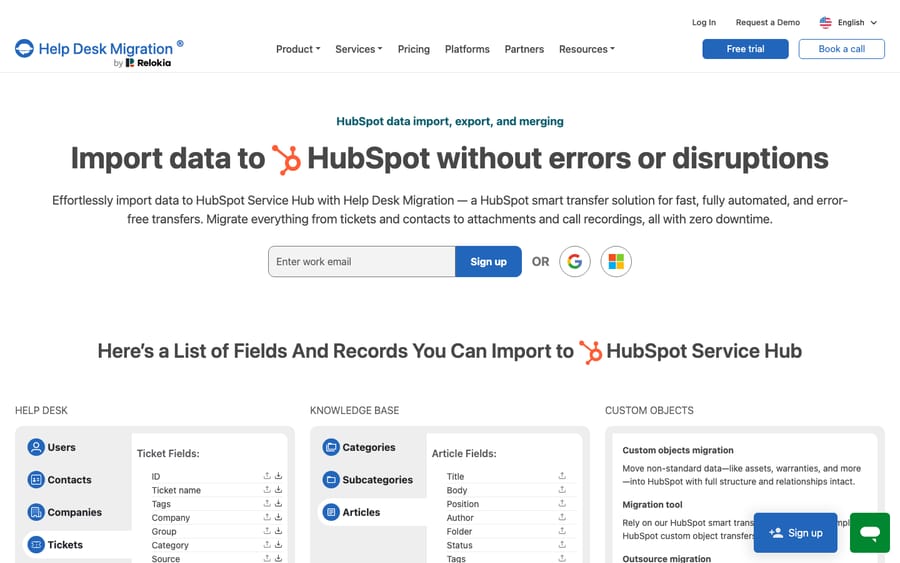
Because the raw Front export is lossy and CSV-shaped, most teams don't hand-build the import. They use a third-party migration service such as Help Desk Migration (by Relokia) or ClonePartner, which read from the source through its API and write into HubSpot's objects, preserving threading, timestamps, and authorship that a plain CSV drops. Help Desk Migration's HubSpot page does not name Front among its listed sources, so confirm Front support with the vendor before you plan around it. HubSpot itself has no native Front importer, so the practical choice is a paid migration service or a DIY API project.
How do conversations, contacts, and pipelines map?
This is where the two models are reconciled, field by field. The mappings that matter most:
- Conversations → Tickets (+ engagements). Each Front conversation becomes one HubSpot ticket; each message inside it becomes an Email or Note engagement associated with that ticket.
- Contacts → HubSpot Contacts. This is a real upgrade: a flat Front contact becomes a CRM record with lifecycle stages, deal associations, and standard properties like
firstname,email,phone, andcompany. Deduplicate on email before import; HubSpot keys on it. - Conversation status → Pipeline stage. Front's assigned / unassigned / archived states must be explicitly mapped to HubSpot's ticket pipeline. HubSpot's default Support Pipeline has four statuses: New, Waiting on contact, Waiting on us, and Closed. Help Desk Migration exposes this as "mapping groups to pipelines," so create your pipeline and stages before you migrate.
- Tags → custom ticket property. HubSpot has no native ticket-tag object. Front tags become values in a custom multi-select property, and you must pre-create every tag value first, or HubSpot rejects the unmapped ones on import.
What moves to HubSpot and what do you rebuild?
Front and HubSpot overlap on records but diverge sharply on logic and configuration. Configuration never migrates; it is rebuilt. This table is the heart of the plan.
| Front object / feature | Moves to HubSpot? | How it lands / what you do |
|---|---|---|
| Shared-inbox conversations | Yes (via tool/API) | Become tickets with Email/Note engagements |
| Messages & internal comments | Yes | Email engagements + Notes (Notes capped at 65,536 chars) |
| Contacts | Yes (separate export) | HubSpot Contacts with lifecycle stages & properties |
| Companies / contact groups | Partial | Mapped to HubSpot Companies or static lists |
| Tags | Rebuilt | Custom ticket property; pre-create every value |
| Conversation status | Mapped | Pipeline stages (New / Waiting / Closed) |
| Attachments | Conditional | Only via EML export on request, or through the migration tool |
| Front Rules | No equivalent | Rebuild as HubSpot Workflows (Professional and above) |
| Shared drafts | No equivalent | No HubSpot concept; recreate as snippets/templates |
| Analytics dashboards | No equivalent | Rebuild in HubSpot reports; history does not carry |
| SLA timer state / history | No | Reconfigure SLAs; historical timers reset |
| Knowledge base / portal | No | Built net-new in HubSpot |
| CSAT / survey data | No | Reconnect surveys; past results stay in Front |
The three rows in bold are the ones teams underestimate. Front Rules have no direct HubSpot analogue: the When/If/Then automations you rely on (Front rules explained covers how they work) get rebuilt from scratch as HubSpot Workflows, which ClonePartner notes need a Professional tier or higher, so check your Service Hub plan before you promise parity. Shared drafts, Front's collaborative "let a teammate finish this reply before it sends" feature, simply do not exist in HubSpot; the closest substitute is snippets or templates, which is not the same thing. And analytics dashboards don't survive: you rebuild the reports and accept that historical trend data stays behind in your read-only Front account.
How long does the migration take, and is there downtime?
A Front-to-HubSpot migration is a near-zero-downtime exercise if you sequence it right. Per the ClonePartner guide, HubSpot Service Hub runs alongside Front for the duration: you migrate history in the background and cut channels over at go-live, not mid-flight. The same guide recommends keeping Front read-only for 8 to 12 weeks as a fallback, and up to 6 to 12 months if you want it as a reference archive for anything that didn't port.
Timeline scales with volume. A mid-size team (30 agents and about 150,000 conversations) should budget 4 to 8 weeks end to end, including planning, a test migration, and validation. The bottleneck is the ticket-plus-engagement write phase: each conversation needs 4 to 6 separate API calls (contact, ticket, associations, engagements, attachments), and ClonePartner puts realistic throughput at 50 to 200 enriched tickets per minute, which works out to roughly 13 to 50 hours of continuous API runtime for 150,000 conversations before error handling. A small team under 10,000 conversations can be done in 1 to 2 weeks.
How much does a Front-to-HubSpot migration cost?
ClonePartner benchmarks managed migrations at $2,000 to $5,000 for under 10,000 conversations (metadata only), $5,000 to $12,000 for 10,000 to 50,000 with full history, and $10,000 to $20,000 at 50,000 to 150,000 conversations with full history and attachments. A DIY build typically eats 80 to 200 engineering hours. Help Desk Migration prices by the number of records you move and offers a free Demo (20 random tickets and 20 knowledge base articles) you can repeat to see the mapping on your real data. If you're weighing the cost of the platforms themselves, Front pricing explained is a useful baseline; on the HubSpot side, Service Hub Starter lists at $7 a seat billed annually ($20 month to month).
Where does an AI layer fit on either platform?
A migration is a good moment to notice that most of what you're moving is repetitive: the same order-status, password-reset, and refund questions, over and over. Moving them to a different CRM doesn't make them go away; it just relocates the queue. This is the seam an AI agent layer fills, and it's platform-agnostic.
Macha is one such layer. It is not a helpdesk and not a Front-or-HubSpot alternative; it runs on top of whichever inbox you land on. If you're still deciding, or you migrate and then automate, Macha connects to Front or to HubSpot and reads each incoming conversation, understands intent rather than keywords, and drafts or sends a grounded reply, pulling a real order or account record through a custom tool that turns your API into something the agent can call. The wider category of AI agents for customer service exists for exactly the reasoning work a pipeline stage can't do, and if you're weighing building it yourself, building an AI agent from scratch vs a platform lays out the trade-offs. Macha bills per ticket, from $299 a month for up to 750 tickets: one conversation, charged once however many messages it takes, never per resolution, so the bill never hangs on an outcome definition you don't control. Migrate the platform; let an agent handle the volume you were about to carry across with it.
FAQ
Is there a native Front-to-HubSpot migration tool? No. HubSpot Service Hub has no built-in Front importer, and Front has no self-serve full export. The practical routes are a third-party migration service (such as ClonePartner, or Help Desk Migration once you've confirmed Front support) or a DIY API project. HubSpot's own Contacts import handles CSV contacts, not conversation history.
How do I export my Front conversations? A company admin has to request the export from Front Support, who acknowledge the request within 72 hours. The export covers shared-inbox conversations, messages, and comments as CSV (attachments only via EML on request) and excludes individual-inbox data, contacts, templates, and tags. See how to export data from Front for the full walkthrough.
Will my Front Rules and shared drafts move? No. Front Rules have no HubSpot equivalent and must be rebuilt as HubSpot Workflows; shared drafts don't exist in HubSpot at all and are approximated with snippets or templates. Analytics dashboards and SLA history also stay behind. Plan to rebuild configuration, not migrate it.
How long does the migration take and will we have downtime? Customer-facing downtime is essentially zero: HubSpot runs alongside Front and you cut channels over at go-live. Timeline is 1 to 2 weeks for a small team and 4 to 8 weeks for a mid-size one (around 30 agents and 150,000 conversations), including a test migration and validation.
Can I add AI without replacing Front or HubSpot? Yes. Macha connects as a layer on top of either platform and reads conversations to draft or send grounded replies. It doesn't replace your inbox, your tickets, or your automations; it handles the repetitive volume you'd otherwise carry across the migration.
Ready to move the platform and automate the queue at the same time? Start a free trial of Macha and connect it to Front or HubSpot in minutes.






