





 Shopify
 Stripe
 Slack
Slack Notion
 Google Workspace
 Confluence

Why Is My Gorgias CSAT Survey Not Sending? 8 Causes and Fixes


Gorgias only sends a CSAT survey when every send condition holds at close, so a survey that never arrives usually means one condition quietly failed. The usual culprits are a conversation under 250 characters, a Rule-sent reply instead of an agent one, an unsupported channel, or a snoozed or reopened ticket.
Key takeaways
- Gorgias only sends a CSAT survey when the total conversation across all messages is longer than 250 characters, so short one-line replies are skipped by design.
- Messages sent via Rules or internal notes don't count as the agent reply Gorgias requires, so auto-replied and auto-closed tickets never receive a CSAT survey.
- Gorgias sends the satisfaction survey 2 hours after a ticket closes by default, and reopening the ticket before that window ends cancels the survey.
- Gorgias CSAT surveys only send on Chat, Email, Contact Form and Help Center tickets, never on Instagram or Facebook DM tickets.
- Gorgias CSAT is available on all Helpdesk plans, so a missing survey points to a failed send condition or an exclusion rather than a plan limit.

A Gorgias CSAT survey usually fails to send because one of six conditions wasn't met: the conversation was 250 characters or shorter, no human agent replied (Rule and internal-note messages don't count), the channel isn't Chat, Email, Contact Form or Help Center, the ticket was snoozed or reopened inside the 2-hour default delay, the last agent reply was over a week old, or an exclusion caught it. Gorgias checks all of them at close, and CSAT is available on every Gorgias Helpdesk plan, so a missing survey is almost never a plan limit (Gorgias docs, checked 24 September 2026).
Which symptom points to which cause?
Find your symptom, then jump to the matching fix below.
| What you observe | Most likely cause | Where to check |
|---|---|---|
| No survey on short, one-line replies | Conversation under 250 characters | Ticket length |
| Survey works on email, not on DMs/SMS | Unsupported or disabled channel | CSAT settings → channels |
| Auto-closed tickets never survey | Last reply came from a Rule, not an agent | The rule that replied + ticket timeline |
| Survey never arrives after close | Ticket was snoozed, or reopened before the delay | Ticket status + snooze |
| Specific customers/tags never survey | An exclusion is stripping them out | CSAT exclusions + rules |
| Nothing sends, ever | Survey isn't enabled, or delay hasn't elapsed | CSAT settings toggle + timing |
What are the common causes, in order?
Each cause below is quick to verify. They're ordered roughly by how often they turn out to be the answer for a Shopify or ecommerce support team.
- The conversation is under 250 characters. This is the most common reason a survey silently doesn't send, and it's by design. Gorgias only sends a satisfaction survey when the total conversation (every message added together) is longer than 250 characters. A crisp one-line answer to "where's my order?" often falls under that threshold, so the fastest tickets are exactly the ones least likely to get surveyed. Fix: don't try to defeat the minimum; recognize it. If you're testing, use a realistic back-and-forth that clears 250 characters. Per the Gorgias docs on sending CSAT surveys, this length rule sits alongside the agent-reply and channel conditions below.
- The last reply came from a Rule, not a human agent. Gorgias requires at least one message from the customer and at least one answer from an agent, and it's explicit that messages sent via Rules and internal notes do not count as that agent answer. So if your workflow auto-replies with a Rule and then auto-closes, the ticket can close with zero qualifying agent replies, and no survey goes out. Fix: check the ticket timeline. If the only outbound message is a Rule-sent auto-reply, that's your answer. Either route those tickets to a human touch before close, or accept that fully automated closes won't be surveyed. This is also worth knowing when you audit CSAT coverage: heavily automated queues will under-report simply because they never met the human-reply condition.
- The ticket is on the wrong channel. A survey only sends on a channel that CSAT supports and that you've enabled. The supported list is four channels: Chat, Email, Contact Form and Help Center. Social-media tickets (Instagram, Facebook, and similar DMs) don't receive surveys at all, and if you've unchecked a channel in settings, tickets on it are skipped. Fix: open Workflows → Tools → CSAT (the settings page is titled Satisfaction Survey) and confirm the channel your ticket used is ticked. SMS and voice aren't on the supported list either, so if a customer wrote in that way, a missing survey is the channel scope, not a fault.
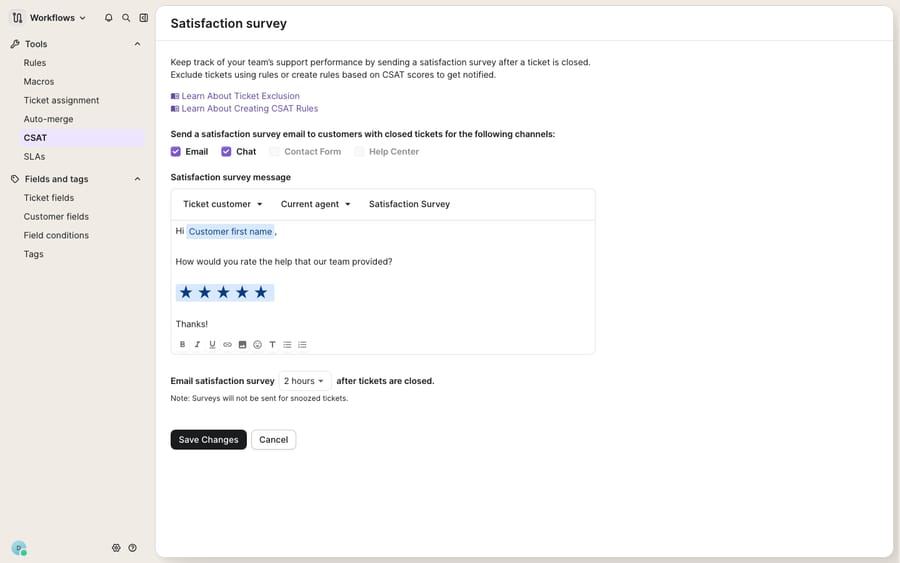
- The ticket was snoozed. Gorgias will not send a satisfaction survey on a snoozed ticket. If your team snoozes tickets to defer follow-up, those tickets sit outside the CSAT flow until they come back and are properly closed. Fix: confirm the ticket was actually closed, not snoozed, at the moment you expected the survey. A snoozed-then-closed ticket surveys on the close; a ticket that's still snoozed won't.
- The ticket was reopened before the delay elapsed. By default, if no delay is set, Gorgias sends the survey 2 hours after a ticket is closed. If a ticket is closed but then reopened before that window passes , a common pattern when a customer replies "thanks, one more thing," the survey is cancelled and won't send for that close. And if a customer already received a survey and the ticket later reopens and re-closes, Gorgias won't send a second one. Fix: check the ticket's timeline for a reopen inside the delay window. This is expected behavior, not a bug; a reopened ticket restarts the flow rather than double-surveying.
- The last agent reply is over a week old. One easy-to-miss condition: the last reply from an agent, at the moment the ticket is closed, must be less than a week old. If a ticket lingers open and gets bulk-closed long after the last human reply, it can fail this staleness check and skip the survey. Fix: for cleanup sweeps of old tickets, don't expect surveys. The week-old-reply rule suppresses them on purpose.
- An exclusion is stripping the ticket out. Gorgias lets you exclude tickets from CSAT, either through an Exclude ticket from CSAT action in a rule, or by excluding specific integrations, customers, tags, or languages in the survey settings. A rule you built months ago to skip surveys for, say, spam or wholesale contacts may be quietly catching more tickets than intended. Fix: review the exclusion links in the CSAT settings and search your rules for the exclude-from-CSAT action. Also remember deleted tickets never trigger a survey.
- The survey isn't actually enabled, or you're checking too early. The most embarrassing one, so save it for when the rest check out: confirm the satisfaction survey is switched on in settings at all, and that enough time has elapsed. With the default 2-hour delay, a survey you expect "immediately" simply hasn't sent yet. Fix: verify the toggle, verify the delay, and give it the full window before concluding anything is wrong.
Does the Gorgias plan or a test store change the result?
A few things won't show up cleanly on a trial or a bare demo store. The CSAT surface itself lives under Workflows → Tools, but the exclusion links, per-integration exclusions, and the report where results land assume a connected store and real ticket history to be meaningful. You can't fully exercise the flow without genuine customer conversations that clear the 250-character bar on a supported channel. Gorgias says CSAT surveys are available on all Helpdesk plans, so if a setting described here isn't visible, check your user role (admin access) and the menu path before assuming a plan limit or a bug. When you test, use a real non-agent contact and a realistic conversation; a two-word internal test will fail the length and agent-reply conditions and teach you nothing. For the fuller tour of how the score, timing, and report fit together, see Gorgias CSAT explained, and for setup from scratch, how to set up CSAT in Gorgias.
Can an AI agent raise the share of tickets that get surveyed?
Notice how many of these failure modes are really volume problems in disguise. The short-ticket rule, the Rule-vs-agent condition, the auto-closed queues that never qualify — they cluster around the repetitive, low-touch tickets ("where's my order," "how do I start a return") that make up most ecommerce support. Here's the incentive behind the rules: Gorgias wants a CSAT score to measure a human conversation, so it filters out the automated and trivial ones. The broader category of AI agents for customer service exists to resolve those conversationally, with a real back-and-forth, rather than firing a one-line auto-reply and closing. Macha is one such layer, and it's worth being clear about what it is: an AI agent layer that runs on top of the Gorgias you already use. It doesn't replace your help desk. It connects to Gorgias and reads and writes the same tickets your team and rules touch. Because a Macha agent actually converses to a resolution, the tickets it handles tend to clear the length and agent-interaction bars a bare auto-close never would, so your CSAT coverage reflects more of your real queue rather than only the human-touched slice.
Because an agent acts on meaning rather than a fixed script, you can grade it before it touches a live queue and extend what it can do. Macha lets you batch-grade a candidate agent against your real historical Gorgias tickets first, and a custom tool turns any REST API into an action the agent can call mid-conversation — looking up an order or return status live, which no native survey condition can do. For the connector specifics, see connecting Gorgias to Macha, and pricing (billing is per ticket, one conversation charged once, never per resolution) for the numbers. Plans start at $299 a month for 750 tickets.
FAQ
Why is my Gorgias CSAT survey not sending on quick tickets? The most common reason is the 250-character rule. Gorgias only sends a survey when the total conversation (all messages combined) exceeds 250 characters, so short, one-line answers to simple questions fall below the threshold and are skipped. It's by design, not a fault. Verify with a realistic conversation that clears the minimum.
Does an auto-reply from a Rule count for CSAT? No. Gorgias requires at least one message from the customer and one answer from an agent, and it explicitly excludes messages sent via Rules and internal notes. A ticket that's auto-replied by a rule and then auto-closed can have zero qualifying agent replies, so no survey sends. Route such tickets to a human before close, or expect them to be uncovered.
Why don't snoozed or reopened tickets get a survey? Gorgias doesn't send surveys on snoozed tickets, and if a closed ticket is reopened before the send delay (2 hours by default) elapses, the survey is cancelled for that close. If a customer already received a survey and the ticket reopens and re-closes, no second survey is sent. Check the ticket's status and timeline.
Which channels support CSAT surveys in Gorgias? Chat, Email, Contact Form and Help Center, depending on which you've enabled in Workflows → Tools → CSAT. Social-media tickets (Instagram, Facebook DMs, and similar) don't receive surveys. If a customer wrote in on an unsupported or unchecked channel, the missing survey is expected.
Can AI improve how many tickets actually get surveyed? Indirectly, yes. Many surveys go unsent because tickets are auto-closed too fast or too short to qualify. An AI agent layer like Macha connects to Gorgias and resolves those conversationally, so more tickets meet the agent-reply and length conditions. See connecting Gorgias to Macha and pricing for details.
Ready to stop losing surveys to tickets that close too fast to qualify? Start a free trial and grade a Macha agent against your own Gorgias history before it goes live.






