





 Shopify
 Stripe
 Slack
Slack Notion
 Google Workspace
 Confluence

Why Are Gorgias Emails Going to Spam or Not Sending? DKIM, SPF and DMARC Fixes (2026)


Gorgias replies that land in junk or never arrive usually come from an unverified sending domain, not a Gorgias outage. Publishing the DKIM, return-path and DMARC records from Gorgias's Verify Domain panel fixes most cases within 72 hours.
Key takeaways
- Gorgias emails go to spam mostly because the custom sending domain is unverified, fixed by publishing two DKIM CNAMEs, a return-path CNAME and a DMARC TXT record.
- Gorgias domain verification can take up to 72 hours after the DNS records are saved and Check Status is clicked, because DNS propagation sets the timeline.
- Gorgias no longer asks for an SPF TXT record at the root domain, and adding a second v=spf1 record beside an existing Shopify or Klaviyo one makes SPF fail.
- Google and Yahoo have required SPF, DKIM and DMARC from senders of more than 5,000 daily messages since February 1, 2024, and Microsoft followed on May 5, 2025.

Gorgias emails go to spam or fail to send mostly because the custom sending domain isn't verified: fix it in Settings → Channels → Email → Verify Domain by publishing the two DKIM CNAME records (gor._domainkey and gor2._domainkey), the return-path CNAME and a DMARC TXT record, then allow up to 72 hours for verification. That's the current record set in Gorgias's domain-verification guide (checked 24 September 2026). Older tutorials that tell you to paste a v=spf TXT value and a k=rsa DKIM key describe a setup Gorgias no longer uses.
Is your Gorgias email not sending, or going to spam?
These are two different failures and they point at different fixes. If Gorgias shows an error on the outbound message or the reply never leaves at all, you're likely looking at an unverified custom domain that Gorgias won't send from, a disconnected email channel, or the recipient's server hard-bouncing you. If the mail leaves cleanly but lands in Spam or Junk, or arrives hours late, that's a deliverability and reputation problem, and DKIM, SPF alignment and DMARC are the levers. The same domain-verification work fixes both, because Gorgias treats verified authentication as a prerequisite for reliable sending.
| Symptom | Most likely cause | Where to fix it |
|---|---|---|
| Reply errors out / never sends | Custom send-from domain not verified | Settings → Channels → Email → Verify Domain |
| Lands in Spam/Junk consistently | DKIM or return-path CNAMEs missing or wrong | Your DNS provider (CNAME records) |
| Marked "via gorgias.com" then junked | Signed with Gorgias's DKIM, not your domain's | Publish both gor._domainkey CNAMEs |
| Some inboxes fine, Gmail/Yahoo/Outlook junk | No DMARC record | Add _dmarc TXT record |
| Was fine, broke after a DNS edit | Record overwritten or duplicated | Re-check the CNAME and SPF values |
What are the causes, ranked, and how do you fix each?
1. Your custom sending domain isn't verified (the big one)
This is the root cause behind most "spam" and "not sending" reports. The domain you send from has to be verified inside Gorgias by publishing DNS records. Per Gorgias's docs, verification is required before you can send when you use automatic forwarding, and "strongly recommended" when you connect a custom domain directly. A verified domain also gets you faster delivery, fewer bounces and fewer messages dropped into Spam or Junk.
The fix, following Gorgias's domain-verification guide:
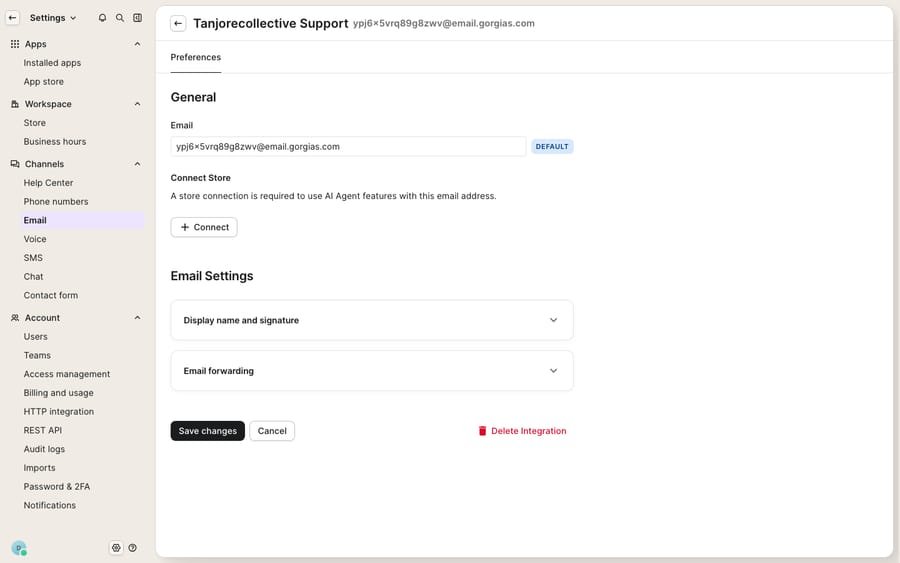
- Open Settings → Channels → Email, select your support email address, and click Verify Domain. Gorgias generates a unique set of DNS values for your domain.
- In your DNS provider, create two CNAME records for DKIM, with hosts
gor._domainkeyandgor2._domainkey, each pointing at the value Gorgias shows. - Create one CNAME record for the custom return path: its host starts with
em, and its value comes from the same panel. This is what lets SPF pass and align for your domain. - Create a TXT record for DMARC at
_dmarc.yourdomain.com(see cause 5). - Save, return to Gorgias, and click Check Status.
That last step matters: once the records exist, it can take up to 72 hours for verification to finalize. Nothing you do speeds this up; DNS propagation and provider caching set the clock. Publish the records, then leave it alone for a day or two before assuming the fix failed. Honest note: this panel only appears once you've added a custom send-from domain. On a default @email.gorgias.com forwarding address there's nothing to configure, which is why deliverability is weaker on the default address: you're borrowing Gorgias's shared reputation instead of authenticating your own domain.
2. Your mail is signed with Gorgias's DKIM instead of your domain's
A subtle trap. For DKIM to authenticate mail for your domain, the signature has to use a key published under your domain, which is what the two gor._domainkey CNAMEs do. Without them, mail goes out signed for Gorgias's domain. As Stellastra's deliverability writeup on stopping Gorgias emails going to spam puts it, "in order for Gorgias's email to pass authentication for your own domain, it is necessary to use your own DKIM keys." Get this wrong and Gmail shows the message as "via gorgias.com" or "on behalf of gorgias.com," a common route to the junk folder. If your replies display that "via" line, check that both DKIM CNAMEs exist and match your Gorgias verify panel, not a generic tutorial.
3. Copy-paste errors in the record values
DNS is unforgiving about exact strings. The most common self-inflicted failures: a stray leading or trailing space in the pasted value; the value pasted into the Host field or the other way round; or a registrar that appends your domain automatically, so gor._domainkey.yourdomain.com becomes gor._domainkey.yourdomain.com.yourdomain.com. If your provider adds the domain for you, enter only gor._domainkey as the host. After saving, use a public DNS lookup or your registrar's record viewer to read back exactly what's published before you blame Gorgias.
4. You now have two SPF records
A domain may have only one SPF (v=spf1) TXT record. Gorgias's current setup handles SPF through the return-path CNAME, so it doesn't ask you to add an SPF record at your root domain. The trouble comes when someone follows an older guide and adds a second v=spf1 record next to the one Shopify, Klaviyo or Google Workspace already needed. Two records don't stack: mailbox providers see a conflict and SPF fails outright, which cascades into DMARC failure. The fix is to merge into a single v=spf1 record that includes every sender that still needs it and ends in ~all or -all. This is a frequent regression when someone "adds Gorgias" months after the store's email was set up.
5. No DMARC record, so Gmail, Yahoo and Outlook distrust you
Since February 1, 2024, Google and Yahoo enforce bulk-sender requirements: senders pushing more than 5,000 messages a day to Gmail must authenticate with SPF, DKIM and a published DMARC policy, with the From domain aligned to SPF or DKIM. Google's sender guidelines also require every sender, at any volume, to use SPF or DKIM. Microsoft followed on May 5, 2025 for Outlook.com, Hotmail.com and Live.com: senders over 5,000 messages a day need SPF, DKIM and DMARC (at least p=none), or their mail goes to junk and can be rejected with error 550 5.7.515. Even below those thresholds, a DMARC record improves placement, and Stellastra notes the "main cause of Gorgias emails being blocked is due to the Gorgias emails failing DMARC," usually a downstream symptom of DKIM or SPF being off. Gorgias's own guide gives the DMARC value: a TXT record at _dmarc.yourdomain.com such as v=DMARC1; p=quarantine; rua=mailto:[email protected]. Move to p=reject only once your reports show clean alignment.
6. The email channel itself is disconnected or misconfigured
If nothing sends at all, not even to your own test address, step back from DNS and check the channel. In Settings → Channels → Email, confirm the address shows as connected and, for Google or Microsoft inboxes, that the OAuth authorization hasn't lapsed. A revoked mailbox connection or an expired forwarding rule produces "not sending" that no DNS change will fix. If tickets stop arriving and replies stop going out together, suspect the channel connection before the DNS.
Does sending fewer emails help deliverability?
Yes, at the margin. Deliverability is partly a reputation game, and reputation is shaped by how much mail you send and how recipients react to it. Google asks every sender to keep the spam rate reported in Postmaster Tools below 0.3%. High volumes of low-value automated replies (order-status pings, "we received your message" acknowledgements) invite spam reports, and bounces hurt further. Anything that trims unnecessary outbound, such as resolving simple questions before they generate a back-and-forth, protects your sender reputation. That's one reason ecommerce teams pair a well-authenticated Gorgias with an AI layer that handles routine questions in-thread.
Where does an AI agent layer fit?
None of the above is Gorgias's fault. This is how internet email works, and the same DKIM, SPF and DMARC steps apply to every sender. Once your domain is authenticated, the next lever is sending fewer, better messages. Macha is an AI agent layer that runs on top of the Gorgias you already use. It isn't a help desk replacement and it doesn't touch your DNS. It reads and writes the same tickets your agents do, so it can resolve the repetitive "where's my order?" and "how do I return this?" questions before they turn into multi-email threads, which keeps your outbound volume leaner. If you're still deciding whether Gorgias is the right base at all, what is Gorgias and the Macha–Gorgias integration overview cover the connection model, and Gorgias AI agent explained compares native automation with an added agent layer.
Because an agent acts on the meaning of a message rather than a keyword rule, you can extend what it does through a custom tool that turns any REST API into an action, such as looking up live order or tracking status mid-reply, so a single accurate answer replaces a chain of clarifying emails. If you already lean on Gorgias rules to triage the inbox, an AI layer complements them: rules route, the agent resolves. Macha bills per ticket, from $299 a month for up to 750 tickets, with one conversation charged once however many messages it takes and never per resolution. See pricing for how that scales.
FAQ
Why are my Gorgias emails going to spam? Almost always because your sending domain isn't authenticated. Verify your custom domain in Settings → Channels → Email → Verify Domain, then publish the records Gorgias gives you: two DKIM CNAMEs (gor._domainkey and gor2._domainkey), a return-path CNAME starting with em, and a _dmarc TXT record. Missing or mismatched records cause DMARC to fail, and Gmail, Yahoo and Outlook route failing mail to Junk.
How long does Gorgias domain verification take? Up to 72 hours after you save the DNS records and click Check Status in Gorgias. DNS propagation and provider caching set that timeline, so publish the records and wait a day or two before assuming it failed.
Why do my emails say "via gorgias.com" and land in spam? That label means the mail was signed with Gorgias's DKIM rather than your domain's. Publish both gor._domainkey CNAMEs from your Gorgias verify-domain panel so DKIM authenticates for your domain, and the "via" line disappears.
Do I still need an SPF TXT record for Gorgias? Not at your root domain under Gorgias's current setup. SPF runs through the return-path CNAME. If you added a second v=spf1 record for Gorgias from an older guide, merge or remove it, because a domain can have only one.
Do I need DMARC for Gorgias? Gorgias's verification guide includes a DMARC record, and if you send more than 5,000 messages a day to Gmail or Outlook.com, the mailbox providers require one: Google and Yahoo since February 2024, Microsoft since May 2025. Below that, a DMARC record still improves inbox placement. Add a _dmarc TXT record starting at p=quarantine.
My emails never send at all. Is that also DNS? Not necessarily. If nothing leaves, first check the email channel connection in Settings → Channels → Email (an expired OAuth authorization or broken forwarding rule stops sending regardless of DNS). Also note that with automatic forwarding, Gorgias requires domain verification before it will send.
Authenticated your domain and want to cut the email volume behind these tickets? Start a free trial and grade a Macha agent against your own Gorgias history before it touches a live queue.






