





 Shopify
 Stripe
 Slack
Slack Notion
 Google Workspace
 Confluence

Gorgias Integration Not Working? How to Fix Recharge, Klaviyo, Loop and Meta (2026)


A broken Gorgias integration is usually fixed by reconnecting it, but each app has its own door: Recharge reconnects from the App Store, Klaviyo from its own Integrations tab, Loop Returns refreshes with an internal note, and Meta channels use the Reconnect button. Check for a Gorgias outage first if several apps failed at the same moment.
Key takeaways
- A stale Recharge panel in Gorgias means webhooks stopped, and the fix is Settings, App Store, All Apps, Recharge, Connect App, then selecting your Shopify store.
- The Klaviyo and Gorgias connection is reinstalled from Klaviyo's Integrations tab: Explore apps, Gorgias, Install, Connect to Gorgias, Authorize, then Complete setup.
- Gorgias's Loop Returns widget only refreshes when a ticket is created, updated or responded to, and an internal note saying Update forces a refresh.
- Meta disconnects in Gorgias are fixed with the Reconnect button under Facebook, Messenger and Instagram, plus checking that no other app holds the Primary Receiver role.
- Gorgias says a disconnected WhatsApp number may take up to 3 minutes to become available before it can be onboarded again.
When a Gorgias integration stops working, reconnect it first, then apply the fix for that app: re-connect Recharge from Settings → App Store → All Apps, reinstall the Gorgias app from Klaviyo's Integrations tab, add an internal note saying "Update" to refresh Loop Returns, and click Reconnect on the Facebook, Messenger & Instagram integration for Meta. Rule out a Gorgias outage before any of that if several apps went dark at once.
Which integration is broken, based on what you see?
Match what you're seeing to the app most likely behind it. That tells you which section below to read.
| What you observe | Likely broken integration | Where the fix lives |
|---|---|---|
| Subscription/next-charge panel empty on a known subscriber | Recharge (webhooks dropped) | Settings → App Store → All Apps → Recharge → Connect App |
| Email/SMS flows stopped syncing, or a re-auth prompt | Klaviyo (authorization lapsed) | Klaviyo → Integrations → Gorgias → Install |
| Return status stuck / out of date in the widget | Loop Returns (refresh trigger) | Add internal note "Update" on the ticket |
| Instagram DMs or FB comments stopped becoming tickets | Meta (page role / permission drop) | Settings → App Store → My Apps → Reconnect |
| Nothing loads and the whole desk feels down | Possible Gorgias outage, not you | Check status first |
What should you check first when a Gorgias integration breaks?
Before you diagnose a specific app, rule out the two things that make every integration look broken. First, confirm Gorgias itself isn't having an incident, a platform-wide blip mimics a dozen integration failures at once. If several unrelated apps went dark simultaneously, that's your tell; our is Gorgias down walkthrough shows how to check the status page before you start unplugging things. Second, most Gorgias integrations live in one place: Settings → App Store → My Apps (also called "Installed apps"). That list is where you re-authorize any misbehaving connection, and it's worth knowing what it looks like when it's healthy versus empty.
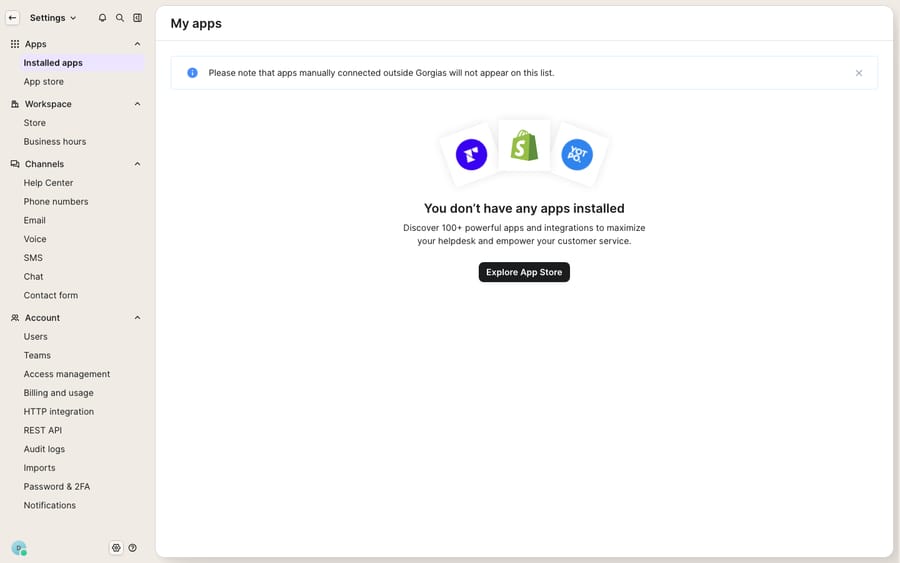
One honest caveat about that screenshot: it's the genuine empty state from a clean demo account with no third-party apps installed. On a live store this list would show your Recharge, Klaviyo, and Meta connections with their status, but the surface is identical, and it's the door you'll walk through for most of the fixes below. Note the fine print: apps connected manually outside Gorgias won't appear here, which is a gotcha in its own right.
1. Why is the Recharge widget in Gorgias empty or stale?
Most common cause: Gorgias stopped receiving webhooks from Recharge. The Recharge widget in the ticket sidebar is fed by webhooks, not a live query. When those webhook messages stop arriving, the panel goes stale or blank even though the customer clearly has an active subscription. Per the Gorgias Recharge documentation, the fix is to reconnect the app. Open your help desk in an incognito tab (or a different browser), log in to both Gorgias and Recharge, go to Settings → App Store → All Apps, search for Recharge, click Connect App, and select your Shopify store. Gorgias prompts you to grant the permissions again, which re-establishes the webhook link.
If you re-authorize and a customer with confirmed active orders in Recharge still shows nothing in the Gorgias widget, the issue is on the webhook plumbing itself, and Gorgias asks you to gather evidence: screenshots from both sides, a screen recording, and the ticket link, before contacting their support team so they can inspect the connection server-side.
2. How do you reconnect Klaviyo when it stops syncing with Gorgias?
Most common cause: the authorization between the two apps lapsed, and the fix is to reinstall from the Klaviyo side. If your Klaviyo email and SMS flows stopped syncing with Gorgias, or you're getting a re-authorization prompt, start here. According to Klaviyo's Gorgias help article, the connection runs from Klaviyo: open the Integrations tab, select Explore apps, search for Gorgias, and click Install. Enter your Gorgias help-desk URL, click Connect to Gorgias, sign in if prompted, and click Authorize to allow access to all resources. Then choose what to sync (tickets, SMS, WhatsApp and reviews, with an option to limit ticket sync to specific tags) and click Complete setup.
One configuration gotcha worth checking while you're in there: your Gorgias inbox notification address must differ from your Gorgias contact email, or notifications won't surface correctly.
3. Why isn't the Loop Returns status refreshing in Gorgias?
Most common cause: the widget only refreshes on specific ticket events, so nudge it manually. Loop's returns panel doesn't poll continuously. The Gorgias Loop Returns doc and Loop's own help center explain that the widget updates return data when one of three things happens on the ticket: it's created, updated, or responded to. So a return that changed status inside Loop after the last ticket activity will look stale until something touches the ticket.
The fix is delightfully low-tech: add an internal note that simply says "Update" on any open or closed ticket, and Loop refreshes the returns data to the latest state. Keep this one in your back pocket: it often fixes a stale panel without any reconnecting at all. Note the honest caveat from the docs: the Loop integration was built by a partner, so if the "Update" note doesn't refresh it and something is genuinely broken, support turnaround can run a little longer than a native-Gorgias request.
4. Why do Instagram, Facebook and WhatsApp keep disconnecting from Gorgias?
Most common cause: a page-admin, role, or permission change on the Facebook side silently revoked Gorgias's access. Meta channels are the ones that seem to disconnect repeatedly, and the trigger is almost always something that happened in Facebook Business settings: a page admin removed, a role changed, a password reset, or permissions that lapsed after a Meta security review. When Instagram DMs or Facebook comments stop becoming tickets, the Gorgias Facebook and Instagram troubleshooting guide is unambiguous: reconnecting is always the first step.
Go to Settings → App Store → My Apps → Facebook, Messenger & Instagram → your Facebook integration, and click the green Reconnect button. If you're specifically missing Messenger tickets, also check your Facebook page's Advanced Messaging settings and make sure no other app holds the Primary Receiver role, because that role conflict quietly intercepts messages before Gorgias ever sees them. For Instagram, if you've granted every permission and replies still fail, Gorgias suggests commenting on a post directly from Facebook: a "Page Publishing Authorization is needed" message means Facebook wants that authorization completed first. WhatsApp disconnects are their own animal. If you're reusing a number that already has a WhatsApp account, delete that account in the WhatsApp app, then, per Gorgias's reuse-a-number guide, allow up to 3 minutes for the number to become available before you onboard it in Gorgias.
If Meta keeps dropping every few weeks, the durable fix isn't repeated reconnecting; it's making sure the Facebook user who authorized Gorgias is a stable admin whose role and password don't churn.
Why do Gorgias integrations keep breaking?
Look across these and the shared root cause is authorization drift: authorizations lapse, webhooks silently stop, page roles change, and the connection you set up months ago quietly lapses. That's normal for any integrated stack, but each stale panel is also a ticket that takes longer to answer, and often a second ticket ("did my return ship?") that only exists because the first answer was slow. Reducing that volume is where an AI layer earns its keep. If you're new to the platform, what is Gorgias covers how these native integrations are meant to fit together in the first place.
Can an AI layer reduce the tickets a broken integration causes?
To be clear about the boundary: Macha is not a Gorgias replacement and not another help desk. It's an AI agent layer that sits on top of the Gorgias you already run. It connects to your Gorgias account and reads and writes the same tickets your team does. The broader category of AI agents for customer service exists to resolve the routine, data-lookup-heavy tickets before a human ever opens them, which is exactly the volume that piles up when a subscription or return panel is slow. Because a Macha agent can call your systems directly through a custom tool (turning a REST API into an action the agent invokes mid-conversation), it can fetch order, subscription, or return status itself rather than depending on a sidebar widget that may or may not have refreshed. That doesn't fix a broken Recharge webhook, but it does mean a stale widget is less often the thing blocking a customer's answer.
Setup mirrors the native integrations above: you authorize the connection once. Our Macha–Gorgias integration overview and the step-by-step on connecting Gorgias to Macha to automate ticket replies walk through it. Pricing is by ticket volume: Macha bills per ticket, one conversation charged once however many messages it takes, starting at $299 a month for 750 tickets with setup by the Macha team included. The details live on the pricing page.
FAQ
Why did my Gorgias Recharge widget stop showing subscription data? Almost always because Gorgias stopped receiving webhooks from Recharge, so the sidebar panel goes stale. Reconnect it under Settings → App Store → All Apps → Recharge → Connect App, then select your Shopify store. If a customer with confirmed active Recharge orders still shows nothing after reconnecting, collect screenshots and the ticket link and contact Gorgias support to inspect the webhook connection.
How do I fix the Gorgias–Klaviyo integration that stopped syncing? Reinstall the connection from Klaviyo. Go to Integrations → Explore apps → Gorgias → Install, enter your Gorgias URL, click Connect to Gorgias, authorize access, choose what to sync, and click Complete setup. Also check that your Gorgias inbox notification address differs from your Gorgias contact email.
My Loop Returns widget isn't updating the return status, what do I do? Loop only refreshes when a ticket is created, updated, or responded to. Add an internal note that says "Update" on the ticket and Loop will pull the latest return data. If it still won't refresh, note that Loop's integration is partner-built, so support turnaround can be a bit longer.
Why does my Gorgias Instagram/Facebook integration keep disconnecting? Meta channels usually drop after a change on the Facebook side: a page admin removed, a role or password changed, or permissions lapsing after a Meta security review. Reconnect via Settings → App Store → My Apps → Facebook, Messenger & Instagram → your integration → Reconnect, and check that no other app holds the Primary Receiver role in your page's Advanced Messaging settings.
How long does a WhatsApp number take to free up after disconnecting? Gorgias says it may take up to 3 minutes for a disconnected number to become available. Wait that long before starting WhatsApp onboarding again in Gorgias.
Is my integration broken, or is Gorgias down? If several unrelated integrations went dark at the same moment, suspect a platform incident rather than each app failing independently. Check the Gorgias status page first, see is Gorgias down, before you start reconnecting things one by one.
Want fewer tickets riding on whether a sidebar widget refreshed in time? Start a free trial and grade a Macha agent against your own Gorgias history before it ever touches a live queue.






