





 Shopify
 Stripe
 Slack
Slack Notion
 Google Workspace
 Confluence

Why Is My Gorgias Rule Not Triggering (or Firing on the Wrong Ticket)? 9 Fixes for 2026


A Gorgias rule that won't fire is usually switched off, set on the wrong trigger, or out-ordered by a rule above it, and one that hits the wrong ticket is usually an ordering or case-matching problem. Work down the checklist below, fastest checks first, and you'll usually find the cause in a few minutes.
Key takeaways
- A Gorgias rule that won't fire is usually disabled, set on the wrong trigger, or losing to a rule higher in the list, so check those three before anything else.
- Gorgias rules fire on five fixed triggers: Ticket Created, New Message In Ticket, Ticket Updated, Ticket Assigned To User and Ticket Snooze Delay Ends, with no native time-based trigger.
- Gorgias rules are case-sensitive only with the IS and IS NOT operators, so an IS condition against refund will not match a value written as Refund.
- If a customer has orders from more than one Shopify store connected to Gorgias, a rule with a Shopify condition such as Shopify Last Order won't be executed.
- Gorgias caps each account at 70 rules and shows a notification at 65 or more, so a missing rule may simply never have been saved.

A Gorgias rule that won't fire is usually switched off, set on the wrong one of its five triggers, or losing to a rule higher in the list; a rule that fires on the wrong ticket is almost always an ordering or case problem, because the IS and IS NOT operators are case-sensitive (Gorgias Rules FAQs, checked 24 September 2026). The rest are ecommerce edge cases: customers with orders in more than one Shopify store, Google Group addresses, and macros holding Shopify, Recharge or Webhook actions.
Which symptom points to which cause?
Start here, then jump to the numbered fix that matches.
| What you observe | Most likely cause | Where to check |
|---|---|---|
| Rule does nothing on any ticket | Rule disabled, or wrong trigger | Rules list: enabled toggle and trigger |
| Fires on some tickets, not others | Case-sensitive tag or IS/IS NOT mismatch | The rule's conditions |
| Two rules fight; wrong one "wins" | Rule order within the same trigger | Position in the Rules list |
| Only the first branch ever runs | IF matched, so ELSE was skipped | The IF/ELSE conditions |
| Shopify-conditioned rule never runs | Customer has data in >1 Shopify store | Connected stores |
| Auto-reply skips some inboxes | G Suite Group / mailing-list header | The receiving email address |
| Macro won't attach to the rule | Macro contains a Shopify/HTTP action | The macro's actions |
What causes a Gorgias rule not to trigger, in the order to check?
1. The rule is disabled: check the enabled toggle first
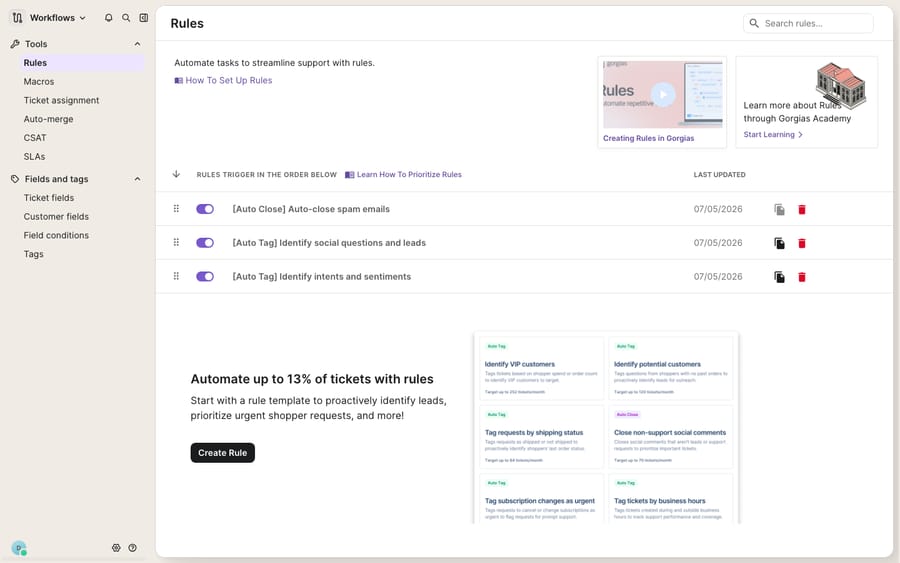
The most common and most embarrassing cause. Under Workflows → Tools → Rules, every rule has an enabled/disabled toggle right on the list view. A rule can be perfectly conditioned and simply switched off. The Rules list is your debugging view: it shows each rule's on/off state and last-updated date at a glance.
2. You're on the wrong trigger
Gorgias rules fire on one of a fixed set of triggers, and picking the wrong one is a silent failure. Per the Gorgias Rules FAQs, the available triggers are Ticket Created, New Message In Ticket, Ticket Updated, Ticket Assigned To User, and Ticket Snooze Delay Ends, and that's the whole list. A rule set to Ticket Created fires only once, when the first message arrives; if you expected it to react to a customer's follow-up, you needed New Message In Ticket. And note there is no native time-based trigger: if you want a rule to run after a delay, you have to route it through the snooze mechanism and fire on Ticket Snooze Delay Ends.
3. Rule order: the wrong rule is winning
If a rule runs but the wrong one takes effect, order is almost always the answer. Rules execute by trigger first, then by list position: Ticket Created rules run before New Message In Ticket, which run before Ticket Updated; when a ticket is assigned, Ticket Updated rules run and then Ticket Assigned rules. Within a single trigger, they fire "in the order listed on the Rule settings page, from top to bottom." So if a broad "assign everything to the general queue" rule sits above your specific "VIP → priority" rule, the broad one can act first and set state your later rule then reads incorrectly. Drag specific rules above generic ones, and keep destructive rules (auto-close, spam) where they belong in the sequence. For the fuller mental model of how triggers and ordering interact, see Gorgias rules explained.
4. Case-sensitive tags and IS / IS NOT
This is the classic "works on some tickets, not others" trap, and the core of it is documented behavior, not a bug. Two things to know:
- The IS and IS NOT operators are case-sensitive. The Rules FAQs say rules are "case-sensitive only with IS and IS NOT"; other operators (contains, etc.) lowercase what you enter. So a rule condition using IS against
refundwill not match a value ofRefund. - Match tag names exactly. Gorgias's docs don't spell out how tag names themselves handle case, so don't rely on it. If a rule applies
VIPand a downstream rule checks forvipwith IS, the check fails. Copy the tag name from the tag list rather than retyping it.
When a rule fires inconsistently across otherwise-identical tickets, audit the exact casing of every tag and every IS/IS NOT value before touching anything else.
5. Nested IF / ELSE: the branch you expected was skipped
Gorgias rules support IF / AND / OR / ELSE logic, and the most common confusion is expecting both branches to run. They don't. Per the rule builder conditions docs, when the IF conditions are met, the ELSE branch is ignored; the rule only "moves on to the ELSE branch" when the IF conditions are not met. If you built a rule expecting the ELSE action to also apply, that's why it's "skipped": by design, exactly one branch runs per evaluation. Restructure into separate conditions (or separate rules) if you genuinely need both paths to fire.
6. Multiple Shopify stores: the multi-store customer trap
This one is pure ecommerce and it surprises almost everyone. If you have more than one Shopify store connected to Gorgias, and a customer has profile data or orders in more than one of those stores, Shopify-dependent rules break. Gorgias's Shopify FAQs put it plainly: if your rule uses a condition that references Shopify data (like Shopify Customer or Shopify Last Order) and the customer has an order from more than one integrated store, the rule won't be executed. So a WISMO auto-tag or an order-status routing rule can silently no-op for exactly your best cross-store shoppers. If a Shopify-conditioned rule works for most customers but mysteriously skips some, check whether those customers exist in multiple connected stores. This only reproduces on an account with two or more Shopify stores actually connected; a single-store or trial account won't show it.
7. G Suite Groups: auto-replies that skip certain inboxes
If an auto-reply rule triggers on some email tickets but not others, check the address that received the customer's message. Gorgias does not send auto-replies to cc recipients when the preceding message carries a header hinting at a mailing list, which is exactly what G Suite (Google) Group addresses produce. So mail that arrives via a group alias can legitimately skip your auto-reply rule. Related: Gorgias also rate-limits auto-replies to no more than once per 5 minutes per customer, so a rapid back-and-forth won't fire a fresh auto-reply each time.
8. Macros with Shopify or HTTP actions won't run from a rule
A subtle but well-documented gotcha: macros that contain Shopify, Recharge or Webhook actions are not usable in Rules (Rules FAQs, which call the HTTP hook a Webhook action). If you're building a rule that applies a macro and the macro you want doesn't appear as an option, or attaches but the external action never fires, this is why. Those action types are excluded from rule-applied macros. The workaround is to split the macro: keep the text/tagging portion in the rule-safe macro, and handle the Shopify/HTTP side through a dedicated integration action or a purpose-built tool. For how macros are meant to be composed, see Gorgias macros explained.
9. You're near the rule ceiling
Gorgias caps accounts at 70 rules, and shows a notification once you reach 65 or more. At the cap you can't add the rule you just wrote, so a "missing" rule may never have been saved. Prune stale or duplicate rules; this is also a good moment to consolidate the sprawling keyword-and-tag rules that tend to accumulate. For building the ones you keep the right way from the start, our step-by-step on how to set up rules in Gorgias covers the setup path.
When is the rules engine itself the problem?
None of the above is Gorgias's fault. The engine is deterministic and, once you understand triggers and ordering, entirely diagnosable. A rule either matched or it didn't. But that determinism is also the ceiling. Rules match on exact tags, exact casing, and fixed Shopify fields; they cannot understand that "I was charged twice and want it back" and "please refund my order" mean the same thing. So teams paper over the gap with ever-longer tag lists and case-matched conditions, and those lists are precisely what quietly break when a tag's capitalization drifts or a customer turns up in a second Shopify store. When your rules keep "not triggering" because real customer language keeps escaping your conditions, you've hit the edge of what a rules engine can express, not a setting you missed.
Can an AI agent handle what Gorgias rules can't match?
This is the seam where an AI agent layer for customer service helps. Macha is one such layer. It runs on top of the Gorgias you already use; it is not a help desk and does not replace Gorgias. It connects to Gorgias and reads and writes the same tickets your rules touch (replies, tags, status, assignment), matching on intent rather than exact tags and casing, so "refund me" and "I was double-charged" route the same way without a hand-maintained, case-sensitive tag list. It doesn't fight your deterministic rules. It takes over the intent-heavy reasoning those rules were never built for, while your routing and auto-close rules keep doing what they're good at.
Because an agent acts on meaning rather than a fixed condition, you can grade it before it touches a live queue, and extend what it does with a custom tool that turns any REST API into an action the agent can call, such as looking up an order across your stores mid-conversation, something no native Shopify condition can do cleanly across multiple stores. For a walkthrough of putting one on your queue, see how to connect Gorgias to Macha and automate ticket replies, or check pricing. Macha bills per ticket, from $299 a month for up to 750 tickets, one conversation charged once however many messages it takes, never per resolution.
FAQ
Why is my Gorgias rule not triggering even though the conditions look right? Check, in order: is the rule enabled (the toggle on the Rules list), is it on the right trigger (Ticket Created fires once; use New Message In Ticket for follow-ups), and does every IS/IS NOT value match the exact casing on the ticket? The IS and IS NOT operators are case-sensitive, so Refund and refund are different values to them.
Why does my rule fire on the wrong ticket? Almost always rule order. Rules run by trigger (Ticket Created, then New Message In Ticket, then Ticket Updated, then Ticket Assigned), then top-to-bottom within each trigger. A broad rule sitting above your specific one can act first and change state your later rule reads. Reorder so specific rules sit above generic ones.
Why doesn't my Shopify-based rule run for some customers? If you have multiple Shopify stores connected and a customer has orders or profile data in more than one of them, rules that reference Shopify data (like Shopify Last Order) won't execute. It's a documented multi-store limitation in Gorgias's Shopify FAQs, not a broken rule.
Why can't I add my macro to a rule? Macros that contain Shopify, Recharge or Webhook actions aren't usable in Rules and won't appear as an option. Split the macro: keep the text/tag part rule-safe and handle the external action separately.
How many rules can a Gorgias account have? 70 rules per account, with a notification once you reach 65 or more. If a new rule seems to be missing, check whether you hit the cap before it saved.
Can an AI agent replace these fragile rules? Often, yes, when the real problem is that customer wording keeps escaping your exact-match, case-sensitive conditions. An AI layer like Macha connects to Gorgias and matches on intent rather than tags, running on top of your existing rules rather than replacing them. See the Gorgias integration and pricing for details.
Ready to stop losing tickets to conditions that can't read? Start a free trial and grade a Macha agent against your own Gorgias history before it goes live.






