





 Shopify
 Stripe
 Slack
Slack Notion
 Google Workspace
 Confluence

How Do You Integrate TikTok Shop and Loox or Okendo with Gorgias? (2026)


Gorgias connects TikTok Shop as a native, US-only chat channel and shows Okendo reviews in the ticket sidebar through a native integration. Loox has no native Gorgias integration, so its reviews need a custom HTTP widget or Zapier.
Key takeaways
- Gorgias connects TikTok Shop from Settings, App Store, All apps, and the integration needs a TikTok account tied to a US shop because it launched in the US only.
- The Gorgias TikTok Shop integration turns TikTok Shop chat messages into tickets with recent order, shipment and return data, but excludes TikTok direct messages and comments.
- Okendo's native Gorgias integration auto-creates a ticket when a review hits a 3-star rating threshold with negative sentiment, and its sidebar widget shows a customer's last 5 reviews.
- Loox publishes no native Gorgias integration, so surfacing Loox reviews in the Gorgias sidebar means building a custom HTTP widget on the Loox API or routing events through Zapier.

To connect TikTok Shop to Gorgias, go to Settings → App Store → All apps, pick TikTok Shop, click Connect App and authorize it with a US TikTok Shop account; Okendo connects from its own admin under Settings → Integrations → Gorgias, and Loox has no native Gorgias integration, so it needs a custom HTTP widget or Zapier. Here's the short version, checked against Gorgias, Okendo and Loox documentation on 24 September 2026:
| TikTok Shop | Okendo | Loox | |
|---|---|---|---|
| Integration type | Native channel (App Store) | Native app + sidebar widget | No native app: custom HTTP widget / Zapier |
| What it brings in | Chat → tickets, with order/shipment/return in sidebar | Auto-tickets for low-rated reviews; reviews + Q&A in sidebar | Review data only if you build the widget |
| Connect from | Gorgias → Settings → App Store | Okendo → Settings → Integrations → Gorgias | Gorgias HTTP integration / Zapier |
| Key limit | US shops only; no DMs/comments | Needs an Okendo account + an existing Gorgias account | No documented native path |
| Best for | TikTok-native brands fielding order chat | Shopify brands already on Okendo | Loox users willing to build |
Why should TikTok Shop and review apps live in one inbox?
The whole point of a help desk like Gorgias is that a shopper's context follows them across channels. Per the Gorgias customer sidebar product page, Gorgias "displays your customers' shopping history right next to tickets (on any channel!)" and supports 65+ ecommerce applications in the sidebar. That matters most on emerging channels. A TikTok Shop buyer who messages "did my order ship?" is the same person who left a photo review on your product last week, and the agent who can see both answers faster, upsells smarter, and spots the unhappy customer before the chargeback. If you're new to how the platform frames all this, our primer on what Gorgias is and the deeper Gorgias customer sidebar explained set the stage.
How do you connect TikTok Shop to Gorgias?
TikTok Shop is a first-party integration in Gorgias, so you connect it from the App Store rather than gluing it together yourself. Before you start, confirm the prerequisite: you need a login to a TikTok account tied to a US shop. Gorgias's TikTok Shop doc says: "At the moment, this is only launching in the US, but more regions may follow in the future."
- In Gorgias, go to Settings → App Store → All apps, search for TikTok Shop, and click Connect App.
- Click Authorize to let the app access Gorgias. You're redirected to TikTok to finish the install in the TikTok Shop app store, including selecting your store region.
- If TikTok asks how long the authorization should last, pick the longest option offered. A time-limited authorization expires, and the integration then has to be reconnected by hand.
- Confirm the install. You'll get a confirmation that the integration is connected and be redirected back to Gorgias.
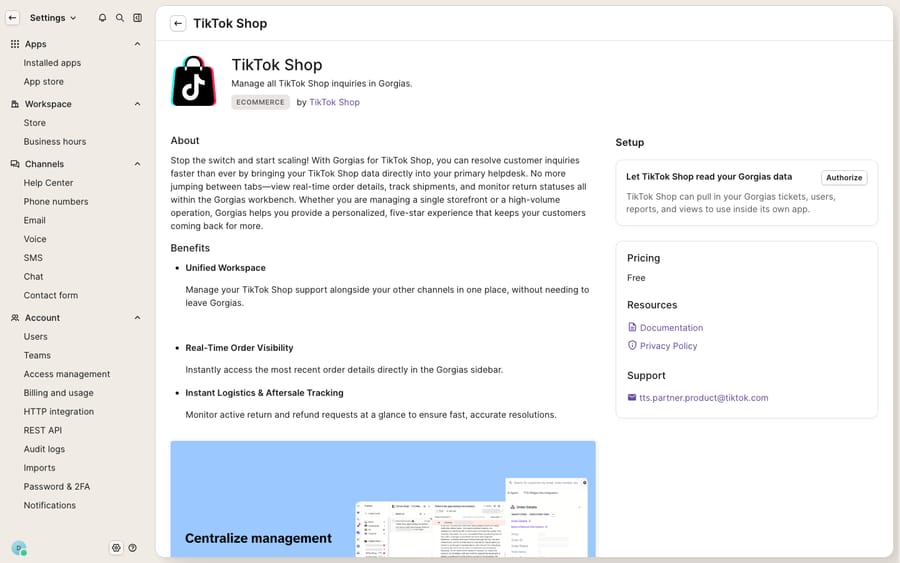
The screenshot above is the connect page: the Authorize step, not a live ticket. That's the honest state of a fresh trial without a connected US TikTok shop. Once you do authorize with a real store, here's what changes: TikTok Shop chat messages route into Gorgias as tickets, and the sidebar surfaces the buyer's most recent order, shipment, and return data alongside the conversation. So a WISMO ticket arrives with the order already attached. The agent isn't hunting for a tracking number; it's right there.
What does the TikTok Shop integration sync, and what does it leave out?
This is where being precise saves you a support headache later. The native integration handles TikTok Shop chat only. Gorgias's doc states that the integration "specifically addresses TikTok Shop interactions, excluding the handling of direct messages (DMs) and comments," and it runs in the US only. Those DMs and comments live on TikTok itself, not in your Gorgias queue. So the mental model is: a shopper who chats you through TikTok Shop about their order becomes a ticket; a comment left under your video does not.
That scoping is fine for the highest-value interactions (order questions, returns, product issues), but plan around it. If comment moderation is core to your brand's TikTok presence, you'll still handle that in TikTok's native tools or a social-listening app. Gorgias isn't claiming that ground. For the rest of the Shopify app stack an AI agent can work with, see AI agent integrations for Shopify brands.
How do you add Okendo or Loox reviews to the Gorgias sidebar?
Reviews are the second half of this setup, and here the two popular apps behave very differently inside Gorgias.
Okendo has a native integration. Per the Okendo–Gorgias setup docs, you connect it from the Okendo side, and you need an existing Gorgias account first:
- In Okendo admin, go to Settings → Integrations → Gorgias.
- Click the edit icon and enter your store name in the Account Name field.
- Click Connect to be redirected to Gorgias, then click Authorize to grant access.
- Configure your ticket-creation rules and click Save.
Out of the box, Okendo auto-creates a Gorgias ticket when a review hits a rating threshold of 3 stars with the negative sentiment rule enabled. Both are configurable, separately for each storefront, and each Okendo storefront connects on its own. Once connected, the Okendo sidebar widget is available automatically and shows the customer's last 5 reviews, their average rating and sentiment, recent Q&A, a quick ticket summary, and any replies already sent to the customer. An agent handling a return can see the customer already left a lukewarm review and adjust the tone accordingly.
Loox is the honest caveat. Loox is a superb Shopify review app, but it does not publish a native Gorgias integration the way Okendo does. The Loox integrations page lists email marketing, page builders, search and loyalty tools, but no help desk category, and its sidebar widget docs cover the Shopify storefront widget, not Gorgias. What Loox does offer is an API. To surface Loox review data next to a ticket you'll use the escape hatch Gorgias documents for exactly this: "Develop your own HTTP integration or use Zapier," building a custom HTTP widget that calls the Loox API (or pipes review events through Zapier into a Gorgias sidebar widget). It works, but it's a build, not a two-click connect, so budget engineering time or a partner for it.
For the fuller landscape of what plugs into Gorgias (reviews, subscriptions, returns, loyalty), our roundup of the best Gorgias integrations is the map, and since most of these apps assume Shopify underneath, Gorgias for Shopify is worth a read if that's your stack.
What can't these integrations do, and where does an AI layer help?
Give Gorgias credit: the native TikTok Shop channel and the Okendo widget do real work. They pull the right context into one screen so an agent doesn't tab-hop, and the sidebar's drag-and-drop editor lets you decide which widgets show and even fire actions like refunds from inside a ticket. That's genuinely useful plumbing.
But notice what the plumbing doesn't do. It surfaces the TikTok Shop order and the Okendo review; it doesn't read them and write the reply. A WISMO ticket still needs a human to look at the tracking status and type an answer. A return still needs someone to check the policy window against the order date. And a 2-star Okendo review that auto-opened a ticket still sits there until an agent drafts an apology and an offer. The integration also enforces its own scope: US-only TikTok shops, no DMs or comments, and no native Loox path at all. The data arrives; the reasoning and the writing are still on your team.
This is the seam where an AI agent layer fits. The category of AI agents for customer service exists to do exactly the reasoning-heavy work the sidebar can't: reading the context and producing the answer. Macha is one such layer, and its Gorgias connector is live: it runs on top of the Gorgias you already use rather than replacing it. You connect Macha to Gorgias (see the Macha–Gorgias integration walkthrough), and it reads and writes the same tickets your channels feed. It can read the TikTok Shop order question and draft the WISMO reply, read the Okendo review that triggered a ticket and propose a grounded response, or fetch order and subscription status through a custom tool that turns a REST API (including a Loox endpoint you'd otherwise wire by hand) into something the agent can call. Macha bills per ticket (one conversation, charged once however many messages it takes), starting at $299 a month for 750 tickets; the pricing page has the breakdown. The clean division of labour: let Gorgias be the inbox and the system of record for TikTok Shop chat and review tickets, and layer an agent on top for the part the sidebar can't do, which is actually answering.
FAQ
How do I connect TikTok Shop to Gorgias? Go to Settings → App Store → All apps in Gorgias, search for TikTok Shop, and click Connect App. You'll authorize the app, then finish the install on TikTok's side, where you select your store region. You need a TikTok account tied to a US shop.
What TikTok Shop data shows up in Gorgias? Once connected, TikTok Shop chat messages become Gorgias tickets, and the sidebar shows the buyer's most recent order, shipment, and return details next to the conversation. The integration is US-only and does not cover DMs or comments.
Does Gorgias integrate with Loox and Okendo? Okendo has a native Gorgias integration: connect it from Okendo's Settings → Integrations → Gorgias, and it auto-creates tickets for low-rated reviews plus a sidebar widget showing the last 5 reviews and Q&A. Loox has no documented native Gorgias app; you surface its data via a custom HTTP widget or Zapier.
Why doesn't Loox appear in my Gorgias sidebar? Because Loox doesn't ship a native Gorgias integration. Gorgias supports this case with its documented "develop your own HTTP integration or use Zapier" path: you build a custom widget that calls the Loox API. It's a build, not a two-click connect.
Can I add AI to these channels without replacing Gorgias? Yes. An AI layer like Macha connects to Gorgias as a live connector and works on top of your existing help desk rather than replacing it. It reads the TikTok Shop order question or the Okendo review ticket and drafts or sends the reply, while Gorgias stays the system of record.
Ready to turn TikTok Shop chat and review tickets into answered tickets? Start a free trial of Macha and connect it to your Gorgias in minutes.






