





 Shopify
 Stripe
 Slack
Slack Notion
 Google Workspace
 Confluence

How Do You Set Up Auto-Close and Reopen Rules in Gorgias?


Gorgias auto-close rules now live under Workflows, then Rules, and can close out-of-office replies, order notifications and social noise the moment they arrive. A customer reply reopens a closed ticket within a time limit, and snooze brings back the tickets you need to wait on.
Key takeaways
- Gorgias auto-close rules are created from the top-left menu under Workflows, then Tools, then Rules, using a WHEN / IF / THEN structure whose THEN action closes and tags the ticket.
- Gorgias ships auto-close templates for Automatic OOO replies, Non-support tickets, IG Story Mention, Social comments, Instagram Giveaway and No-reply/Thanks.
- A closed Gorgias ticket reopens when the customer replies within a time limit, reported as about 3 days for chat and about 10 days for email, after which a new ticket opens.
- Gorgias snooze pauses a ticket for 1 hour up to 1 week or a custom date, and the WHEN TICKET SNOOZE DELAY ENDS trigger lets a rule reassign it when it returns.
- Gorgias bills a ticket fee even when a Rule sends the only message, while Macha bills per ticket from $299 a month for 750 tickets, about $0.40 each.

To set up auto-close in Gorgias, open the top-left menu, go to Workflows, then Tools, then Rules, click Create rule, and either pick an auto-close template (such as Automatic OOO replies) or build a WHEN / IF / THEN rule whose THEN action closes the ticket and adds a tag. Reopening is mostly automatic: when a customer replies to a closed ticket, Gorgias reopens it. Snooze covers the tickets you need to come back to later, with presets from 1 hour to 1 week.
| Task | Where it lives in Gorgias (checked 24 September 2026) |
|---|---|
| Create an auto-close rule | Top-left menu → Workflows → Tools → Rules → Create rule |
| Start from a template | Automatic OOO replies, Non-support tickets, IG Story Mention, Social comments, Instagram Giveaway, No-reply/Thanks |
| Protect VIPs | The rule's exclusion list |
| Reopen on reply | Automatic when a customer replies to a closed ticket |
| Wait, then reopen | Snooze: 1 hour, 3 hours, 6 hours, 1 day, 3 days, 1 week or a custom date |
| Act when a snooze ends | Rule trigger WHEN TICKET SNOOZE DELAY ENDS |
What do auto-close and reopen rules actually do?
Gorgias runs on Rules, small if-this-then-that automations that fire on tickets. An auto-close rule watches for tickets that match a condition (a subject line, a sender, an intent, a channel) and closes them so a human never has to. The goal isn't to close everything faster. It's to keep tickets that don't need an agent out of your queue, so the ones that do stand out. Gorgias' own Rules engine is the foundation here, and if you're still getting oriented on the platform, what Gorgias is covers the wider picture.
The reopen half is mostly automatic. Gorgias' Handle incoming tickets article says it plainly: if a customer replies to a closed ticket, Gorgias reopens it. That behavior is what makes auto-close safe. You can close aggressively knowing a genuine follow-up pulls the ticket back into the queue. The catch is that reopening has a time limit, and past it a reply starts a brand-new ticket instead (more on that in the reopen section below).
Where do you build an auto-close rule in Gorgias?
Everything lives under one menu. Per Gorgias' Create rules to take automatic actions on tickets documentation:
- Click the dropdown menu in the top-left corner of Gorgias.
- Select Workflows, then under Tools, select Rules.
- Click Create rule, then pick a template or Create Custom Rule.
- Build the logic with the WHEN / IF / THEN structure. WHEN is the trigger (the event that fires the rule), IF / AND / OR / ELSE are optional conditions that narrow it, and THEN is the action (here, close the ticket, and usually add a tag).
- Name the rule clearly (for example "Auto-close: OOO replies") and save it.
Older guides, including an earlier version of this one, send you to Settings → Ticket management → Rules. Gorgias has since moved Rules under Workflows.
One thing to know before you build: order matters. Rules run by trigger type first, and rules that share a trigger run top to bottom, in the order listed on the Rules page; you reorder them with the six-dot drag handle. Per Gorgias' Best practices for Rules, a broad rule near the top can act on a ticket before a more specific one below it gets a look, so keep narrow, high-stakes rules above sweeping ones.
Which auto-close templates does Gorgias include?
You rarely have to start from scratch. Gorgias ships auto-close rule templates for the usual suspects, documented in Auto-close common Rule templates:
- Automatic OOO replies: closes tickets that are out-of-office auto-responders.
- Non-support tickets: closes system noise like Shopify order notifications and PayPal payment confirmations; you extend it by adding customer emails or subject lines.
- IG Story Mention / Social comments / Instagram Giveaway: close Instagram mention notifications, throwaway social comments and giveaway-post comments.
- No-reply/Thanks: closes non-support one-liners that don't need a human.
Pick the template closest to your noise, or build a custom WHEN a new ticket is created → IF subject contains "Out of Office" → THEN close ticket + add tag auto-closed. Always add a tag in the THEN action. Tags are what let you audit later: filter a View to auto-closed and confirm the rule isn't eating real tickets. (If tags are new to you, Gorgias tags explained covers the setup.)
How do the exclusion list and always-apply list work?
This is the guardrail step. An installed auto-close rule gives you two lists that decide who the rule ignores and who it always fires on:
- The exclusion list: email addresses (or domains) the rule will never auto-close. Put VIP customers, wholesale accounts and anyone mid-escalation here, so a stray "thanks" from a high-value shopper doesn't shut their ticket.
- The always-apply list: senders the rule always closes on, regardless of other conditions. Known no-reply and notification addresses go here (
no-reply@…, order-confirmation senders).
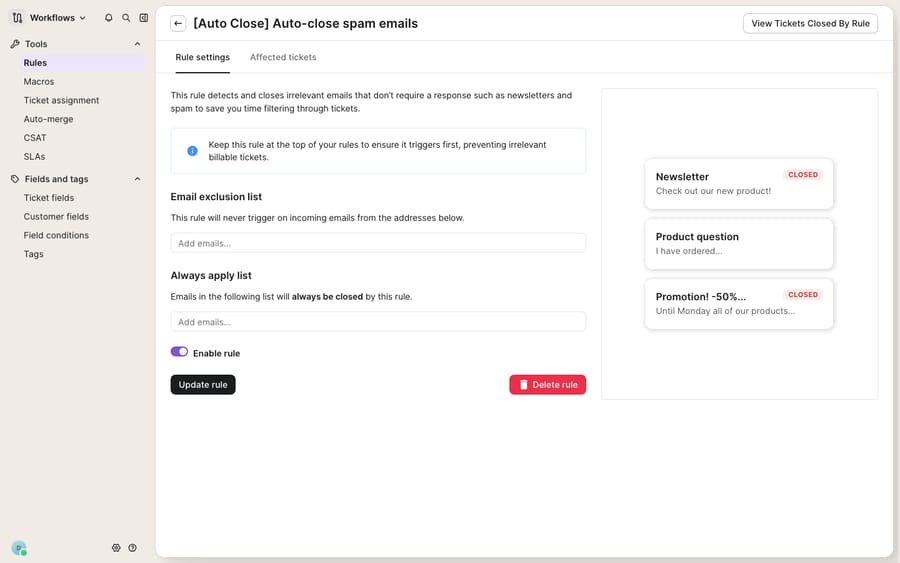
Below those lists sits the Enable rule toggle (the rule does nothing until you flip it on) and a live preview of the tickets the rule has already closed. Read that preview before you trust the rule at scale. If you see a real customer question in there, your condition is too broad or your exclusion list is too thin. Fix it before the rule runs unattended.
How long does a closed Gorgias ticket stay reopenable?
Auto-close is only safe because of reopen-on-reply, and the reopen period is where "premature close" complaints start. Gorgias' current help center confirms that replies reopen closed tickets but no longer publishes a per-channel table, so treat the figures below as reported behavior and test them on your own account:
| Channel | Reported reopen window | What happens after the window |
|---|---|---|
| Chat / Messenger / Instagram DM | About 3 days (earlier Gorgias guidance; not in the current docs) | A later reply opens a new ticket |
| About 10 days (eesel: a reply after 10 days creates a new ticket) | A new ticket, without the earlier thread in view | |
| Postscript SMS | 24 hours | A later reply opens a new ticket |
The practical upshot for ecommerce: a WISMO ("where is my order?") ticket you auto-close after sending tracking will reopen fine if the shopper replies "still not here" the next day. But a returns thread that goes quiet for two weeks and then gets a "did you receive my package?" email may land as a fresh ticket with none of the prior context, so your agent starts cold. The quickest test: close a ticket on your own test address, reply after a day, and see which ticket the reply lands on. Past the window, lean on tags and customer history instead of assuming the thread will stitch itself back together.
How do you snooze a ticket so it reopens later?
Auto-close is for tickets you're done with. Snooze is for tickets you'll be done with later: a backorder that ships Friday, a customer who said "I'll check tonight." Per Gorgias' Snooze tickets documentation, snoozing pulls the ticket from your queue for a preset duration (1 hour, 3 hours, 6 hours, 1 day, 3 days, or 1 week) or until a custom date and time. It reopens when the timer expires, when the customer replies, or when an agent reopens it manually.
The automation payoff is a dedicated trigger. Build a rule on WHEN TICKET SNOOZE DELAY ENDS so that the moment a snoozed ticket resurfaces, it's re-tagged, reassigned to the original rep, or given a nudge reply, and no ticket reappears unowned. You can also snooze from inside a rule with the Snooze for action, and gate rules on whether a ticket has ever been snoozed using the IF ticket unsnooze date IS / IS NOT EMPTY condition. A clean subscriptions example: WHEN a "pause my subscription until next month" ticket comes in → THEN snooze for 3 days and tag subscription-followup; WHEN the snooze delay ends → reopen and assign to the retention rep.
What can't auto-close rules do, and where does an AI layer fit?
Auto-close and reopen rules are deterministic and useful. Gorgias' native automation does exactly what a rule engine should. Be clear about the edges, though.
They close on patterns, not understanding. A rule that closes anything containing "thanks" will happily close "thanks, but this is the wrong size, I need to exchange it." The exclusion list and the closed-ticket preview are your only defense, and both need ongoing tuning. They don't answer anything. Auto-close removes noise; it never produces the reply a real WISMO, return or subscription question needs. And the reopen window is a cliff, not a ramp: once it passes, context is gone and your agent starts from zero.
This is the seam where an AI agent layer fits. The broader category of AI agents for customer service exists to do the reasoning auto-close can't: read the ticket, decide whether it's noise or a real question, and draft the answer. Macha is one such layer. It runs on top of the Gorgias you already use as a native connector, and it does not replace Gorgias, its Rules, or its built-in AI Agent. You connect Macha to Gorgias and it reads and writes the same tickets your rules already touch: triaging by intent so a disguised exchange request never gets auto-closed as a "thanks," and looking up live order or subscription status through a custom tool so the shopper gets a real answer instead of a closed ticket.
The billing incentive is worth naming. Gorgias' billing documentation charges a ticket fee on any ticket with at least one message sent from the helpdesk, whether a human, AI Agent or an automatic message from a Rule sent it. When AI Agent resolves a ticket without handing over to a human, an outcome-based automation fee applies on top of the ticket fee. So an auto-reply rule is not free, and a ticket AI Agent resolves is billed twice. Macha bills per ticket: one conversation, charged once however many lookups, drafts and replies it takes, with no per-resolution fee on top. Pricing starts at $299 a month for 750 tickets, about $0.40 each, and the pricing page has the full tier table. The clean division of labor: let Gorgias' rules keep the queue clean and time-boxed, and put an agent on top for the part a rule can't do, which is answering the tickets that shouldn't have been closed.
FAQ
Where do I set up auto-close rules in Gorgias? Open the top-left dropdown menu → Workflows → under Tools, Rules → Create rule, then pick a template or Create Custom Rule and build the logic with the WHEN / IF / THEN structure. Gorgias ships auto-close templates for OOO replies, order notifications and social-media noise.
Does Gorgias reopen a closed ticket when a customer replies? Yes. Gorgias reopens a closed ticket when the customer replies, within a time limit. Reported windows are about 3 days for chat, Messenger and Instagram DM, about 10 days for email and 24 hours for Postscript SMS. After the window, a later reply creates a new ticket. Gorgias' current docs don't list the windows, so test on your account.
How do I stop auto-close from closing real tickets too early? Add high-value senders and anyone mid-escalation to the rule's exclusion list, always add a tag in the THEN action so you can audit, and read the rule's closed-ticket preview before you trust it. If a real question appears in the preview, tighten the condition.
What's the difference between auto-close and snooze? Auto-close is for tickets you're finished with; snooze is for tickets you'll handle later. Snooze pulls the ticket for a set duration (1 hour up to 1 week, or a custom date) and reopens it when the timer ends, the customer replies, or an agent reopens it. Automate the follow-up with the WHEN TICKET SNOOZE DELAY ENDS trigger.
Does a rule's automatic reply count as a billable Gorgias ticket? Yes. Gorgias bills any ticket with at least one message sent from the helpdesk, including an automatic message from a Rule. A rule that only closes and tags, without sending a message, does not by itself make the ticket billable.
Can I add AI to Gorgias auto-close without replacing Gorgias? Yes. An AI agent layer like Macha connects to Gorgias as a native connector and runs on top of your existing help desk and its rules. It triages by intent so real questions don't get auto-closed, and drafts or sends grounded replies, while Gorgias stays the system of record for what's open, closed and snoozed.
Ready to keep the queue clean and answer the real tickets fast? Start a free trial of Macha and connect it to your Gorgias in minutes.






