





 Shopify
 Stripe
 Slack
Slack Notion
 Google Workspace
 Confluence

Lindy AI Review 2026: Pricing, Credits and Is It Worth It?


Lindy AI is a Slack-based AI teammate that costs $29.99 to $199.99 per user a month, with a pooled credit allowance worth about a cent a credit. It scores 15 out of 30 on our rubric, below the 18-point bar, mostly because it works for your team and does not answer customers.
Key takeaways
- Lindy AI scores 15 out of 30 on the help-desk software rubric used across the site, below the 18-point shortlist bar, because Lindy AI has no customer-facing channel and does not answer customers directly.
- Lindy AI's Plus, Pro and Max plans cost $29.99, $99.99 and $199.99 per user a month with 3,000, 15,000 and 35,000 pooled credits worth about a cent each; top-ups cost $10 per 1,000 and opt-in overages bill at 2x.
- For customer tickets, Macha is the done-for-you option: the Macha team builds and runs agents inside your help desk at about $0.40 a ticket, with a dedicated success manager included.
- Lindy AI holds a 4.9 rating from 171 G2 reviewers but only a 1.7 rating from 39 Trustpilot reviewers, with 77% of Trustpilot reviews rated one star.
- Lindy AI's Zendesk integration lists 14 actions including Create Ticket, Add Ticket Tags and Delete Ticket, but approval guardrails apply only in shared Slack threads, not in DMs or the web app.

Lindy AI is an AI teammate that works inside Slack for $29.99 to $199.99 per user a month plus usage credits, and it scores 15 out of 30 on our help-desk rubric because it helps your team rather than answering customers. Most other "Lindy AI review" pages describe a product that no longer exists in that form: a no-code agent builder with a free 400-credit plan. We re-read Lindy's pricing page and pricing docs on 24 September 2026. Where a fact comes from a third party rather than Lindy itself, we say so.
| Lindy AI at a glance | Detail (checked 24 September 2026) |
|---|---|
| What it is | AI teammate in Slack DMs and channels, for internal requests |
| Price | Plus $29.99, Pro $99.99, Max $199.99 per user a month; Enterprise custom |
| Credits | 3,000 / 15,000 / 35,000 per user a month, pooled, about a cent each |
| Top-ups | $10 per 1,000 credits; optional overages at 2x the standard rate |
| Trial | First week free for teammates who join through Slack |
| Answers customers directly? | No customer-facing channel |
| Ratings | G2 4.9 (171), Trustpilot 1.7 (39), Capterra 3.5 (2) |
How we researched this. On September 15, 2026 we read lindy.ai, its pricing page, changelog, security page and the current docs, captured the product screenshots below from Lindy's own documentation, and pulled ratings from Capterra (capterra.com/p/10027702/Lindy) and Trustpilot the same day. We also fetched the pricing pages of the three workspace-agent alternatives compared later on. We have not run Lindy Teammate on a live support queue: it needs a paid Slack workspace and a billed seat per person, and the product is five weeks old, so treat the cost model here as arithmetic on published rates rather than a bill we paid. On 22 September 2026 we went back and read G2, Trustpilot and the pricing page in a real Chrome session: the G2 listing is g2.com/products/lindy-lindy and the 4.9 Lindy advertises sits on 171 ratings, which we could not confirm on the first pass because G2 returns 403 to a scripted fetch. The seat prices were unchanged on that re-read.
Is Lindy AI any good? Our verdict, scored
Six criteria, 0 to 5 each, 30 available, 18 out of 30 to clear the bar. It is the rubric we publish with its full working on best help desk software, and we run every tool on this site through it, including the ones that were never built for the job. Lindy is one of those, so read the low scores as a fit statement rather than a quality judgment.
| Criterion (0-5) | Lindy | Why |
|---|---|---|
| Published pricing | 4 | Every seat price, credit allowance and top-up rate is on the pricing page, re-read 22 September 2026. A point off because the credit cost per task is published as a band rather than a rate, so the monthly bill still takes guesswork. |
| Entry cost for a small team | 3 | $29.99 per user a month is close to the cheapest help-desk seat, but there is no free plan with real volume, credits are consumed from the first task, and adoption adds seats. |
| AI that resolves | 1 | Lindy does not answer customers. Lindy's own use-cases doc describes triage, routing, drafted replies and escalation, all of which land in Slack or your tools for a person to act on. One point for the drafting, not five for resolution. |
| Write actions | 4 | The Zendesk integration lists a real write set: create and update tickets, add and remove tags, set custom fields, delete. The point comes off because guardrails apply in shared Slack threads only, not in DMs, the web app, iMessage or SMS. |
| Independent review base | 2 | 171 ratings on G2, 39 on Trustpilot, 2 on Capterra. Enough to be worth reading, and they disagree violently, which is the next section. |
| Channel coverage | 1 | Slack, plus connected inboxes. There is no customer-facing channel: no chat widget, no email agent that replies as tickets arrive. |
| Total | 15 / 30 | Below the 18/30 bar. |
The honest reading of 15 out of 30: Lindy loses 8 of its 15 missing points on two criteria that measure whether a product answers customers, and it does not try to. On the criteria that measure what it is for, published pricing and write actions, it scores 8 out of 10, better than most of the enterprise agent platforms we have run through this rubric. If you arrived here from a support-tooling shortlist, that number is the answer to your question. If you arrived looking for an AI coworker for the humans in your team, ignore the total and read the pricing section.
Is Lindy AI worth it?
It is worth it if your team lives in Slack and you want one assistant across many small jobs: inbox triage, meeting notes, CRM updates, a morning pass over the queue. At $29.99 a seat that is a cheap experiment, and the people who use it that way rate it 4.9 on G2.
It is not worth it if you need a predictable monthly bill, or you want an agent that answers a customer without a person in the loop. The single most-repeated complaint across all three review sites is not about capability at all: it is that the credits run out faster than anyone expected.
What is Lindy AI?
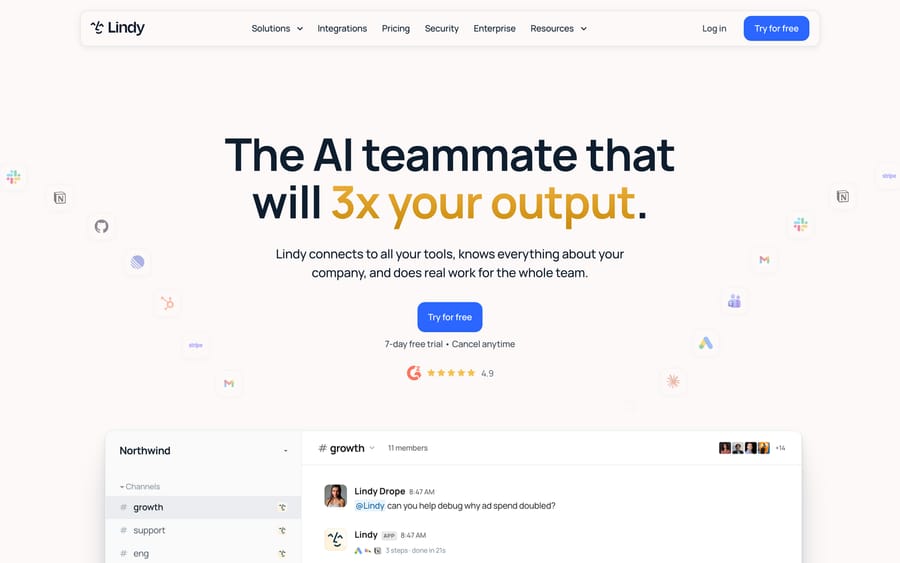
Lindy is a general-purpose AI coworker. Every person on a team gets a private Lindy in their Slack DMs, and the team shares one Lindy in channels. You @mention it with a request ("summarize last week's escalations," "draft a reply to this customer," "update the deal in HubSpot") and it works through your connected apps, then posts the result back in the thread. Its homepage says it "connects to all your tools, knows everything about your company, and does real work for the whole team."
The company was founded by Flo Crivello, a former Uber product manager. Lindy grew out of his previous startup, Teamflow, a virtual office product that shrank when offices reopened. In his SaaS Club interview, Crivello describes cutting two-thirds of Teamflow's staff in early 2023 and rebuilding around Lindy, which was first pitched as an "AI employee" and then repositioned as closer to "Zapier plus ChatGPT." Third-party funding trackers such as Extruct put total funding at about $50M, with Battery Ventures leading the largest round. Lindy hasn't published those figures on its own site, so treat them as reported.
Lindy's homepage shows logos from Shopify, Apple, Adobe, McKinsey, NVIDIA, Airbnb, Autodesk, Harvard and Stanford. Those are logos, not case studies. With per-seat Slack pricing, a logo can mean one team inside a large company.
Three products in about eighteen months
Knowing the history explains why reviews contradict each other. According to a Saner.AI review published in August 2026, Lindy has shipped three distinct products:
- 2024 to early 2026: a no-code agent builder. You built "Lindies" from triggers and actions, including phone agents. Lindy's own changelog shows Lindy 3.0 with an Agent Builder in August 2025, phone call improvements in June 2025, and 500+ actions added through Pipedream in July 2025.
- February 2026: a personal executive assistant over iMessage.
- August 10, 2026: Lindy Teammate, the Slack-native coworker priced per seat.
We tested the old URLs. Lindy's /solutions/customer-support and /agents pages now redirect to the homepage, and the former phone agent pages return 404. The app builder (/build, now /app-builder) still resolves. If you read a review that mentions building a phone agent or a free plan, it's describing an earlier version.
How does Lindy's AI work?
The current docs organize Lindy around five building blocks. It helps to understand them, because they decide what you pay and what can go wrong.
- Skills are named playbooks for recurring work. Lindy picks the right skill automatically when a request matches, so "triage the support queue" can follow the same steps every time.
- Routines are standing jobs on a schedule or a trigger, for one person or the whole team. A daily escalation summary is a routine.
- Files are Lindy's memory: plaintext documents your team can open and edit. When Lindy learns your refund policy or your tone rules, that knowledge lives in a file you can correct.
- Meetings are recordings and transcripts Lindy joins, stores in shared folders, and reads later as context.
- Integrations connect the tools. The integrations overview lists four routes: 1,000+ native integrations, any MCP server your team runs, browser automation where Lindy "drive[s] the browser the way a person would," and writing its own integration against a tool's API.
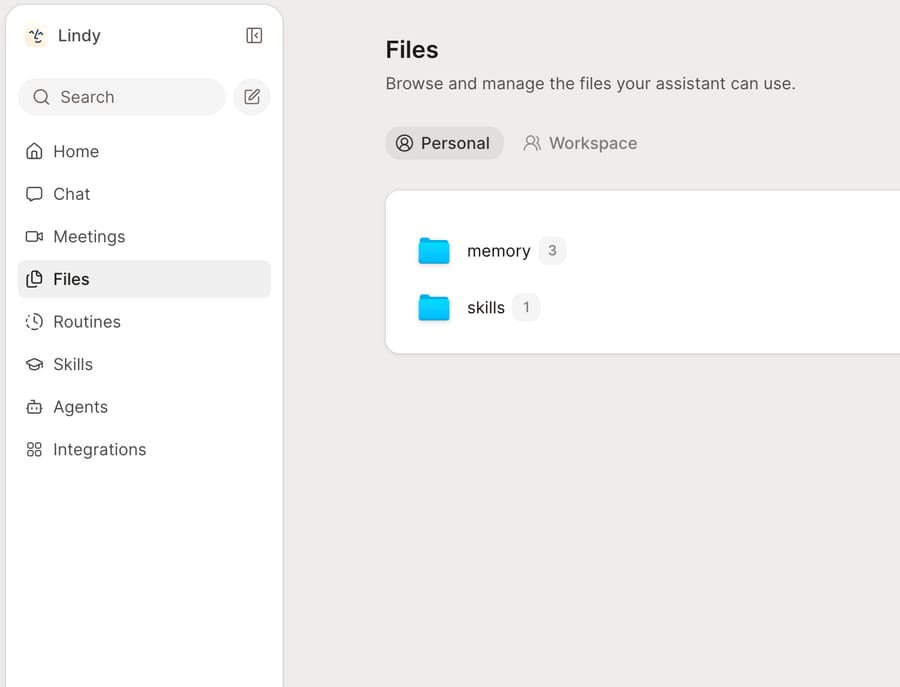
That sidebar is the whole product surface: Chat, Meetings, Files, Routines, Skills, Agents, Integrations. Memory is not a hidden vector store you have to trust. It's two folders you can open.
When someone asks for something, Lindy reads the relevant files and connected data, plans the steps, calls the integrations, and reports back. On the homepage demo, a request resolves as "3 steps · done in 21s."
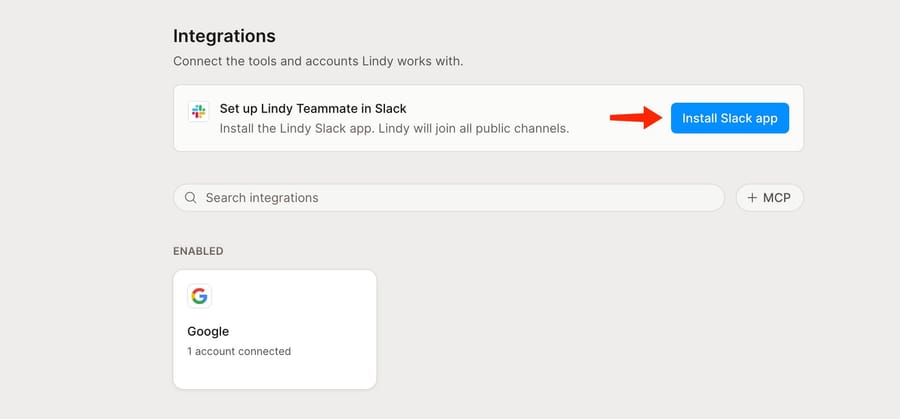
Setup is two moves: an admin installs the Slack app (Lindy "will join all public channels," per the button's own subtext), then each person connects their own accounts. The docs note Lindy requires a paid Slack plan, which is a real line item if your support team isn't already on one.
Approvals and where they stop
Write actions are gated. The docs say Lindy "asks in Slack before writing" when a workspace sets "Require approval," and either the requester or an admin can approve. The same docs add a boundary a support lead should read twice: "Guardrails apply in shared Slack threads only. Your web app chat, Slack DMs with Lindy, and iMessage and SMS aren't guarded."
So an agent on your team who DMs Lindy "close out all the spam tickets from today" isn't stopped by the channel approval setting. Whether that's acceptable depends on who has Zendesk access through Lindy, which brings us to support.
Which models it runs on
The current pricing doc says Lindy picks a model for each task to stretch credits, and you can choose the model yourself if you'd rather, but the docs we read don't list the models. The older agent builder did: its changelog lists o3, Gemini 2.5 Flash and Gemini 2.5 Flash-Lite during 2025. Lindy's security page says "Lindy and our providers do not use your data to train AI models," without naming the providers.
What can Lindy do for customer support?
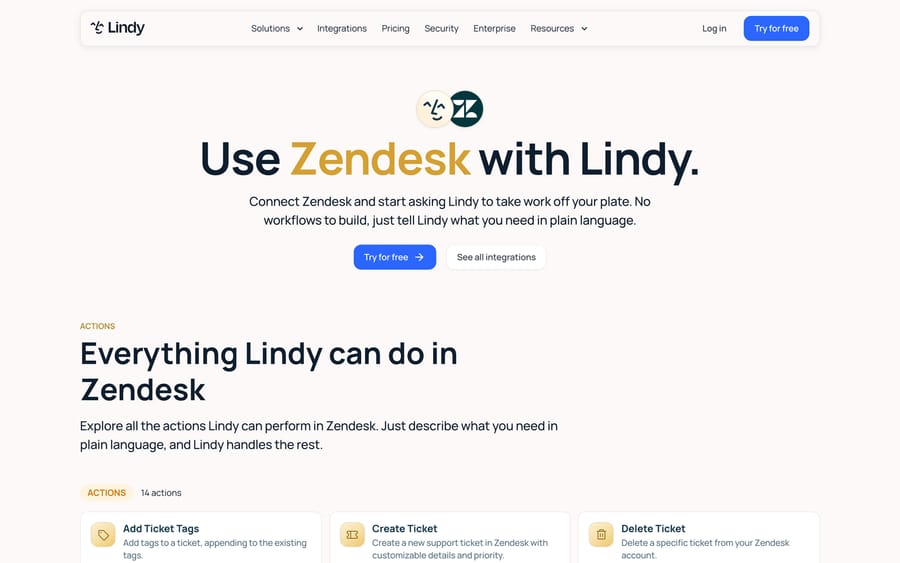
Lindy's use cases doc describes the support job as "ticket triage, routing, drafted replies, escalation." Lindy triages tickets across Zendesk, Intercom and Slack, routes them by topic or severity, drafts replies from your help center, and escalates hard cases with context attached.
On Zendesk specifically, the integration page lists actions including Search Tickets, List Tickets, Get Ticket Info, List Ticket Comments, Get User Info, List Macros, Add and Remove Ticket Tags, Set Custom Ticket Fields, Create Ticket, Update Ticket (which adds comments), and Delete Ticket. That's a full working set for triage: read the queue, classify, tag, set fields, leave an internal note.
Who starts the work is the part to check. Every example in Lindy's docs begins with a teammate asking Lindy for something, or a routine firing on a schedule, and the output lands in Slack or in your tools for a person to act on. The docs we read describe Lindy working for your team. They don't describe a customer-facing chat widget or an agent that replies to customers on its own as tickets arrive. For a support team, that makes Lindy a helper for the humans running the queue rather than a first-line agent on the queue.
A support lead who wants a morning routine ("tag yesterday's untagged tickets, post the five angriest ones in #support, draft replies for the three about shipping") gets that from Lindy without building a workflow. A team that wants every incoming "where's my order?" email answered inside Zendesk within two minutes needs something that runs on each ticket as it arrives.
What features does Lindy AI include?
- Private and shared Lindy. A personal Lindy in DMs handles your inbox, calendar and meeting prep. The shared Lindy in channels builds workspace memory from meetings, tools and Slack history.
- Email handling. Docs pages cover email drafting, email labeling, time-sensitive email alerts and follow-up bumps. Plans cap connected inboxes at 2 (Plus), 3 (Pro) and 5 (Max and Enterprise).
- Meeting assistant. Recording, transcripts, meeting prep and a daily brief.
- iMessage, SMS and a Chrome extension as extra ways to reach Lindy.
- 40+ prebuilt skills on the homepage, covering research, data analysis, decks and dashboards.
- 1,000+ integrations plus MCP, including Slack, Notion, HubSpot, Gmail, Google Drive, Zendesk and Intercom.
- Security. SOC 2 Type II, GDPR and PIPEDA compliance listed on the security page, with HIPAA and a signed BAA on the Enterprise plan.
How much does Lindy AI cost?
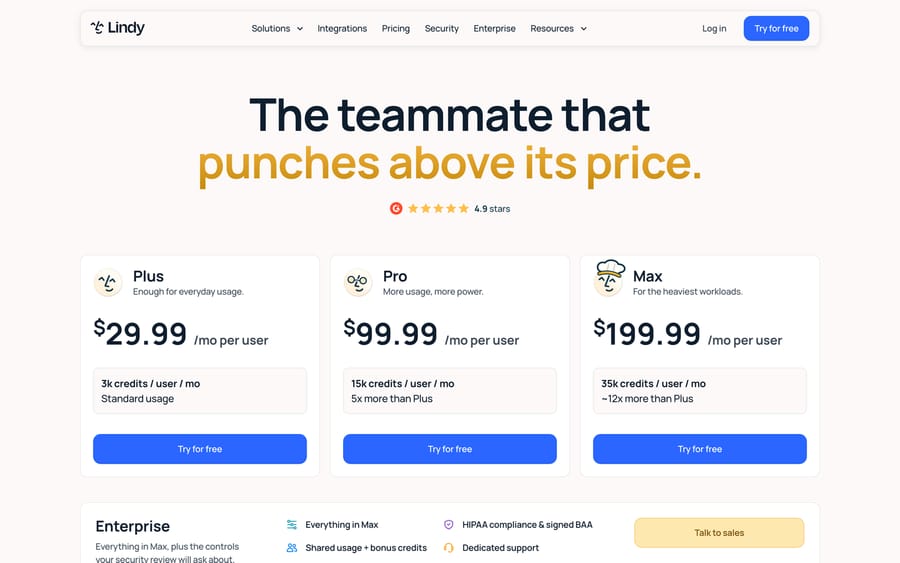
Lindy publishes its prices, which puts it ahead of most tools in this category. From the pricing page and the pricing doc:
| Plan | Price (re-read 22 September 2026) | Credits | Connected inboxes |
|---|---|---|---|
| Plus | $29.99/user/month | 3,000/user/month | 2 |
| Pro | $99.99/user/month | 15,000/user/month | 3 |
| Max | $199.99/user/month | 35,000/user/month | 5 |
| Enterprise | Custom | Everything in Max, plus shared usage and bonus credits | 5 |
The terms that shape your bill:
- Credits are "about one cent each." Lindy's own bands: 2 to 250 credits for everyday tasks like answers, summaries and drafts; 250 to 1,000 for "deep work" such as research reports and queue triage; 1,000 to 2,500 for big builds like dashboards.
- Credits pool across the workspace and reset every billing cycle. Plan credits don't roll over.
- Top-ups cost $10 per 1,000 credits, sold in 1,000-credit blocks, and purchased top-ups don't expire.
- When the pool runs low, the pricing doc says Lindy "pauses credit-using actions and tells you," with "no surprise bill." That is the default. The usage doc adds an opt-in: an admin can switch on Overages in Settings → Billing, and overage usage is then charged "at 2x the cost of regular Lindy credits." Admins can also cap how many credits any one person draws.
- Trial: teammates who join through Slack get their first week free, once per person. The pricing page notes direct signups are billed immediately.
- Monthly only on the page we fetched. No annual price is listed.
What queue triage costs on Lindy
Here's the arithmetic for a support team. Lindy puts queue triage in its 250 to 1,000 credit band, which is $2.50 to $10 per run at a cent a credit. A three-person team on Plus pays $89.97 a month and gets a 9,000-credit pool.
- One triage pass per weekday, at the midpoint of 625 credits, is about 13,750 credits over 22 working days. The 9,000 credits in the plan are included, so the gap is 4,750: five top-up blocks, $50 on top of seats.
- At the top of the band (1,000 credits a run), the same routine burns 22,000 credits. Subtract the pool and you're buying about 13,000 credits, which is $130 a month in top-ups at $10 per 1,000, or roughly $260 if an admin has switched on Overages and the extra usage bills at 2x instead of being bought as top-ups.
So the same daily routine lands somewhere between $140 and $350 a month all-in for three people, depending on a band Lindy states as a range and whether you top up or let Overages run at 2x. A "run" here is one pass over the queue, not one ticket, and Lindy doesn't publish a per-ticket figure. Credit burn also depends on how many tickets are in the queue that day and what else your team asks Lindy to do from the same pool. That uncertainty is the most common complaint in reviews: Lindy's Trustpilot page (trustpilot.com/review/lindy.ai) includes an August 2026 reviewer who wrote, "I managed to kill my months credits (3000) in one day!"
The incentive in per-seat plus credits
Lindy charges on two meters at once. Seats grow with how many people use it, and credits grow with how much they ask of it. The Saner.AI review reports that any @mention in Slack creates a billed seat, which means adoption spreading through your Slack workspace is also the vendor's growth plan. Credits that expire each month earn Lindy money on the capacity you didn't use. None of this is unusual for SaaS, but it's the reverse of what a support budget wants: a cost that tracks tickets handled, not headcount and curiosity.
What do Lindy AI reviews say?
Review data is thin for the current product, because the Slack teammate is about five weeks old, and the ratings that exist point in opposite directions. Here is every number we could check on September 15, 2026.
| Source | Rating | Reviews | Checked | What we could verify |
|---|---|---|---|---|
| G2 | 4.9 | 171 | 22 September 2026 | Read in a real browser session. The count behind the 4.9 Lindy advertises is 171 ratings, and it is genuine |
| Capterra (capterra.com/p/10027702/Lindy) | 3.5 | 2 | 15 September 2026 | Fetched directly; the listing still shows the retired Free / $49.99 / $299.99 plans |
| Trustpilot | 1.7 | 39 | 22 September 2026 | Fetched directly; 77% one-star |
The gap between those first and last rows is the most interesting number on this page. A 4.9 from 171 people and a 1.7 from 39 people are not describing different products; they are describing the same product from two different distances. G2 reviews are collected from workspace users, often through vendor campaigns, and they talk about what Lindy can do. Trustpilot reviews are left by people who went looking for somewhere to complain, and almost all of them talk about the bill. Neither number is fake. If you are deciding, weight G2 for capability and Trustpilot for billing surprises, and read the next paragraph before you set a budget.
Three reviewers, in their own words. A CEO in design gave Capterra five stars for "Great to help solo founder automate time-wasting tasks," with the con that "It can be hard to figure out how / why one of the custom bots isnt working." A veterinarian gave two stars: "It's not consistent in its delivery. It does not follow instructions at least 50% of the time." On Trustpilot, Yossi Coleman wrote on August 21, 2026 that "The tool is powerful but the cheap price is just bait...I managed to kill my months credits (3000) in one day!"
What users complain about
The recurring complaint across all three sites is the same one, and it's about money rather than capability: credits vanish faster than people expect, and the bill arrives before the value does. Reliability on long-running tasks is second.
The G2 dislikes, read on 22 September 2026, are milder and more specific, and they are worth pairing with the Trustpilot anger rather than reading instead of it. An administrator at a small business wrote on 9 October 2025 that "the learning curve for truly complex flows can be steep at first. Creating a simple automation is quick, but when you start adding multiple conditions, branches, and integrations with different APIs, it takes patience" (G2). A CEO at a small business, same date, put the same thing more kindly: "while setting up a workflow can take some time, the effort is definitely worthwhile." A legal head's answer to the dislike question, on 28 April 2026, was one word: "Nothing."
So the honest complaint list is short. Complex flows take longer than the demo suggests, long-running tasks are not always reliable, and the credit meter is the thing that surprises people. Nobody in 171 G2 reviews complains that it cannot answer customers, because nobody bought it to. Note also that most of these reviews describe the agent builder or the iMessage assistant, not the Slack teammate. The Substack review that ranks for "lindy ai" praised how easy agents were to build and criticized "credit anxiety," but it tested the old $50, 5,000-credit plan.
Pros
- Published pricing, published credit bands and published top-up prices.
- Setup is an @mention in Slack, with no workflow diagram to build.
- Memory lives in plaintext files your team can read and fix.
- Approval gates on write actions in shared channels.
- Broad reach: 1,000+ integrations, MCP servers, browser automation.
- SOC 2 Type II and a stated no-training commitment, with a HIPAA BAA on Enterprise.
Cons
- Credit use per task is a range, not a price, so monthly cost is hard to forecast.
- Guardrails don't cover DMs, the web app, iMessage or SMS.
- Requires Slack for the team experience. Saner.AI reports no Microsoft Teams support.
- Per-seat billing on top of credits.
- Dedicated support is Enterprise-only; Carly's review (written by a competitor) reports help center and community support on the lower plans.
- Three repositionings in about eighteen months, which is a risk if you build processes on it.
- Built for internal requests. The docs don't describe it answering customers directly as tickets arrive.
Who is Lindy AI best for?
Lindy suits teams that already work in Slack and want one AI coworker across many jobs: inbox triage for founders and account managers, meeting notes and prep, CRM updates, research, weekly reports. Its value grows with the number of different tools and requests, because it's one product in place of several single-purpose ones.
For support, Lindy fits a lead or ops person who wants help running the queue: daily triage passes, escalation digests, drafted replies a human reviews and sends. It's the wrong fit if you want an agent acting on every ticket as it lands, with a cost you can model per ticket, or if your support team doesn't live in Slack.
Who should not buy Lindy AI
- Anyone shopping for a first-line support agent. Lindy's own docs describe triage, routing, drafting and escalation, all initiated by a person or a schedule. There is no customer-facing channel. This is the single biggest mismatch and it costs Lindy 8 of the 15 points it drops on our rubric.
- Anyone who needs the bill to be predictable. Credit cost per task is published as a band, the plan pool does not roll over, and at zero Lindy either pauses work until the next cycle or, with Overages on, bills the extra at 2x. Budget for top-ups from month one.
- Teams not on Slack. The team experience is Slack-native, and a third-party review reports no Microsoft Teams support.
- Teams building long-lived processes. Three repositionings in about eighteen months is a real risk if the thing you are automating has to still work next year.
What are the best Lindy AI alternatives?
Lindy competes in two different markets at once, so the shortlist splits. If you want a general AI coworker for your team, the rivals are other workspace agents. If you want customer questions answered, the alternatives are support AI agents, which is where Lindy is weakest. We covered the wider category in our guide to AI agents for customer service.
Workspace-agent alternatives
These three do the same job as Lindy Teammate: agents that work for your staff, across your company's tools. We fetched each pricing page on September 15, 2026.
| Tool | What it is | Pricing | Watch out for |
|---|---|---|---|
| Relevance AI | Agents and multi-agent "workforces" with 2,000+ integrations, sold to companies scaling without headcount | Not published. The pricing page lists one tier, Enterprise, behind "Talk to sales" | No self-serve price and no published usage rate, so you can't model cost before a sales call |
| Zapier Agents | Agents built on Zapier's 9,000+ app connections, run on command or on a schedule | Billed in "activities" separate from Zapier tasks: 400 a month free, 1,500 on paid plans, which start at $19.99/month billed annually | A single agent run is capped at 10 activities (free) or 40 (paid), so long jobs get cut off. It's a second meter on top of your task plan |
| Dust | Custom agents over Slack, Notion, GitHub and Drive, with 20+ frontier models | Free seat with 500 lifetime credits, Pro €24/seat/month billed yearly (8,000 credits), Max €120 (40,000) | Same two-meter shape as Lindy: per seat plus credits. Prices are in euros, and the credit allowance is per seat rather than pooled below Enterprise |
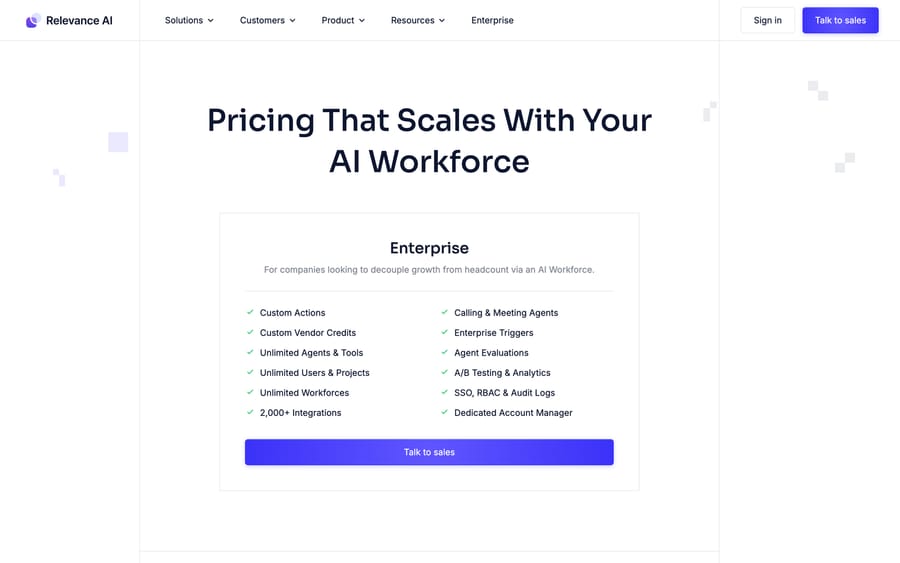
Relevance AI is the closest to Lindy in ambition and the furthest from it in sales motion: no price, no free tier on the page, a demo call before you can model anything.
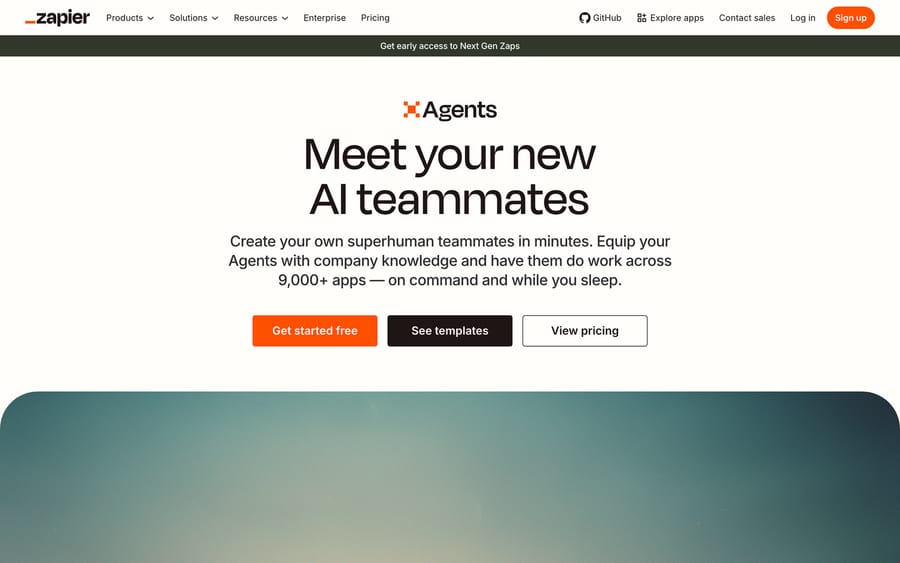
Zapier Agents is the cheapest way to test the idea, because your team probably already has a Zapier account and the free tier includes 400 activities a month. The per-run activity cap is the thing to read before you build a queue-triage agent on it.
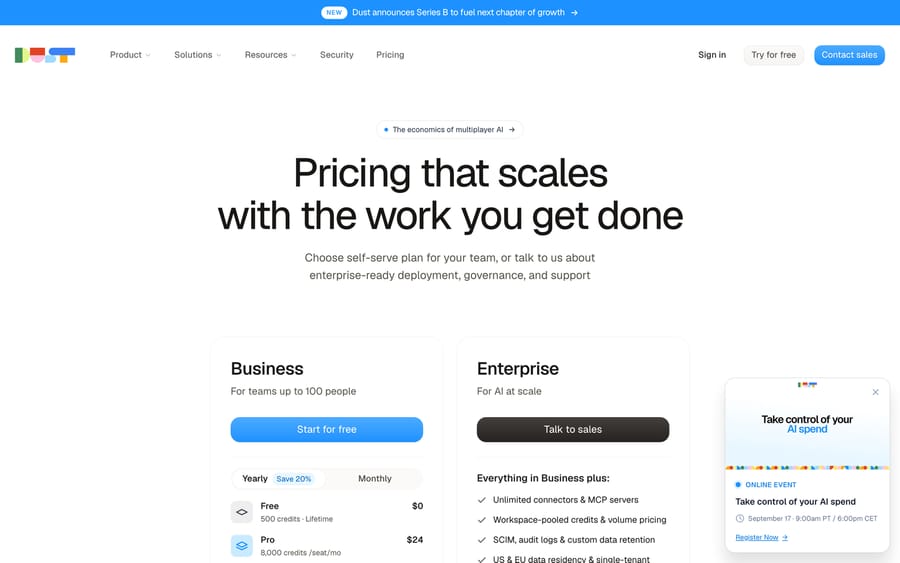
Dust prices like Lindy (seats plus credits) at roughly a fifth of Lindy's Pro rate, with a free seat to try it on. It's the sensible like-for-like test if the Slack teammate appeals but the credit math doesn't.
Customer-facing alternatives
| Lindy AI | Chatbase | Macha | |
|---|---|---|---|
| Model | AI teammate in Slack for internal requests | Customer-facing AI chat agent trained on your content | AI agent layer on your existing help desk |
| Who it serves | Your team | Your customers, via a website widget | Your customers and your agents, inside the help desk |
| Support work | Triage passes, drafts, escalation digests on request or schedule | Answers chat questions, hands off to humans | Runs on each ticket: replies, tags, routes, takes actions |
| Pricing | $29.99 to $199.99/user/month plus credits, published | $0 to $500/month by message credits, published | From $299/mo for 750 tickets (~$0.40/ticket), published |
| Setup | Self-serve in Slack | Self-serve | Done for you by the Macha team, with a dedicated success manager, included |
| Trial | 7 days for Slack-joined teammates | Free plan (50 message credits) | $50 free usage |
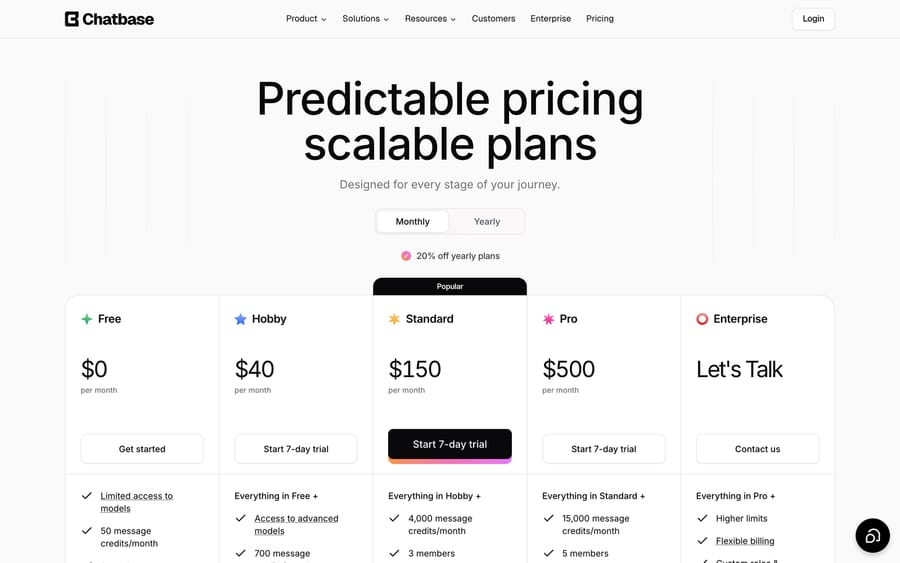
Chatbase is the closer match if the goal is a chat widget answering customers from your docs. Its pricing page lists a free plan with 50 message credits, then Hobby at $40, Standard at $150 and Pro at $500 a month. Our Chatbase guide covers where it works and where it stops.
If your tickets already arrive in a help desk rather than a widget, the comparison to make is with agents that run on the desk itself. Our guide to Intercom's Fin covers the per-outcome version of that model.
Macha fits teams already running Zendesk, Freshdesk, Gorgias, Front, HubSpot or Intercom who want agents working inside the ticket. Macha runs as an AI agent layer on top of the help desk you already use: a ticket arrives, the agent reads it with your knowledge and connected systems such as Shopify, then replies, tags, routes or escalates in the help desk itself. Pricing is per ticket, where one thread with one person is one charge however many replies it takes, from $299 a month for 750 tickets. See Macha pricing for the tiers. Macha is done for you: the Macha team analyzes your past tickets, builds the knowledge base and the agents, and runs them in safe mode until the drafts are right. At about $0.40 a ticket, the price includes that setup and a dedicated success manager who handles your changes, where Lindy's agents are self-serve: you build them yourself in Slack.
The two can coexist. Lindy's strength is the internal side of support (the lead's digest, the Slack question about a customer), while Macha handles the tickets themselves.
FAQ
What is Lindy AI? Lindy AI is an AI teammate that works in Slack. Each person gets a private Lindy in DMs and the team shares one in channels. It connects to 1,000+ tools and does tasks like email triage, meeting notes, reports and CRM updates when asked or on a schedule.
Is Lindy AI worth it? For a Slack-native team wanting one assistant across many small jobs, yes, and its 171 G2 reviewers rate it 4.9. For customer support specifically it scores 15 out of 30 on our rubric, below our 18-point bar, because it does not answer customers and has no customer-facing channel. Budget for credit top-ups either way.
Why is Lindy AI rated 4.9 on G2 and 1.7 on Trustpilot? Both figures are real, read on 22 September 2026 from 171 and 39 ratings respectively. The G2 reviews describe what the product can do; the Trustpilot reviews are overwhelmingly about the bill, with 77% one-star and the most-quoted complaint being credits running out far faster than expected. Weight G2 for capability and Trustpilot for billing surprises.
What do users complain about with Lindy AI? Credit burn first, by a distance, across all three review sites. Then reliability on long-running tasks, then a steep learning curve once a flow gains multiple conditions, branches and APIs. Guardrails covering shared Slack threads but not DMs, the web app, iMessage or SMS is the complaint a support lead should care about most.
How much does Lindy AI cost? Plus is $29.99 per user per month with 3,000 credits, Pro is $99.99 with 15,000, and Max is $199.99 with 35,000. Enterprise is custom. Credits are worth about a cent each, pool across the workspace, don't roll over, and top-ups cost $10 per 1,000. Overages, if an admin turns them on, bill at 2x.
Does Lindy AI have a free plan? Not anymore. The old 400-credit free plan belonged to the agent builder product. Today, teammates who join through Slack get a one-time free week.
Can Lindy AI answer customer support tickets? It can triage, tag, route and draft replies in Zendesk and Intercom when a teammate asks or a routine runs. Its docs describe work for internal teammates, not an agent that replies to customers on its own as tickets arrive.
Is Lindy AI safe to connect to Zendesk? Lindy lists SOC 2 Type II, GDPR and PIPEDA compliance and says data isn't used for training. Its Zendesk actions include Delete Ticket, and approval guardrails apply only in shared Slack threads, so set permissions with that in mind.
Why are Lindy AI reviews so mixed? Most reviews describe earlier products: the no-code agent builder and the iMessage assistant. The Slack teammate launched on August 10, 2026, according to Saner.AI. Trustpilot complaints center on credit burn, billing and cancellation.
What are the best Lindy AI alternatives? For a general workspace agent, Dust is the closest like-for-like (seats plus credits, from €24 a seat), Zapier Agents is the cheapest way to test the idea, and Relevance AI is the enterprise option with no published price. For customer-facing support, Chatbase covers website chat, and Macha runs agents inside Zendesk, Freshdesk, Gorgias, Front, HubSpot or Intercom, set up and run for you by the Macha team at about $0.40 a ticket, with a dedicated success manager included.
Who founded Lindy AI? Flo Crivello, previously a product manager at Uber and founder of Teamflow. Third-party trackers report about $50M in total funding.
If your question is the narrower one, whether an agent can work your Zendesk or Gorgias queue without a Slack-shaped detour, the fastest answer is to point one at your own tickets: Macha's trial is $50 of free usage with no card, and you can start it here. The Macha team builds the first agent for you.
Sources: Lindy homepage, Lindy pricing, Lindy pricing doc, Lindy usage doc, Lindy use cases, Lindy integrations overview, Lindy docs index, Lindy Zendesk integration, Lindy security, Lindy changelog, Saner.AI Lindy review, SaaS Club interview with Flo Crivello, Extruct funding profile, Trustpilot (trustpilot.com/review/lindy.ai, blocks automated link checks), Substack review, Carly review, Capterra listing for Lindy (capterra.com/p/10027702/Lindy, blocks automated link checks), Chatbase pricing, Relevance AI pricing, Zapier Agents, Zapier pricing, Dust pricing.






