





 Shopify
 Stripe
 Slack
Slack Notion
 Google Workspace
 Confluence

What Is Rosie AI and How Much Does It Cost? (2026 Guide)


Rosie is an AI phone-answering service for small service businesses, priced at $49, $149 or $299 a month for 250, 1,000 or 2,000 call minutes. It suits contractors, salons, law firms and auto shops that lose a job every time a call goes to voicemail.
Key takeaways
- Rosie answers small-business calls 24/7 on three published minute-based tiers: $49/month for 250 minutes, $149 for 1,000 and $299 for 2,000.
- Rosie's Website Texting add-on costs $50 a month for 25 conversations, then $1 per additional conversation, and every plan starts with a 7-day free trial.
- Rosie's homepage cites more than 2,000 small businesses and 3.1 million calls handled, but we found no independent G2, Capterra or Trustpilot reviews to check those claims against.
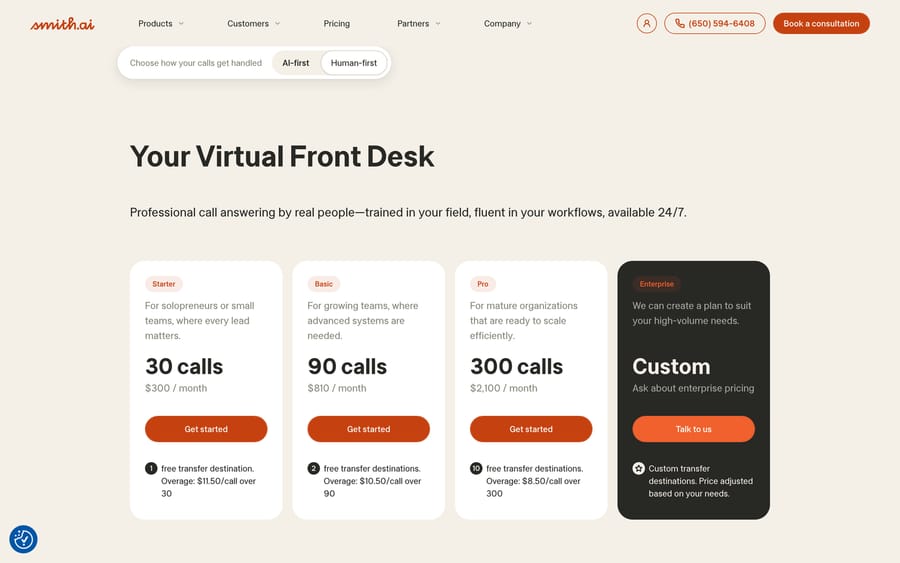
- Smith.ai, the closest human-first alternative to Rosie, charges per call instead, starting at $300 a month for 30 calls with overage of $8.50 to $11.50 per call.
- For help desk tickets rather than phone calls, Macha is the done-for-you option: the Macha team builds and runs the agent, included at about $0.40 a ticket with a dedicated success manager.

Rosie is an AI phone-answering service for small businesses that costs $49, $149 or $299 a month for 250, 1,000 or 2,000 call minutes, with a 7-day free trial on every plan (heyrosie.com/pricing, checked 24 September 2026). It answers calls 24/7 in English and Spanish, books appointments and transfers callers to staff.
| Question | Answer (checked 24 Sept 2026) |
|---|---|
| What it does | AI answering for inbound calls, plus a website chat widget |
| Plans | Professional $49/mo (250 min), Scale $149/mo (1,000 min), Growth $299/mo (2,000 min) |
| Billing meter | Minutes, not calls; overage rate not published |
| Trial | 7 days free on every plan; 2 months free when paid annually |
| Languages | English and Spanish |
| Independent reviews | None found on G2, Capterra or Trustpilot |
We build AI agents for customer service that live inside a help desk's ticket queue, a different job than answering a ringing phone, so we read Rosie as a specialist next door to what we do.
What is Rosie and who uses it?
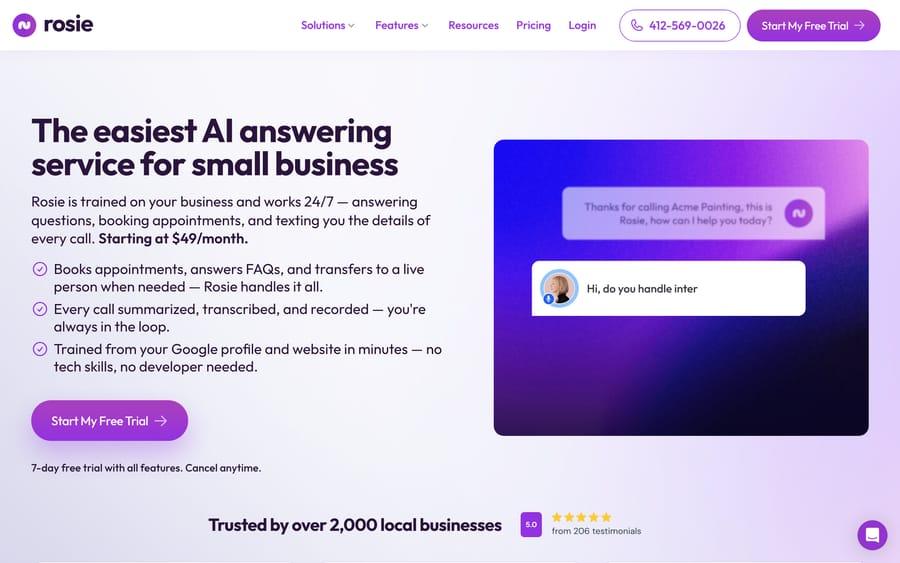
Rosie answers calls 24/7 for solo owners and small service businesses: home services, plumbing, HVAC, electricians, construction, real estate, property management, accounting, law, salons and automotive shops are the industries it names directly. Setup is built around three steps: connect a business's website and Google Business profile so Rosie can train itself on real business details within minutes, review and customize the greeting and responses, then forward the business phone line to Rosie. No developer, and according to the vendor no meaningful technical skill, is required for any of it.
Rosie's homepage cites more than 2,000 small businesses and over 3.1 million calls handled. When we first checked on 17 September 2026 it also showed a 5.0 rating from 206 testimonials; that figure was not on the homepage on 24 September, and it was always Rosie's own testimonial count, not an independent G2 or Capterra score. Named testimonials on the site include Dan Mallatt of Franklynn Auto, Francisco Fierro of Iron Volt Electric, and Daniel Terner of Terner Elder Law, who said: "It can't be easy to develop a product that is both super-configurable yet also easy to use. Rosie strikes this balance extremely well. My clients are happy and I'm happy, it's a win/win."
How does Rosie's AI answer a call?
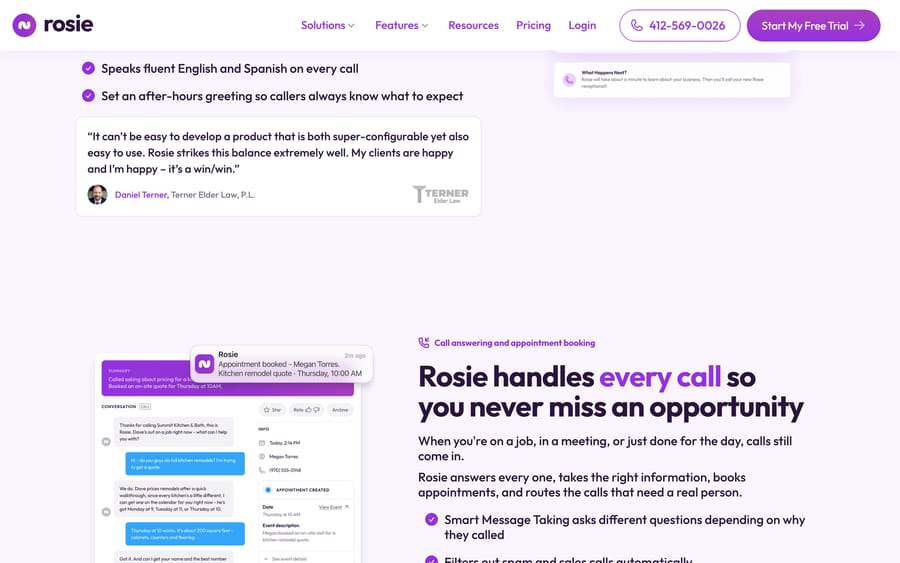
Rosie's core mechanism is training itself directly from a business's existing public information, its website and Google Business profile, so an owner never has to write a script or build a knowledge base from scratch. The screenshot above shows what a resolved call actually produces: a full transcript, a summary at the top ("Called asking about pricing for a kitchen remodel. Booked an on-site quote for Thursday at 10AM"), and an appointment created directly against the caller's real contact details, all generated from one phone call with no manual data entry after the fact.
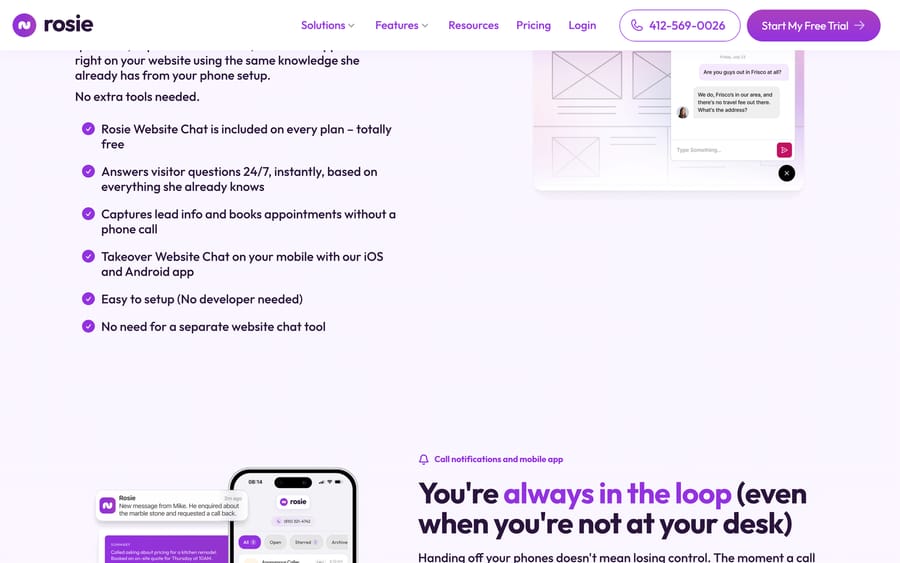
Smart message taking adjusts what Rosie asks a caller based on why they're calling, instead of running the same fixed script regardless of context. Waterfall transfers, available on the top Growth tier, try multiple staff numbers in sequence until someone actually picks up, going well past routing to one number and dropping to voicemail if that person is unavailable. Rosie also ships a website chat widget on every plan, built from the same training data as the phone agent, so a visitor typing a question gets an answer grounded in the same business information a caller would hear.
What features does Rosie include?
- Auto-training: builds Rosie's knowledge from a business's website and Google Business profile in minutes.
- Smart message taking: adjusts questions asked based on the reason for the call.
- Appointment booking: direct calendar booking or appointment links sent by text.
- Call routing: warm transfers (with a team briefing), live transfers, and waterfall transfers across multiple numbers.
- Spam filtering: automatic detection and blocking of robocalls and sales calls.
- Website chat widget: included free on every plan, trained from the same data as the phone agent.
- Bilingual support: English and Spanish on every call, with 10+ voice options.
- Zapier integration: included on every plan, alongside call summaries, transcripts and recordings.
- Mobile apps: iOS and Android apps for call notifications and team management.
How much does Rosie cost?
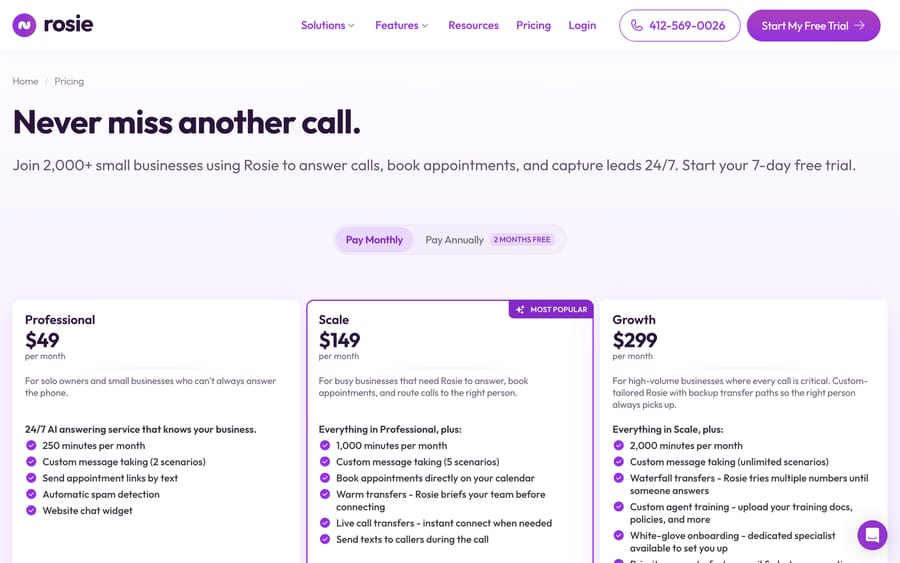
Rosie publishes its pricing directly, with minutes as the meter that scales cost (unchanged between our 17 and 24 September checks):
| Plan | Monthly | Minutes included | Custom scenarios | Notable extras |
|---|---|---|---|---|
| Professional | $49 | 250 | 2 | Spam detection, website chat widget, text appointment links |
| Scale | $149 | 1,000 | 5 | Calendar booking, warm and live transfers, mid-call texting |
| Growth | $299 | 2,000 | Unlimited | Waterfall transfers, custom agent training, white-glove onboarding |
Paying annually gets two months free on any tier. A separate Website Texting add-on costs $50 a month for 25 conversations, then $1 per additional conversation. Every plan includes a 7-day free trial with cancellation any time.
Minutes are the meter here, a meaningfully different design from competitors that count unique callers or individual calls instead. Run the arithmetic on a Scale-tier plumbing business averaging 4 minutes a call: 1,000 minutes covers 250 calls a month before anything extra is owed. A busier month at 350 calls burns 1,400 minutes, 400 over the allowance, and Rosie's overage isn't published on the pricing page itself, so that's a number worth confirming with sales before assuming the $149 headline is the ceiling. The minutes model rewards Rosie modestly for longer calls, the opposite incentive from Goodcall's unlimited-minutes, per-unique-customer structure, so a business whose calls tend to run long should weigh Rosie's per-minute exposure carefully against a flatter competitor before picking a tier.
What do real users say about Rosie?
This is the section where honesty matters more than a number. No independent review-site data exists for Rosie that we could verify: G2 has no accessible public listing, Capterra returns a 404 for every plausible product slug, and Rosie's Trustpilot profile was unclaimed with zero submitted reviews when we checked on 17 September 2026 (Trustpilot blocked our 24 September re-check). The testimonials on Rosie's own homepage, from Dan Mallatt, Robert of River City Frozen Beverages, Amanda of Newport Ave Landscaping, Francisco Fierro, Daniel Terner, and Dean Konstantine of McKnight, are real named customers with attributed quotes, which is more transparent than an anonymous testimonial wall, but they're still vendor-selected and vendor-hosted rather than independently collected. If you saw the "5.0 from 206 testimonials" figure, treat it as a vendor claim, not a third-party rating. The numbers Rosie now leads with, 2,000+ businesses and 3.1 million calls, are also self-reported.
What are Rosie's pros and cons?
Pros
- Genuinely fast setup: trained from an existing website and Google profile with no developer needed.
- Published, transparent pricing with a clear minutes-based structure across three tiers.
- Website chat widget included free on every plan, not sold as a separate product.
- Named, attributed customer testimonials rather than anonymous marketing copy.
Cons
- No independent review-site data exists anywhere we could verify; the only evidence is Rosie's own testimonials and usage counts.
- Minutes-based pricing means longer average call length increases cost, unlike a flat per-customer or per-agent model.
- Overage pricing beyond the included minutes isn't published; get it in writing before committing to a tier.
- Waterfall transfers and custom agent training are locked to the top Growth tier at $299/month.
Who is Rosie best for?
Rosie suits you if you run a solo or small service business, a contractor, salon, law office, or auto shop, that misses real revenue every time a call goes unanswered and wants a fast, low-effort setup over a highly customized one. Its named-customer testimonials skew toward exactly this profile: single-location, appointment-driven businesses where a missed call is a missed job.
It's a weaker fit for a business with call volumes high enough that per-minute exposure becomes unpredictable, or for a team that wants independently verified reviews before committing, since none currently exist for this vendor.
How does Rosie compare with Smith.ai and Macha?
| Rosie | Smith.ai | Macha | |
|---|---|---|---|
| Model | AI-only phone answering, minutes-based pricing | AI-first or human-first receptionist, per-call pricing ($8.50 to $11.50 per extra call) | AI agent layer on your existing help desk |
| Best for | Solo owners and small service businesses wanting fast setup | Businesses wanting real people or a hybrid AI/human model | Teams on Zendesk, Freshdesk, Gorgias, Front, HubSpot or Intercom automating ticket volume |
| Pricing | $49 to $299/month published, minutes-based | $300 to $2,100/month published, per-call-based | From $299/mo for 750 tickets (about $0.40/ticket), published |
| What scales the price | Minutes used per month | Number of calls handled | Tickets solved per month |
| Reviews | No independent data found; vendor testimonials only | Independently reviewed on multiple platforms | See /pricing |
Rosie and Smith.ai solve the same basic problem, an unanswered small-business phone, at very different price points and with very different pricing mechanics: Rosie meters minutes starting at $49, while Smith.ai meters calls starting at $300 for 30 calls, with the option of real human receptionists and a 30-day money-back guarantee. Macha has nothing to do with either use case; it automates the ticket queue inside a help desk instead of a phone line. If your actual bottleneck is help desk tickets instead of missed calls, Macha is the tool built for that, and it's done for you: the Macha team analyzes your past tickets, builds the knowledge base and the agent on your help desk, and runs it in safe mode until the drafts are right. That's included at about $0.40 a ticket, along with a dedicated success manager who handles your changes. For a business that also wants proactive outbound calling and texting on top of inbound answering, see our Regal AI guide; for a broader look at voice AI positioned for larger sales and support teams, see our Crescendo AI guide. See pricing for the current numbers.
How we researched this: we checked Rosie's own homepage and pricing page directly on 2026-09-17 and again on 2026-09-24; prices, minutes and add-ons were unchanged, and the named customer testimonials were still on the homepage. No G2 or Capterra listing could be found for Rosie, and its Trustpilot profile is unclaimed with no reviews. Smith.ai's pricing came from its own pricing page, re-checked on 2026-09-24.
FAQ
What is Rosie? Rosie is an AI phone-answering service for small businesses, trained on a business's website and Google profile, answering calls 24/7, booking appointments, and routing calls to staff when needed.
How much does Rosie cost? Three published tiers: Professional at $49/month (250 minutes), Scale at $149/month (1,000 minutes), and Growth at $299/month (2,000 minutes), with two months free on annual billing and a 7-day free trial.
Does Rosie charge by the call or by the minute? By the minute. Each plan includes a monthly minutes allowance, so a business with longer average call times uses its allowance faster than one with short calls.
Does Rosie have a free trial? Yes. Every plan starts with a 7-day free trial, and you can cancel any time. Rosie does not publish its per-minute overage rate, so ask sales before you pick a tier.
Is Rosie good, based on reviews? No independent review-site data could be found. G2 has no visible listing, Capterra returns no matching product, and Rosie's Trustpilot profile is unclaimed with zero reviews. The 5.0 rating from 206 testimonials that Rosie's site showed in mid-September 2026 was a vendor-collected count, not a third-party score.
Does Rosie replace a website chat tool? Yes, for many small businesses. A website chat widget trained on the same business data as the phone agent is included free on every plan.
What are good Rosie alternatives? Smith.ai is the closest comparison for a business that wants a human-first or hybrid option instead of AI-only. For automating support tickets inside a help desk instead of answering phone calls, Macha solves a different problem entirely.
Can Rosie transfer callers to a real person? Yes. Warm transfers brief the staff member before connecting, live transfers connect instantly, and Growth-tier waterfall transfers try multiple numbers in sequence until someone answers.
Rosie is a sensible pick for a small business that just needs its phone answered without a complicated setup. If the real bottleneck is your help desk queue instead, start a Macha trial or check /pricing.
Sources: Rosie homepage, Rosie pricing, Smith.ai pricing.






