





 Shopify
 Stripe
 Slack
Slack Notion
 Google Workspace
 Confluence

How Do You Prepare Zendesk for a Ticket Volume Spike?


Preparing Zendesk for a volume spike means auditing what already fires per ticket while it is quiet, because a surge multiplies your existing configuration. Decisions made during the surge are all bad ones.
Key takeaways
- Preparing Zendesk for a volume spike means auditing what already fires on every ticket, because a surge multiplies existing trigger and webhook configuration rather than creating new problems.
- On our test instance, three triggers named Macha - New Ticket Trigger showed 7-day counts of 10, 1 and 2, so they matched different tickets rather than firing three times.
- Solving a Zendesk Problem ticket automatically sets every linked Incident ticket to solved, but a macro cannot make that link; a webhook setting problem_id can.
- Zendesk business hours need Suite Growth or Support Professional and above, and only Enterprise plans can run several schedules and apply them by trigger.
- Zendesk states that AI agent tickets cannot be linked to Problem and Incident tickets, so automated tickets sit outside that bundle during a spike.

To prepare Zendesk for a volume spike, do three things while it is quiet: sort your active triggers by the Triggered (7d) column to see what fires on every ticket, set up Problem and Incident tickets so solving one problem ticket solves every linked incident, and write down which triggers you will switch off. A volume spike doesn't create new problems. It multiplies the ones already in your configuration, and it does so at the exact moment you have the least attention to spare. So the preparation worth doing is an audit of what your instance already does per ticket, on the assumption that whatever that is, you're about to do a great deal more of it.
| Before the spike | Where in Zendesk | Why it matters at volume |
|---|---|---|
| Count active triggers | Triggers, filtered to Active, Triggered (7d) column | Everything on creation runs once per ticket |
| Check webhooks | Webhooks list, authentication setting | Rate limits hit systems outside Zendesk |
| Split the queue | Shared views | One long list buries ordinary tickets |
| Bundle by cause | Ticket type Problem / Incident | One solve closes every linked incident |
| Plan what to pause | A written list of trigger names | Turns a judgement call into one action |
What fires on every ticket in your Zendesk?
Every trigger that runs on ticket creation runs once per ticket. That's obvious until you count how many there are and notice that some of them are the same trigger twice.
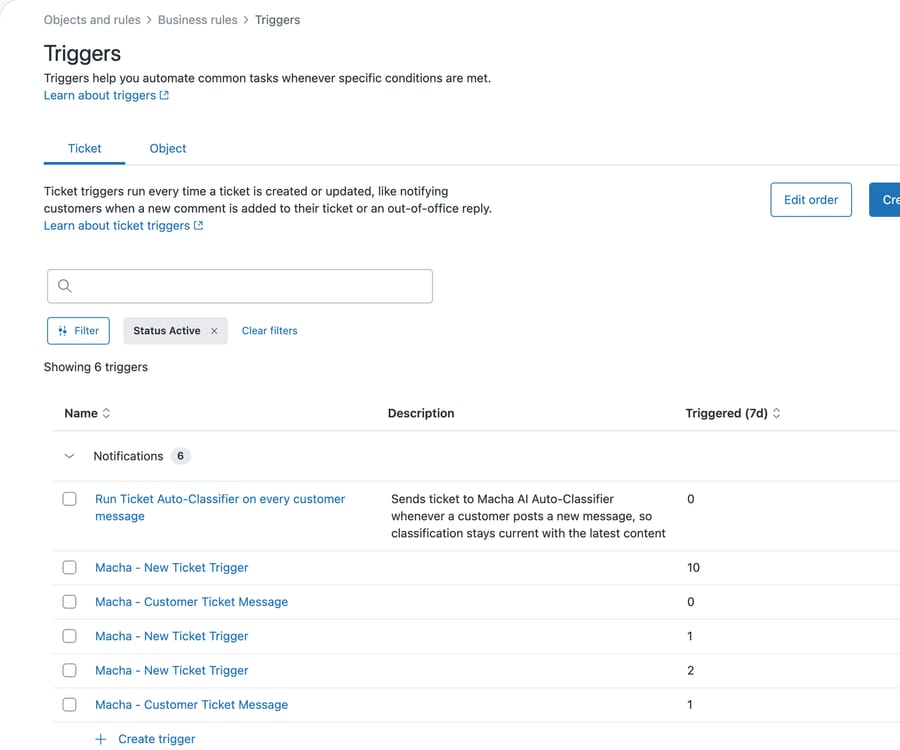
Our developer instance has six active ticket triggers. Three of them are called "Macha - New Ticket Trigger". Two more are both called "Macha - Customer Ticket Message".
The column that makes this legible is Triggered (7d). Ours reads 10, 1 and 2 across the three identically-named triggers.
Read that carefully, because it rules out the obvious reading. Three copies firing on every ticket would show three similar numbers. Ten, one and two are three different rules matching three different populations, and two of them are nearly dormant. Nothing here is firing three times per ticket.
What it does mean is that the instance is unauditable by name. You cannot look at this list and say what happens when a ticket arrives, because three entries share a label and only opening each one tells you which tickets it catches and what it does to them. In a spike that is the expensive part: the thing you most need to reason about quickly is the thing you have to reverse-engineer.
Untangling that is a quiet-week job.
What should the pre-spike audit cover, and in what order?
Count what runs per ticket. Filter triggers to Active and read the count. Sort by the Triggered column and look at the top. Anything firing on a large share of tickets is something you will be doing many more times per hour shortly, so it's worth knowing what it costs.
Find the duplicates. Identical or near-identical names are the obvious case. The less obvious case is two differently-named triggers with overlapping conditions, which you find by reading conditions rather than names. Our trigger and webhook audit goes through this properly.
Check what leaves the building. Triggers that call webhooks are the ones with a blast radius outside Zendesk. During a spike they turn your incident into somebody else's incident, and the failure mode is usually a rate limit rather than an outage, which is harder to notice.
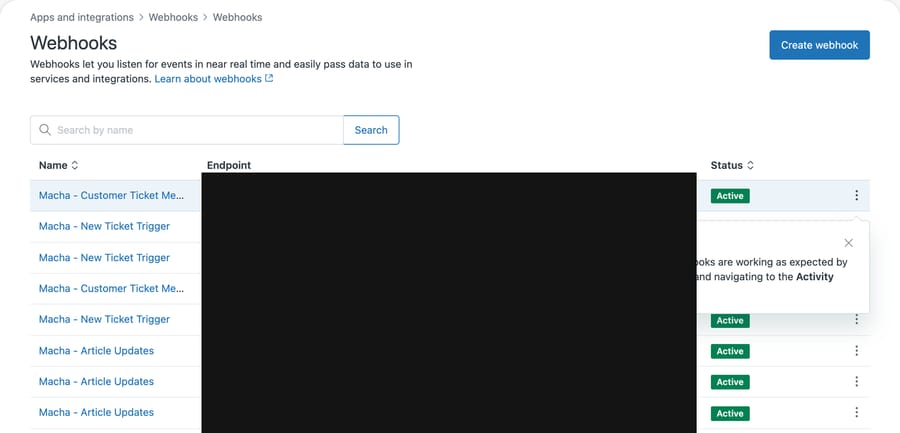
Eight active webhooks on our instance, with the same name duplication as the triggers. We have blacked out the endpoint column deliberately, and the reason is worth borrowing: a Zendesk webhook's URL contains its id, and where authentication is set to none that URL is the whole credential. Anyone who can read it can post events to it. Treat that column as a secret when you screenshot this page, and check the authentication setting on any webhook whose URL has ever been shared.
Look at the views agents actually open. A view that is comfortable at forty tickets is unusable at four hundred. If your main queue is sorted in a way that only makes sense when it is short, that's a five-minute fix now and a real problem later.
Ours has three active shared views:
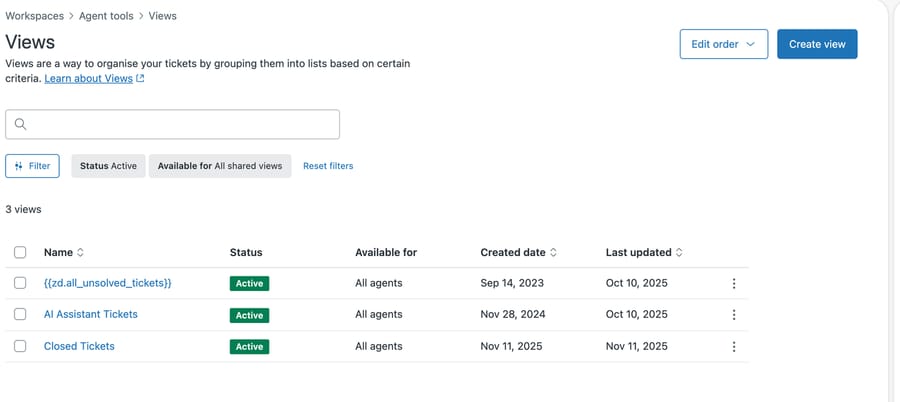
Three is fine at this volume and thin at ten times it, because two of those three are not queues anybody works from. The first is Zendesk's stock unsolved-tickets view, showing here under its untranslated key rather than its label, which is worth knowing if you ever go looking for it by name. Effectively there is one working list, and in a spike everyone is looking at the same one. The fix is boring and it has to happen beforehand: a view that slices the surge away from everything else, so the ordinary tickets that arrived that morning do not get buried under the incident.
How do Problem and Incident tickets help during a spike?
A spike usually means one cause and many tickets, and Zendesk has a native structure for that shape which a surprising number of instances never use.
Set the ticket type on one ticket to Problem and describe the cause there. Set every ticket reporting the same thing to Incident and link it to that problem ticket. Zendesk's guide to working with problem and incident tickets is explicit about the payoff: solve the problem ticket and "the status of all the incident tickets is automatically set to solved".
That is the difference between closing four hundred tickets and closing one. It is also the difference between a report that says "four hundred unrelated complaints" and one that says "one outage, four hundred people affected", which is the number anybody senior will ask for afterwards.
There is a limit here worth knowing before you build a workflow on it, because it is the kind of thing you would otherwise discover mid-incident. A macro can set the ticket type and add a tag, but it cannot make the link. Zendesk states it plainly in building macro action statements: "It's currently not possible to link incident tickets to problem tickets or set task due dates using the task action in macros."
So the macro gets you two of the three fields and an agent picks the problem ticket by hand on every incident. That is a macro limitation, not a platform one: problem_id is a writable field on the ticket, described in the Tickets API reference as "For tickets of type 'incident', the ID of the problem the incident is linked to". A trigger firing a webhook can set it, which is how automated incident-bundling setups work.
Prepare accordingly. If you have someone who can wire a webhook, do that before you need it. If you do not, write the macro for type and tag and have one person own the linking, because twelve people linking inconsistently is worse than one person linking slowly.
Zendesk's workflow for tracking problem and incident tickets is worth reading for the surrounding pattern: it builds a view for problem tickets and a notification trigger that tags the problem ticket so it stops re-notifying.
What will you stop doing when volume spikes?
The single most valuable thing you can prepare is a decision about what you will stop doing.
Under a spike, something has to give, and the choice is either made deliberately in advance or accidentally by whoever is on shift. The candidates are usually the same: first-reply SLAs on low-priority tickets, proactive follow-ups, satisfaction surveys, and the notifications that tell customers things they can already see.
Write down which of those you will suspend, and how. If suspending it means deactivating a specific trigger, note the trigger's name. A written list of three trigger names is worth more during an incident than any amount of general resilience thinking, because it converts a judgement call into an action somebody junior can take at 2am.
How do you set customer expectations without writing them mid-incident?
The instinct during a surge is to tell people you are busy. The mechanism for doing that should already exist, because writing it under pressure produces the worst version of it.
A notification banner is the other half of this: a line at the top of your help center saying what is broken deflects the tickets that would otherwise ask, and most teams add one through their help center theme, so build and hide it now. Business hours and holiday schedules handle the rest. Zendesk documents setting them up on Suite Growth and above or Support Professional and above; those plans get one schedule, and only Enterprise plans can run several and apply them by trigger. They are worth configuring even if you don't think of yourself as having strict hours, because they let a trigger say something accurate about when a reply is realistic. A ticket that arrives at 3am during an incident and gets an honest automated acknowledgement is a ticket that doesn't generate a follow-up "did you get this" an hour later, and follow-ups are how a spike compounds into a bigger spike.
That compounding is the actual danger, and it's worth being precise about it. A surge in incoming tickets is linear. A surge in incoming tickets plus a surge in people chasing their unanswered tickets isn't, and the second one is a function of how well you set expectations in the first hour.
Why doesn't Zendesk warn you about duplicate triggers?
Worth naming the incentive, because it explains why so little of this is built in.
Being straight about the example: those three identically-named triggers are ours. They were installed by our own Zendesk integration across separate setup runs on a developer instance, not left behind by Zendesk. The general point survives that admission, and it is a better example for being ours. A helpdesk vendor is measured on how easy it is to add automation, so the product optimizes for that: creating a trigger takes a minute, and nothing in that flow counts what already exists or warns that a name is taken. Any integration that installs triggers, including ours, can therefore stack them quietly. The cost of that design lands as sprawl, and sprawl only hurts at volume, which is to say on your worst day rather than during evaluation.
That's not a conspiracy, it's just where the attention went. It does mean the counting nobody built is the counting you have to do, and the quiet week is when to do it.
What should you check after the spike?
An incident with attachments moves file storage quickly, and file storage is the counter with the least headroom relative to how fast it fills. If your spike involves customers sending screenshots or video of something broken, check storage afterwards rather than discovering it at the next threshold email.
What preparation is not worth the time?
Some preparation is theater and it's worth naming so you don't spend the quiet week on it.
Don't build elaborate new automation in anticipation of a spike you haven't had. Untested automation under load is a way to turn one incident into two, and the trigger you wrote last month and never watched fire is the least trustworthy thing in your instance.
Don't add statuses or forms to model the crisis. A crisis isn't a new workflow, it is your normal workflow at volume. Every custom status you add has to be associated with your forms and understood by everyone, and that's work you're doing instead of the work that helps.
Don't over-index on capacity planning for agents you don't have. Knowing you'd need eleven more people isn't actionable at 9am on the day.
The preparation that survives contact is small: know what fires, know what you will turn off, and have the acknowledgement already written.
Common questions
What should I check before an expected volume spike? Count your active triggers and read the Triggered (7d) column to see what runs most often per ticket. Look for duplicates by name and by overlapping conditions, check which triggers call webhooks, and confirm your main views are usable when they are long.
How do duplicate triggers hurt during a surge? Mostly by making the instance impossible to reason about quickly. On our instance three triggers share a single name with 7-day counts of 10, 1 and 2, so they match different populations rather than tripling one action. The cost is that nobody can say what fires on a new ticket without opening all three, which is exactly the question you need answered fastest under load.
Should I turn automations off during an incident? Decide in advance which ones and write down their names. Suspending satisfaction surveys and non-essential notifications is usually right; deciding which those are while the queue is climbing usually is not.
How do I stop customers chasing unanswered tickets? An accurate automated acknowledgement in the first hour, driven by business hours so it doesn't promise a reply time you can't meet. Chasing messages are what turn a linear surge into a compounding one.
Does a spike affect storage? It can, sharply, if the incident produces attachments. File storage fills much faster than data storage, so check it after any incident involving screenshots or video.
Where does an AI agent fit in a volume spike?
A spike is the case where automation earns its keep, and also the case where a badly-scoped agent does the most damage. Both are true, and the difference is entirely in what you allowed it to do before the spike started.
One constraint shapes this more than anything else about the agent's quality. Zendesk's guide to problem and incident tickets states that AI agent tickets cannot be linked to problem and incident tickets. So the tickets your automation handles sit outside the bundling structure described above, and solving the problem ticket will not sweep them up. Plan for two piles, not one.
The version that helps is narrow: an agent that handles the repeated question the incident is generating, which during a real incident is usually one question asked four hundred ways. The version that hurts is an agent with broad permissions and no rehearsal, confidently answering something adjacent to the incident and wrong.
The test worth applying is whether you have watched it handle the specific question at low volume. If you have, a spike is the best possible time to have it. If you haven't, a spike is the worst possible time to find out.
Macha sits on top of your existing Zendesk, so the triggers and views you audited stay in charge and the agent works inside them. It suits teams who already have a clear picture of their top repeated questions and want those handled consistently when volume moves. It suits you poorly if your instance is the untidy kind described above, because an agent added to unclear automation makes the tangle harder to read. Fix what fires per ticket first. Our Zendesk integration page covers the rest.
Start your free trial and try it on your top repeated question while things are quiet.






