





 Shopify
 Stripe
 Slack
Slack Notion
 Google Workspace
 Confluence

Do New Zendesk Ticket Forms Inherit Custom Statuses? How Per-Form Statuses Work (2026)


A new Zendesk ticket form gets only the default statuses, so every custom status has to be associated with it by hand. We created a form through the API and it showed 4 statuses while the Default Ticket Form showed 7.
Key takeaways
- A new Zendesk ticket form does not inherit custom statuses: a form created via the API showed 4 statuses in its picker while the existing Default Ticket Form showed 7.
- Zendesk includes the default statuses New, Open, Pending, On-hold (if activated) and Solved on every ticket form; each custom status must be associated with a form by hand.
- The per-form status association is an explicit join, readable at GET /api/v2/ticket_form_statuses, which returns one row per status-and-form pair and gives a one-call audit.
- Filtering ticket statuses per form needs Suite Growth or above, or Support Enterprise, while custom statuses themselves are available from Suite Team and Support Team upward.
- The per-form setting sits in Zendesk Admin Center under Objects and rules, Tickets, Ticket statuses, on the second tab called Ticket statuses by form.

No: a new Zendesk ticket form gets only the default statuses (New, Open, Pending, Solved, plus On-hold if you have activated it), and every custom status has to be associated with the form by hand. On our test account a new form showed 4 statuses in its picker while the existing Default Ticket Form showed 7, and the missing three were exactly our custom ones.
| Question | Answer | Source |
|---|---|---|
| Does a new form inherit custom statuses? | No. It starts with the default statuses only | Our API test, Zendesk docs |
| Can a default status be removed from a form? | No. Defaults are included in every form | Admin Center form status screen |
| Where is the setting? | Admin Center > Objects and rules > Tickets > Ticket statuses > Ticket statuses by form | Admin Center |
| Plans for custom statuses | Suite Team and up; Support Team, Professional, Enterprise | Zendesk help center |
| Plans for per-form filtering | Suite Growth, Professional, Enterprise, Enterprise Plus; Support Enterprise | Zendesk help center |
We found that edge by creating a new ticket form and looking at what it inherited: less than half of what the account had.
What happens when you create a new ticket form?
Our developer instance has eight ticket statuses, five standard and three custom. Seven are active; the standard On-hold status is switched off, which is why the filtered list further down shows seven rows rather than eight. The three custom ones are named Escelation, New on-boarding request, and On-going investigation, spelled that way on the instance. We created a second ticket form through the API called Billing question, passing no status configuration at all, and then opened the per-form view in Admin Center. Worth naming the limit of that: we tested the API path only, so we cannot tell you whether a form created through the Admin Center behaves the same way.
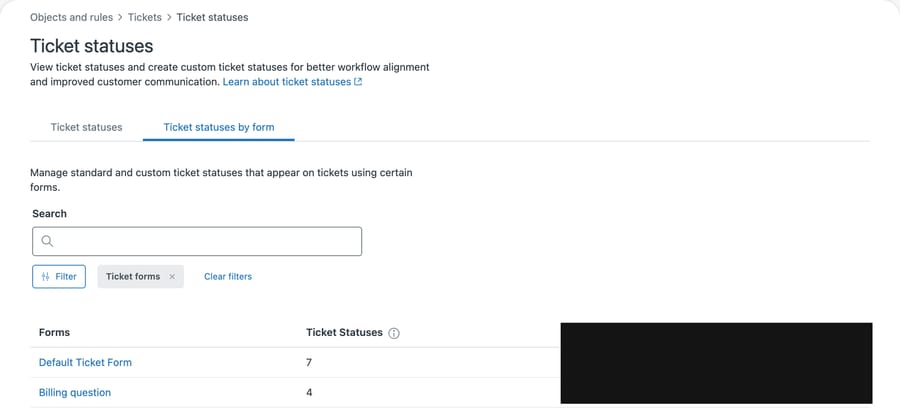
The Default Ticket Form carries seven statuses. The form we had just made carries four.
Nothing about that is an error, and Zendesk isn't hiding it. But nobody told us either, and the difference is exactly the three custom statuses. A form created today starts with the standard set and none of the workflow states your team built.
Which statuses does a new form show, and why?
Opening the new form's status screen explains the number.
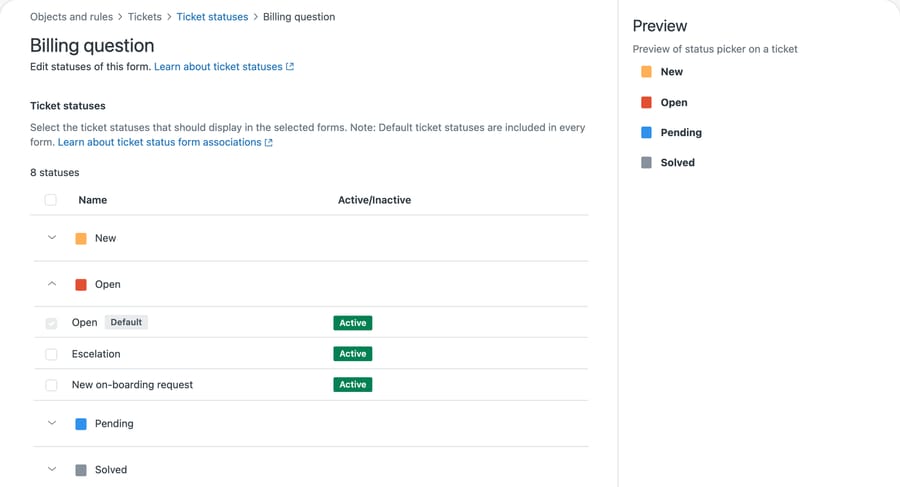
The header says eight statuses, because eight is what the account has to offer. Expanding the Open group shows the mechanism directly: Open is ticked and greyed out because it is a default, while Escelation and New on-boarding request sit beneath it, both marked Active and both unticked. They exist, they work elsewhere, and this form does not offer them.
The Preview panel on the right confirms what an agent working a ticket on this form will actually see in the picker: New, Open, Pending, Solved. Four.
The screen also states the rule in a line that is easy to read past:
"Select the ticket statuses that should display in the selected forms. Note: Default ticket statuses are included in every form."
Default statuses are included in every form and cannot be removed, which is why Open carries a Default badge with its checkbox ticked and disabled. Zendesk's About form ticket statuses article lists those defaults as New, Open, Pending, On-hold (if activated) and Solved, so our form showed four because On-hold is switched off on our account. Everything else is opt-in per form.
The association can also be set when the status is created. Zendesk's guide to creating custom statuses describes choosing "All forms" or picking specific forms at that point.
The association turns out to be an explicit join, which settles what the screens only imply. GET /api/v2/ticket_form_statuses returns one row per status-and-form pair:
total association rows: 3
  form 10424154664476 -> 3 custom-status rows
  created dates: ['2026-05-12']
  Billing question form 29890560706716 present: False
Three rows, all pointing at the Default Ticket Form, all created on the day the custom statuses were made. The form we created has no rows at all, and asking for its associations directly returns {"ticket_form_statuses":[],"count":0}.
So a custom status does not "apply to all forms" as a standing rule. It is written into a table against the forms that exist when you associate it, and a form created afterwards is simply not in that table. Nothing recalculates. That is why the gap opens over time rather than at setup: you add a form one day and it begins life with no rows.
It also gives you a one-call audit. Fetch that endpoint, group by ticket_form_id, and any form missing from the result carries default statuses only.
So the mental model that gets people into trouble is "a status is on or off for the account". The real model has two levels. A status is active or inactive account-wide, and separately it is associated or not associated with each form. Both have to be true for an agent to see it.
Why does a missing status cause problems later?
The failure is quiet and it shows up late.
An admin builds a custom status for a workflow, tests it on the default form, and it works. Months later somebody adds a form for a new request type. Tickets start arriving on that form. Agents go to set the status they have been using all year and it isn't in the list. The status still exists, is still active, and still works everywhere else, so nothing looks broken from the admin side.
The reporting version is worse, because it doesn't announce itself at all. If a workflow depends on tickets reaching a custom status, and one form can't reach it, that form's tickets silently sit in a different state. Any view or trigger keyed to the custom status skips them, and the numbers look fine because the tickets are counted somewhere, just not where you expected.
The order of operations that prevents this is short: create the form, then go straight to the per-form status screen and select the statuses it needs. Doing it at creation time costs a minute. Discovering it later costs a confusing afternoon and some bad data.
Where is the per-form status setting in Admin Center?
Admin Center, Objects and rules, Tickets, Ticket statuses. That page has two tabs, and the second one is the one people miss.
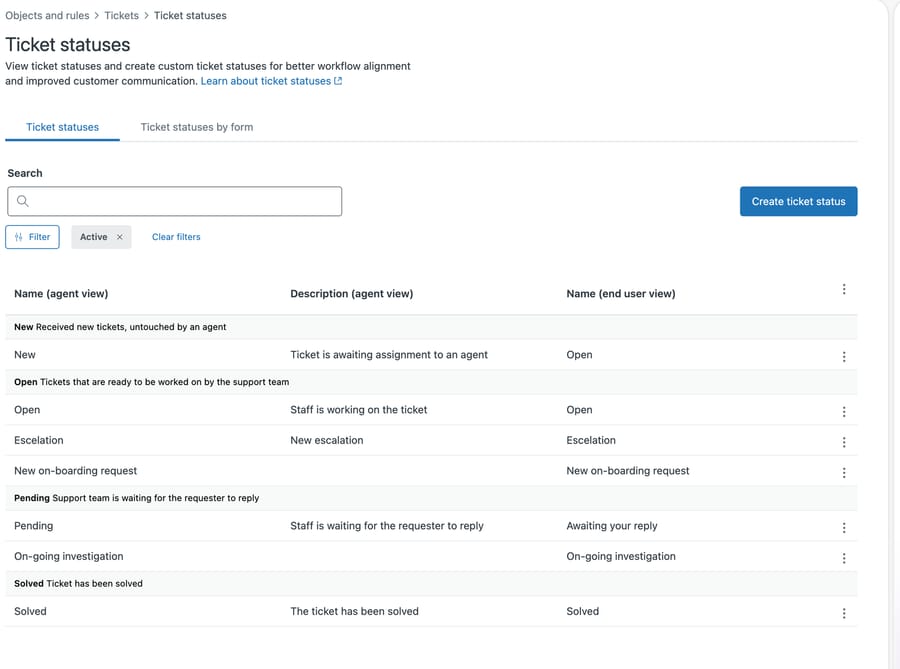
The first tab, Ticket statuses, is the account-level list. It groups statuses under their category and is where you create and deactivate them. The shot above is filtered to Active, so it shows seven of our eight; the inactive On-hold is hidden by that filter rather than missing. This is the screen most admins know.
The second tab, Ticket statuses by form, is the association view. It lists every form with a count of how many statuses it carries and which brands it belongs to, and clicking a form opens the checkbox screen above. If you've more than one form, this tab is where you should be checking your work.
The counts on that tab are the fastest audit available. Any form showing fewer statuses than your busiest form is worth opening, and the difference tells you what is missing before you click anything.
Does per-form association change what a status does?
A custom status sits inside one of four categories, and per-form association doesn't change that. Categories are a different axis from custom fields, which are also configurable per form and are the other place a form quietly differs from its siblings. It decides visibility, not behavior.
This matters when you're tempted to solve a problem with the wrong tool. If a form needs a state that doesn't exist yet, associating statuses won't help; you need a new custom status in the right category. If a form is showing a state that confuses the agents working it, deselecting it on that form is exactly right and costs nothing elsewhere.
We covered how the categories constrain the model in designing a Zendesk custom ticket status model, and the underlying lifecycle in Zendesk ticket statuses explained. The short version is that custom statuses are labels on categories that already exist, so per-form association controls which labels appear, and the category underneath still governs what the ticket does.
Which Zendesk plans can filter statuses per form?
These are two separate entitlements and it is worth keeping them apart, because we had them muddled until we checked.
Custom ticket statuses are on every plan. Zendesk's guide to creating them gives the plan box as every Suite tier from Team upward, and Support Team, Professional and Enterprise. If you have Zendesk, you can build custom statuses.
The per-form screen is the gated part. About form ticket statuses gives it as Suite Growth, Professional, Enterprise and Enterprise Plus, and Support Enterprise only (checked 24 September 2026). So a Suite Team account can create custom statuses and cannot filter them per form, and a Support Professional account is in the same position.
The incentive behind that split is easy to read once you say it out loud. Giving custom statuses away on every tier is cheap and makes the product feel flexible. The cost of that flexibility only appears once you have several forms, and the tool that manages the cost sits two tiers up. So the tier that most needs tidying is a Suite Team account with a growing status list and no per-form control, and the only route to the fix is upward. Zendesk isn't hiding any of this, but it does mean the mess is available to everyone and the remedy is not.
How do you audit your forms for missing statuses?
If you've already got several forms, three steps will tell you whether you have this problem.
Open the Ticket statuses by form tab and read the counts. Note the highest number and any form below it. For each form below, open it and compare the checked statuses against the workflow that form is for. Where a status is missing that the workflow needs, check it and save.
Then check the other direction, which people forget. A form carrying every status isn't automatically correct. If your billing form offers a status that only makes sense for onboarding, agents will occasionally pick it, and every downstream report inherits the mistake. Fewer, more relevant options is usually a better picker.
Common questions
Does a new ticket form inherit my custom statuses? Not on our instance. A form we created with no status configuration came out with the four default statuses, while the existing default form had seven. Custom statuses are associated per form and the association is opt-in.
Can I remove a default status from a form? No. The form status screen states that default ticket statuses are included in every form, and their checkboxes are ticked and disabled. You can only add and remove custom statuses.
Where is the per-form setting? Admin Center, Objects and rules, Tickets, Ticket statuses, then the "Ticket statuses by form" tab. Click a form name to open its checkbox list and preview.
Why does the form say 8 statuses but the preview shows 4? The count in the header is how many statuses the account has available to associate. The Preview panel shows what an agent will actually see in the picker on that form, which is the subset currently selected plus the defaults.
Does this affect the API? The association itself is exposed as GET /api/v2/ticket_form_statuses, which returns one row per status-and-form pair. That is the fastest way to audit which forms carry which custom statuses. Setting a status on a ticket is a separate path from the agent picker, so still test your own integration rather than assuming the picker's restriction applies to it.
What does this mean for an AI agent that sets statuses?
An AI agent that sets ticket status runs into the same wall, and it fails less visibly than a human does. A person who can't find a status asks somebody. An automation that's configured to set one just doesn't.
The practical implication is to keep the set of statuses an agent can set small and consistent across the forms it works on. If a custom status is part of an automated path, associate it with every form that path can touch, and check that association when you add a form rather than when something looks wrong in a report.
Macha works on top of your existing Zendesk, so it inherits whatever status model you have built, including the per-form gaps. That suits teams who have already invested in a status model and want it applied consistently. It suits you less well if your statuses are still in flux, because an agent working against a model you're still changing will need retuning each time you change it. Our Zendesk integration page covers what it reads and writes.
Start your free trial and connect your Zendesk in a few minutes.






