





 Shopify
 Stripe
 Slack
Slack Notion
 Google Workspace
 Confluence

How Do You Migrate from Zendesk to Front? Importer, Mapping and Rules (2026)


Front's free native importer moves Zendesk conversations, contacts, attachments, internal notes and assignments, but skips tags, teammates and rules. Macros, triggers, views and SLA policies do not import at all and have to be rebuilt as Front templates and rules.
Key takeaways
- Front's native Zendesk importer moves inboxes, contacts, conversations, messages, attachments, comments and conversation assignments, but skips tags, teammates and rules entirely.
- Zendesk macros, triggers, automations, views and SLA policies have no import path into Front and are rebuilt as Front templates, rules or SLA rules.
- Front's pricing page caps rules by plan: up to 10 on Starter at $25 a seat, up to 20 on Professional at $65, and unlimited on Enterprise at $105.
- Front's help article says a Zendesk ticket whose historical agent is deactivated is imported as unassigned in a majority of cases, so audit active agents before migrating.
- Macha, an AI agent layer that runs on top of Front, is priced from $299 a month for 750 tickets, about $0.40 a ticket, with a $50 free trial.

To migrate from Zendesk to Front, create a Zendesk API token, then run Front's free native importer under company settings, Imports, Zendesk: it moves conversations, contacts, attachments, internal notes and assignments, while tags, teammates, macros, triggers, views and SLA policies are rebuilt by hand in Front. Plan for the rule caps too, because Front allows up to 10 rules on Starter and up to 20 on Professional.
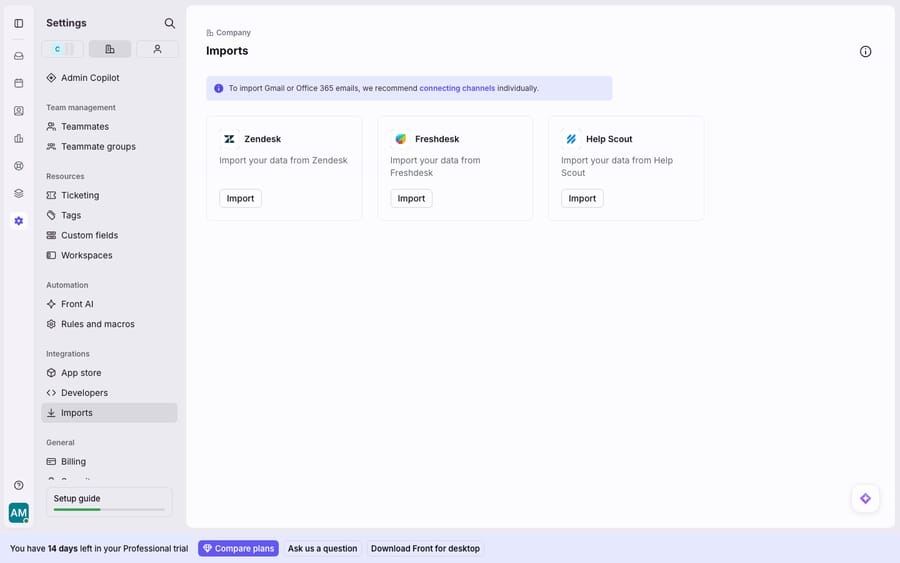
Going the other way, from Front to Zendesk? That is a different project with different tooling, and it has its own guide: how to migrate from Front to Zendesk. We checked every path and limit on this page against Front's and Zendesk's documentation on September 24, 2026; the screenshot of Front's Imports settings was captured first-hand in a live Front demo account.
What moves from Zendesk to Front, and what do you rebuild?
Split the Zendesk instance into two buckets: data, meaning the historical record, and configuration, meaning the logic that acted on it. Front's importer handles the first well and ignores the second completely.
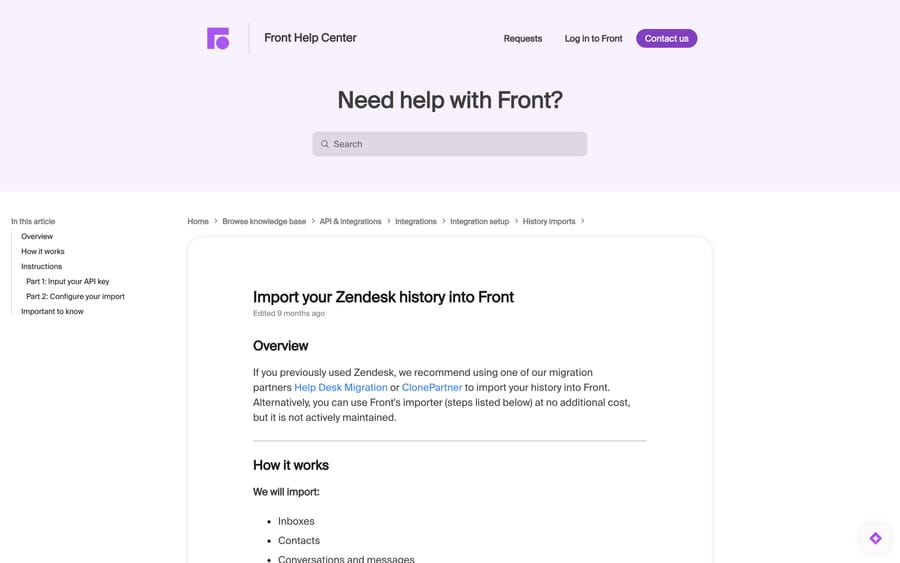
Per Front's guide to importing your Zendesk history into Front, the importer brings over inboxes, contacts, conversations and messages, attachments, comments, and conversation assignments. That is the substance of your support history: the thread an agent needs when a returning customer writes in, with attachments and internal notes intact.
It explicitly skips tags, teammates and rules. And nothing about your Zendesk configuration travels, because Front has no slot to drop it into.
| Zendesk object | Moves or rebuilds? | Where it lands in Front |
|---|---|---|
| Tickets, conversations and messages | Moves (native importer) | Conversations in shared inboxes |
| Contacts | Moves | Contacts |
| Attachments | Moves | Attached to conversations |
| Internal notes | Moves | Comments |
| Ticket assignments | Moves | Conversation assignees |
| Tags | Rebuild | Front tags, recreated by hand |
| Agents | Rebuild | Teammates, invited manually |
| Macros | Rebuild | Message templates, plus a rule if it took actions |
| Triggers and automations | Rebuild | Rules, on Front's When / If / Then model |
| Views | Rebuild | Shared views, or rules |
| SLA policies | Rebuild | Front SLA rules |
| Help Center | Separate migration | Front Knowledge Base |
Macros and triggers are the two that catch teams out. A Zendesk macro is a canned response with pre-set actions, so in Front it becomes a template and, when it should fire actions automatically, a rule as well. A Zendesk trigger is event-driven logic, which in Front is a rule. Neither imports. Our guide to rules, sequences and macros in Front covers which of the three each piece of Zendesk logic belongs in.
What should you export from Zendesk before the import?
The importer will not carry your logic, and reverse-engineering a trigger chain from memory three weeks later is miserable. Before anything else:
- List every macro, trigger, automation, view and SLA policy, with its conditions and actions. A screenshot per object is fine; a CSV is better.
- Export your tag list. Tags are the one piece of reporting taxonomy the free importer drops.
- Note which agents are active. Front's article says that when the historical agent on a ticket is deactivated, the ticket is imported as unassigned "in a majority of cases", so a long tail of ex-agents becomes a long tail of orphaned conversations.
- Decide the cutover moment. New mail should start landing in Front from a chosen time, with history backfilling behind it.
How do you create the Zendesk API token Front needs?
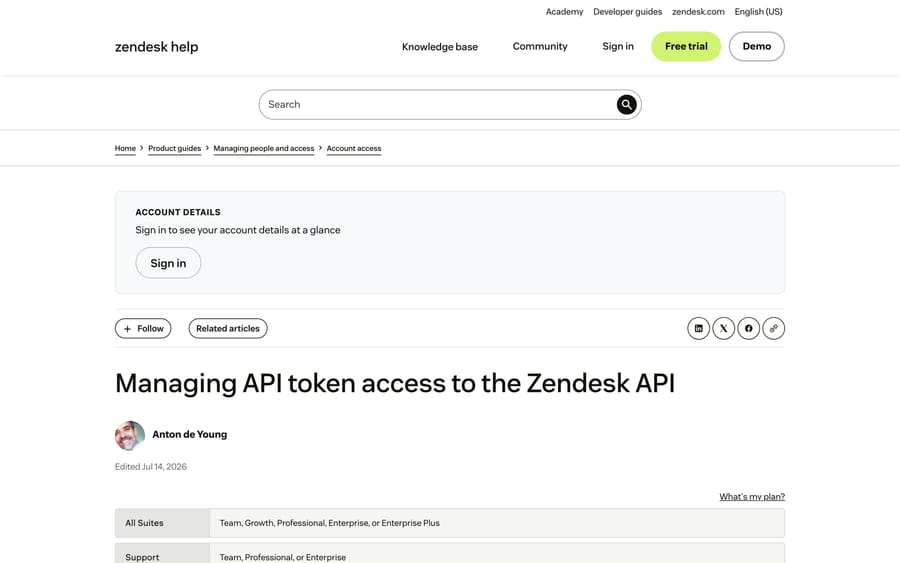
Front authenticates against Zendesk with an email address plus an API token. Per Zendesk's own documentation, you need to be an administrator with API token access enabled.
- In Zendesk, open Admin Center → Apps and integrations → APIs → API tokens.
- Click Add API token.
- Add a description so you can find it later, then click Save.
- Copy the token now. Zendesk's article is blunt about this: "When you click Save to close this window, the full token will never be displayed again."
- Click Save again to return to the token list.
One thing worth knowing before you create it: Zendesk states that "Each API token can be used by any verified user on the account and isn't associated with a specific user." Treat it as an account-level credential, put it in your password manager, and delete it once the import is done.
How do you run Front's native Zendesk importer?
Front's importer lives in company settings, alongside the Freshdesk and Help Scout ones.
Part 1: input the API key.
- Click the gear icon in Front and open company settings.
- Select Imports from the left menu.
- Choose Zendesk.
- Enter your Zendesk email address, the API key you just created, and your Zendesk subdomain.
Part 2: configure the import.
- Select the workspace the data lands in, a default teammate, and the timeframe you want imported.
- Match Zendesk Agents to Front teammates. Invite the teammates into Front first, or everything routes to the default.
- Map Zendesk Groups to Front inboxes.
- Click Start Import.
Front then walks the import through a visible status sequence: Searching, Importing Groups as Inboxes, Importing Teammates, Importing Tickets as Conversations, and finally Done. One operational warning from Front's article: leave the inboxes involved alone while it runs, because deleting one stops the import.
Front is candid about the tool. Its article recommends Help Desk Migration or ClonePartner and says its own importer is available "at no additional cost, but it is not actively maintained." The incentive is worth reading correctly: Front earns nothing from either route, so the recommendation is not a sales pitch. It is a maintenance warning.
When should you use a migration partner instead?
Use a partner when tag continuity matters for reporting, when you need custom fields preserved, when you have deleted or inactive agents whose tickets need reassigning, or when somebody needs to be accountable for the result.
Per Help Desk Migration's own Front page, an automated migration moves tickets with their tags, contacts with custom fields, agents with mapping to reassign from deleted or inactive agents, attachments (skippable to speed the run up) and notes. That is coverage the free importer does not offer. Both partners run in the background while your team keeps working, and both quote on data volume after a demo rather than publishing a rate card, so we cannot give you a number here.
How do you rebuild Zendesk triggers and macros in Front?
Rebuild in order of traffic, not in order of the list you exported.
Templates first. Your top ten macros cover most of the volume. Recreate those as Front templates before launch and leave the long tail for week two.
Then rules. Front's rules use a When / If / Then model, and rule counts are plan-gated. Front's pricing page lists up to 10 rules on Starter ($25 a seat a month billed annually, up to 10 seats), macros and up to 20 rules on Professional ($65 a seat, up to 50 seats) and unlimited macros and rules on Enterprise ($105 a seat). A Zendesk instance with 60 triggers will not fit on Professional, and consolidating is usually the right answer anyway. Many Zendesk trigger chains exist to work around a queue model that Front does not use, so a migration is the cheapest moment to delete them. Our Front rules setup guide covers the builder.
Then tags, teammates and views. Recreate the tags that carry your reporting first. Ten good tags beat fifty inherited ones.
Then channels. Point email, chat and the rest at Front only after the import finishes, or a single conversation ends up split across two systems. If Gmail is your main channel, our Gmail connection guide covers that setup.
What are the limits of a Zendesk to Front migration?
The free import is data-only and lossy by design. Tags, teammates and rules do not come through it, and macros, triggers and views were never in scope. If tag continuity matters, pay a partner or accept the manual rebuild.
Cutover is not instant. A large history can run for hours. Conversations arriving mid-migration need a plan, which in practice means picking the moment Front becomes the system of record and letting history backfill behind it.
The return trip is worse. Front's own self-serve export is thinner than its import: our guide to exporting data from Front covers what it does and does not hand you. Front-native constructs like rules, shared drafts and analytics have no equivalent to import into elsewhere. That is not a reason to avoid Front. It is a reason to keep the portable, reasoning-heavy layer outside the inbox.
How do you keep AI automation when you switch help desks?
This is the argument for not welding your automation into whichever help desk you are on this year. Macha is an AI agent layer that runs on top of the help desk you use (Zendesk, Freshdesk, Gorgias, Front, HubSpot or Intercom): the agents, knowledge sources and custom tools you build live in Macha, so switching the desk underneath does not mean rebuilding them. It is never a replacement for Front, your inboxes or your rules.
The reason it matters during a Zendesk migration specifically: you are about to rebuild 60 triggers by hand, and a fair share of them exist to route or auto-reply to questions a grounded agent can answer outright. Rebuild the rules you need, and let the agent handle the repetitive layer above them.
Pricing is one plan on monthly ticket volume, from $299 a month for 750 tickets, about $0.40 a ticket at every tier, with setup and monitoring by our team included. A ticket is one thread with one person, charged once however many replies it takes. The trial is $50 of free usage with no credit card. It suits teams landing in Front who want the repetitive third of the queue handled without hiring for it, and it is the wrong choice if your queue is small enough that a person clears it before lunch. See Macha on Front and pricing.
Frequently asked questions
Does Front have a native Zendesk importer? Yes. Under the gear icon, company settings, then Imports, Front offers built-in importers for Zendesk, Freshdesk and Help Scout at no additional cost. It moves inboxes, contacts, conversations and messages, attachments, comments and assignments, and it skips tags, teammates and rules. Front's own article says the importer "is not actively maintained" and recommends its migration partners for complex moves.
What do I need to start the import? A Zendesk API token, the email address that goes with it, and your Zendesk subdomain. Create the token in Zendesk under Admin Center, Apps and integrations, APIs, API tokens, then Add API token. You must be a Zendesk administrator with API token access enabled, and the full token is shown only once.
What does not transfer from Zendesk to Front? Tags, teammates and rules are excluded from the import itself. Configuration has no import path at all: macros, triggers, automations, views and SLA policies are rebuilt natively. Macros become Front templates, and triggers become Front rules on the When / If / Then model.
How long does a Zendesk to Front migration take? It depends on volume. The import runs through a visible status sequence and can take hours on a large account, so plan the cutover across two days. Migration partners import in the background while your team keeps working, which removes the pressure but does not remove the need to pick a moment when Front becomes the system of record.
What happens to tickets assigned to agents who have left? Front's article says a ticket whose historical agent is deactivated is imported as unassigned in a majority of cases, because Zendesk itself unassigns deactivated agents. Audit your agent list first, and either reactivate the accounts long enough to map them or use a migration partner, which can reassign tickets from deleted and inactive agents.
Do I have to rebuild my Zendesk macros and triggers? Yes, neither imports. Recreate high-traffic macros as Front templates and the triggers that matter as Front rules. Note the plan caps while you plan: Front lists up to 10 rules on Starter, macros and up to 20 rules on Professional, and unlimited macros and rules on Enterprise.
Can I keep my AI automation when I switch help desks? That is the case for keeping AI in a separate layer. Macha connects to Front or Zendesk as an integration and runs on top of the inbox, so the agents, knowledge and tools you build are not tied to either platform and do not need rebuilding when you migrate.
Sources:
- Import your Zendesk history into Front (Front help center, checked September 24, 2026)
- Managing API token access to the Zendesk API (Zendesk help center)
- Front pricing (checked September 24, 2026)
- Help Desk Migration's Front page and ClonePartner, the two partners Front names






