





 Shopify
 Stripe
 Slack
Slack Notion
 Google Workspace
 Confluence

How Do You Auto-Resolve Front Conversations with AI? (2026)


Auto-resolving a Front conversation means an AI reads the thread, sends a grounded reply, then tags and assigns it so no human has to touch it. In Front itself only Autopilot does that, at $0.89 per resolved conversation on top of seats (as of October 2026), while an AI agent layer like Macha does it on top of Front for a per-ticket price.
Key takeaways
- Front's Autopilot is the only native Front AI feature that resolves a conversation without a human; AI Compose and Copilot help an agent write a reply faster, but a person still sends it.
- Front bills Autopilot once per conversation, $0.05 for triage, $0.39 for a handoff and $0.89 for a resolution as of October 2026, on top of annual seat plans of $25 for Starter, $65 for Professional and $105 for Enterprise per seat per month.
- Front's Copilot costs $20 per seat per month as an add-on or is included on Enterprise, while Smart QA and Smart CSAT are Enterprise-only as of October 2026.
- Front's older AI Answers chatbot is legacy and no longer available for purchase, so new Front buyers who want autonomous replies are steered to Autopilot instead.
- Macha, an AI agent layer that connects to Front, bills per ticket instead of per resolution or per seat, starting at $299 a month for 750 tickets, about $0.40 each.

To auto-resolve Front conversations with AI you need something that reads the whole thread, answers from real data, sends the reply and then tags and assigns the conversation, and in Front itself only Autopilot does that, billed once per conversation at $0.05 for triage, $0.39 for a handoff or $0.89 for a resolution, on top of seats from $25 a month (front.com/pricing, checked 24 September 2026; Front's Autopilot pricing, as of October 2026). AI Compose and Copilot help a person write faster, but a person still sends. The alternative is an AI agent layer that runs on top of Front and is priced per ticket.
| Option | Resolves without a human? | Price (24 September 2026) |
|---|---|---|
| Front Autopilot | Yes, on email, chat and Slack | $0.05 triage / $0.39 handoff / $0.89 resolution per conversation, on top of seats |
| Front Copilot | No, drafts for an agent | $20 a seat a month, or included on Enterprise |
| AI Compose | No, rewrites an agent's reply | Included, up to 200 actions per teammate a day |
| AI Answers (legacy) | No longer sold | Not available for purchase |
| Macha agent layer on Front | Yes, sends or drafts by your rules | From $299 a month for 750 tickets |
What does "auto-resolve" actually require?
Strip the buzzwords and a real auto-resolution is a short chain of decisions the AI has to get right in order:
- Read the conversation. The whole thread, the customer's history, and any context sitting in the shared inbox, not just the latest line.
- Understand intent. "I was double-charged" and "why is my invoice higher this month" are the same underlying question in different words. Keyword matching misses that; a language model doesn't.
- Ground the answer. Pull the true fact (the order status, the policy, the account state) from a knowledge base or a live system, so the reply is correct rather than plausible.
- Write and send. Produce a reply in your team's voice and either draft it for review or send it directly on channels you trust.
- Close the loop. Add the right tags, assign to the correct teammate or team, and mark the conversation handled, so reporting and routing stay clean.
Any tool can do step 4 in isolation. The value is in doing all five reliably, on a shared-inbox platform where support, sales, and ops all work side by side.
What does Front's native AI do well?
Front has invested heavily here, and it deserves real credit. Its AI splits into three buckets (Analyze, Assist, and Automate) and each earns its place.
Autopilot is the autonomous piece. Front's Autopilot product page calls it "the AI agent for handling more than FAQs" and lists email, chat and Slack as its channels. With Autopilot Playbooks you "define the work once": what data to collect, what actions to take across systems, and when to hand off to a human. Autopilot then runs the Playbook end to end, with built-in safeguards and handoffs. That is a legitimate auto-resolution engine, not a chatbot bolt-on.
AI Compose is the writing assistant most agents will touch daily: one click to make a reply sound more professional or friendly, fix typos, or change its length. Copilot goes further, drafting a suggested reply from your past conversations and help-center articles when an agent opens a message. Summarize condenses a long thread so whoever jumps in isn't reading a novel.
On the Analyze side, Smart QA uses AI to score agent responses across every conversation rather than a hand-picked sample, and Smart CSAT infers satisfaction without a survey. For a support leader, that all-conversation coverage is a genuine step up from manual QA.
If you want the full breakdown of each feature and where it lives, Front AI explained covers it in depth.
Where does Front's native AI stop short?
Front's native AI is strong, but three things are worth naming plainly before you assume Autopilot alone covers "auto-resolve."
Assist is not resolve. AI Compose and Copilot make a human faster. They polish or suggest, but a person still reads and sends. That's deflection of effort, not deflection of the ticket. Only Autopilot closes a conversation without a human, and Front sells it as a separate, metered capability.
The billing is add-on and usage-shaped. Per Front's pricing, Autopilot starts at $0.05 per conversation, and its help center bills each conversation once at the highest level reached: $0.05 for triage, $0.39 for a handoff, $0.89 for a resolution (as of October 2026, Front's Autopilot pricing). Copilot is $20/seat/mo as an add-on or included on Enterprise; Smart QA and Smart CSAT are now Enterprise-only, no longer sold on Starter or Professional as of October 2026. AI Compose is included, capped at 200 Compose actions per teammate a day. None of that is unreasonable, but it stacks on top of Front's seat pricing (Starter $25, Professional $65, Enterprise $105 per seat a month, billed annually), and a per-conversation plus per-seat bill gets harder to predict as volume grows.
AI Answers is gone. Front's older AI Answers chatbot is now legacy. The help center says it is "no longer available for purchase," and Front steers new buyers to Autopilot instead. If your team once evaluated Front on AI Answers, the current story is Autopilot.
None of this makes Front's AI bad. It makes it a native layer with native constraints: it grounds primarily in Front's own knowledge base and past conversations, Front's help center says only English is officially supported for knowledge sources, and deeper actions live behind Playbooks and the connectors Front supports.
How does an AI agent layer auto-resolve a Front conversation?
An AI agent layer sits on top of the Front you already run. It does not replace your inboxes, your rules, or Autopilot. It's the reasoning tier for the conversations you want fully handled, and it exposes the whole five-step chain as one agent you configure:
- The agent reads the conversation. When a message lands in a shared inbox, the agent ingests the full thread and any customer context, not just the last line.
- It classifies intent. It decides what the person actually wants (a refund status, a shipping ETA, a policy clarification) regardless of the exact words used.
- It grounds the reply. It answers from your connected knowledge sources, and for live facts it calls a custom tool that turns your REST API into something the agent can invoke, pulling a real order, subscription, or account record so the answer is true, not merely fluent.
- It drafts or sends. On conversations you trust it with, it sends a grounded reply in your voice; on the rest, it drafts for a human to approve. You set the bar.
- It tags and assigns. It applies the right tags and routes the conversation to the correct teammate or team, so anything that does need a human lands in the right place already labelled. The mechanics of that routing are covered in smart routing, tagging, and teammate assignment.
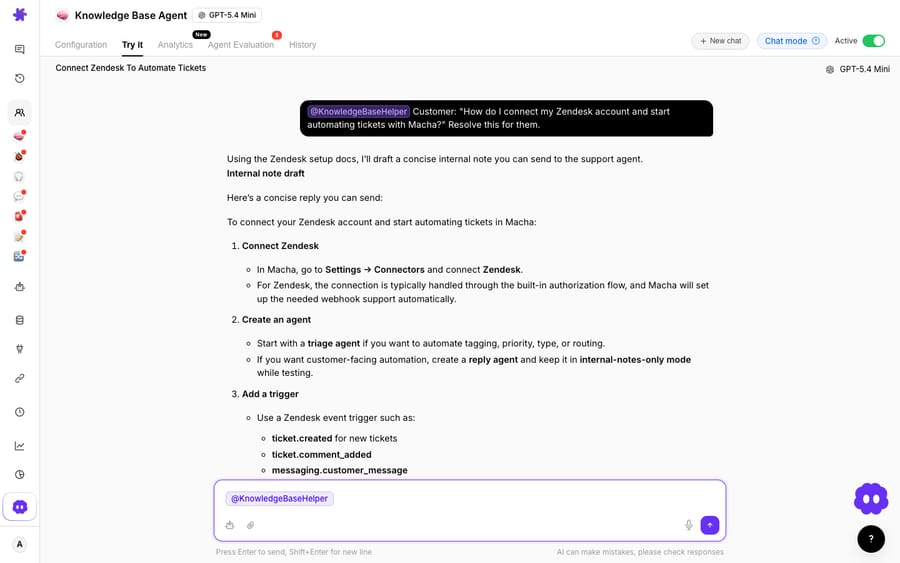
The screenshot above shows a Macha Knowledge Base agent in the Macha dashboard reading a conversation, producing a grounded step-by-step answer, and closing it out. It's a demo-org agent showing the flow, not a live Front conversation. To wire it into your own shared inbox, connecting Front to Macha to route conversations to AI and the Macha–Front integration walk through the live connector, and building an AI agent for Front covers the agent setup itself.
Per conversation or per ticket: which cost model should you pick?
The pricing model shapes how confidently you can turn AI loose. Native Front AI meters on conversations and seats. An agent layer like Macha meters on tickets: one conversation is one charge however many replies, lookups or tags it takes, and the bill does not grow with your seat count.
| Native Front AI | AI agent layer (Macha) | |
|---|---|---|
| Autonomous resolution | Autopilot $0.89 per resolution ($0.05 triage, $0.39 handoff) | Included in the per-ticket price |
| Copilot / assist | $20 / seat / mo add-on (or Enterprise) | Drafts included in the per-ticket price |
| Smart QA | Enterprise only (as of October 2026) | Not offered |
| What you're billed for | Per conversation, per seat, per add-on | Per ticket (from $299/mo for 750) |
| Grounding source | Front KB + past Front conversations | Your KB + live systems via custom tools |
| Runs on top of Front | Native | Yes, a connector, not a replacement |
Macha never bills per resolution, so the bill never hangs on an outcome definition you don't control. Pricing starts at $299 a month for 750 tickets, about $0.40 each, and the Macha team builds, tests and monitors the agents on every plan. The current numbers live on the Macha pricing page, and Front's own tiers are broken down in Front pricing explained.
How should you start auto-resolving in Front?
You don't have to auto-resolve everything on day one. The teams who get this right narrow the scope first:
- Pick one high-volume, low-risk intent: "where's my order," "reset my password," "what's your return window." These are grounded, repeatable, and safe to answer automatically.
- Connect the grounding. Point the agent at your help center and, for live facts, wire a custom tool to the one API that holds the truth (order status, account state).
- Start in draft mode. Let the agent draft, have humans approve, and watch the quality for a week before you flip trusted intents to auto-send.
- Let it tag and assign the rest. Even where it doesn't resolve, an agent that labels and routes cleanly makes the whole shared inbox faster.
That's the division of labour worth aiming for: Front and its rules stay the deterministic dispatcher, native Autopilot handles the workflows it's built for, and an agent layer takes the conversations that need real reading and grounded answers. The wider category context is in AI agents for customer service.
FAQ
Can Front auto-resolve conversations without any add-on? Not fully. AI Compose and Copilot help a human write and send faster, but only Autopilot resolves a conversation without a person, and Autopilot is metered per conversation on top of your seat plan ($0.89 for a resolution, $0.39 for a handoff, $0.05 for triage, as of October 2026). The older AI Answers chatbot is legacy and no longer available for purchase.
What's the difference between deflection and resolution here? Deflection often means the customer got an answer without reaching a human, which assist tools can influence. Resolution means the conversation was actually closed correctly. Auto-resolve requires the AI to read intent, ground the reply in real data, send it, and close the loop: all five steps, not just a suggested draft.
Does an AI agent layer replace Front or Autopilot? No. Macha runs on top of the Front you already use through a live connector. It doesn't replace your shared inboxes, your rules, or Autopilot. You keep native Front doing what it's good at and add an agent for the reasoning-heavy conversations.
How is the AI billed if not per resolution? An agent layer like Macha charges per ticket (one conversation, charged once however many replies, lookups or tags it takes) rather than per resolution or per seat. Pricing starts at $299 a month for 750 tickets, about $0.40 each. Current numbers are on the pricing page.
Can the AI pull live order or account data into a reply? Yes. Grounding a reply in real facts is what makes auto-resolution trustworthy. A custom tool turns your REST API into something the agent can call, so it fetches the actual order or account record before answering rather than guessing.
Which channels does Front Autopilot cover? Front's Autopilot page lists email, chat and Slack, running 24/7, with Playbooks deciding when a conversation goes to a human.
Ready to turn a routed, tagged Front conversation into one that's actually answered? Start a free trial of Macha with $50 of free usage and connect it to your Front.






