





 Shopify
 Stripe
 Slack
Slack Notion
 Google Workspace
 Confluence

How Do You Automate Freshdesk Triage and Routing With AI? Freddy Auto Triage vs AI Agents (2026)


Freshdesk triages tickets with ticket creation rules, Omniroute assignment and Freddy AI Auto Triage. This guide covers each native option step by step, what it costs on which plan, when keyword rules are enough, and the AI tools that read a ticket and route it themselves, with a live test of both on our own Freshdesk trial.
Key takeaways
- Freshdesk ticket creation rules route by keyword on every plan from Growth at $19 an agent a month; round-robin and load-based assignment need Pro at $55.
- Freddy AI Auto Triage sets Priority, Group and Type on Pro and Enterprise, is listed under the $29 Freddy AI Copilot add-on, and needs about 2,000 past tickets.
- In our 8 October 2026 Freshdesk test, keyword rules misrouted two of four tickets and missed the other two, including a double charge.
- Macha's triage agent put all four tickets in the right Freshdesk group with a note quoting the deciding sentence, at about $0.40 a ticket including setup and a dedicated success manager.

Freshdesk triages and routes tickets natively in three layers. Ticket creation rules (the old Dispatch'r) set the group, priority and tags from keywords and fields on every plan from Growth at $19 an agent a month. Omniroute then hands each ticket to an agent in that group by round-robin or load on Pro ($55) and Enterprise ($89), with skill-based routing on Enterprise only. Freddy AI Auto Triage suggests or sets Priority, Group and Type on Pro and Enterprise; Freshworks sells it as part of the Freddy AI Copilot add-on ($29 an agent a month) and recommends at least 2,000 past tickets. Rules alone are enough when your categories show up as clear words or addresses. When they don't, eesel AI, SentiSum, a Zapier flow with an AI step, or Macha (from $299/month for 750 tickets, setup done for you) can read the ticket and route it.
| Option | Native or add-on | What it actually does | Write actions | Setup | Pricing unit | Entry price (checked 8 Oct 2026) | Where it falls short |
|---|---|---|---|---|---|---|---|
| Ticket creation rules (Dispatch'r) | Native, Growth and up | Matches keywords, fields, requester and company properties on new tickets | Group, agent, priority, type, status, tags, spam, webhook | Self-serve | Included | Growth $19/agent/month (annual) | Reads words, not intent: our refund-as-fallback order ticket went to Billing |
| Omniroute assignment (round-robin, load-based) | Native, Pro and Enterprise | Picks the agent inside a group by turn or by workload | Agent assignment | Self-serve | Included | Pro $55/agent/month (annual) | Decides who is next, not what the ticket is about |
| Skill-based routing | Native, Enterprise | Matches ticket, contact or company conditions to agent skills | Agent assignment | Self-serve | Included | Enterprise $89/agent/month (annual) | Skills still key off fields someone has to set |
| Freddy AI Auto Triage | Native AI, Pro and Enterprise, part of the Freddy AI Copilot add-on | Suggests or auto-sets Priority, Group, Type and custom dropdowns from past tickets | Those fields | Self-serve, enablement takes up to 2 days | Per agent seat | Copilot $29/agent/month on top of Pro or Enterprise | Needs about 2,000 past tickets; Email and Portal tickets only |
| eesel AI | Third-party AI layer | An agent reads the ticket and routes it from your written instructions | Group, priority, status, tags, private note | Self-serve | Credits (1 ticket = 1 credit) | $299/month for 500 credits | You build, test and tune it yourself |
| SentiSum | Third-party, analytics first | Custom taxonomy tagging; an Automation Agent add-on that routes | Routing via the add-on | Sales-led | Annual partnership | From $100,000 a year | Built for enterprise insight teams |
| Zapier + AI step | Do it yourself | A Zap sends each new ticket to an AI step and writes the answer back | Whatever Freshdesk actions you wire up | You build it | Tasks | Professional $19.99/month (annual), 750 tasks | You own the prompt, errors and retries |
| Macha | AI agent layer on your help desk | One agent reads the ticket, tags it, sets priority, looks up the real groups, assigns and leaves a note | Tags, priority, status, group or agent, custom fields, internal note, reply | Done for you by the Macha team, with a dedicated success manager, included | Per ticket | $299/month for 750 tickets | You review its first weeks of decisions; you don't write or tune it |
How do you route Freshdesk tickets with automation rules?
Every Freshdesk plan comes with three rule types, and older guides still use their old names. Ticket creation rules (Dispatch'r) run once on each new ticket. Ticket update rules (Observer) run when something changes. Hourly triggers (Supervisor) sweep for tickets that have sat too long. For routing, the first type does nearly all the work. Our guide to how Freshdesk automations work covers all three; Freshworks' own walkthrough is the ticket creation rules article.
To build a routing rule:
- Create the groups first under Admin > Groups (Billing, Orders and Shipping, and so on). Freshdesk's docs say groups, tags and fields must exist before a rule can reference them.
- Go to Admin > Workflows > Automations, open the Ticket Creation tab and click New rule.
- Add conditions on ticket fields (subject or description contains, source, type), on the requester (email, language) or on their company.
- Add actions: assign to group or agent, set priority, type or status, add tags, send a notification or call a webhook.
- Check the execution mode from the gear icon above the list. The default is Execute first matching rule, which runs only the first enabled rule that matches, so put specific rules above generic ones. The other mode runs every matching rule.
Rule order causes most surprises; our explainer on which order Freshdesk automation rules run in walks through it. Rules also match the words a customer typed, which isn't always what they meant.
We tested that on our own Freshdesk trial (getmacha.freshdesk.com, 8 October 2026). Through the API we created four groups and two ticket creation rules: "subject or description contains refund, invoice or billing" sends the ticket to Billing at High priority with the tag rule_billing, and "contains where is my order, tracking or delivery" sends it to Orders and Shipping with rule_orders. Then we created four made-up tickets, also through the API. Here's where the rules put them:
| Ticket (synthetic) | What the customer wants | Where the keyword rules sent it |
|---|---|---|
| #4 "Order #4471 still not here" (mentions tracking, then "I'd rather just have a refund" if it's late) | Their order before Saturday | Billing, High, rule_billing. Wrong: "refund" matched the first rule, and first match wins |
| #5 "Charged twice?" (two $49 payments for one order) | A double charge fixed | Nowhere. No rule fired, because the ticket never says refund, invoice or billing |
| #6 "Atlas desk lamp in Spain" (220V question before ordering two) | A product answer | Nowhere. No rule covers it |
| #7 "Partnership: faster delivery for your store" | To sell us freight services | Orders and Shipping, rule_orders. Wrong: "delivery" matched |
Two misroutes and two unrouted tickets out of four. You can patch each one with another keyword or an exception, and many teams do, but every patch is a guess about the next customer's wording. Rules are excellent for hard signals: the address a ticket came in on, a VIP company, a channel, a form field. Keep them for those.
How do round-robin, load-based and skill-based assignment work in Freshdesk?
Once a ticket has a group, Omniroute (Freshdesk's routing engine, "Advanced Automatic Routing" in the admin) picks the agent. It's set per group, and Freshworks' Omniroute article lists it for Pro and Enterprise. There are three methods:
- Round-robin: the ticket goes to the available agent in the group who has gone longest without one, skipping anyone at their capacity.
- Load-based: tickets go by how many each agent can carry across channels.
- Skill-based (Enterprise): tickets go to the agent whose skill matches (setup article). You create skills under Admin > Skills, give each one conditions on ticket, contact or company fields, and add agents to it.
To switch it on, open the group under Admin > Groups, go to Group Properties, choose Advanced Automatic Routing (Powered by Omniroute) and pick the method. Agent capacity and who can change availability live in the Omniroute settings. Only tickets with an active SLA timer count toward an agent's load.
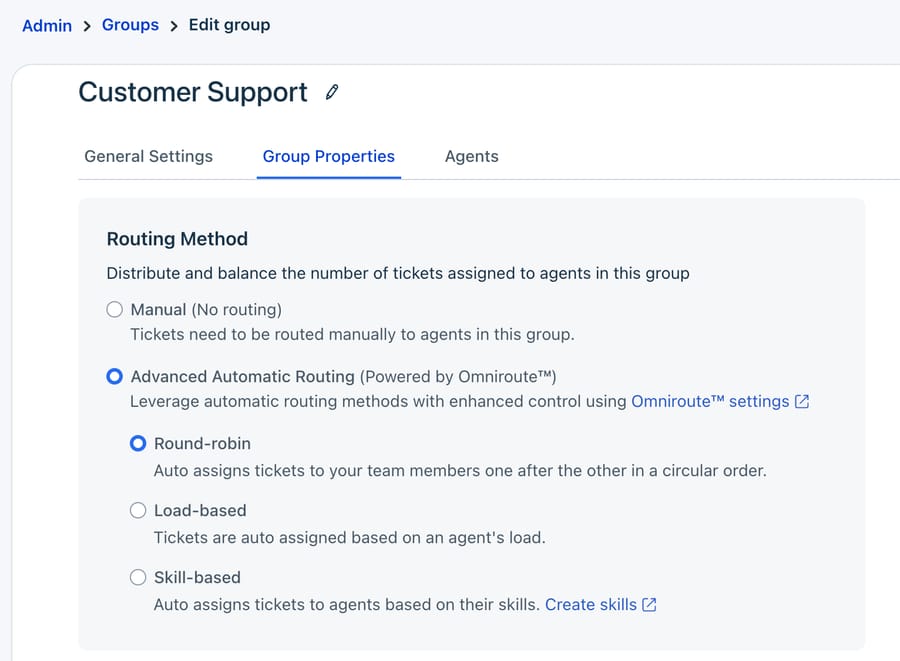
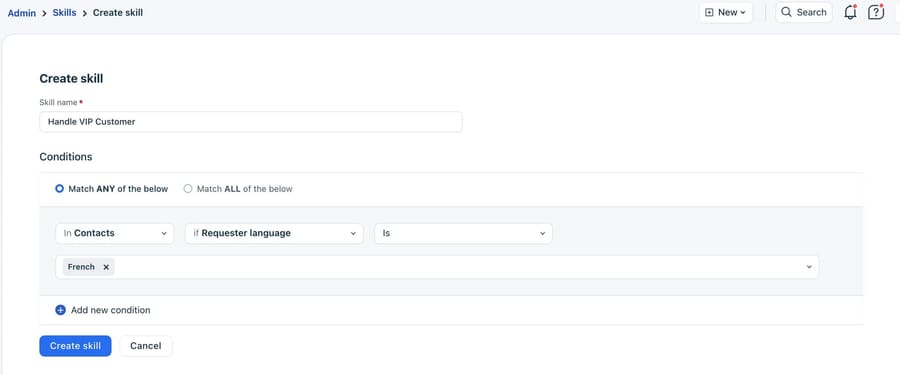
Omniroute needs a group as input, and skill-based routing also needs a field value to match. Round-robin decides who's next in a group; it never reads the ticket. It pairs well with anything that sets the group correctly first, a rule or an AI. Freshworks' round-robin article says it runs when a new ticket arrives or is reassigned from another group. Our pages on round-robin vs load-based vs skill-based assignment and why round-robin sometimes doesn't assign cover the settings in depth.
What does Freddy AI Auto Triage do, and what does it cost?
Auto Triage is Freshdesk's own AI answer to the keyword problem. Per Freshworks' Auto Triage article, it reads incoming Email and Portal tickets and fills Priority, Group and Type, plus custom dropdown and dependent fields you add, based on how your team labeled past tickets. Each field runs in one of two modes: Manual, where the agent sees "Freddy suggestions" and clicks Apply, or Automatic, where Freddy sets the value in the backend when the ticket is created. Automation rules always take precedence: when a rule sets a field, Auto Triage leaves that field alone, even in Automatic mode.
Setup steps:
- Go to Admin > Freddy > AI Copilot > Auto triage and toggle it on.
- Click Configure and review the default fields.
- Click Add ticket fields to add standard dropdowns or custom fields.
- Choose Manual or Automatic for each field.
- Wait for enablement. Freshworks says it's automated and typically completes within 2 days; the dashboard shows each field as Processing, then Active.
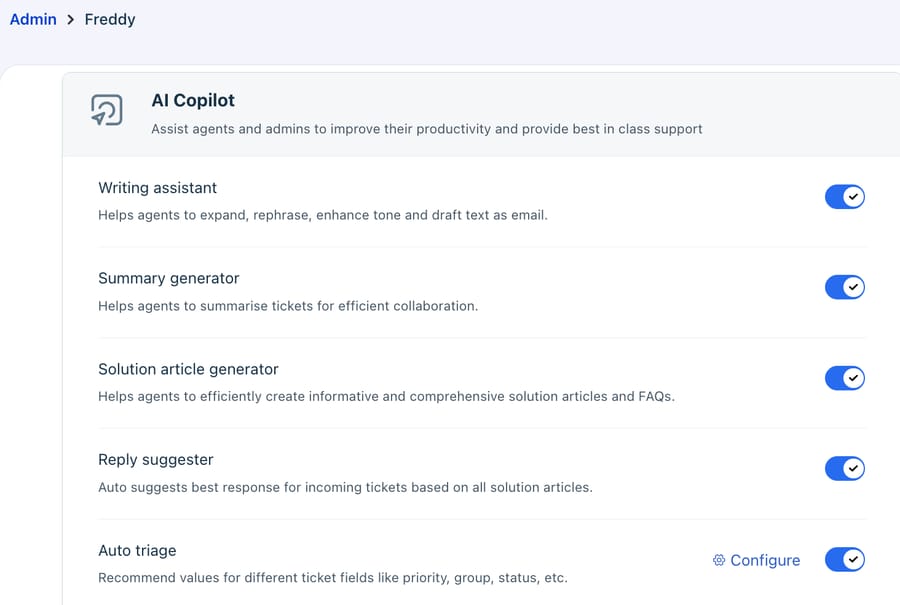
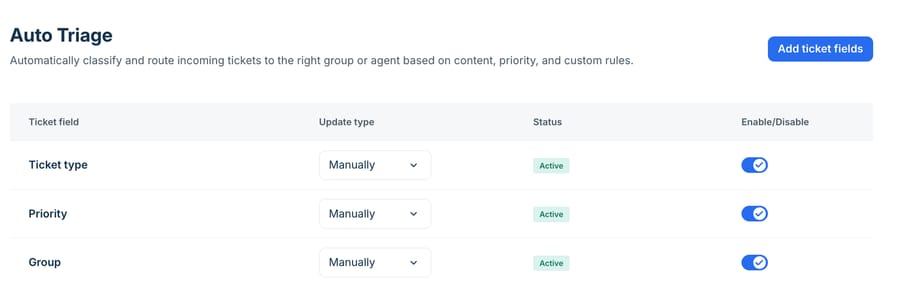
The Auto Triage article lists Freshdesk and Freshdesk Omni Pro and Enterprise. Freshworks' Freddy AI overview lists Auto triage as a Freddy AI Copilot feature and tells admins to buy the Freddy add-ons and assign the Copilot role to agents, and the pricing page sells Copilot at $29 an agent a month on Pro and Enterprise (8 October 2026). Copilot can be bought for some agents rather than all, so budget for the seats that will work triaged tickets. If every seat needs it, a 10-agent team on Pro pays $55 + $29 = $84 an agent, or $290 a month for Copilot on top of $550 for Pro. Seat pricing follows Freshworks' business model: Copilot is a bundle of agent-side features (drafting, summaries, sentiment, triage), so the price tracks headcount, and a team that only wants routing pays for the whole bundle on every seat that needs it.
The other gate is data. Freshworks recommends at least 2,000 historical tickets, because the model learns from your past labels. A new team, a team that just renamed its groups, or one whose past tickets were labeled inconsistently will get weaker suggestions. We didn't test Auto Triage: our trial account had 11 tickets, nowhere near 2,000.
Don't confuse it with the Freddy AI Agent, the customer-facing bot. That's priced per session: 500 sessions once per account, then $49 per 100, where an email session is a 72-hour window from the customer's first email. It answers customers; it isn't the triage feature. Our Freddy AI explainer separates the pieces.
Which AI tools auto-tag and route Freshdesk tickets?
Three third-party options do this job on Freshdesk today, and they fit very different teams.
eesel AI
eesel's Freshdesk integration page says its agent can "route tickets to groups, update ticket fields (priority, status, tags)" and add private notes. You describe your categories and routing in plain-language instructions. Its pricing page on 8 October 2026 listed a free plan with 100 credits, then $299 a month for 500 credits, where one ticket is one credit. It's self-serve: you write the instructions, test them and keep them tuned.
SentiSum
SentiSum lists Freshdesk among its integrations and starts from analytics: a custom taxonomy across all your conversations. Routing comes from an Automation Agent that its pricing page says "resolves and routes conversations automatically", sold as an add-on on top of a partnership that starts at $100,000 a year (8 October 2026). It's sized for enterprise insight teams; a 10-person team routing tickets would be paying for far more than it uses.
Zapier with an AI step
The do-it-yourself route: a Zap triggers on a new Freshdesk ticket, sends the subject and description to an AI step with your category list, and updates the ticket's group and tags with the answer. Zapier's Professional plan started at $19.99 a month billed annually for 750 tasks on 8 October 2026, and each ticket uses several tasks. It's cheap to start. You own the prompt, the failures and the retries, and nobody tells you when it drifts.
How does Macha triage a Freshdesk ticket? A live test run
Macha runs AI agents on the help desk you already use (Zendesk, Freshdesk, Gorgias, Front, HubSpot or Intercom). On Freshdesk it connects with your subdomain and an API key, and the agent gets read and write tools: Get Ticket, List Groups, Update Tags, Update Priority, Assign Ticket (group or agent), Update Fields, Update Status, Add Internal Note and Add Public Reply. For triage it runs on a Ticket Created trigger. It doesn't need Auto Triage, Copilot seats or a ticket history.
On 8 October 2026 we created an agent called "P10-14 Freshdesk triage router" on our Macha Demo workspace, connected to the same Freshdesk trial, with six tools attached: Get Ticket, List Groups, Update Tags, Update Priority, Assign Ticket and Add Internal Note. This is the instruction, verbatim:
You triage new Freshdesk tickets. You never reply to the customer.
1. Read the ticket with freshdesk_get_ticket.
2. Pick one topic: order_status, billing, product_question, vendor_pitch or other. Judge the main request, not single words: a customer who mentions a refund only as a fallback for a late order is order_status, and a sales or partnership pitch from another company is vendor_pitch even if it talks about orders or delivery.
3. Update the tags: keep every tag already on the ticket and add triage_<topic>.
4. Set the priority: urgent if they were charged twice or more than they expected; high if the message has a deadline or the customer is angry; low for vendor_pitch; medium otherwise.
5. Call freshdesk_list_groups and assign the ticket to the matching group: billing to Billing, order_status to Orders and Shipping, product_question to Product Questions, vendor_pitch to Partnerships. If no group fits, leave the group as it is and add the tag triage_review.
6. Finish with a one-line internal note: topic, priority, group, and the sentence from the ticket that decided it.
Step 3 exists because Freshdesk's API sets a ticket's tags as a whole list, so the agent sends the old tags back with the new one. Step 5 makes the agent look up the real group names on every run instead of trusting a list typed into the prompt.
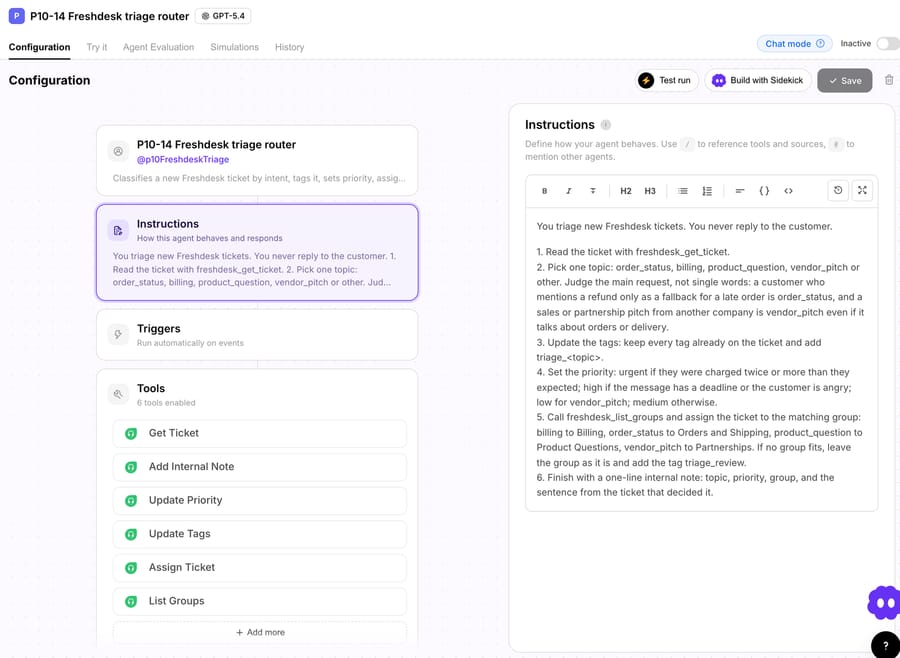
We used the agent's Test run in the "Create a test ticket and run autonomously" mode. It creates a real ticket in the connected Freshdesk with the subject, message and requester you give it, then runs the agent as if the Ticket Created trigger had fired, so every write lands on that ticket. We gave it the same four messages as above. Because these were brand-new Freshdesk tickets, our two keyword rules fired on them first, which made this a direct comparison on the same tickets. The agent stayed inactive with no trigger, and we read each ticket back through the Freshdesk API afterwards.
| Ticket | Keyword rules (ran first) | Macha agent (ran second) | Agent's note: the deciding sentence |
|---|---|---|---|
| #8 Late order, refund as a fallback | Billing, High, rule_billing | Moved to Orders and Shipping, High, added triage_order_status | "It's a birthday present for Saturday." |
| #9 Charged twice | No match, unassigned | Billing, Urgent, triage_billing | "my card shows two payments of $49 on 6 October for the same order." |
| #10 Lamp voltage question | No match, unassigned | Product Questions, High, triage_product_question | "I live in Spain and want to order two before the holidays." |
| #11 Freight company pitch | Orders and Shipping, rule_orders | Moved to Partnerships, Low, added triage_vendor_pitch | "We help online stores cut delivery times by up to 30%." |
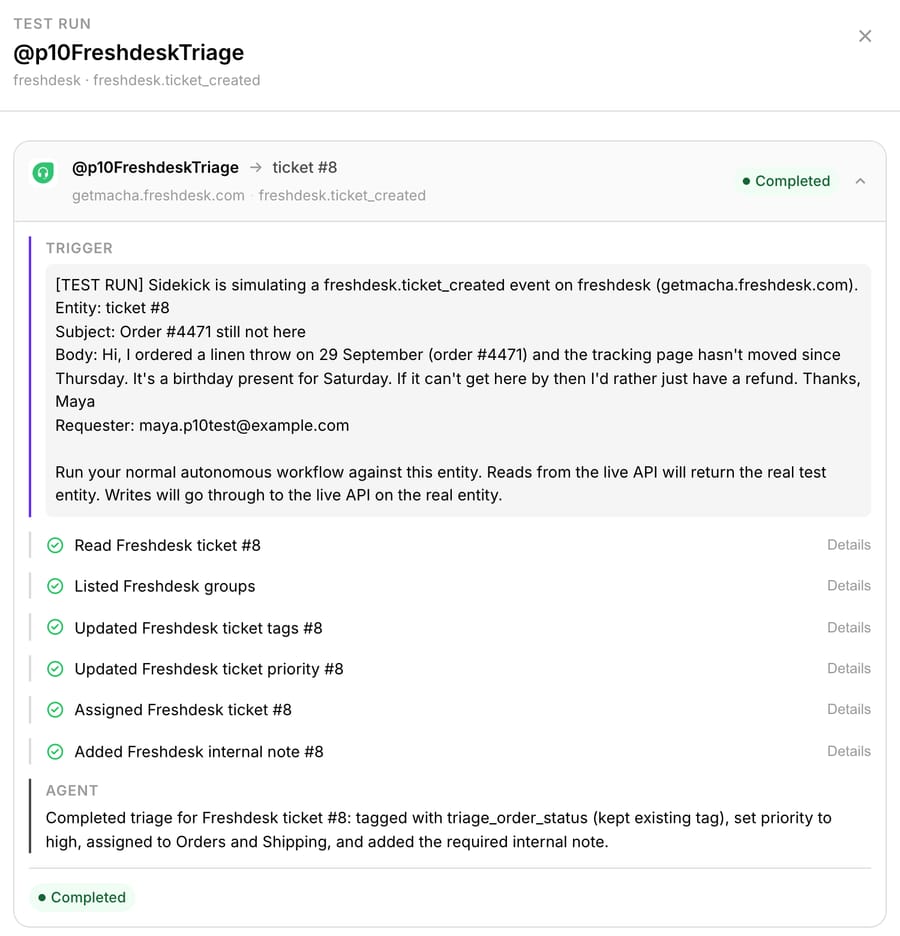
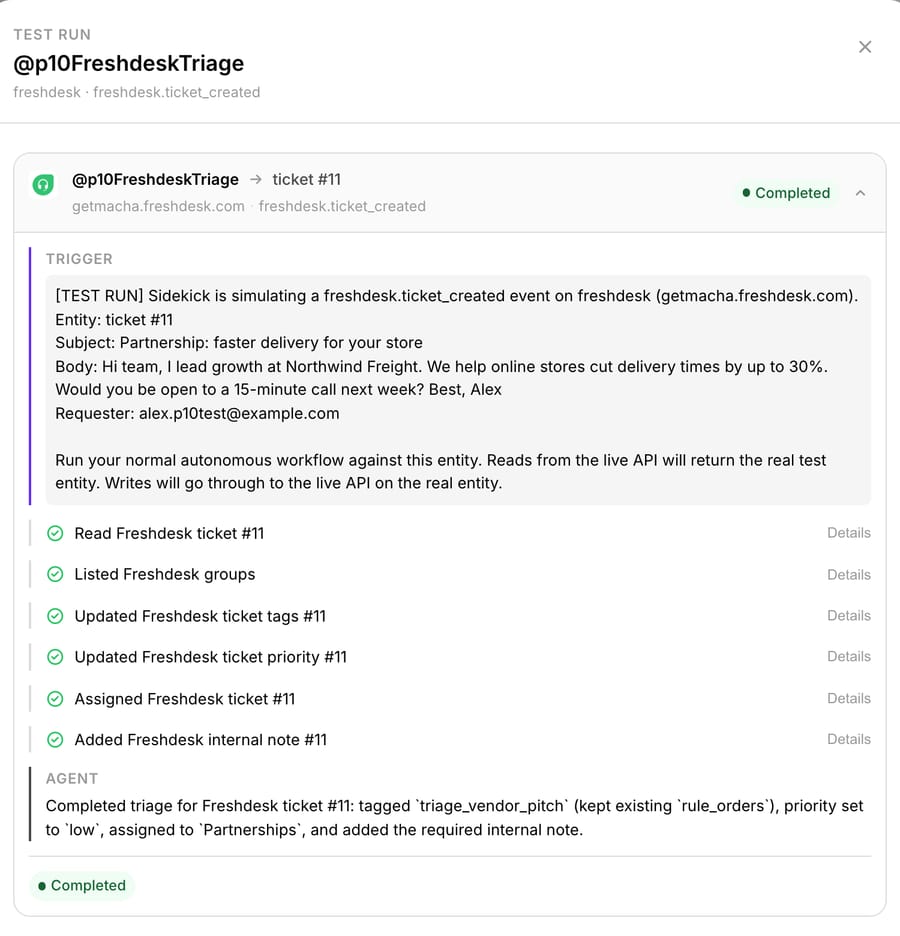
All four landed in the right group. The rule's tag stayed on tickets #8 and #11 next to the agent's tag, so a saved view filtered on "has rule_billing and triage_order_status" shows exactly where your old rules and the agent disagree, which is the evidence you need before deleting a rule. And each note quotes the sentence that decided the call, so a reviewer can check a routing decision in five seconds without rereading the thread.
We'd change one call, and it's our instruction's fault. The lamp question went to High because "before the holidays" counts as a deadline under step 4 as we wrote it. The fix is one clause: "high only if the customer needs something within 7 days". Most triage tuning we've done looks like this, a reworded sentence in the instruction.
In production you'd point the agent at a Ticket Created trigger and drop the topic-keyword rules, keeping only the hard-signal rules (VIP addresses, channels, spam). Then turn on round-robin in each group so Omniroute picks the person once the agent has set the group. We didn't test that hand-off on our trial (it had one agent), so watch the first day's assignments when you switch it on.
Macha fits teams already running Zendesk, Freshdesk, Gorgias, Front, HubSpot or Intercom who want routing decided and explained inside the ticket, without buying seats or waiting for 2,000 labeled tickets. On price, Macha bills per ticket, one thread with one person charged once however many tools the agent calls, from $299 a month for 750 tickets. That's about $0.40 a ticket, which includes setup and a dedicated success manager who handles your changes, like a new routing group or a reworded priority rule. Macha is the done-for-you option: the Macha team analyzes your past tickets, builds the agent on your Freshdesk and runs it in safe mode until its decisions are right, on the trial and every plan. Against eesel's entry plan, $299 gets you 750 tickets on Macha and 500 on eesel: $0.40 a ticket against $0.60, with setup done for you included. There's more on the Freshdesk integration page and the Freshdesk triage use case.
Which triage option should you choose?
- Your categories show up as clear words, addresses or form fields: ticket creation rules plus round-robin. Revisit when misroutes start costing your team a morning a week.
- You're on Pro or Enterprise, have 2,000+ consistently labeled tickets, and want Copilot's other features anyway: turn on Auto Triage in Manual mode, then Automatic per field once you trust it.
- The same words mean different things in your queue (refund as a threat, delivery in a sales pitch), or you're on Growth: an AI agent layer. Pick eesel if you want to build and tune it yourself; pick Macha if you want the team to build and run it for you.
- Enterprise volume and a CX insights team: SentiSum, through its sales process.
How do you roll out AI triage without misrouting live tickets?
- Start with tags and notes only. For two weeks, let the agent add its
triage_tag and note without assigning. Compare its call with where your team actually sent each ticket. - Measure reassignment. Count tickets whose group changes after the first assignment. That's your misroute rate, and it should drop when you switch assignment on.
- Keep a review lane. A tag like
triage_review, in a shared view, catches the tickets the agent wasn't sure about instead of letting it guess. - Retire keyword rules one at a time. Keep the hard-signal rules. Delete a topic-keyword rule only once the views show the agent beating it.
- Check after 30 days that priority still means something. If half the queue is High, tighten the instruction.
For the wider picture, see how to automate Freshdesk with AI; for the tagging side alone, auto-tagging Freshdesk tickets with AI; and for the same comparison on Zendesk, our Zendesk intelligent triage guide. If many of your tickets are order questions, the Freshdesk WISMO guide covers answering them, not just routing them.
Frequently asked questions
Does Freshdesk have AI ticket triage built in? Yes. Freddy AI Auto Triage suggests or sets Priority, Group, Type and custom dropdowns on Email and Portal tickets. It's on Pro and Enterprise as part of the Freddy AI Copilot add-on ($29 an agent a month on 8 October 2026), and Freshworks recommends at least 2,000 past tickets.
What's the difference between Dispatch'r and Auto Triage? Dispatch'r, now called ticket creation rules, runs your if-then conditions on keywords and fields. Auto Triage is a model that predicts field values from your past tickets. When both set the same field, the rule wins.
Which Freshdesk plan has round-robin and skill-based routing? Round-robin and load-based assignment through Omniroute are on Pro and Enterprise. Skill-based routing is Enterprise only. Growth teams assign by rules or by hand.
Can AI route Freshdesk tickets without Freddy? Yes. A third-party agent writes the group, priority, tags and notes through the Freshdesk API, so it doesn't depend on Auto Triage or Copilot seats. eesel and Macha both do this; our Macha test ran on a trial account with 11 tickets.
What does AI triage cost per ticket on Freshdesk? Freddy is priced per seat, so the per-ticket cost depends on headcount: Copilot for 10 agents is $290 a month however many tickets you route. eesel is $299 for 500 credits, about $0.60 a ticket at entry. Macha is $299 for 750 tickets, about $0.40, including setup and a dedicated success manager.
Which is best for a small team? If keyword rules cover your categories, use them; they're free on your plan. If they don't, a small team on Growth can't get Auto Triage at all, and an agent priced per ticket fits better than an upgrade plus seats. Macha's trial runs the full setup on about 125 tickets before you pay.
How we researched this
Freshdesk facts come from Freshworks' support articles "Automate ticket handling with Auto Triage" (50000002117), "Overview of Freddy AI for Ticketing" (50000010359), "Setting up automation rules to run on Ticket Creation" (37614), "About Omniroute (Advanced Automatic Routing)" (196581), "Configure Round-Robin Ticket Routing" (221904), "Configure Skill-Based Ticket Routing" (222692) and freshworks.com/freshdesk/pricing, all accessed 8 October 2026. The four Freshdesk admin images are from those articles, not our account. Competitor details come from eesel.ai/pricing and eesel's Freshdesk integration page, sentisum.com/pricing and zapier.com/pricing, accessed the same day. Prices change; we dated each one.
What we ran live on 8 October 2026, on a 14-day Freshdesk trial (getmacha.freshdesk.com, Enterprise trial tier): we created four groups and two ticket creation rules through the Freshdesk API, created four synthetic tickets (#4 to #7) and read back where the rules sent them; then we ran the Macha agent shown above four times with the Test run feature, which created tickets #8 to #11 with the same messages, and read the groups, priorities, tags and notes back through the API. We didn't log in to the Freshdesk admin UI or test Auto Triage. All names, emails, companies and order numbers are made up. Arithmetic: $55 + $29 = $84 per agent per month; $29 × 10 = $290 and $55 × 10 = $550 a month; $49 / 100 = $0.49 a session; $299 / 750 = $0.40; $299 / 500 = $0.60.
Want the routing layer built for you instead of tuned by you? Start a free trial of Macha and the team will set it up on your Freshdesk.






