





 Shopify
 Stripe
 Slack
Slack Notion
 Google Workspace
 Confluence

What Are the Best AI Automations to Set Up in Front? (2026)


The five AI automations worth building first in Front are auto-route by intent, knowledge-grounded drafts, triage and tag, VIP escalation, and follow-up. Front's rules, Topics and Autopilot handle the deterministic half, and an AI agent layer on top handles the reading and judgment.
Key takeaways
- The five AI automations worth setting up first in Front are auto-route by intent, KB-grounded drafts, triage and tag, VIP escalation, and follow-up.
- Front's AI Answers is no longer for sale (its help center points to Autopilot Resolve), and Front's Autopilot AI agent is billed once per conversation at $0.05 for triage, $0.39 for a handoff or $0.89 for a resolution, with Copilot a $20 per seat per month add-on and Smart QA Enterprise only.
- Front caps automation rules at 10 on Starter and 20 on Professional, with unlimited rules only on Enterprise at $105 per seat per month billed annually.
- Front includes Compose, Translate and Summarize in base plans with a limit of 200 actions per teammate per day, while Autopilot AI agents reply to the conversations assigned to them, replacing the older Topic-based auto-replies.
- Macha runs AI agents on top of Front at about $0.40 a ticket from $299 a month, with setup by the Macha team and a dedicated success manager included.

The five AI automations to set up first in Front are auto-route by intent, KB-grounded drafts, triage and tag, VIP escalation, and follow-up. Front rules, Topics and Autopilot (billed once per conversation: $0.05 for triage, $0.39 for a handoff, $0.89 for a resolution, as of October 2026) cover the deterministic half of each; an AI agent layer on top covers the part that needs reading and judgment.
| Automation | Native Front path | Where an AI agent adds |
|---|---|---|
| Auto-route by intent | Rules on subject, sender, domain | Routes on meaning, not keywords |
| KB-grounded draft | AI Compose; Autopilot AI agents reply on conversations assigned to them | Grounds every draft in your KB plus live data |
| Triage and tag | Topics, rule-based tags | Intent, urgency and sentiment tagged together |
| VIP escalation | Rule on domain or tag, then @mention | Spots tone shifts and churn signals |
| Follow-up | Delayed rules (Unreplied after, Unassigned after) | Decides whether a nudge is warranted and drafts it |
If you'd rather have someone set these up, our Front AI implementation guide compares doing it yourself, Front's services team and a done-for-you setup.
Which AI automations should you build first in Front?
You don't need thirty automations. You need five that cover the conversation types your shared inbox sees every day. A message lands, and before anyone reads it, it should already be in the right inbox, tagged, with a grounded draft waiting and the right teammate mentioned if it's urgent.
- Auto-route by intent: get the conversation to the right inbox or teammate the moment it arrives.
- KB-grounded draft: when a message matches a known question, write the answer from your help center instead of a canned template.
- Triage and tag: classify by topic, urgency, and sentiment so reporting and routing both have something to work with.
- VIP escalation: spot the high-value or at-risk conversation and mention the right person immediately.
- Follow-up and close-the-loop: nudge unreplied threads and chase the customer reply that never came.
Each of these has a native Front path and a place where an AI agent goes further.
How do you route Front conversations by intent?
What Front does natively. Front rules route on patterns: subject contains "invoice" → move to Billing, from a VIP domain → assign round-robin to the account team. It's fast and deterministic, and for a lot of routing it's exactly right. For the mechanics of rule-based routing, smart routing in Front: tagging, teammate assignment, and @mention breaks it down.
Where AI goes further. A keyword rule can't tell that "I was charged twice and nobody's replied" is both a billing issue and an escalation. An AI agent reads the message, infers intent, and routes on meaning, so "my payout is late" reaches the ops team even when the word "payout" never appears in your rule list.
Can Front write replies from your knowledge base?
What Front does natively. Front's AI Compose polishes drafts, adjusts tone and fixes grammar before you send, per Front's AI features. Front's pricing page lists Compose, Translate and Summarize as included in base plans, with a limit of 200 actions per teammate per day. Autopilot AI agents reply to the conversations assigned to them by a rule or a teammate, guided by instructions, knowledge sources and Playbooks (Front's Autopilot AI agents article, edited October 5, 2026; the older Topic-based auto-replies are Front's legacy version as of October 2026), drawing on knowledge sources of up to 3,000 pages each and handing off to a human when it can't answer. That's real automation for FAQ-shaped traffic.
Where AI goes further. The gap is grounding and scope. A polished draft is only as good as what it's grounded in, and native auto-reply is scoped to the conversations you route to the Autopilot agent and what its knowledge sources cover. A dedicated agent layer grounds every draft in your knowledge base and can pull live data, like a real order status or an account balance, through a custom tool that turns your REST API into something the agent can call. The result is an answer built from this customer's actual situation. For the full picture of native Front AI, see Front AI explained.
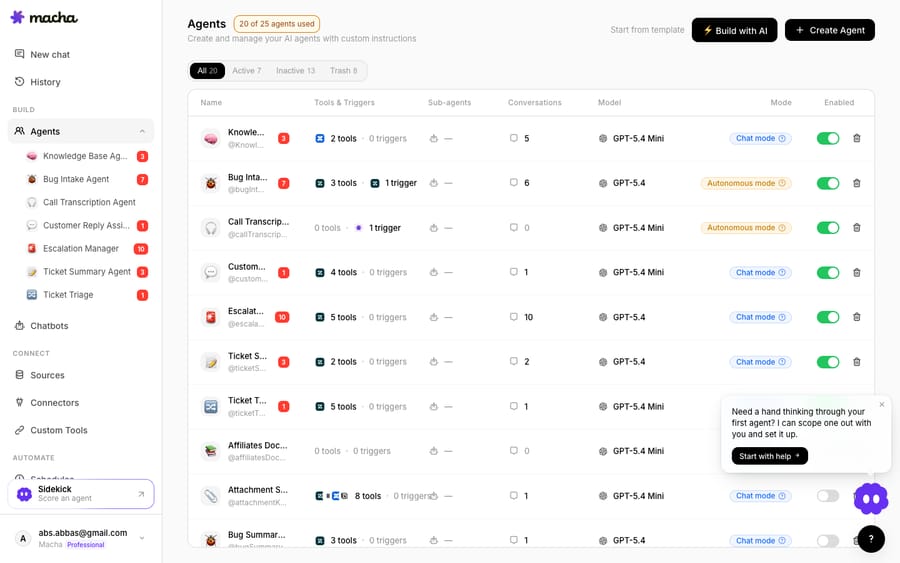
The agents above are Macha demo-org agents: a Knowledge Base agent for grounded drafts, a Ticket Triage agent, an Escalation Manager, each with its own tools, triggers, model, and mode. They illustrate the playbook, not a live Front conversation.
How do you triage and tag Front conversations with AI?
What Front does natively. Front automatically analyzes conversations to create Topics and organize them, and Summarize condenses long threads, both handy in a busy shared inbox. Rules then tag on keyword matches for reporting.
Where AI goes further. Topic-based tagging is broad. An agent can tag on the dimensions that drive workflow (intent, urgency, and sentiment together) and do it consistently across every channel feeding the inbox. Instead of "this thread mentions 'refund,'" you get "billing dispute, high urgency, frustrated tone" applied the same way every time, which is what makes downstream routing and reporting trustworthy.
How do you escalate VIP conversations in Front?
What Front does natively. A rule can watch for a domain or a tag and @mention a manager. Deterministic, reliable, and a fine safety net for known accounts.
Where AI goes further. The escalations that hurt are the ones a rule can't see coming: a normally calm customer whose tone just turned, a sales lead asking about enterprise pricing, a churn-risk signal buried in paragraph three. An agent reads for those signals and escalates on judgment, mentioning the right person before the conversation goes cold. For teams building this end to end, how to build an AI agent for Front covers the setup.
How do you automate follow-ups in Front?
What Front does natively. Delayed rules (Unreplied after, Unassigned after) are Front's built-in nudges, and they're good at catching threads that stall on your side.
Where AI goes further. A time-based nudge is blind to content. An agent can decide whether a follow-up is warranted, draft a context-aware nudge ("still waiting on that screenshot to finish your refund"), and close conversations that are clearly resolved, so your open count reflects real work, not stale threads.
What does Front's native AI do well, and how is it billed?
Front's AI is good, and it's fair to say so. Autopilot is Front's "omnichannel AI agent" for end-to-end workflows like quote requests, scheduling and intake, with hand-off to a human built in. Copilot answers questions about the customer, summarizes, and generates drafts. Smart QA (Enterprise only as of October 2026) reviews all your conversations rather than a manual sample, which is a real quality-assurance upgrade. If native features cover your needs, use them.
Two things to go in with your eyes open on. First, AI Answers is discontinued: Front's help center says "AI Answers is no longer available for purchase" and points you to Autopilot Resolve instead (AI Answers legacy notice). If you built on AI Answers, that's a migration. Second, the billing model. Front's AI is priced as a per-seat add-on on top of your plan (Copilot) or bundled into Enterprise (Smart QA and Smart CSAT), and the agent piece is metered:
| Front plan or AI capability | How it's billed (annual, checked 24 Sept 2026; AI rows updated October 2026) |
|---|---|
| Plan (Starter) | $25 / seat / mo, up to 10 seats, up to 10 rules |
| Plan (Professional) | $65 / seat / mo, up to 50 seats, up to 20 rules |
| Plan (Enterprise) | $105 / seat / mo, unlimited rules, Copilot, Smart QA and Smart CSAT included |
| Autopilot (AI agent) | $0.05 triage / $0.39 handoff / $0.89 resolution per conversation, billed once at the highest level |
| Copilot | $20 / seat / mo add-on |
| Smart QA, Smart CSAT | Enterprise only; no longer sold as add-ons on Starter or Professional |
| Compose, Translate, Summarize | Included, 200 actions per teammate per day |
Source: Front's pricing page and Front's Autopilot pricing. The nuance worth naming: a per-conversation meter charges by outcome level, not by work done, so a five-step workflow that ends in a human takeover costs the same $0.39 as a single drafted reply, and it's easy to under-model at volume. Read Front's tiers closely too, because the rule caps (10 on Starter, 20 on Professional) mean a rules-heavy automation strategy hits a ceiling; Front pricing explained lays out where each capability unlocks.
How does an AI agent layer like Macha work on top of Front?
Macha is the AI agent layer that runs on top of the Front you already use, through the Macha–Front connector. It doesn't replace Front, your shared inboxes, your rules, or your teammates. You keep Front as your collaborative hub; Macha adds agents that read conversations, understand intent, ground answers in your knowledge base, pull live data through custom tools, and act inside the conversation. The broader category of AI agents for customer service exists for the reasoning work a keyword rule structurally can't do.
Macha bills per ticket: one conversation, charged once, however many drafted replies, lookups and classifications it takes, and never per resolution. Plans start at $299 a month for up to 750 tickets, about $0.40 a ticket, and that price includes setup and a dedicated success manager who handles your changes. A per-resolution vendor earns more by defining more outcomes as resolutions; a per-ticket price keeps the bill tied to volume you can count yourself. Your part of the setup is connecting Front and the tools your answers come from, about 15 minutes, and connecting Front to Macha to route conversations to AI walks through it step by step. The rest is done for you: the Macha team analyzes your past conversations, builds the knowledge base and the agent, and runs it in safe mode, with drafts as internal notes in Front, until the drafts are right.
The clean division of labor: let Front rules and native AI be the fast, deterministic layer, and put Macha's agents on top for the reasoning-heavy automations (grounded drafts, intent-based routing, judgment-based escalation) that turn a routed conversation into a resolved one.
FAQ
What are the best AI automations to set up in Front first? Start with five that map to real shared-inbox traffic: auto-route by intent, KB-grounded drafts, triage and tag by intent, urgency and sentiment, VIP escalation, and follow-up. Each has a native Front path (rules, Topics, Autopilot, Copilot) and a place where an AI agent layer adds reasoning.
Does Front have a native AI agent? Yes. Autopilot is Front's AI agent for end-to-end workflows, and Copilot assists with answers, summaries and drafts. The older AI Answers feature is no longer available for purchase; Front points you to Autopilot Resolve instead.
How is Front's AI billed? Copilot is a $20 a seat a month add-on on Starter and Professional, and Smart QA and Smart CSAT are Enterprise only as of October 2026; all three are included in Enterprise. Autopilot is metered, billed once per conversation at $0.05 for triage, $0.39 for a handoff or $0.89 for a resolution. Check Front's pricing page for current figures.
Can I add an AI agent to Front without replacing it? Yes. Macha connects to Front as a live connector and runs on top of your existing inboxes and rules. Your rules keep routing and tagging; Macha's agents read the conversation, ground a reply in your knowledge base, and act.
How does Macha's pricing differ from per-resolution AI? Macha bills per ticket: one conversation, charged once however many drafts, lookups or classifications it takes, never per resolution, so the bill never hangs on an outcome definition you don't control.
Which help desks does Macha run on besides Front? Macha runs on Zendesk, Freshdesk, Gorgias, Front, HubSpot or Intercom, with the same agents, tools and per-ticket billing on each.
Want "routed and tagged" to become "actually answered" in your Front inbox? Start a free trial of Macha ($50 of usage, no credit card) and connect it to Front.






