






 Shopify
 Stripe
 Slack
 Notion
 Google Workspace
 Confluence


How to Draft Gorgias Replies as Internal Notes With AI: Native Options, Zapier + ChatGPT, and Safe Mode (2026)


To have AI draft Gorgias replies as internal notes, you need three pieces: something that fires when a ticket arrives, a model that writes the reply, and a call that posts it back to the ticket on the internal-note channel so customers never see it. Gorgias's API supports the last step directly: POST /api/tickets/{ticket_id}/messages adds the message "as an internal note" when you specify that channel. There are four ways to put the pieces together: a Gorgias Rule that adds a fixed note by intent, the Gorgias MCP connected to ChatGPT or Claude, a Zapier Zap with a ChatGPT step, or an AI agent layer such as Macha running in safe mode. This guide shows how each one works, what it costs in Gorgias, and where each breaks.
Key takeaways
- Gorgias's API adds a message as an internal note when the channel is internal-note, using POST /api/tickets/{ticket_id}/messages, and internal notes are never sent to customers.
- An internal note doesn't make a Gorgias ticket billable, so AI drafts left as notes add no Gorgias ticket fee until a person sends the reply.
- The Gorgias MCP lets ChatGPT or Claude add internal notes on any Helpdesk plan without an AI Agent subscription, but you prompt it ticket by ticket.
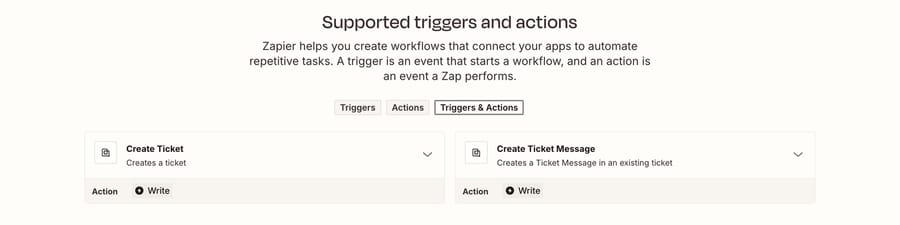
- Zapier's Gorgias app lists two actions, Create Ticket and Create Ticket Message, so a Zapier and ChatGPT draft flow starts from a Gorgias HTTP integration webhook.
- Gorgias says an internal note can't be deleted once sent, so test any automated drafting flow on a few tickets before turning it on for the whole queue.

| Option | Who writes the draft | Starts on its own? | Knows your orders and policies? | Setup | Gorgias cost of a note |
|---|---|---|---|---|---|
| Rule: internal note by intent | Nobody; fixed text with variables | Yes, on ticket created | Only the variables you insert | Minutes | Not billable |
| Gorgias MCP + ChatGPT or Claude | The model, when you ask | No, you prompt per ticket | Whatever it reads in Gorgias | Minutes | Not billable |
| Zapier + ChatGPT | The model, from what the Zap passes it | Yes, from an HTTP integration | Only what you pass into the prompt | An afternoon, then upkeep | Not billable |
| Gorgias AI Agent | Gorgias's AI | Yes | Your knowledge, skills and Shopify | Configured in Gorgias | Replies, rather than drafts; ticket plus automation fee when it resolves |
| Macha in safe mode | An agent built by Macha's team | Yes, on new ticket or new message | Shopify, macros, knowledge, your policies | Done for you | Not billable until someone sends |
Why draft Gorgias replies as internal notes first?
The request comes up often. An April 2025 thread on r/shopify (thread) asks whether anyone has connected Gorgias and ChatGPT through Zapier to read incoming emails and leave a suggested reply as an internal note that an agent can copy or tweak. The poster says they're happy with Gorgias as a platform, just not with paying for more automation.
Notes are the right place for a draft for three reasons Gorgias's own documentation supports:
- Customers can't see them. Gorgias's internal notes article says notes appear in the ticket on a yellow background and are visible to anyone with access to the ticket in your helpdesk, not to the customer. Our guide to Gorgias internal notes, mentions and forwarding covers the rest of how they behave.
- They don't cost a ticket. Gorgias's billing article lists "an internal note" among the changes that don't make a ticket billable. The ticket bills once, when your agent sends the reply.
- They don't distort your reporting. Gorgias says notes don't count toward the tickets replied, messages sent or one-touch tickets metrics.
One rule shapes everything below: Gorgias says "it isn't possible to delete an internal note once it's been sent." A flow that posts a wrong or very long note leaves it on the ticket for good. Test on a handful of tickets before you point any automation at the whole queue.
Can a Gorgias Rule add an internal note automatically?
Yes, but it adds fixed text, not a drafted reply. Gorgias's Auto-reply Rule best practices article has an "Internal note auto-reply" pattern: WHEN a ticket is created, IF the ticket's intent contains one of the intents you choose, THEN add an internal note, written in the Body field with variables such as Ticket Customer or Current Agent.

That's useful for a reminder ("Discount request: check the active promo list before replying") or a macro-style starting point with the customer's name filled in. It won't read the message or write an answer. Gorgias also notes a side effect: auto-reply Rules can't be applied to tickets that only contain an internal note, which matters if you build a flow that creates note-only tickets.
Can Gorgias AI Agent leave its answer as a note for review?
Not in the way the Reddit poster wanted. In the AI Agent documentation we read, AI Agent either replies to the customer or hands the ticket over to your team; we found no setting that makes it post its answer as an internal note for an agent to send. Gorgias's review paths are before and after go-live instead: test conversations and Playground let you preview replies before you enable a channel, and the AI Feedback panel lets you review closed AI Agent tickets afterward. The gap has an obvious incentive behind it. Gorgias's billing article charges AI Agent's automation fee when it "resolves a ticket without handing over the conversation to a human agent." A draft that a person sends is, by that definition, a human reply, so a drafts-as-notes mode would turn billable automations into ordinary tickets. A product priced per resolution is optimized for resolving, not for drafting. Our Gorgias AI Agent explainer covers the review tools and the billing, and our guide to drafting Gorgias replies with AI from your Help Center covers grounding replies in your articles.
How do you draft internal notes with ChatGPT or Claude through the Gorgias MCP?
This is the newest option and the simplest one for a small team. Gorgias's MCP article says the Gorgias MCP is available to all roles on all Helpdesk plans, and "AI Agent isn't required." You add it from Claude's connector directory or ChatGPT's plugin directory, enter your Gorgias subdomain, sign in and authorize. Other MCP clients connect to https://mcp.gorgias.com/mcp.
Once connected, the assistant can search and read tickets, reply to customers, add internal notes, and update status, priority, assignee and tags, within the limits of your Gorgias role. Gorgias's MCP tools list shows the split that matters for drafting: create_message and reply_and_close are marked "Sends to customers," while add_internal_note is available to all roles and "Customers can't see it."

A prompt that keeps it safe: "Read ticket 12345. Draft a reply in our voice using only what's in the ticket and our macros. Post it with add_internal_note. Do not send anything to the customer." Gorgias also says some actions "can reach your customers," so read what the assistant proposes before you approve a tool call.
Where it stops: nothing happens until you ask. It's a drafting assistant you drive ticket by ticket, not an automation that has a draft waiting when the ticket lands.
How do you build a Zapier and ChatGPT flow that drafts Gorgias internal notes?
This is the build the Reddit thread asked about. It runs on its own, and it takes more care than it looks.
Step 1: Start the Zap from Gorgias. Zapier's Gorgias app lists two actions, Create Ticket and Create Ticket Message, and we saw no Gorgias trigger on its page. Gorgias's own Zapier article starts the other direction with an HTTP integration: in Gorgias, add an HTTP integration, choose POST, paste a Webhooks by Zapier catch-hook URL, and pick the event. Our guide to Gorgias webhooks lists the events an HTTP integration can fire on; use Ticket created, not Ticket message created, for the reason in step 4.
Step 2: Pass the ticket to ChatGPT. Add a ChatGPT (OpenAI) step. The prompt gets the customer's message and the ticket ID from the webhook payload, plus everything the model needs to answer: your return window, shipping times, tone rules. It has no other access to your store, so anything you don't paste into the prompt, it will guess.
Step 3: Post the draft as a note. Add Gorgias's Create Ticket Message action with the ticket ID from step 1 and the channel set to internal-note. That maps to Gorgias's Create a message endpoint, which adds the message as an internal note when you specify that channel; the API reference says a receiver is optional when the source type is internal-note. Zapier's form may also ask for fields such as Via and Source type; set them to match an internal note (source type internal-note), as the API reference describes. Connecting Zapier to Gorgias uses your REST API credentials; our guide to finding your Gorgias API key shows where they are.
Step 4: Stop it reacting to itself. If the trigger fires on new messages, the note the Zap just posted is a new message, and the Zap runs again. Trigger on ticket creation, or add a Zapier filter that drops anything not from the customer.
Step 5: Test on five tickets. Notes can't be deleted, so turn the HTTP integration on, send a few test emails from a test address, and read the notes before you let it run on real traffic.
What the Zap won't do without much more work:
- Look up the order. Most Gorgias tickets on a Shopify store are about an order. Unless you add a Shopify lookup step and pass the result to the prompt, the draft can't say where the parcel is.
- Handle follow-ups. A Zap triggered on ticket creation drafts the first reply only.
- Know when to stay out. A refund dispute and a "thanks!" both get a draft, unless you build filters for each.
- Run for free. Each run uses Zapier tasks and OpenAI usage on top of Gorgias.
For the API details behind steps 1 and 3, our Gorgias API guide covers authentication and rate limits.
How does Macha's safe mode draft Gorgias replies as internal notes?
Macha is an AI agent layer that runs inside the help desk you already use, and safe mode is how every Macha rollout starts. On Gorgias it's the Zapier flow above with the missing parts filled in:
- It starts on its own. Macha's Gorgias connector has Ticket Created and New Message Added triggers, so a draft is waiting when an agent opens the ticket, including on the customer's second and third messages. A Custom Webhook trigger lets a Gorgias HTTP integration decide which tickets reach the agent.
- It reads more than the message. The agent reads the full ticket thread, searches your Gorgias macros, and looks up Shopify orders through Macha's Shopify connector, so the draft has the tracking status, not a guess.
- It posts the draft with Add Internal Note. The customer sees nothing. Your agent reads the note, copies it into the reply, adjusts if needed, and sends.
- It does the ticket work, too. The connector's write tools set tags, status, priority, custom fields and assignment, so the ticket lands with the right owner and a draft in one pass.
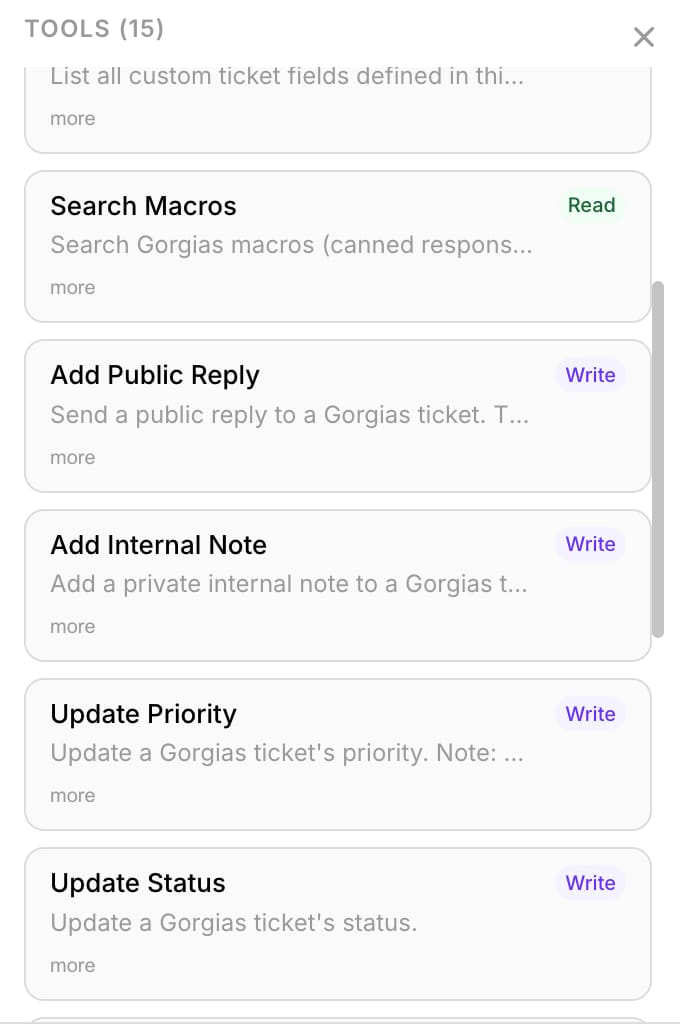
Macha's tool picker makes the line between a draft and a customer-facing reply explicit. The screen below is from an agent in Macha's demo workspace that runs on our Zendesk sandbox; Gorgias agents get the same choice between Add Public Reply and Add Internal Note.
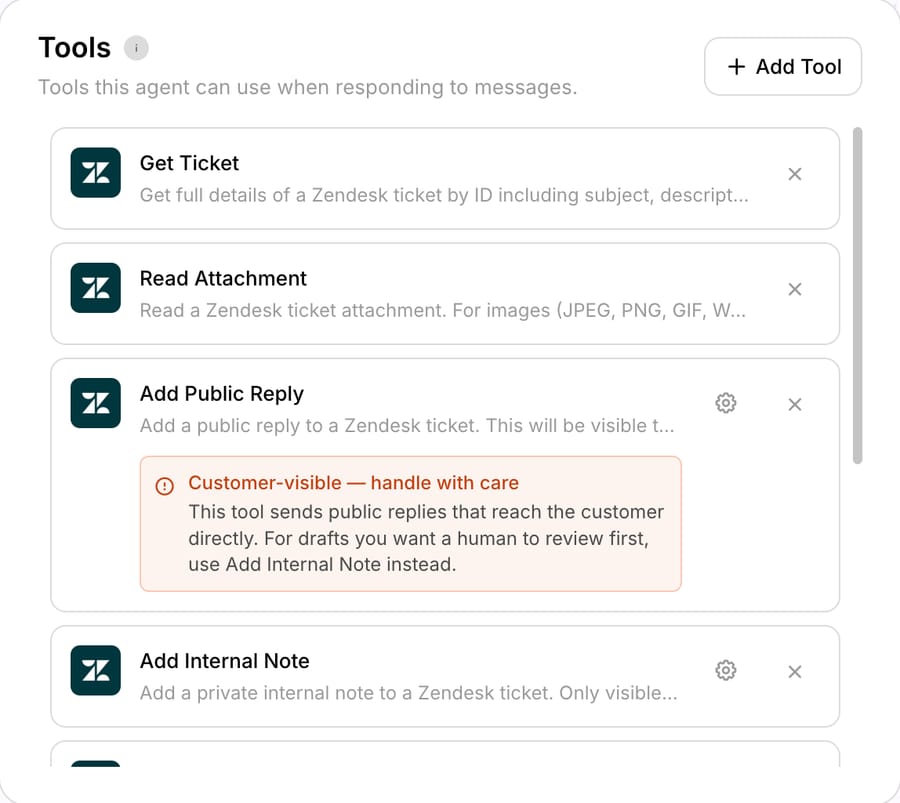
How categories graduate. Each category, say order status, stays in notes until the drafts are consistently right. Then that category moves to public replies, and the next one starts in notes. While drafts are notes, Gorgias's billing rules mean they add no Gorgias ticket fee; once a category moves to replies, expect each reply to count as a billable Gorgias ticket, as your team's replies do.
Who builds it. Macha's team analyzes about a month of your past tickets, builds the knowledge base, writes the agent's instructions from how your team already answers, and tests the agent on past tickets before it touches a live one. The promise is "live in safe mode within 7 days, or your first month is free." Macha costs about $0.40 per ticket, which includes the setup and a dedicated success manager who handles your changes; pricing lists the tiers, and the trial is $50 of free usage (about 125 tickets), no credit card, no time limit. The use case for adding internal notes with context on Gorgias tickets, the Gorgias integration and Macha on Gorgias show the workflow, and done-for-you setup explains the rollout.
Which way of drafting Gorgias internal notes should you choose?
| Your situation | Best fit |
|---|---|
| You want a reminder or checklist note on certain intents | Gorgias Rule |
| A few people, low volume, happy to prompt per ticket | Gorgias MCP with ChatGPT or Claude |
| You like building automations and will maintain the Zap | Zapier + ChatGPT |
| You want Gorgias's own AI to answer customers directly | Gorgias AI Agent |
| You want drafts on every ticket, grounded in Shopify, without building it | Macha in safe mode |
Macha fits teams already on Gorgias that want drafts on every ticket and have no one free to build and maintain the flow. It's the wrong fit if you only want a reminder note on a few intents: the free Rule does that.
Common questions
Can Gorgias add an internal note automatically?
Yes. A Gorgias Rule can add an internal note when a ticket is created and its intent matches the ones you choose, using variables such as the customer's name. The note is fixed text you write in the Rule, not an AI-drafted reply.
Can ChatGPT write internal notes in Gorgias?
Yes, two ways. Connect the Gorgias MCP to ChatGPT and ask it to draft a reply and post it with add_internal_note, ticket by ticket. Or build a Zapier flow that passes new tickets to ChatGPT and posts its answer with Gorgias's Create Ticket Message action on the internal-note channel.
Do internal notes count as billable tickets in Gorgias?
No. Gorgias's billing documentation says changes that don't include a reply to the customer, such as adding an internal note, tags or a ticket field, don't make a ticket billable. A ticket becomes billable when a message is sent to the customer from the helpdesk.
Can you delete an internal note in Gorgias?
No. Gorgias says it isn't possible to delete an internal note once it's been sent. That's why any automated drafting flow should be tested on a few tickets first, and why its prompt should keep drafts short and clearly marked.
Does the Gorgias MCP require an AI Agent subscription?
No. Gorgias says the MCP is available on all Helpdesk plans and AI Agent isn't required. What you can do through it depends on your Gorgias role; adding internal notes is available to all roles.
How do I stop a Zapier draft flow from replying to its own notes?
Trigger the Gorgias HTTP integration on ticket creation rather than on every new message, or add a Zapier filter that only continues when the message is from the customer. Otherwise the note the Zap posts counts as a new message and starts the Zap again.
How we researched this
Every statement about Gorgias in this article comes from Gorgias's public help center and developer reference, read on November 21, 2026: Add internal notes to tickets, Auto-reply Rule best practices, Zapier, Connect your AI assistant to the Gorgias MCP, Explore Gorgias MCP tools, How you're billed for using Gorgias, Preview AI Agent responses with test conversations, and the Create a message API reference. Zapier's actions come from its Gorgias integrations page, checked the same day. The HTTP integration's trigger events come from our own Gorgias webhooks guide, which checked Gorgias's docs on September 24, 2026. We didn't build the Zap or connect the MCP in a Gorgias account for this article; the five steps and the example prompt are our design, from the documented pieces. The Reddit thread is paraphrased and linked without usernames. Macha's workflow is described from its Gorgias connector (tools and triggers) and screens captured in Macha's demo workspace, where the agent shown runs on our Zendesk sandbox.