





 Shopify
 Stripe
 Slack
Slack Notion
 Google Workspace
 Confluence

Why Is Front Not Syncing Emails From Gmail or Office 365? 5 Causes and Fixes


An email sits in Gmail or Office 365 but never shows up in your Front shared inbox, or a whole channel goes quiet. Almost every case traces back to five known causes, and most take a couple of minutes to fix without contacting Front support.
Key takeaways
- The most common cause of Front not syncing new email is an expired channel token, fixed by reauthorizing under Settings, Channels, the channel, then its Settings tab.
- Front's help center says tokens lapse when account credentials change, access is revoked, the token goes unused for an extended period, or Front's renewal request fails.
- Five actions break Front's Gmail or Office 365 sync: moving a conversation to another inbox, replying from another account, Front-logic threading, splitting a conversation and merging conversations.
- Front's initial Gmail history import can take up to 72 hours and pulls up to the 50,000 most recent messages, so older mail beyond that ceiling never appears.
- Read or unread status, archive, tag changes, trash and snooze do not sync two-way between Gmail and Front, and a reauthorized channel's backfilled messages skip tags and statuses.
When email reaches Gmail or Office 365 but not Front, the usual cause is an expired channel authorization, and the fix is to reauthorize the channel under Settings → Channels → your channel → Settings → Reauthorize. If that doesn't do it, the cause is almost always one of four others: an outage, one of Front's 5 sync-breaking actions, the same mailbox open in Gmail and Front, or an import that is still running. Match your symptom below, then work down the list.
Which symptom points to which cause?
Before you change anything, match what you're seeing to the most probable culprit. Working top to bottom saves you from reauthorizing a channel when the real problem is a broken threading setting.
| Symptom | Most likely cause | Where to fix |
|---|---|---|
| One channel stopped; others fine | Channel connection / OAuth token expired | Reauthorize the channel |
| All channels stopped at once | Provider-side or Front-side outage | Check status pages, then reauthorize |
| Specific threads missing / duplicated | One of the 5 sync-breaking actions | Undo the action, contact support with message ID |
| New mail delayed by minutes/hours | Normal sync latency or import in progress | Wait; verify import isn't still running |
| Old imported mail never appeared | Import scope (50,000-message limit) or reconnected channel | Expected behavior, see cause 5 |
1. Has the channel connection dropped, and how do you reauthorize it?
This is the most common cause, and the first thing to try when one channel stops syncing while your others keep working. Front connects to Gmail and Office 365 with an access token, and Front's help center lists what makes that token lapse: you or an admin changed the account credentials, Front's access was revoked from the Google or Microsoft side, the token went unused for an extended period, or Front's renewal request to the provider failed. Front says it alerts you when the connection stops working, so check your inbox settings for a warning before you start digging elsewhere.
The fix is to reauthorize (Front: Reauthorizing your inbox). Click the gear icon, open your workspace or personal settings, choose Channels, open the affected channel (for example your Gmail channel), and select its Settings tab. Click Reauthorize and complete the Google or Microsoft sign-in. The inbox owner reauthorizes an individual inbox; a shared inbox needs an admin working from the workspace settings. Admins can also jump straight there from the warning notification.
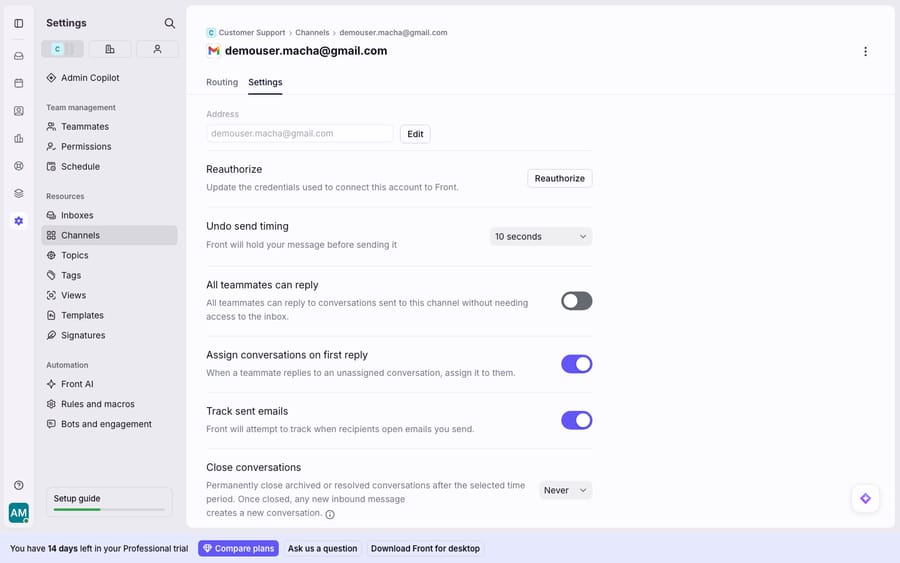
The Reauthorize button is always on that tab, so you can use it as the recovery lever even when no warning is showing. Reauthorizing with the correct account is safe and is the step Front's own help center documents. One caution: reauthorize with the exact same mailbox the channel was originally connected to. Connecting a different Google or Microsoft account creates a new channel rather than repairing the old one. If you're not sure how the channel was wired up in the first place, how to connect Gmail to Front covers the original setup, and Front channels explained covers the different channel types.
2. Did everything stop at once? Check for an outage
If every channel went silent simultaneously and you changed nothing, you're probably looking at an outage rather than a per-channel problem. This exact scenario shows up in Front's own community: one team reported inbound email landing in Gmail but "not showing up in any way in Front" across all channels, direct and shared, having made no configuration changes (community.front.com). They'd already tried restarting, updating and reauthenticating before Front's support stepped in to investigate by message ID.
The fix here is triage, not tinkering:
- Check status.frontapp.com for a reported Front incident.
- Check the Google Workspace or Microsoft 365 status dashboard for a provider-side outage.
- If both are green, reauthorize one channel (cause 1) to rule out a token issue.
- If it's still dead across the board, that's the case to open a ticket. See is Front app down for how to confirm an outage versus a local problem before you escalate.
3. Which 5 actions break Front's sync with Gmail and Office 365?
If sync mostly works but specific threads are missing, duplicated, or arriving on the wrong conversation, the cause is usually an action that Front explicitly warns breaks the Gmail/Office 365 link. Front's documentation on actions that break the sync lists five:
- Moving a conversation to an inbox it wasn't originally received in.
- Replying from a different account than the one the message originated on.
- Changing the threading mode so messages thread by Front's logic instead of native Gmail/Office 365 logic.
- Splitting a conversation into separate threads.
- Merging conversations, whether automatically or manually.
The fix depends on which one bit you. If a teammate changed the threading mode, switch it back to native (Gmail/Office 365) threading in the channel's settings. Front-logic threading is the setting most likely to silently desync a shared inbox. For splits and merges, avoid repeating the action on affected threads. Because these actions can leave a conversation in a state Front can't cleanly reconcile, the affected messages may need Front's team to repair. Grab the message ID or email headers of a message that didn't sync and open a support ticket. That's the information Front asked for in the community thread above, and it's the fastest path to a fix for this class of problem.
4. Is the same account open in both Front and Gmail?
This one is subtle and common on teams that are still half-migrated to Front. Front is explicit: "You should not have the same account open in Gmail/Office 365 and in Front." The reasoning is that "navigating through Gmail/Office 365 may trigger actions you do not intend to within Front" (help.front.com). Archiving in Gmail, moving a message, or replying natively can all collide with Front's sync and produce missing or duplicated conversations.
The fix is a workflow rule, not a settings toggle: once a mailbox is connected to Front, handle it only in Front. Ask everyone who shares that inbox to close the native Gmail/Office 365 tab for that account. If your team collaborates in a shared inbox, the whole point is a single surface. Front shared inbox explained covers why keeping work inside Front (comments, assignments, tags) rather than the underlying mailbox matters for exactly this reason.
5. Is sync actually working, and you're seeing normal latency or import limits?
Not every "missing" email is a fault. Two behaviors look like sync failures but are expected:
Initial import is still running. When you first connect a Gmail channel, you can import history. Front's Gmail history import and sync article says that import "may take up to 72 hours to finish," depending on message volume, content and attachments, and pulls up to your 50,000 most recent messages. During that window, older conversations trickle in. That's the backfill catching up, not broken sync.
The 50,000-message and reconnection limits. Front imports at most the 50,000 most recent messages, so older mail beyond that ceiling won't appear. That's by design. There's a second caveat: when you reauthorize a channel that was offline, Front imports the messages it missed, but tags and statuses are only synced during the initial import. More broadly, Front's two-way sync covers new inbox messages, sent emails and spam status, while read/unread status, archive/unarchive, tag changes, trash and snooze actions are not synced between Gmail and Front. So if the "problem" is that a message you archived in Gmail is still open in Front, that's expected behavior, not a sync outage.
If new mail is simply arriving a few minutes late, give it time before escalating. Brief latency is normal and resolves itself.
When do you need Front support, and where does an AI layer help?
Most of the fixes above are quick, but two patterns need Front's support team rather than a self-serve toggle: a genuine cross-channel outage (cause 2) and threads mangled by a sync-breaking action (cause 3). In both, the message ID or email headers are what get you a resolution. Everything else (reauthorizing, closing the duplicate Gmail tab, reverting a threading change, waiting out an import) you can handle yourself.
There's also a quieter angle. Many of the tickets sitting in a shared inbox are the routine, repetitive ones, and every one of those is a conversation a human has to open, read and answer. Reducing that volume doesn't fix sync, but it makes a temporary hiccup or a post-outage backlog far less painful, because there's less human work queued behind it. That's the seam an AI agent layer fills. The broader category of AI agents for customer service exists for this, and Macha is one such layer: it runs on top of the Front you already use through the live Macha–Front connector, and it doesn't replace Front, your channels or your inboxes. When conversations flow in, Macha's agent reads them, works out the intent, and drafts or sends grounded replies, pulling a real order or account status through a custom tool that turns your REST API into something the agent can call. It bills per ticket, from $299 a month for 750 tickets: one conversation, charged once however many messages it takes, never per resolution. Your Front sync stays exactly as it is; the agent handles the routine volume behind it.
FAQ
Why is my email in Gmail but not in Front? The most common cause is a dropped channel connection. Reauthorize the affected channel under Settings → Channels → your channel → Settings. If every channel stopped at once, check status.frontapp.com and your provider's status page for an outage. If only specific threads are missing, one of Front's five sync-breaking actions (moving, replying from another account, changing threading, splitting or merging) may have desynced them; contact Front with the message ID.
How do I reauthorize a channel in Front? Click the gear icon, open workspace or personal settings, go to Channels, open the affected channel, and click the Settings tab. The Reauthorize button is there; click it and complete the Google or Microsoft sign-in. An admin reauthorizes shared inboxes. Always reauthorize with the same mailbox the channel was originally connected to, or you'll create a new channel instead of repairing the old one.
What actions break the sync between Front and Gmail/Office 365? Front's documentation lists five: moving a conversation to an inbox it wasn't received in, replying from a different account than the message originated on, changing the threading mode to Front logic instead of native, splitting a conversation, and merging conversations (automatically or manually).
Can I keep Gmail open while using Front? Front recommends against it. Having the same account open in both can trigger unintended actions in Front and cause missing or duplicated conversations. Once a mailbox is connected, handle it only in Front.
Why didn't my old emails import into Front? Front imports up to the 50,000 most recent messages, and the import can take up to 72 hours. Mail older than that ceiling won't appear, by design. Read/unread, archive, tags, trash and snooze also don't sync two-way between Gmail and Front.
Why do my reauthorized channels show the wrong tags or statuses? When an offline Gmail channel is reauthorized, Front imports the messages it missed, but tags and statuses are only synced during the initial import, so those backfilled messages won't carry them.
Want less human work sitting behind every sync hiccup? Start a free trial of Macha and connect it to your Front in minutes.






