





 Shopify
 Stripe
 Slack
Slack Notion
 Google Workspace
 Confluence

Why Are My Front Sequences Not Sending? 6 Causes and Fixes


Front sequences usually stop sending because the From channel isn't an email channel, the workspace is below the Professional plan, Stage A was never started, or a 200-recipient send is still throttling. Follow-ups that ignore replies point to a channel in No threading mode, and every sequence send also counts as a New conversation in analytics.
Key takeaways
- Front sequences most often fail because the From channel is not an email channel, since Front does not support SMS or chat channels as sequence senders.
- Front sequences are available on the Professional plan or above, which costs $65 a seat per month billed annually, plus some legacy plans.
- A Front sequence is capped at 200 recipients and can take up to about 25 minutes to send, with a 7.5 second delay between Gmail or Office 365 sends.
- When a Front sending channel is set to No threading mode, recipient replies are not registered, so later sequence stages keep sending anyway.
- Front analytics counts each outbound sequence message sent from a shared address toward that inbox's New conversations metric, which rolls up into Active conversations.
Front sequences usually fail to send for one of five reasons: the From channel isn't an email channel, the workspace is below the Professional plan (from $65 a seat per month billed annually), Stage A was never started or is scheduled for later, the recipient list lost rows or passed the 200-address cap, or a 200-recipient send is still working through its roughly 25-minute throttle. Follow-ups that keep sending after a reply almost always mean the sending channel is in "No threading" mode. Separately, every outbound sequence message from a shared address counts as a New conversation in Front analytics, so a working campaign can look like an inbound spike (Front Help Center, checked 24 September 2026).
Which symptom points to which cause?
| Symptom | Most likely cause |
|---|---|
| Can't create a sequence: "No results" in the From channel picker | No eligible email channel (SMS/chat channels, or wrong inbox type) |
| Sequences menu missing entirely | Plan gating: sequences need Professional or above |
| Stage A never sends | Scheduled send time / no recipients / channel disconnected |
| Follow-ups keep sending after a reply | Sending channel is in "No threading" mode |
| Campaign didn't fully send | 200-recipient cap, or the ~25-minute send throttle |
| Reports show a spike in "New conversations" | Each sequence send counts as a new conversation — expected |
1. Why does the From channel picker show "No results"?
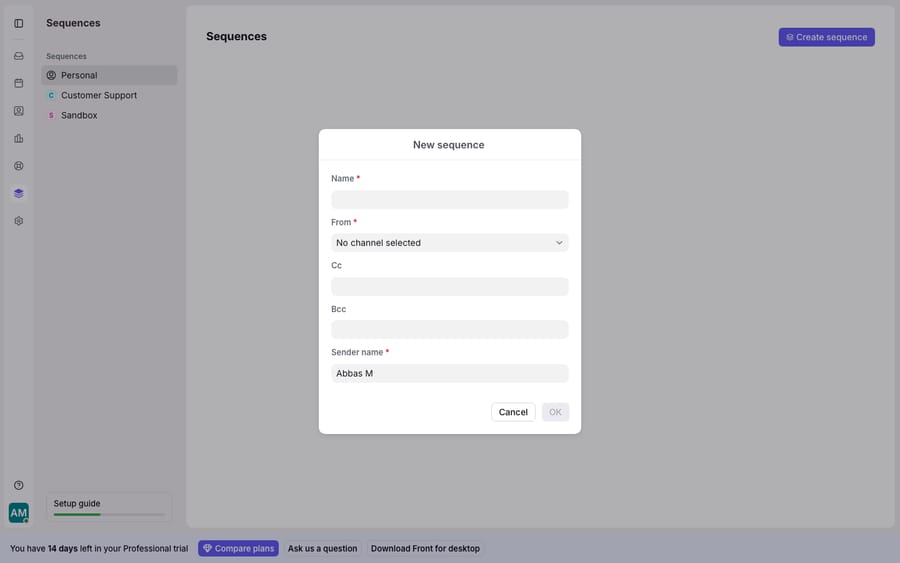
The most common blocker is that Front won't let you pick a sender at all. When you open Sequences → Create sequence, the From channel field is mandatory, and if that picker returns No results, you're stuck at the very first step. Retrying the send won't help, because there's nothing to send from.
Per Front's guide to understanding sequences, the From channel must be an email channel. Specifically, a personal sequence needs "any individual inbox containing an email channel," and a workspace sequence needs "any shared inbox as long as it's an email channel. SMS, chat, etc. are not supported." So if your only connected channels are SMS, live chat, WhatsApp, or a social channel, the picker will legitimately show nothing. It's not a bug. Front is telling you no channel here is eligible to be a sequence sender.
Fix: connect (or select) an actual email channel: a shared Gmail/Office 365 mailbox for a workspace sequence, or an individual email channel for a personal one. If you're unsure what channel types you have, Front channels explained covers how each one behaves and which are email vs. non-email.
2. Which Front plan includes sequences?
If the Sequences area is missing entirely, not just empty, it's a plan question, not a settings one. Front says sequences are "available on the Professional plan or above," and adds that "some legacy plans may also have this feature," per the sequences documentation. Front's current tiers are Starter at $25, Professional at $65 and Enterprise at $105 per seat per month (front.com/pricing, 24 September 2026). On Starter, or a trial provisioned below Professional, you won't see the feature at all.
Fix: confirm your workspace is on Professional or higher before troubleshooting anything else. This is worth checking first if a teammate "can't find sequences": often they're simply on a plan that doesn't include them, or looking at a workspace where the feature isn't enabled. There's no configuration toggle that unlocks a gated tier.
3. Why does Stage A never send?
Once you can build a sequence, the most common "nothing sent" cause is the schedule on Stage A. When you build stages, Front asks you to "choose a date and time to send Stage A," per its how to create a new sequence walkthrough. Two things trip people up here:
- You never clicked Start sequence. Building the stages isn't the same as launching. The sequence only begins once you click Start sequence and confirm a second time.
- The scheduled time is in the future, or already passed. If Stage A is scheduled for later, it simply hasn't sent yet. Conversely, Front notes that "if the time you select passes by the time Stage A is sent, then it will be sent immediately," so a stale time won't hold it back.
Two more things to rule out. The first is an empty or malformed recipient list. The first CSV column must be email; a row with no email address is deleted without a warning; and a list over 200 addresses throws an error, so you have to delete the extras before the sequence starts. The second is a disconnected sending channel. If the email channel behind the sequence has lost its OAuth connection, outbound sends fail across the board, not just for sequences. When a whole channel goes quiet, it's worth confirming Front itself is healthy first. is Front app down shows how to check status before you assume the sequence is the problem.
Fix: re-open the sequence, verify Stage A's send time, confirm your recipient list actually loaded, reconnect the sending channel if it shows a broken state, and then Start sequence.
4. Why do follow-ups keep sending after someone replied?
This is the most confusing sequence failure, and it has one specific cause: the "No threading" channel mode. Normally, sequences stop themselves. Per Front, "if a recipient sends a reply to a sequence stage, subsequent stages will not send out to their email address." The campaign halts for anyone who answers. (One nuance: automatic replies like out-of-office messages do not count as a reply, so an OOO won't wrongly stop the sequence.)
But there's a real exception that catches teams out. Per Front's sequence FAQ, "when a sequence is sent from a channel configured with 'No threading' mode, then replies from recipients do not prevent the next sequence stage from being sent. The replies are not registered as replies to the sequence, so subsequent sequence stages will still be sent." In other words, if your sending channel has threading turned off, Front can't match the incoming reply to the outgoing sequence, so it keeps firing follow-ups at people who've already responded. That's an easy way to annoy prospects.
Fix: check the sending channel's threading mode: click the gear icon, pick the workspace or personal settings, open Channels, select the channel, then the Settings tab and Threading mode (Front's threading guide). If it's set to No threading, switch it to a threading mode and save so replies register against the sequence. The change only applies to new conversations, not ones already in flight, so a sequence already running from that channel is safest restarted. If you can't change threading for that mailbox, avoid using it as a sequence sender.
5. Why does a big campaign look half-sent?
A sequence that looks half-sent is often just still sending. Front rate-limits outbound to protect deliverability: per the sequences documentation, a sequence is capped at 200 recipients, and "a sequence containing 200 recipients can take up to ~25 minutes to send completely." Front waits about 7.5 seconds between each Gmail or Office 365 send (roughly 1 second for other providers). So a large Stage A genuinely takes time to work through the list.
Fix: give a large send its full window before assuming it failed, and split anything over 200 recipients into multiple sequences. Once a sequence has sent to 200 recipients you need a new sequence, and you can't add stages to one that has started. The throttle also helps deliverability: blasting hundreds of identical emails in seconds is exactly what gets a domain flagged.
6. Why do sequences inflate "New conversations" in Front analytics?
Even a perfectly working sequence can make your reports look wrong, and this one isn't a failure at all. Here's the mechanic most teams miss. Per Front's analytics FAQs, "when sending a Sequence out of Front using a shared email address, analytics will count each individual outbound message towards the shared inbox's New conversations metric, which also rolls up into the Active conversations metric in the conversations view."
Read that carefully: every recipient of every stage is a separate outbound message, and each one is counted as a new conversation. Send a three-stage sequence to 150 people and, over its life, that's up to 450 outbound messages, every one of which lands in your New conversations (and Active conversations) totals. If you don't know this, a routine outreach push looks like a sudden inbound surge, and any "conversations per agent" or "volume" chart is quietly distorted.
Fix: read the report correctly. Sequence engagement itself is reported per sequence (per-recipient sent and opened status inside the sequence view), and Front has no aggregate dashboard across sequences, so tagging is how you keep campaign volume separable:
- Segment sequences out. Filter or tag sequence-originated conversations so you can view inbound support volume separately from outbound campaign sends.
- Watch the metric definition. "New conversations" here means conversations created, not inbound requests received. Outbound sequence sends legitimately create conversations.
- Compare like with like. When you report week-over-week volume, note whether a sequence ran; a spike that lines up with a campaign launch is the sequence, not real demand.
For the bigger picture of how conversations, inboxes, and metrics fit together, Front shared inbox explained is the model to keep in mind, and Front rules explained covers the automation engine that sits alongside sequences.
Can an AI agent handle the replies sequences generate?
Most of these headaches trace back to the same root: sequences are fire-and-forget automation. They send on a schedule and stop on a reply, but they can't read the reply, and every one they send is another conversation someone has to work, plus another tick on your New conversations chart.
That's the seam an AI agent layer fills. The broader category of AI agents for customer service exists to do the reasoning fixed automation can't. Macha is one such layer: it runs on top of the Front you already use through the live Macha–Front connector. It doesn't replace Front, your channels, or your sequences, and the same agents run on Zendesk, Freshdesk, Gorgias, Front, HubSpot or Intercom. When a sequence recipient replies, instead of that response just reopening a thread for a human, Macha's agent reads the intent, pulls real context through a custom tool that turns your REST API into something the agent can call, and drafts or sends a grounded answer. Fewer of those replies become manual tickets, so the conversation volume behind your inflated analytics actually comes down. Macha bills per ticket, never per resolution: one conversation is charged once however many messages it takes, starting at $299 a month for 750 tickets with setup and monitoring by the Macha team included.
FAQ
Why does the From channel say "No results" when I create a sequence? Because none of your connected channels is an eligible email channel. Front requires an email channel to send a sequence: a shared email inbox for workspace sequences, or an individual email channel for personal ones. SMS, chat, and social channels are not supported as sequence senders, so if those are all you have, the picker shows nothing.
Why do my Front follow-ups keep sending after the person replied? The sending channel is almost certainly in "No threading" mode. In that mode Front doesn't register the incoming reply as a reply to the sequence, so subsequent stages still send. Switch the channel to a threading mode so stop-on-reply works.
Why did my sequence spike my "New conversations" in analytics? That's expected behavior. Front counts each individual outbound sequence message sent from a shared address toward the shared inbox's New conversations metric, which also rolls up into Active conversations. Segment or tag sequence conversations so campaign sends don't get read as inbound support volume.
Which Front plan do I need for sequences? Sequences are available on the Professional plan or above ($65 a seat per month billed annually), plus some legacy plans. If the Sequences area is missing entirely rather than empty, that's the reason.
How many stages can a Front sequence have? Between 1 and 10 stages, labeled A to J. Each stage is sent as a reply to the previous one with the same subject line, and you can't add stages once the sequence has started.
Does an out-of-office auto-reply stop my sequence? No. A genuine reply stops the remaining stages for that recipient, but automatic replies like out-of-office messages do not count, so the sequence continues.
Want the replies your sequences generate to resolve themselves instead of piling up? Start a free trial of Macha and connect it to your Front.






