Shopify
 Stripe
 Slack
 Notion
 Google Workspace
 Confluence


Gladly Internal Notes Explained: Mentions, Deleting, Routing and the API (2026)


Gladly notes are internal entries on a customer's conversation timeline that customers never see. Agents add them from the customer profile, tag a teammate in it with an @mention, and attach files or drop in a saved Answer. Notes can't be edited once added, only an administrator can delete one, and a note isn't a routable item, so adding one won't put a conversation back in anyone's queue. Integrations add notes through POST /api/v1/conversations/{conversationId}/notes. This guide covers each of those rules and what they mean for teams using notes for handoffs, call summaries and AI-drafted replies.
Key takeaways
- A Gladly note is internal only: it sits on the conversation timeline for agents, and Gladly's help center says anything left as a note is for internal use.
- Gladly notes can't be edited after they're added, and only users with the Administrator role can delete a note, from the note's menu on the timeline.
- Typing @ and a name in a Gladly note sends that user a notification and an entry in their Notifications Center, but users can't mention themselves.
- Gladly treats notes as non-routable items, so adding a note, whether by an agent or an integrated app, doesn't change whether a conversation routes.
- Integrations add notes with POST /api/v1/conversations/{conversationId}/notes, and the Gladly API has no endpoint to edit or delete a note afterward.

| Question | Gladly's answer | Source |
|---|---|---|
| Can customers see notes? | No, internal use only | Add a Note to a Conversation |
| Who can add a note? | Agents, from the customer profile | Add a Note to a Conversation |
| Can a note be edited? | No, "only deleted but not edited at this time" | Add a Note to a Conversation |
| Who can delete a note? | Administrators only | Add a Note to a Conversation |
| Can you @mention someone? | Yes, they get a notification; no self-mentions | What are Notes? |
| Does a note route the conversation? | No, notes aren't routable items | Are Notes routable? |
| Can the API add notes? | Yes, POST /api/v1/conversations/{id}/notes | Gladly REST API |
| Can the API edit or delete notes? | No endpoint for either | Gladly REST API |
What is a note in Gladly?
Gladly organizes support around the customer profile. Each customer has one profile, and everything that happened with them sits on a single timeline split into conversations: emails, chats, SMS, calls, voicemails and notes. A note is the one item on that timeline written for your team instead of the customer. Our overview of what Gladly is covers the timeline model in more detail.
Gladly's What are Notes? article lists the uses it expects: writing up a phone call and its action items, summarizing a long chat (by hand or with Gladly's AI Summaries), transcribing a voicemail, and attaching a document to the timeline as a reference. In practice, notes also carry the handoff when a conversation moves between agents or teams, because the next agent reads the timeline top to bottom.
Because the timeline belongs to the customer rather than to one ticket, a note written today is visible to the agent who picks up that customer's next conversation in six months. That's the main difference from a ticket-based desk, where an internal comment usually stays inside one closed ticket. A good note in Gladly is written for whoever reads the profile next, not just for today's handoff.
How do you add a note to a conversation in Gladly?
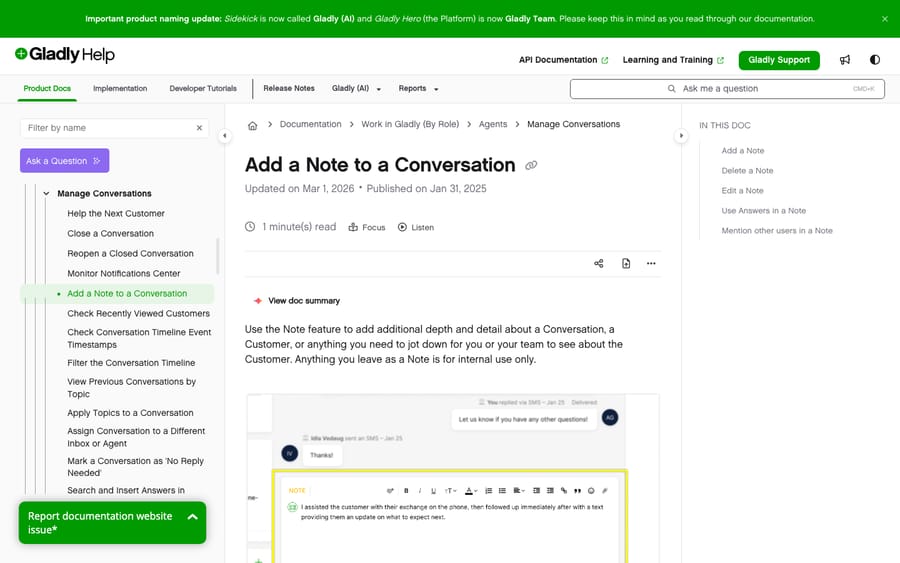
Gladly's Add a Note to a Conversation article gives four steps:
- Open the profile of the customer you want to add a note to and click the + icon.
- Click Note.
- Type in the Note Composer.
- Click Add Note. The note appears on the conversation timeline.
When an agent accepts a phone call, the Note Composer opens on its own, so the call summary gets written while the call is fresh. You can also insert an Answer from your knowledge base into a note. Gladly notes that the Use option only appears for Message and Email Answer types, so for other types you copy and paste.
Can you edit or delete a note in Gladly?
You can't edit one. Gladly's article says plainly that "Notes can only be deleted but not edited at this time."
Deleting is limited to administrators. Gladly's documented steps: find the note on the conversation timeline, open its menu (the three vertical dots), and choose Delete Message. An agent who notices a typo in their own note can't fix it or remove it. Their options are to add a second note with the correction, or to ask an administrator to delete the first one.
That rule is the reason we'd tell any team to treat notes as permanent by default. It also shapes how you should let software write notes. An integration that posts a long, wrong note leaves it on the customer's timeline, visible to every agent who opens the profile later, until an admin removes it by hand.
The rule has an obvious logic from Gladly's side. A timeline that agents can quietly rewrite is a weaker record for quality reviews and disputes, and Gladly sells to brands with large contact centers where QA depends on that record. The incentive is to optimize for the auditor over the author. The cost lands on the agent who made a typo, and Gladly has decided that's the right trade.
How do @mentions work in Gladly notes?
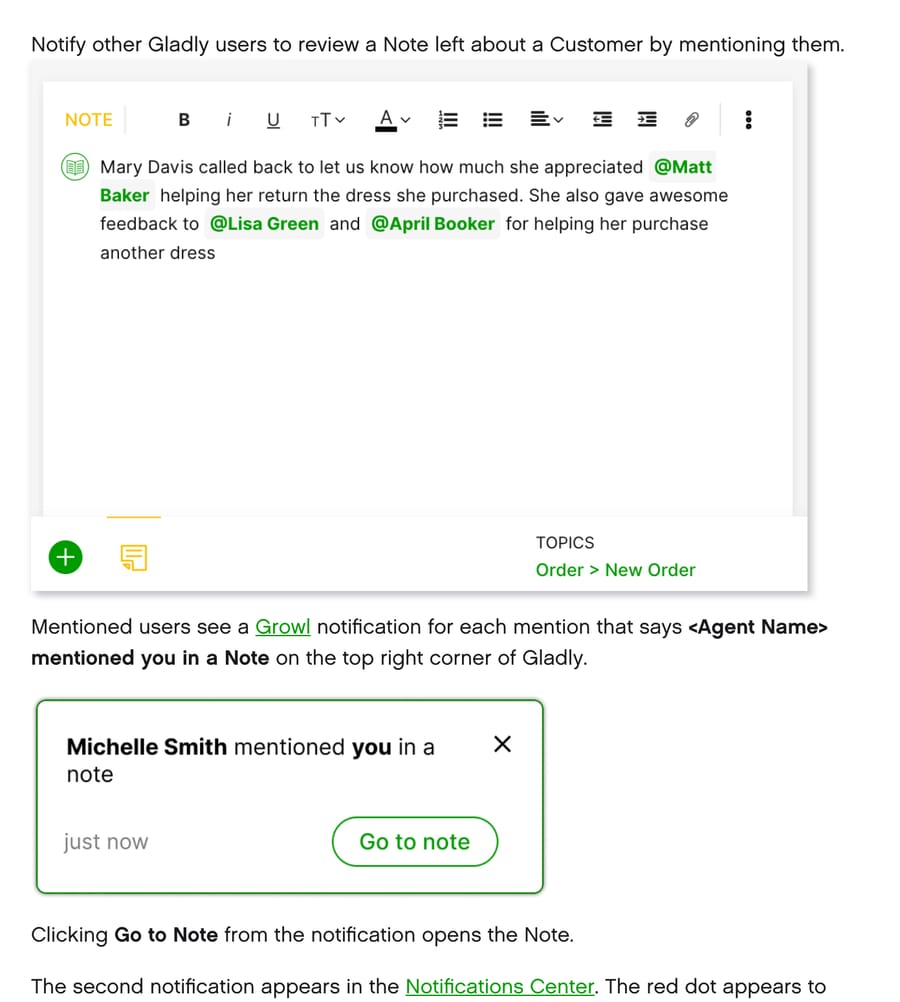
Type @ followed by a name in the Note Composer, pick the person from the list, and they're notified. Gladly's help center describes two notifications:
- A Growl pop-up in the top right of Gladly that reads "<Agent Name> mentioned you in a Note," with a Go to Note link that opens it.
- An entry in the Notifications Center, flagged with a red dot until it's read.
Users can't mention themselves. Gladly says self-mention "is not possible," so a note can't double as a personal reminder. A Task is the better fit for that.
Do notes route a conversation in Gladly?
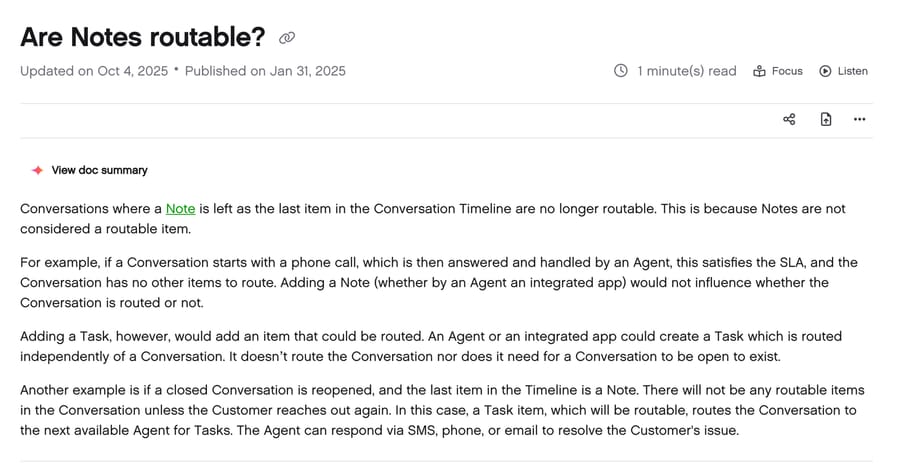
No. Gladly's Are Notes routable? article says notes "are not considered a routable item." Its example: a conversation starts with a phone call, an agent answers and handles it, the SLA is met, and there's nothing left to route. Adding a note afterward, "whether by an Agent or an integrated app," doesn't change that.
The same article says a conversation whose last timeline item is a note is no longer routable, and gives a second example: a closed conversation is reopened, and the last item is a note. Nothing routes until the customer writes in again.
Gladly's answer for "someone needs to act on this later" is a Task. A task is routed on its own, independently of the conversation, and can exist when the conversation is closed. So the rule of thumb is:
| You want | Use |
|---|---|
| A record of what happened on a call or chat | Note |
| A teammate to look at something now | Note with an @mention |
| Someone to do something later, even after close | Task |
| Someone to pick the conversation up | Reassign it to an inbox or agent, or create a Task |
If a tool leaves a note saying "customer needs a callback" and nothing else, no one is routed that work. Gladly's design is explicit about it, and it's easy to miss when you're used to desks where any new internal comment bumps a ticket.
How do you add notes through the Gladly API?
The REST endpoint is POST /api/v1/conversations/{conversationId}/notes, with a body of {"content": {"body": "..."}} in plain text or Gladly's limited rich-content HTML. GET /api/v1/conversations/{conversationId}/notes/{noteId} reads one back. Three things about notes specifically, from the Gladly REST API reference (our Gladly API guide covers authentication, rate limits and the rest of the endpoints):
- No edit or delete. There's no PATCH or DELETE for notes. The general item DELETE only works on CUSTOMER_ACTIVITY items, and the redact endpoint covers messages, emails, voicemails and calls, not notes. An integration's note is as permanent as an agent's.
- No mention field. The note body has no way to tag a user, so don't plan on an integration's notes notifying anyone the way an agent's @mention does. Add a topic or reassign the conversation instead.
- A webhook fires on every note. CONVERSATION/NOTE_CREATED fires whenever a note is added. An integration that listens for events and also writes notes should ignore its own, or it can end up reacting to itself.
How does Macha use Gladly notes to draft replies?
Notes are how Macha starts on a Gladly desk. (For how a layer like Macha compares with Gladly's built-in AI overall, see Gladly AI versus an AI agent layer.) When a new conversation starts, Macha reads the thread and the customer's profile, writes the reply it would send, and adds it as an internal note. Because notes can't be edited, the agent copies the draft into the reply composer, adjusts it if needed and sends it. The customer sees nothing until a person sends the reply. The draft Gladly replies as internal notes use case walks through one: a customer asks to change a delivery address, Macha looks up the customer, and the note holds a ready-to-send draft plus the help article it came from.
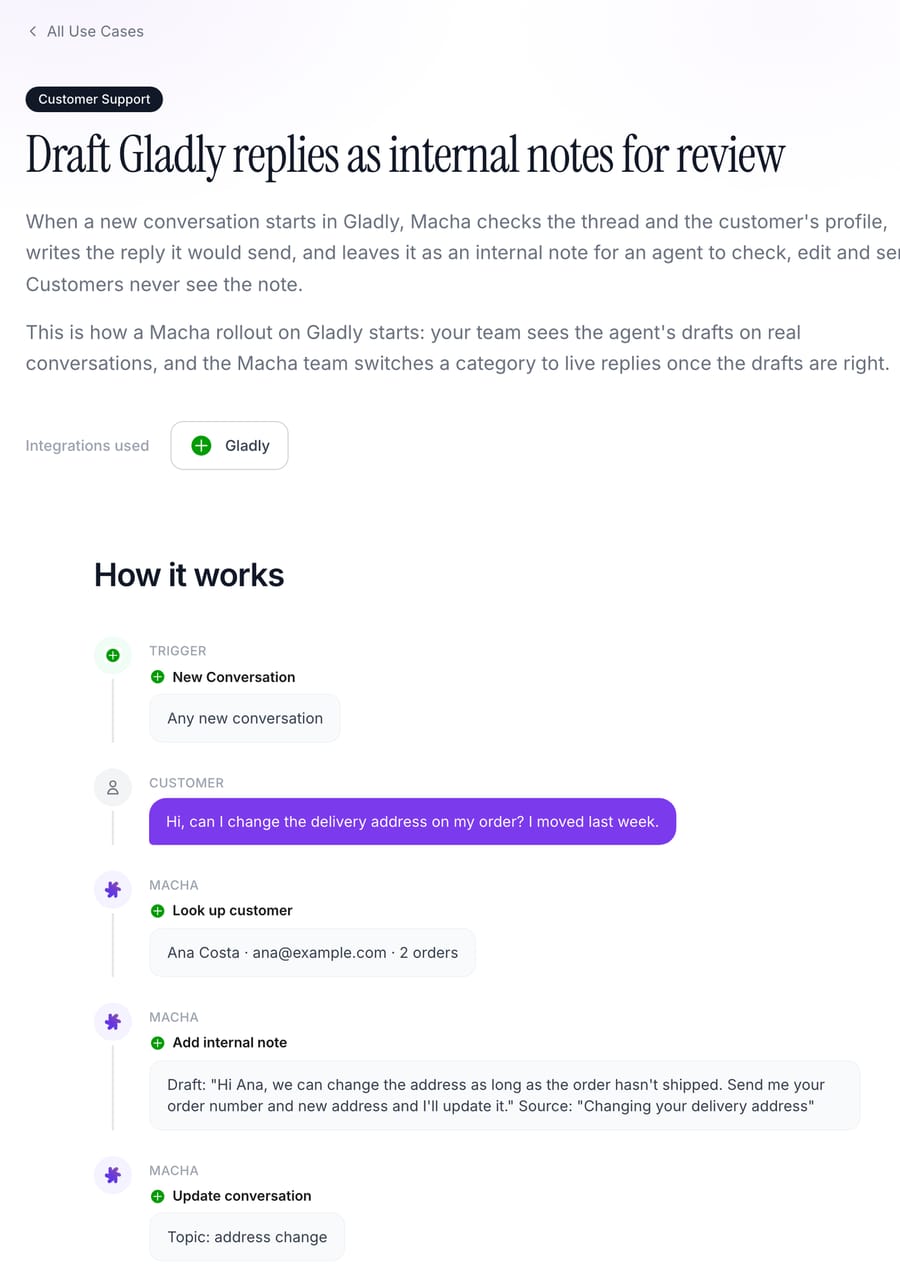
Other AI tools that work with Gladly handle this step differently; our ranking of the best AI agents for Gladly covers how each one works inside Gladly. The note rules above are why Macha's workflow is shaped the way it is:
- Drafts are permanent, so they have to be good before they're live. Before the agent drafts on real conversations, Macha's team tests it on a sample of your past conversations and reads every draft. A note Gladly won't let you edit is a bad place to discover the agent misunderstood your returns policy.
- Notes don't route, so Macha doesn't rely on them to. The customer's own message is what keeps the conversation in your queue. Macha's note sits next to it for the agent who picks it up, and Macha can also add a topic or move the conversation to the right inbox so it reaches the right person.
- Each category goes live on its own. Once drafts for a category, say order status, are consistently right, that category moves to direct replies on the customer's channel, and the next category starts in notes.
The Gladly connector covers the whole loop: read conversations and customer profiles, reply, add internal notes, add topics, reassign or change status, and send outbound messages, triggered by a new conversation or a new customer message. Macha's team does the setup, including the past-conversation analysis, the knowledge base and the agent's instructions, and a dedicated success manager handles changes after go-live, all included at about $0.40 per ticket; pricing lists the volume tiers. The Macha on Gladly page shows the full product, and done-for-you setup explains the rollout.
Macha fits teams on Gladly that want AI drafts landing where agents already work, on the timeline, rather than in a separate tool. If you're comparing it with Gladly's own AI, our Gladly AI explainer covers what Gladly AI does natively.
How we researched this
Every rule about Gladly notes in this article comes from Gladly's public help center and developer reference, read on November 21, 2026: What are Notes? and Add a Note to a Conversation (Add a Note showed an update date of March 1, 2026), Are Notes routable? (updated October 4, 2025), and the notes, conversation items and webhook sections of the REST API reference. We did not test note behavior in a Gladly account for this article; where the docs are silent (for example, mentions created through the API), we say so instead of guessing. The Macha workflow is described from Macha's Gladly connector and its published use-case page.
Common questions
Can customers see internal notes in Gladly?
No. Gladly's help center says anything you leave as a note is for internal use only. Notes appear on the conversation timeline for agents and administrators, and they're never sent to the customer on any channel.
Why can't I edit a note in Gladly?
Gladly doesn't support editing notes. Its help center says notes "can only be deleted but not edited at this time." If you need to correct one, add a new note with the correction or ask an administrator to delete the original.
Who can delete a note in Gladly?
Gladly's help center says only Administrators can delete a note. They find the note on the conversation timeline, open the note's menu and choose Delete Message. An agent who wants their own note removed has to ask an administrator.
Can I mention myself in a Gladly note as a reminder?
No. Gladly says self-mention isn't possible; you can only mention colleagues and other active users. For a reminder to yourself, create a Task, which Gladly routes independently of the conversation.
Does adding a note reopen or reroute a Gladly conversation?
No. Gladly treats notes as non-routable items, so a note added by an agent or an app doesn't change routing. To get someone to act later, create a Task or reassign the conversation instead.
Can an AI tool write notes in Gladly?
Yes, through the notes endpoint in Gladly's REST API. Macha uses it to leave draft replies as internal notes for agents to review before anything reaches the customer, which is how every Macha rollout on Gladly starts.
To see Macha's drafts land as notes on your own Gladly conversations, start a trial with $50 of free usage (about 125 tickets), no credit card, no time limit; the Macha team sets it up with you.